KeyboardKit for custom Swift and SwiftUI keyboards
Create amazing custom iOS keyboards with Swift & SwiftUI.
At a glance
- What is it?
- KeyboardKit is a binary Swift framework for building customizable iOS keyboard extensions with Swift and SwiftUI. Its core engine is presented as free and open source, while the repository uses a custom licence and reserves localized keyboards and several advanced capabilities for KeyboardKit Pro.
- Who is it for?
- KeyboardKit is appropriate for iOS teams that want a SwiftUI-based keyboard architecture and accept its binary dependency, App Group configuration, platform restrictions, and split between the core engine and KeyboardKit Pro. It is a poor fit for developers seeking an Apple system keyboard clone, a fully source-available product, or a package that can be linked independently by every target.
- Can I use it commercially?
- Check first. The repository uses a licence we do not classify automatically, so read its LICENSE file before any commercial use.
- Is it still maintained?
- Yes. The repository last received commits 2 days ago.
- What is it written in?
- Mainly Swift, according to GitHub's language statistics.
Answers come from the project's GitHub data, last synced on November 7, 2026, and from our analysis. They are not legal advice.
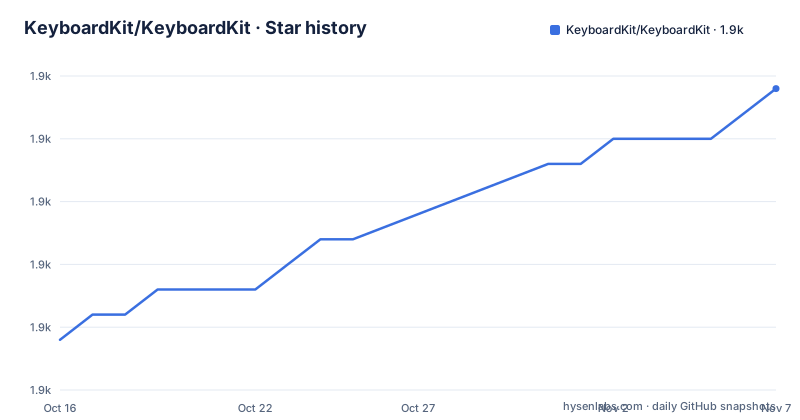
Star history
- KeyboardKit/KeyboardKit1,902 ★ · +10
| Repository | 2026-10-16 | 2026-11-07 |
|---|---|---|
| KeyboardKit/KeyboardKit | 1.9k | 1.9k |
10 Stars in the last 22 days, measured from the daily GitHub snapshot. Compare with other projects
Editorial analysis
KeyboardKit's target: UIKit and SwiftUI keyboard extensions
KeyboardKit addresses a specific gap in Apple's keyboard extension APIs. A custom iOS keyboard is not just a grid of buttons: it must interact with the active text document, expose settings, request access where appropriate, open its containing app, and remain responsive under the system's extension lifecycle. The README describes KeyboardKit as a layer that extends Apple's limited keyboard APIs with additional capabilities.
The intended audience is Swift and SwiftUI developers building a custom keyboard extension, with an accompanying host app for configuration or shared data. The repository includes a `Demo/Demo.xcodeproj/` directory and separate `Demo/Demo/` and `Demo/Keyboard/` directories, so the project is structured around both sides of an Apple keyboard integration rather than a standalone text editor library.
The framework is presented primarily through `KeyboardInputViewController`, observable controller state, services, SwiftUI views, and a configurable `KeyboardApp`. It is not a general-purpose on-screen keyboard for macOS, watchOS, tvOS, or visionOS. Although those platforms appear among the repository topics, the README's installation and setup examples are specifically for an iOS keyboard extension and its main app target. Platform support for the broader framework should therefore not be treated as evidence that the documented setup applies unchanged to every listed Apple platform.
Inside the KeyboardKit setup and state model
The central configuration object is `KeyboardApp`. The README example gives it a display name, an optional `licenseKey`, an `appGroupId`, enabled locales, autocomplete settings, and deep-link configuration. This object acts as the shared description of how the host app and keyboard extension are connected. The `appGroupId` is used for App Group data synchronization, while `licenseKey` is needed for KeyboardKit Pro.
The keyboard controller inherits from `KeyboardInputViewController` instead of `UIInputViewController`. According to the README, this adds `services` and observable `state` to the controller. During `viewDidLoad()`, `setup(for:)` receives the configured `KeyboardApp`. Its completion closure reports whether setup returned `.success`, giving the extension a point at which services and other custom behavior can be added.
The default keyboard is not fixed in place. Overriding `viewWillSetupKeyboardView()` and calling `setupKeyboardView(_:)` lets the developer compose a `KeyboardView` from keyboard buttons, collapsed content, an emoji keyboard, and a toolbar. This is an architectural choice rather than a cosmetic theme switch: the view receives controller state, and each part of the interface is supplied by a view closure. A project can replace the supplied views while retaining the controller and state infrastructure.
The host app follows the same configuration path through `KeyboardAppView`. The README example wraps the main app's `ContentView` with `KeyboardAppView(for: .keyboardKitDemo)`. That gives the main app access to the same keyboard configuration used by the extension. The documentation also names settings synchronization, dictation, deep links, external-keyboard detection, clipboard integration, input utilities, and locale-aware layouts as areas covered by the broader feature set.
Adding KeyboardKit and configuring the first keyboard
The README gives a Swift Package Manager repository URL rather than a command-line installation recipe. Add this package URL through the project's Swift Package Manager integration in Xcode. KeyboardKit is a binary framework, so the README says it must only be linked to the main app target. Other targets can use it without linking it independently.
The following is the package location documented by the README:
https://github.com/KeyboardKit/KeyboardKit.gitAfter the package is available, create one `KeyboardApp` value for the host app and extension. The license key is needed for Pro and is a placeholder here. The ellipses in the example are illustrative placeholders, not compilable Swift; supply the actual arguments for your chosen features.
import KeyboardKit

extension KeyboardApp {
    static var keyboardKitDemo: KeyboardApp {
        .init(
            name: "KeyboardKit",
            licenseKey: "your-key-here",
            appGroupId: "group.com.keyboardkit.demo",
            locales: .keyboardKitSupported,
            autocomplete: .init(
                nextWordPredictionRequest: .claude(...)
            ),
            deepLinks: .init(app: "kkdemo://", ...)
        )
    }
}
Replace the illustrative identifiers with values owned by the application. The `appGroupId` must correspond to the App Group arrangement used by the main app and keyboard extension. The `kkdemo://` deep link is also an example from the README, not a universal setting.
The controller, standard view, and host-app connection
Make the keyboard controller inherit from `KeyboardInputViewController`. An empty subclass is enough for the initial setup because the inherited behavior supplies the additional controller facilities described by the README.
class KeyboardController: KeyboardInputViewController {}Then call `setup(for:)` from `viewDidLoad()`. The closure is documented as the place to configure custom services after checking whether setup succeeded.
class KeyboardViewController: KeyboardInputViewController {
    override func viewDidLoad() {
        super.viewDidLoad()

        setup(for: .keyboardKitDemo) { result in
            // If `result` is `.success`, the setup did succeed.
            // This is where you can setup custom services, etc.
        }
    }
}
The standard keyboard can be customized by supplying the views expected by `KeyboardView`. This example is intentionally close to the README example. The README warns to use a weak or unspecified `self` capture in this closure.
override func viewWillSetupKeyboardView() {
    setupKeyboardView { [weak self] controller in
        KeyboardView(
            state: controller.state,
            buttonContent: { $0.view },
            buttonView: { $0.view },
            collapsedView: { $0.view },
            emojiKeyboard: { $0.view },
            toolbar: { $0.view }
        )
    }
}
The containing app then uses `KeyboardAppView` with the same `.keyboardKitDemo` value. This shared definition is the mechanism that connects app settings, keyboard configuration, App Group synchronization, deep links, and setup state.
KeyboardKit Pro, localization, and the licence boundary
The README describes a free, open-source keyboard engine, but the repository metadata identifies the project as closed source and says that KeyboardKit is distributed as a binary framework. The repository also has a custom `LICENSE` file that GitHub cannot classify. Those statements are not interchangeable. A team should read the actual `LICENSE` file and the terms for any Pro component before using the package in a product.
KeyboardKit Pro is the commercial extension described by the README. The documented Pro features include localized keyboards, autocomplete, an emoji keyboard, AI support, themes, and other additions. The example `licenseKey` is explicitly identified as needed for KeyboardKit Pro, so a basic SwiftUI keyboard and a production product using Pro should not be evaluated as the same licensing package.
Localization is also split. The README says KeyboardKit supports 75 locales and lists them, but says that Pro unlocks localized keyboards, layouts, callouts, and behaviors for all supported locales. That distinction matters when assessing language coverage. A project that needs a functioning keyboard shell can start from the documented core configuration, while a product requiring complete locale-specific behavior must establish whether those features are available under the applicable licence.
The `LICENSE` file is the first place to verify redistribution, modification, attribution, target-linking, and Pro-use terms. This review does not interpret the custom licence or provide legal advice. The relevant practical issue is that the repository's marketing description and GitHub metadata do not provide enough detail to replace the file's actual terms.
Constraints of a binary keyboard framework
The largest implementation constraint is that this is not a conventional source package that can be linked into every target. The README says the binary framework must only be linked to the main app target, while other targets use it without linking. A project with a complicated target graph, extension-specific dependency rules, or an existing App Group configuration needs to verify this arrangement before integrating the package.
KeyboardKit also inherits Apple's extension boundaries. A keyboard extension operates under the system's rules, including restrictions around network access, shared containers, permissions, and opening the containing app. The README mentions settings synchronization and a status feature that detects whether the keyboard is enabled and has full access, which indicates that extension state and host-app access are important parts of the design. It does not claim that a keyboard can bypass those platform requirements.
The documentation does not specify a rollback procedure, a migration guide for every `KeyboardKit` major version, or a compatibility matrix for every Apple platform listed in the topics. It also does not document the exact Xcode project settings needed to reproduce the demo. Those omissions make the demo and the linked documentation necessary parts of an adoption check. A team that needs offline source inspection, unrestricted redistribution, or a completely Apple-native implementation should verify the binary package and licence before committing to it.
The repository's last push was on 2026-10-14, so it is recent activity rather than an archived project. Releases 11.0.3, 11.0.2, and 11.0.1 were published in October 2026. That indicates ongoing release work, but it does not remove the need to read `RELEASE_NOTES.md` for migration details.
Why KeyboardKit differs from UIInputViewController
The direct alternative described by the README is Apple's own `UIInputViewController`. A project can implement a keyboard extension directly with `UIInputViewController`, Swift or SwiftUI views, and the platform APIs, without adopting KeyboardKit's `KeyboardInputViewController`, `KeyboardApp`, `KeyboardView`, and service/state abstractions.
The difference is architectural. Apple's controller supplies the extension entry point and system integration, but the application team owns the keyboard behavior and UI composition. KeyboardKit adds a higher-level framework with observable state, services, reusable keyboard views, layout and input utilities, actions, callouts, clipboard support, dictation, emoji models, settings synchronization, and related components. The README also places several localized behaviors and AI-related features behind Pro.
That makes KeyboardKit more relevant when the goal is to build a feature-rich keyboard using a shared SwiftUI configuration across an app and extension. It is less suitable when the team wants only Apple's native extension controller, needs to inspect every framework implementation line, or wants the entire product to be covered by a conventional open-source licence. The choice is not simply between a better and worse keyboard. It is between a higher-level framework with an App Group and binary-package workflow, and a lower-level implementation that carries more of the UI and service design work in the application.
Editorial conclusion
KeyboardKit is appropriate for iOS teams that want a SwiftUI-based keyboard architecture and accept its binary dependency, App Group configuration, platform restrictions, and split between the core engine and KeyboardKit Pro. It is a poor fit for developers seeking an Apple system keyboard clone, a fully source-available product, or a package that can be linked independently by every target. Before adoption, inspect the LICENSE file, confirm whether your chosen features require a Pro licence key, and verify that the keyboard extension's App Group and host-app configuration satisfy the project's data-sharing design.
Frequently asked questions
How do I install KeyboardKit in a Swift project?
The README lists `https://github.com/KeyboardKit/KeyboardKit.git` as the Swift Package Manager package URL. It says KeyboardKit is a binary framework and should only be linked to the main app target; other targets can use it without linking it independently.
What is the first controller change required for KeyboardKit?
The keyboard controller should inherit from `KeyboardInputViewController` rather than `UIInputViewController`. The README says this adds functions and capabilities, including `services` and observable `state`.
Does KeyboardKit support localization in the free version?
The README says KeyboardKit supports 75 locales, but it also says KeyboardKit Pro unlocks localized keyboards, layouts, callouts, and behaviors for all supported locales. A project needing complete locale-specific behavior should verify which features require Pro.
Is KeyboardKit open source?
The README calls it a free, open-source keyboard engine, while the repository metadata labels it closed source and describes it as a binary framework. The custom `LICENSE` file is the controlling document to inspect for the project's actual permissions and obligations.
Official sources
Add this badge to your README
If you maintain this project, the badge below links readers to this analysis and shows its maintenance status from the daily GitHub snapshot. Paste the markdown into your README; add ?metric=license or ?metric=stars to the image URL for a different field.

[](https://hysenlabs.com/projects/keyboardkit-keyboardkit)Star history chart for your README
[](https://hysenlabs.com/projects/keyboardkit-keyboardkit)Was this useful?