Heeler puts every coding agent on your machines in one iPhone list
Native iOS agent console for herdr — watch and drive the coding agents on your machines over SSH, with a real libghostty terminal, QR pairing, and push notifications when an agent needs you
At a glance
- What is it?
- A SwiftUI companion app for the herdr terminal runtime that sorts agents by who needs you, attaches to their real terminals through libghostty, pairs over QR, and pushes an encrypted alert when an agent goes Blocked, all over plain SSH with no server changes.
- Who is it for?
- Heeler fits someone who already runs herdr across several machines and wants to be interrupted only when an agent actually needs a decision, since the status ordering, the Blocked and Done push, and the Live Activity are the parts that replace a terminal window on a second monitor. Verify three things first.
- Can I use it commercially?
- Yes. Apache-2.0 is a permissive licence: you can use, modify and sell software built on it, as long as you keep its copyright and licence notices.
- Is it still maintained?
- Yes. The repository received new commits within the last day.
- What is it written in?
- Mainly Swift, according to GitHub's language statistics.
Answers come from the project's GitHub data, last synced on November 15, 2026, and from our analysis. They are not legal advice.
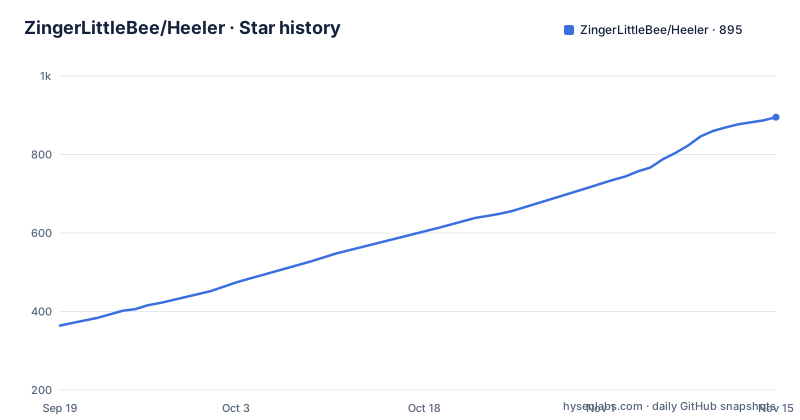
Star history
- ZingerLittleBee/Heeler895 ★ · +531
| Repository | 2026-09-19 | 2026-11-15 |
|---|---|---|
| ZingerLittleBee/Heeler | 364 | 895 |
531 Stars in the last 57 days, measured from the daily GitHub snapshot. Compare with other projects
Editorial analysis
The console sorts by who needs you, and Blocked sits at the top
The organizing idea is a single list rather than a set of windows. Every agent on every machine appears in one status-sorted list with blocked entries first, the list is filterable by host, and it updates live, so the ordering is the notification. Opening an agent gives you its live terminal to read and steer, a native composer to draft in, and one send action that delivers the whole message. The transport underneath is plain SSH, with no tunnel service and no relay in the data path for the terminal itself, and the composer's premise is that a phone keyboard is a real keyboard: autocorrect, IME input and dictation all work, and the message is composed locally in full and sent once rather than streamed keystroke by keystroke. The tools keyboard adds agent control keys, agent skills, reusable snippets and terminal appearance settings without moving any of that into the draft text.
Attach renders the agent's real terminal, not a text approximation
The terminal is libghostty, wired in through libghostty-spm for terminal emulation and Metal rendering, which is why the attached view can claim things a plain text view cannot. Native scrollback is there, and so is momentum touch scrolling that also drives full-screen terminal programs, so a full-screen TUI in the remote session behaves like a full-screen app on the phone instead of a wall of escaped output. Long-press selection works for copying. There is a takeover path for a stale terminal owner, which matters because an attached session left open elsewhere would otherwise block the next person, and the view quietly collects web links as the agent prints them so you can open them later instead of transcribing them by hand. Appearance is configurable: system, light or dark, 30 terminal themes with separate light and dark slots, JetBrains Mono and IBM Plex Mono bundled, and pinch to zoom.
Every request opens a direct stream-local channel onto herdr.sock
The connection story is the part the project itself flags as not obvious, which is why there is an ADR directory for it. Heeler speaks herdr's JSON API over SSH. Each request opens a direct-streamlocal channel onto `herdr.sock`, one long-lived channel carries the event stream, and interactive terminals run `herdr agent attach --takeover` on an SSH PTY. The prerequisites are deliberately small: SSH access and a running herdr, with no server changes and no extra packages. There is exactly one host-side requirement that is not on by default everywhere, and it is the one to check first: the SSH server must allow stream-local forwarding. That is the OpenSSH default, and onboarding calls it out explicitly when it is disabled, because with it off the pairing appears to succeed and then nothing connects. For machines that are not routable, the answer is a jump host, with keys verified at both hops and two guides covering the setup and the security boundaries.
Pairing generates the key on device and pins the host fingerprint
Adding a machine is a QR scan, and the security properties are in the pairing code rather than in a server you trust. Keys are generated on the device, private keys stay in the Keychain, and the code pins the host key fingerprint, so the code carries the addresses, the host key fingerprint and the SSH key enrollment in one artifact. The host side is a herdr plugin installed from this repository:
herdr plugin install ZingerLittleBee/Heeler/plugin --ref main --yes
herdr plugin action invoke heeler.pair
The second command prints the pairing code as a QR, and scanning it registers the machine as a host. The host requirements are stated up front: Node 20 or newer, herdr 0.7.5 or newer, and an OpenSSH server, which on macOS means Remote Login under System Settings, General, Sharing. The same plugin has a second job. Once notifications are enabled for a host in the app, it delivers the encrypted pushes, so the alert path reuses the installation you already did for pairing rather than asking for another one.
The relay carries encrypted alerts and nothing it can read
Notifications and Live Activities are described together because they solve the same problem at two distances. When an agent goes Blocked or Done you get an end-to-end encrypted push, and while it is working a lock screen or Dynamic Island banner tracks it in real time. The privacy claim is specific rather than general: the relay can never read the content, and PRIVACY.md is the file that carries the detail. That is what makes a third-party relay acceptable in the path, since it sees that something happened on a host without seeing what the agent said or what you replied. The relay lives in its own top-level directory in the repository, which is convenient for anyone auditing the claim, since the piece to read is separated from the app code rather than embedded in it.
Attachments go up over SFTP before the message leaves the phone
Photos and files are staged on the host rather than pasted into the prompt. You attach a photo or a file of up to 64 MiB, the app uploads it to the host over SFTP, and the resulting path is inserted into the draft, so the agent receives a path on the machine it is already running on instead of a blob travelling through the chat. The plain Terminal feature is a separate affordance in the same area: it opens a normal shell in the agent's directory, with Text and Keys modes and one reused tab per workspace, so repeated shells in the same workspace do not accumulate tabs. Worktrees sit alongside these as a starting condition rather than a feature of the transport: an agent can be started on a clean checkout of the workspace's repository, which is how you keep a review agent from inheriting whatever is sitting in your working tree.
The build is a Makefile around XcodeGen with two device defaults
Development runs through a Makefile whose variables make the defaults visible:
#   make install                 # build Debug and run it on the connected iPhone
#   make install-ipad            # same, on the connected iPad
#   make bump && make testflight # interim TestFlight build, no version cut
#   make publish                 # cut a release: see docs/guides/releasing.md

PROJECT := Heeler.xcodeproj
SCHEME  := Heeler
ARCHIVE := build/Heeler.xcarchive
APP_ID  := dev.bybee.heeler
SIM     ?= iPhone 17
SIM_IPAD ?= iPad Pro 13-inch (M5)
Device discovery is a script rather than a hardcoded UDID: DEVICE and DEVICE_IPAD default to the output of `python3 scripts/find-ios-device.py`, overridable for a second paired device. Tests are split across three targets, test-app, test-ipad and test-ci-app, and the SSH layer has its own pair of targets, with ssh-artifacts rebuilding the pinned HeelerSSH XCFrameworks and verify-ssh-artifacts checking artifact hashes, slices and policy. The project file itself is generated, since generate runs XcodeGen against project.yml, which is why a rename shows up as a regeneration rather than a merge conflict.
Not affiliated with herdr, shipped at 0.1.x, and honest about the edges
The status section is short and worth quoting closely, because it sets expectations. The app is released on the App Store, it is not yet available in every country or region, and where it is missing the TestFlight build stays available. It is built for personal use first and shaped by daily driving, so expect rough edges and fast iteration, and it is not affiliated with the herdr project. The tags match that cadence: v0.1.10 on 22 September 2026, v0.1.11 on 27 September, v0.1.12 on 1 October, with the last commit landing the same day as the newest tag. One feature gap the history makes plain is iPad: support was restored in 0.1.8 with Magic Keyboard shortcuts, multiwindow and drag and drop, which means anything older than that release predates a working iPad app. The repository also carries AGENTS.md, CLAUDE.md and CONTEXT.md at the root next to CHANGELOG.md, which tells you how the project expects both people and coding agents to work in it.
Editorial conclusion
Heeler fits someone who already runs herdr across several machines and wants to be interrupted only when an agent actually needs a decision, since the status ordering, the Blocked and Done push, and the Live Activity are the parts that replace a terminal window on a second monitor. Verify three things first. The SSH server must allow stream-local forwarding, which is the OpenSSH default but is the one prerequisite that silently breaks pairing, and onboarding flags it. herdr 0.7.5 and Node 20 are the floors on the host side. And the app is not affiliated with the herdr project, its own release notes move fast at version 0.1.x, and iPad support only came back in 0.1.8, so a workflow that assumes a stable multiwindow console is ahead of what the build history shows.
Frequently asked questions
What does the Heeler app do?
It is a native iOS agent console for herdr: a dashboard of every coding agent running on your machines in one status-sorted list with blocked agents first, filterable by host and updated live. Opening an agent lets you read and steer its live terminal and send a composed message over SSH.
How do I add a machine to Heeler?
On the machine running herdr, install the plugin with herdr plugin install ZingerLittleBee/Heeler/plugin --ref main --yes and then run herdr plugin action invoke heeler.pair, which shows the pairing QR to scan. The host needs Node 20 or newer, herdr 0.7.5 or newer and Remote Login enabled on macOS.
Does Heeler need any change on the server it connects to?
No server changes and no extra packages are needed, only SSH access and a running herdr. The one requirement to check is that the SSH server allows stream-local forwarding, which is the OpenSSH default and which onboarding calls out when it is disabled.
Can the Heeler relay read my agent conversations?
No. Pushes when an agent goes Blocked or Done are end-to-end encrypted, and the project states the relay can never read the content, with the detail in PRIVACY.md. The relay is kept in its own top-level directory so the claim can be audited separately from the app.
Is Heeler available outside the App Store in my country?
Availability differs by country or region, and where the App Store build is missing the TestFlight build stays available. iPad support was restored in version 0.1.8 with Magic Keyboard shortcuts, multiwindow and drag and drop, so builds older than that predate a working iPad app.
Official sources
Where developers are discussing it
Posts on Hacker News, dev.to and Lobsters that link to this repository, found by our scan of those communities. 0 in the last 30 days; newest first.
- Heeler: Open-Source iOS App for HerdrHacker News · Oct 9, 2026 · 3 points · 0 comments
Add this badge to your README
If you maintain this project, the badge below links readers to this analysis and shows its maintenance status from the daily GitHub snapshot. Paste the markdown into your README; add ?metric=license or ?metric=stars to the image URL for a different field.

[](https://hysenlabs.com/projects/zingerlittlebee-heeler)Star history chart for your README
[](https://hysenlabs.com/projects/zingerlittlebee-heeler)Was this useful?