Keygen API self-hosting and licensing architecture
Keygen is a modern, fair source software licensing and distribution API. For developers, by developers.
At a glance
- What is it?
- Keygen API is a source-available licensing and distribution service for validating license keys, defining entitlements, and activating devices. It can be used through Keygen Cloud, self-hosted under CE, or self-hosted with the licensed EE edition, but those options have different release and support terms.
- Who is it for?
- Keygen is a reasonable fit for software vendors that need centralized key validation, entitlement rules, and device activation through an API, especially when they accept the Fair Core License and can operate the required services. It is less suitable for a team that requires guaranteed CE support, unrestricted open source use, or a quick deployment without planning PostgreSQL, Redis, encryption keys, workers, and upgrades.
- Can I use it commercially?
- Check first. The repository uses a licence we do not classify automatically, so read its LICENSE file before any commercial use.
- Is it still maintained?
- Yes. The repository received new commits within the last day.
- What is it written in?
- Mainly Gherkin, according to GitHub's language statistics.
Answers come from the project's GitHub data, last synced on October 23, 2026, and from our analysis. They are not legal advice.
Star history
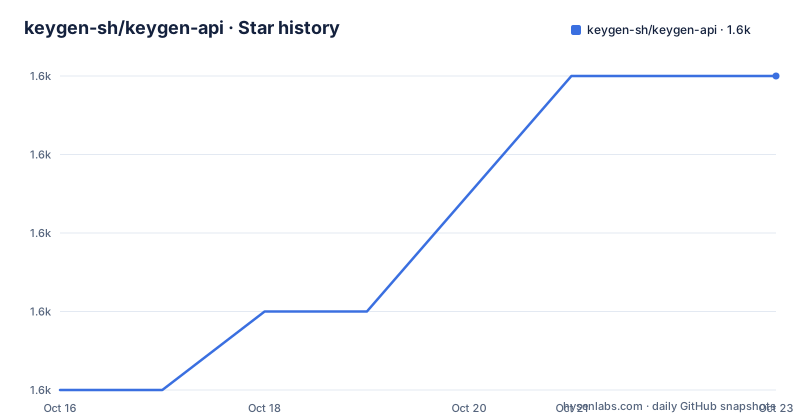
- keygen-sh/keygen-api1,614 ★ · +4
| Repository | 2026-10-16 | 2026-10-23 |
|---|---|---|
| keygen-sh/keygen-api | 1.6k | 1.6k |
4 Stars in the last 7 days, measured from the daily GitHub snapshot. Compare with other projects
Editorial analysis
Keygen API's licensing responsibilities
Keygen API addresses product entitlement rather than general-purpose key generation. According to the README, applications can use it to validate license keys, represent entitlements, and manage device activation across desktop applications, server software, on-premise products, and other commercial products. This places policy and customer state in a server-side system rather than requiring every client to enforce all licensing rules independently.
The project is aimed at developers who need licensing behavior as an application capability, including teams distributing paid software and organizations applying licenses to private container images through the licensed EE edition. Its Rails API shape also makes it possible for product clients to integrate licensing calls, although the README excerpt does not provide SDK examples or document exact endpoint payloads.
There are three deployment and edition choices. Keygen Cloud is the vendor-managed service and includes infrastructure operations such as availability, backups, security, and maintenance. Keygen CE is the self-hostable Community Edition for personal and commercial use. Keygen EE is the self-hostable Enterprise Edition, which requires a license key and adds support and selected account, migration, identity, and distribution features. The README says CE and Cloud use the same code base, but Cloud receives fixes and features several times per week while self-hosted CE is combined into a release about every six months.
Keygen's Rails services and data flow
The repository layout and startup commands identify Keygen as a Ruby on Rails application with a separate Sidekiq worker process. The `web` container runs Keygen on port `3000`, while the development instructions also provide a separate `bundle exec sidekiq` command for worker execution. PostgreSQL is the primary relational store in the Compose configuration, and Redis is used as another required service. The compose file publishes PostgreSQL on port `5432` and Redis on port `6379`.
A self-hosted request path therefore depends on several application layers. The Rails application receives API traffic, Active Record accesses PostgreSQL, and background work is handled through Sidekiq and Redis. The `Procfile` entry, Rails configuration, and `config.ru` are consistent with a conventional Rails service layout, while the repository's `features/` directory records API behavior in Cucumber scenarios. The README does not expose enough of the request schema to describe validation, entitlement resolution, or device-count enforcement step by step.
The Docker image adds an important deployment boundary. It is based on `ruby:3.4.9-alpine`, installs production gems, runs as the non-root `keygen` user, binds to `0.0.0.0`, and uses `/app/scripts/entrypoint.sh` as its entrypoint. It sets `KEYGEN_EDITION="CE"` and `KEYGEN_MODE="singleplayer"` by default. The Dockerfile also installs PostgreSQL client tools and links the build to OpenSSL, YAML, XML, and timezone-related runtime dependencies.
The `setup` Compose profile waits until PostgreSQL accepts connections and then runs the Rails setup task. This is a meaningful implementation detail: database initialization is orchestrated as a separate operation rather than being hidden in the normal web command.
Running Keygen CE locally
The README provides a direct Rails workflow for development. Keygen expects secrets through environment variables, so generate the Rails application secret and the three at-work encryption values before installing dependencies and running setup. The following commands reproduce the repository instructions exactly.
export SECRET_KEY_BASE="$(openssl rand -hex 64)"That variable is the internal Rails secret key. The at-work encryption secrets are generated separately:
export ENCRYPTION_DETERMINISTIC_KEY="$(openssl rand -base64 32)"
export ENCRYPTION_PRIMARY_KEY="$(openssl rand -base64 32)"
export ENCRYPTION_KEY_DERIVATION_SALT="$(openssl rand -base64 32)"
With the environment configured, install the locked Ruby dependencies and initialize Keygen:
bundle
bundle exec rails keygen:setup
`bundle` installs dependencies, while `keygen:setup` performs Keygen's setup task. Optional development data can be added for a local first session:
bundle exec rails db:seed:developmentThe Rails server, worker, and console are started independently:
bundle exec rails server
bundle exec sidekiq
bundle exec rails console
Run these as separate processes when performing development work. The server exposes the application, the worker handles its background processing role, and the console provides a Rails console. The README does not document a minimal license-validation request, so it does not support inventing a first API call from this excerpt.
Docker Compose services for a first self-hosted deployment
The repository includes `compose.yaml`, `.env.sample`, and a multi-stage `Dockerfile`. Docker Compose is therefore a concrete deployment path, but the visible configuration still requires environment values before it can be used. `.env.sample` marks `POSTGRES_USER`, `POSTGRES_PASSWORD`, and `POSTGRES_DB` as mandatory and sets the Redis URL to `redis://redis:6379` for Compose.
POSTGRES_USER=
POSTGRES_PASSWORD=
POSTGRES_DB=
REDIS_URL=redis://redis:6379
SECRET_KEY_BASE=
These entries are shown to identify the required configuration, not as a complete production `.env` file. The sample file notes that Docker Compose consumes `.env`, while a non-Compose installation requires manual environment configuration.
The Compose file defines profiles for one-time operational tasks. The `setup` profile starts PostgreSQL and waits for `pg_isready` before invoking `bundle exec rails keygen:setup`. The `migrate` profile runs `bundle exec rails db:migrate`, while the `console` profile opens `bundle exec rails console`. The normal `web` service maps container port `3000` to host port `3000`.
The excerpt does not show the complete command used to launch those profiles, so it would be inaccurate to invent a `docker compose` command with invented flags. It does show that the application and worker require coordinated startup in production. That coordination, plus PostgreSQL backups, Redis persistence, TLS termination, and secret management, makes Compose a deployment description rather than a one-command local demo.
Edition gaps, support, and upgrade obligations
Keygen CE is not equivalent to every Keygen Cloud capability. The README says fixes and features reach Cloud several times per week, while self-hosted CE receives a combined release roughly every six months. It also explicitly states that CE lacks some Cloud features and that most of those features are available in EE. The excerpt does not provide a complete feature matrix, so buyers should verify each required capability against the selected edition rather than infer parity from the shared code base.
CE is community supported. The README provides no guarantee that the creators will troubleshoot a self-hosted installation, although it describes community help through Discord and a forum as best effort. Keygen Cloud and EE customers have different support terms, with dedicated support associated with EE and support guarantees offered through paid options. That distinction matters for an internal platform team evaluating response time or incident assistance.
The visible releases show a continuing change surface. v1.5.0, dated 2025-06-20, added multiplayer mode, SSO, the Docker or OCI engine, and other changes. v1.6.0, dated 2026-01-12, added ECDSA P-256, memory and disk metering, and cross-environment authentication. v1.7.0, dated 2026-06-23, introduced Clickhouse. These are substantial operational changes, not just copy-only patches. A deployment therefore needs a planned database and configuration review for each version rather than an untested image replacement.
The repository is not archived, and the last push was on 2026-10-15. That is recent activity, but maintenance status alone does not reduce the operator's responsibility for backups, secret rotation, schema migration, dependency review, and compatibility testing.
Fair Core License and restricted alternative choices
Keygen is not presented as conventional permissive open source software. Its GitHub license classification is custom, and the README identifies the Fair Core License at `fcl.dev`. The README describes the FCL as a mostly permissive non-compete Fair Source license that eventually contributes to Open Source after two years, with the timeframe applying to each available software version. That is a source-available licensing model with conditions that must be reviewed for the exact release and intended use; this article does not provide legal advice.
The closest alternative within the material is not a different open source licensing engine. It is Keygen Cloud, which uses the same Keygen product and code base but removes the operator's responsibility for hosting the API. The practical difference is ownership of operations: a self-hosted CE or EE installation runs PostgreSQL, Redis, Rails, and workers in the buyer's environment, while Cloud delegates availability, backups, security, and maintenance to Keygen. The trade-off is control and edition selection versus operational burden and service fees.
Keygen is also the wrong tool when a project only needs a local, offline activation check and has no need for a centralized licensing API. The repository is designed around server-side account, entitlement, and device state. By contrast, it fits products that need policy changes to take effect centrally, multiple products or deployment modes, and an API boundary between client software and license administration. EE's OCI registry becomes relevant only when private container distribution itself must be license gated.
Editorial conclusion
Keygen is a reasonable fit for software vendors that need centralized key validation, entitlement rules, and device activation through an API, especially when they accept the Fair Core License and can operate the required services. It is less suitable for a team that requires guaranteed CE support, unrestricted open source use, or a quick deployment without planning PostgreSQL, Redis, encryption keys, workers, and upgrades. Before adoption, verify the exact edition against the required features, review LICENSE.md for the intended version and deployment, test license and device workflows, and confirm whether the Cloud release schedule is more important than the CE schedule.
Frequently asked questions
What can Keygen API be used for?
The README says it supports license key validation, entitlements, and device activation for desktop apps, server applications, on-premise software, and other products.
Can I self-host Keygen API for free?
Keygen CE is free for personal and commercial self-hosting under the project's Fair Core License. The README says CE is community supported and lacks some Cloud features.
How do I set up Keygen API locally?
The documented Rails path is to configure the secret and encryption environment variables, run `bundle`, then run `bundle exec rails keygen:setup`. The repository also provides Docker Compose service profiles for setup, migration, console access, and the web process.
Official sources
Add this badge to your README
If you maintain this project, the badge below links readers to this analysis and shows its maintenance status from the daily GitHub snapshot. Paste the markdown into your README; add ?metric=license or ?metric=stars to the image URL for a different field.

[](https://hysenlabs.com/projects/keygen-sh-keygen-api)Star history chart for your README
[](https://hysenlabs.com/projects/keygen-sh-keygen-api)Was this useful?