MDUT: one desktop window for five databases and the tooling around them
MDUT - Multiple Database Utilization Tools
At a glance
- What is it?
- A Go and Wails rebuild of a database utility that merges GUI administration with post-exploitation modules, a Redis relay, and an MCP server.
- Who is it for?
- MDUT is a database utility with two audiences, and it is more useful when you decide which one you are before you install it. As an administration client it is a single Go binary with a Monaco-backed SQL editor and uniform connection handling across five engines.
- Can I use it commercially?
- Yes, with strict conditions. AGPL-3.0 is a network copyleft licence: if people use a modified version over a network, for example as a hosted service, you must offer them its source code under the same licence.
- Is it still maintained?
- Yes. The repository last received commits 3 days ago.
- What is it written in?
- GitHub does not report a main language for this repository.
Answers come from the project's GitHub data, last synced on October 20, 2026, and from our analysis. They are not legal advice.
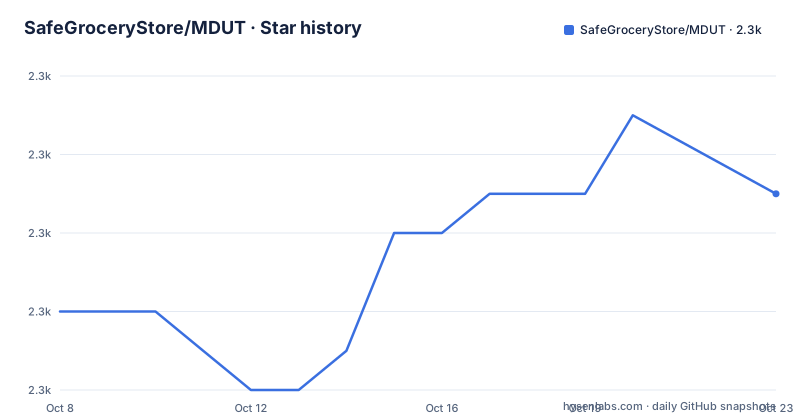
Star history
- SafeGroceryStore/MDUT2,281 ★ · +5
| Repository | 2026-10-08 | 2026-10-20 |
|---|---|---|
| SafeGroceryStore/MDUT | 2.3k | 2.3k |
5 Stars in the last 12 days, measured from the daily GitHub snapshot. Compare with other projects
Editorial analysis
Two tools sharing one window
The repository description expands the acronym as Multiple Database Utilization Tools, and the README calls it a cross-platform desktop database management and exploitation tool rebuilt from scratch with Go, Wails v2 and React with TypeScript. That phrasing puts both halves of the project in one sentence, and the split between them is the first thing to understand.
The management half is ordinary and uncontroversial. Connection management, an SQL query editor, table browsing and editing, and schema inspection are the features any database client provides, and MDUT provides them across MySQL, Microsoft SQL Server, PostgreSQL, Oracle and Redis with a single interface. Minimum supported versions are listed as MySQL 5.5 and 8.0 including MariaDB, SQL Server 2005, PostgreSQL 8.2, Oracle 11g and Redis 4.0.
The assessment half is the reason the tool is distinctive. Command execution through UDF, CLR and Java is supported against all five engines. File management is available everywhere. Reverse shell capability is listed for MySQL, PostgreSQL, Oracle and Redis. Shellcode execution is listed for MySQL alone. SOCKS5 forwarding proxying is available for MySQL, PostgreSQL, Oracle and Redis, and Redis has an RDB write capability of its own. The README adds that MSSQL supports xp_cmdshell, OLE Automation and Agent Job execution strategies.
The README closes with a disclaimer stating the tool is intended solely for authorized security testing and enterprise security assessment, that usage must comply with local laws, and that the developers assume no legal liability for misuse. Read that alongside the feature table rather than after it. A database client with a file manager and shell access is a different artifact from a database client, and the distinction determines whether it belongs on your machine at all.
What zero CGO buys a desktop tool
The two bullets that explain the architecture best are the pure Go drivers, described as zero CGO with single-binary cross-compilation, and the zero-dependency runtime with embedded frontend assets. Together they describe a build where the Go program carries the web interface inside it and needs nothing else installed.
The pure Go driver decision is the consequential one. The traditional database clients in this space carry C or C++ client libraries, which means a build toolchain, a compiler per target, and platform-specific packaging for every engine. Removing CGO collapses that. The declared stack is Go 1.25 with Wails v2.12 on the backend, and the local storage layer is SQLite in pure Go, which matters because a local SQLite dependency built on C would reintroduce the exact problem the rest of the stack avoids.
The frontend is React 18.3 with TypeScript 5.7, Vite 5.4, Tailwind CSS v4 and shadcn/ui for components, with Zustand 5.0 for state and i18next for the built-in Chinese and English localization. Wails is what ties the two halves together, packaging the compiled web assets into the binary and exposing Go methods to the frontend. The editor is Monaco, the same engine behind Visual Studio Code's editor, with syntax highlighting and multi-result support.
For an assessor or administrator the practical consequences are mundane and welcome. There is one file to move to a target machine, no runtime to install, and the same artifact shape on Windows, macOS and Linux. The monaco choice shows up in the editor quality you get, which matters when the work is reading unfamiliar schemas under time pressure.
The feature matrix is not symmetrical, and should not be
The README's capability table is laid out per database, and reading it across rather than down is the honest way to understand the tool's scope. Connection management, command execution and file management carry a checkmark for all five engines. The SQL query editor, table browsing and editing, and schema inspection all carry a checkmark for the four relational engines and a dash for Redis.
That single column of dashes is not an omission to be fixed. Redis has no SQL surface, so an SQL editor and a table browser would have nothing to operate on. Redis gets the two things that make sense for it instead: command execution against the server and RDB write capability. Reading the matrix as a rectangular grid of features produces the wrong impression that four capabilities are missing; reading it as five engine-specific profiles produces the right one.
Reverse shell is available for MySQL, PostgreSQL, Oracle and Redis but not SQL Server, which instead routes through xp_cmdshell, OLE Automation and Agent Job execution. Shellcode execution appears only under MySQL. SOCKS5 forwarding proxying is absent for SQL Server. These asymmetries reflect the different ways each engine exposes the primitives an assessment needs, and they are the kind of detail that separates a tool built by someone who has used it from one assembled from feature lists.
The SOCKS5 support deserves particular attention because it is stated as applying to all database types in the feature list, while the matrix marks it absent for MSSQL. The two statements conflict on that one engine, and the matrix is the more specific source. Plan on testing that path yourself rather than assuming it works everywhere.
Downloads, the quarantine step, and the architecture gap
Pre-built binaries come from the releases page, with a small table defining the shapes. Windows ships as `.exe` or `.zip`. macOS ships as `.dmg` or `.zip`, and the README specifies it is a Universal Binary running natively on both Apple Silicon and Intel Macs. Linux ships as a `.zip` containing an executable, and the README is explicit that this is the x86_64 build, to be extracted and run as `./Multiple_Database_Utilization_Tools`.
Compare that against the architecture claim in the feature list, which promises single-binary cross-compilation for all platforms on the strength of having zero CGO. Those two statements sit side by side, and they are not describing the same thing. The absence of CGO makes cross-compilation straightforward, and the macOS Universal binary proves the project uses that freedom. The release table nonetheless offers Linux for amd64 only. If you are on an ARM Linux machine, the capability is plausible but no documented artifact is provided, and you should check the releases page for an asset matching your architecture before assuming one is there.
The macOS path has an extra step the README explains at length. Because the app is not signed with an Apple Developer certificate, Gatekeeper blocks it on first launch, and the documented fix is to strip the quarantine attribute:
sudo xattr -r -d com.apple.quarantine /Applications/Multiple_Database_Utilization_Tools.appThe README also names the specific failure message this addresses, an app reported as damaged and unable to open, and states that the command fixes it. The honest interpretation is that the message is Gatekeeper refusing an unsigned application, not a corrupted download.
If you would rather build it, the prerequisites are Go 1.25 or newer, Node.js 20 or newer, and the Wails CLI.
Two branch names and two generations of the tool
Repository metadata and README prose disagree about branch names in a way that is easy to trip over. The recorded default branch is `v3`. The release notes for v3.1.0 and v3.1.1 both link their changelogs at paths beginning with `blob/v3/`, for instance the English changelog at `CHANGELOG_EN.md` under that branch. But the README badges at the top of the file point elsewhere, with the license badge targeting `blob/main/LICENSE` and the star badge targeting the stargazers path.
Both naming conventions exist in the repository, and the metadata says which one is current. If a README link resolves to nothing, replacing `main` with `v3` is the fix. This is worth knowing before you conclude a link is dead or a file was removed.
The second signal is generational. The two most recent releases are v3.1.0 on 2026-07-03 and v3.1.1 on 2026-07-23, and both carry release notes that contain no changes at all. They point at CHANGELOG and CHANGELOG_EN and say in effect that the full change list lives there. The last push to the default branch matches v3.1.1's date. Look further back and you find v2.1.1 from 2022-06-22, whose release notes describe optimizing logic code, restructuring an HTTP tunnel generation interface, swapping a dependency to jTDS because the Microsoft driver had too many problems, adding Oracle-specific upload functionality, adding a Redis shell feature with an explicit warning against using it in production environments, and strengthening a key replacement feature. Its published assets are named as a `.jar` and a `.zip` for the 2.1.1 version.
So the record contains a Java-era 2.x that shipped a jar, and a Go and Wails v3 that ships native binaries. The README documents only the current generation. That is normal for a rewritten tool, and it is also why the version number is the signal to check before reading documentation: an archived page describing a 2.x workflow is describing a different program.
The two extension points that change how you use it
Two capabilities sit outside the core feature table and change the tool's shape more than anything in it.
The first is the Redis relay. When a target Redis instance sits behind NAT or a SOCKS5 proxy, the rogue server technique needs an intermediate relay to forward traffic, and the README points to a dedicated guide for its setup and names the relay tool as mdut-relay in a separate repository. That is an architectural admission worth taking seriously. The relay is not a bundled convenience; it is a second component you obtain and operate, which means an assessment involving a proxied Redis target involves moving traffic through infrastructure you are responsible for.
The second is the Model Context Protocol integration. The README states that MDUT exposes its capabilities through MCP, enabling AI clients to interact with databases, execute commands and manage files programmatically, with configuration and startup details in a separate usage guide. Read that sentence against the feature table and the combination is striking. A tool with command execution and file management across five engines, plus SOCKS5 tunnelling, now has a programmatic interface designed to be driven by a model rather than a human clicking through a desktop application.
That is a genuine change in risk profile. The desktop interface puts a person between the intent and the action. An MCP surface lets something else choose the action. Neither is wrong, and for an authorized assessment the programmatic route may be far more efficient. But it means the access control question is no longer only about who can run the binary. The licence reinforces the point: the project is AGPL-3.0, so if you extend MDUT and distribute your version, your obligations follow the copyleft terms. That is a concrete constraint to raise before anyone plans to build on this codebase.
A sensible adoption sequence
Start with the management half and treat the assessment half as a separate decision. Installing MDUT to browse schemas and run queries across five engines is a normal client install. Installing a client that includes command execution, file management and shell access on your workstation is a decision about what lives on your laptop, and it deserves a different conversation than a query tool.
Then check the artifact. Find a release asset that matches your platform and architecture before downloading, with the Linux amd64 caveat and the macOS quarantine step in mind. If you plan to run it on an ARM Linux host, verify an asset exists first. And read the release tag, not just the version number, since the v3 line is a rewrite of an earlier Java implementation.
If you are evaluating the MCP surface, configure it in a contained environment first. The integration is powerful precisely because it can execute commands and manage files, which is exactly the property that makes it valuable and the property that makes access control the whole problem. Treat the guide as a security document as much as a setup document.
Finally, if your plans involve redistribution or embedding, read the AGPL-3.0 licence before writing code against it. The permission grant is generous and the obligations are real, and discovering them after building on top of the project is the expensive order to discover them in.
Editorial conclusion
MDUT is a database utility with two audiences, and it is more useful when you decide which one you are before you install it. As an administration client it is a single Go binary with a Monaco-backed SQL editor and uniform connection handling across five engines. As an assessment tool it adds command execution, file management, shell access and proxy tunnelling, which changes both the legal conversation and the operational one. The AGPL-3.0 licence and the MCP surface both matter for anything you intend to build on. Before downloading, check that an asset exists for your architecture, and expect the documentation links to point at a branch name that is not the default one.
Frequently asked questions
Which databases does MDUT support and what are the minimum versions?
The README lists MySQL 5.5 and 8.0 including MariaDB, Microsoft SQL Server 2005 and newer, PostgreSQL 8.2 and newer, Oracle 11g and newer, and Redis 4.0 and newer. Connection management, command execution and file management are available across all five, while the SQL editor, table browsing and schema inspection apply to the four relational engines and not to Redis.
Does MDUT run on macOS and how do I get past the Gatekeeper block?
The macOS release is a Universal Binary that runs on both Apple Silicon and Intel Macs, shipped as a .dmg or .zip. Because the app is not signed with an Apple Developer certificate, Gatekeeper blocks it on first launch, and the README documents removing the quarantine attribute with sudo xattr -r -d com.apple.quarantine on the installed app bundle. Linux is a separate story: the release is a zip containing the x86_64 executable.
What is the difference between the 2.x and 3.x versions of MDUT?
The 2.x line was a different implementation. The v2.1.1 release from 2022-06-22 published a jar and a zip, and its notes describe swapping a driver dependency to jTDS for Microsoft SQL Server. The README documents only the current generation, which it describes as rebuilt from scratch with Go, Wails v2 and React with TypeScript, and the repository default branch is v3.
Official sources
Add this badge to your README
If you maintain this project, the badge below links readers to this analysis and shows its maintenance status from the daily GitHub snapshot. Paste the markdown into your README; add ?metric=license or ?metric=stars to the image URL for a different field.

[](https://hysenlabs.com/projects/safegrocerystore-mdut)Star history chart for your README
[](https://hysenlabs.com/projects/safegrocerystore-mdut)Was this useful?