sddm-astronaut-theme: a Qt6 SDDM login theme with animated wallpapers
Series of modern looking themes for SDDM.
At a glance
- What is it?
- Keyitdev's theme collection swaps the SDDM greeter for a QML login screen with ten presets, video backgrounds and a virtual keyboard. It installs in one script on pacman, xbps-install, dnf and zypper systems, but it is not a package you can roll back with your package manager.
- Who is it for?
- Adopt it if you run SDDM with Qt6 >= 6.8 and want a login screen with animated wallpapers and a scripted install, and you are willing to keep the theme directory under your own version control because there is no packaged rollback. Skip it if you are on a display manager other than SDDM, or if you cannot supply qt6-svg, qt6-virtualkeyboard and qt6-multimedia.
- Can I use it commercially?
- Yes, with conditions. GPL-3.0 is a copyleft licence: if you distribute software that includes it, you must release that software's source code under the same licence. Running it internally without distributing it does not trigger that obligation.
- Is it still maintained?
- Yes. The repository last received commits 67 days ago.
- What is it written in?
- Mainly QML, according to GitHub's language statistics.
Answers come from the project's GitHub data, last synced on November 24, 2026, and from our analysis. They are not legal advice.
Star history
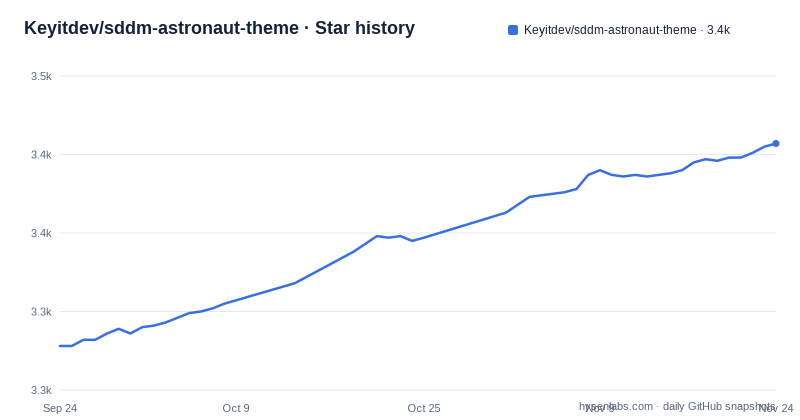
- Keyitdev/sddm-astronaut-theme3,407 ★ · +129
| Repository | 2026-09-24 | 2026-11-24 |
|---|---|---|
| Keyitdev/sddm-astronaut-theme | 3.3k | 3.4k |
129 Stars in the last 61 days, measured from the daily GitHub snapshot. Compare with other projects
Editorial analysis
The problem: SDDM ships a greeter, not a look
SDDM is a display manager, and the login screen it shows is a QML theme loaded from a directory. A stock install gives you something functional and plain. Changing it means writing QML, wiring up the config file the theme reads, and getting the theme registered in /etc/sddm.conf. That is the gap sddm-astronaut-theme fills: it is a ready-made theme directory with ten presets, so the work becomes copying files and picking a config.
The audience is narrow and specific. You need SDDM as your display manager, Qt6 on the system, and enough comfort with sudo to write into /usr/share/sddm/themes and /etc/sddm.conf. The README states the theme is written using Qt6 and that all themes were created for 1080p, though it says they should work well at other resolutions. If you run GDM, LightDM or greetd, none of this applies to you.
How the theme is structured: one config file drives the look
The repository layout is the architecture. Main.qml sits at the top level, with Components/, Assets/, Backgrounds/, Fonts/, Previews/ and Themes/ alongside it. metadata.desktop is what SDDM reads to find the theme's config, and setup.sh is the installer.
The design decision worth noting is that appearance is concentrated in one file. The README says each of the ten pre-made themes was created by modifying just one file, Themes/astronaut.conf. Switching themes is therefore not a code change but a pointer change: metadata.desktop contains a line reading ConfigFile=Themes/astronaut.conf, and you edit it to point at another file in Themes/. Everything else in the tree, the QML components and the shared assets, stays put.
That is a real constraint as much as a convenience. If you want a look that differs from all ten presets in a way the config keys do not express, you are back in QML, and your changes live in a directory that the install script owns.
Installing sddm-astronaut-theme with setup.sh or by hand
The README offers an automatic path first. It is a curl piped into bash, and the README itself adds the warning to always read scripts you run from the internet. The stated support is distributions using pacman, xbps-install, dnf or zypper.
bash -c "$(curl -fsSL https://raw.githubusercontent.com/keyitdev/sddm-astronaut-theme/master/setup.sh)"If you prefer to see every step, the manual route is five steps. First install dependencies: sddm >= 0.21.0, qt6 >= 6.8, qt6-svg >= 6.8, qt6-virtualkeyboard >= 6.8 and qt6-multimedia >= 6.8. The package names differ per distribution, and the README lists them separately, for example sddm qt6-svg qt6-virtualkeyboard qt6-multimedia on Arch, sddm-qt6 libQt6Svg6 qt6-virtualkeyboard qt6-virtualkeyboard-imports qt6-multimedia qt6-multimedia-imports on OpenSUSE, and sddm qt6-svg-dev qml6-module-qtquick-virtualkeyboard qt6-multimedia-dev qml6-module-qtquick-controls qml6-module-qtquick-effects libxcb-cursor0 on Debian trixie (13.5). It also notes you may want additional video codecs such as h.264, which matters if you use an animated background.
Then clone into the theme directory, copy the fonts, and write the two config files.
sudo git clone -b master --depth 1 https://github.com/keyitdev/sddm-astronaut-theme.git /usr/share/sddm/themes/sddm-astronaut-theme
sudo cp -r /usr/share/sddm/themes/sddm-astronaut-theme/Fonts/* /usr/share/fonts/
echo "[Theme]
Current=sddm-astronaut-theme" | sudo tee /etc/sddm.conf
echo "[General]
InputMethod=qtvirtualkeyboard" | sudo tee /etc/sddm.conf.d/virtualkbd.conf
After that, the theme is selected. To change which preset loads, edit ConfigFile in /usr/share/sddm/themes/sddm-astronaut-theme/metadata.desktop. To see the result without logging out, the README gives a test mode command:
sddm-greeter-qt6 --test-mode --theme /usr/share/sddm/themes/sddm-astronaut-theme/What you should see is the greeter rendering the theme in a window. The README warns that depending on the system configuration the preview may differ slightly from the actual login screen, so treat it as a close approximation rather than proof.
Animated wallpapers and the codec dependency they drag in
The feature that distinguishes this theme from most SDDM themes is animated wallpapers. The README lists virtual keyboard support, an installation script and animated wallpapers as key features, and shows video previews of several animated presets.
That capability is why qt6-multimedia is a hard dependency and why the README mentions h.264 codecs as an optional extra. A static theme can get away with Qt Quick and SVG alone. A video background routes through Qt Multimedia, so a system missing the codec will not render the animation. The NixOS snippet in the README makes the same point in its own idiom, listing kdePackages.qtmultimedia with the comment that it is required for video backgrounds and audio.
This is the clearest case where the theme's requirements exceed what SDDM itself needs. If you only want a static background, the multimedia stack is weight you are carrying for nothing.
Where it breaks: no rollback, and a display manager you cannot test in place
The install script copies into system directories. The README does not document rollback, and the repository has no published releases, so there is no versioned artifact to reinstall if a change goes wrong. Recovery means knowing what was in /usr/share/sddm/themes and /etc/sddm.conf beforehand. Backing up /etc/sddm.conf before the tee command above is the difference between a two-minute fix and a broken login flow.
The second failure mode is the login screen itself. A display manager greeter is the one piece of software where a mistake locks you out of the graphical session, and the only preview mechanism the README documents is sddm-greeter-qt6 --test-mode, which the README says may differ slightly from the real login screen. Test mode runs in your current session with your current environment. It does not reproduce what happens when the greeter starts before any user session exists.
The third is scope. This is an SDDM theme. On a machine where SDDM is not the display manager, or where Qt6 >= 6.8 and the virtual keyboard module cannot be installed, the theme is simply the wrong tool, and no amount of config editing changes that.
Alternatives: Catppuccin-sddm and sddm-silent-theme
The comparison that matters is against other SDDM themes rather than other display managers, because the theme format is SDDM's, not this project's.
Catppuccin-sddm is a palette-first theme: its reason to exist is the Catppuccin colour scheme, and it is the right pick if your desktop already follows that palette and you want the login screen to match rather than to be a distinct piece of art. sddm-silent-theme goes the other way, toward a stripped-back greeter with minimal visual noise. sddm-astronaut-theme sits at the opposite end of that axis: ten presets, animated backgrounds, a bundled font set, a virtual keyboard configuration and an install script that writes your /etc/sddm.conf for you.
The practical difference is what you are choosing between. With a minimal theme you get fewer moving parts and fewer dependencies to satisfy. With this one you get a designed login screen and a dependency list that includes Qt Multimedia and the virtual keyboard module. The README also notes the project began as an independent fork of MarianArlt's sddm-sugar-dark and has since deviated significantly, so if you liked the original's approach, this is no longer that.
NixOS, licensing and what upgrades cost you
NixOS users do not follow the manual path. The README points to a community-maintained package, sddm-astronaut, maintained by @DaniD3v, @uxodb and @qweered, and explicitly says it is not officially packaged by the upstream maintainers. Customisation happens through an override in configuration.nix, where embeddedTheme selects a preset and themeConfig takes keys such as HeaderTextColor and Background. The same snippet sets services.displayManager.sddm.theme to sddm-astronaut-theme and adds kdePackages.qtmultimedia to extraPackages. Because the package is community-maintained, its update cadence is not the upstream repository's cadence.
The project is GPL-3.0. That is a copyleft licence, and it governs the QML and other files in the tree. Redistributing a modified theme, or shipping it inside a distribution image, brings the licence's obligations with it. The README also notes that many of the wallpapers and fonts used in the project are popular ones copied from elsewhere, so the licence on the code and the provenance of the bundled assets are two separate questions. This is not legal advice; if you plan to redistribute, check the assets yourself.
Upgrade cost is the real ongoing expense. The last push to the repository was on 2026-09-18. There is no release channel, so updating means re-running setup.sh or re-cloning, and either one overwrites local edits in the theme directory. If you have customised Themes/astronaut.conf or dropped your own background into Backgrounds/, keep those files somewhere else and reapply them, because the tooling does not merge.
Editorial conclusion
Adopt it if you run SDDM with Qt6 >= 6.8 and want a login screen with animated wallpapers and a scripted install, and you are willing to keep the theme directory under your own version control because there is no packaged rollback. Skip it if you are on a display manager other than SDDM, or if you cannot supply qt6-svg, qt6-virtualkeyboard and qt6-multimedia. Before installing, run sddm-greeter-qt6 --test-mode against the theme directory and confirm your distribution's package names for those Qt6 modules, since the README lists different ones per distribution.
Frequently asked questions
How do I install sddm-astronaut-theme?
The README gives an automatic path, a curl of setup.sh piped into bash, which it says works on distributions using pacman, xbps-install, dnf or zypper. The manual path is to install the Qt6 dependencies, clone the repository into /usr/share/sddm/themes/sddm-astronaut-theme, copy the fonts, and write /etc/sddm.conf plus /etc/sddm.conf.d/virtualkbd.conf.
Is there an animated theme for SDDM?
sddm-astronaut-theme supports animated wallpapers, and the README shows video previews of several animated presets. Using them requires qt6-multimedia, and the README suggests installing additional video codecs such as h.264.
What are some minimalistic SDDM themes available?
sddm-astronaut-theme is not one of them: it ships ten presets, animated backgrounds, bundled fonts and a virtual keyboard configuration. If you want less visual noise, the related-searches list points at themes such as sddm-silent-theme, which the README of this project does not discuss.
What is the default theme in SDDM?
The sddm-astronaut-theme README does not describe SDDM's own default theme. It does show how to make this theme the current one by setting Current=sddm-astronaut-theme under a [Theme] section in /etc/sddm.conf.
Official sources
Add this badge to your README
If you maintain this project, the badge below links readers to this analysis and shows its maintenance status from the daily GitHub snapshot. Paste the markdown into your README; add ?metric=license or ?metric=stars to the image URL for a different field.

[](https://hysenlabs.com/projects/keyitdev-sddm-astronaut-theme)Star history chart for your README
[](https://hysenlabs.com/projects/keyitdev-sddm-astronaut-theme)Was this useful?