Jumper's repository is a prompt-driven toolkit for a 22-DoF crab robot, built on a vendored MuJoCo training stack
🦀 Jumper — an crab robot.
At a glance
- What is it?
- KingKongRobotics/jumper does not hold firmware or a single install script. It holds the AI toolkit for designing skins, training motions and building scenes for a 22-DoF crab robot, plus a reinforcement learning framework that vendors mjlab and rsl_rl.
- Who is it for?
- Jumper suits people who own or plan to own the crab robot and are comfortable letting an AI coding assistant drive a MuJoCo training pipeline. It is a poor choice as a general legged-robot framework, because the training stack is vendored and the project asks you not to install mjlab or rsl-rl-lib alongside it.
- Can I use it commercially?
- Yes. Apache-2.0 is a permissive licence: you can use, modify and sell software built on it, as long as you keep its copyright and licence notices.
- Is it still maintained?
- Yes. The repository last received commits 9 days ago.
- What is it written in?
- Mainly Python, according to GitHub's language statistics.
Answers come from the project's GitHub data, last synced on November 7, 2026, and from our analysis. They are not legal advice.
Star history
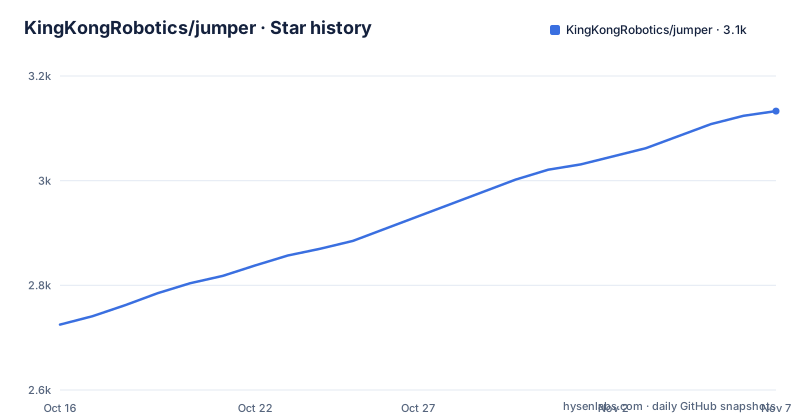
- KingKongRobotics/jumper3,133 ★ · +408
| Repository | 2026-10-16 | 2026-11-07 |
|---|---|---|
| KingKongRobotics/jumper | 2.7k | 3.1k |
408 Stars in the last 22 days, measured from the daily GitHub snapshot. Compare with other projects
Editorial analysis
The README is a set of three sentences you hand to an AI coding assistant
Jumper is described as a 22-DoF crab robot, and the repository is its AI toolkit for appearance, motion and scene creation. The instruction is short: open the repository in an AI coding assistant and try the prompts. Those prompts are written as plain sentences.
For appearance: "Design a warm sand ranger appearance for Jumper with coordinated body and limb colors, then export a `.skin`." For motion: "Train a stable tripod gait for Jumper, replay and evaluate the result, then package it as an `.app`." For scenes: "Create a park pump-track scene for Jumper with rolling terrain, trees and benches, then export a `.map`."
Each sentence ends in a file format. A `.skin` is the look of the robot, an `.app` is a packaged motion with its controller, and a `.map` is a scene. The README does not show a command line for any of this, so the assistant reading the repository's `AGENTS.md` and `CLAUDE.md` does the translation from sentence to action.
That design has a cost. The quality of a result depends on the assistant you pick and how closely it follows those instruction files, and the README gives no list of assistants that work. If you prefer typed commands you can run by hand, start with the tutorial rather than the prompts, because the tutorial is the document that describes training, replay and policy export step by step.
Appearance and scenes live in a second repository, jumper-design
The skin and scene sides are not in this repository. They belong to `jumper-design`, which the README describes as handling appearance and scene creation. Your assistant reads that repository's `AGENTS.md` instructions and uses its tools as needed.
The sample libraries sit there too. Three skins are named: Warm sand ranger, Silver armor and Raphael Turtle, each linked to a `.skin` file under `library/skins`. Three maps are named: Park pump track, Bedroom and Soccer, each a `.map` file under `library/maps`. The links point to a pinned commit of `jumper-design`, so the examples you click will not change underneath you, and there are separate pages to browse all skins and all maps.
The practical consequence is a two-repository setup. If you want to make a skin or a scene, you need `jumper-design`, and this repository alone will not do it. The README does not explain how the two are wired together on your machine.
Six motions are shown, and training is documented in two places
The motion gallery lists six categories: Walk, Posture, Gesture, Dance, Jump and Grasp. The example prompt asks for a stable tripod gait, and the sequence it describes is train, replay and evaluate, then package.
Two documents carry the details. `docs/TUTORIAL.md` covers motion training, replay and policy export in this repository. `docs/COLAB.md` covers GPU training in a notebook, with checkpoint backup, resume, ONNX export and MP4 simulation replay. The Colab route matters if you do not own a CUDA machine, since the training stack has a GPU backend.
Packaging is a third document. `deploy/BUNDLE.md` explains how to package trained motions and their controller as an `.app`, and `deploy/README.md` is the build guide with prerequisites. The README lists the documents but not the commands inside them, so the first real decision, local training or Colab, is made by reading those two files.
The README also does not state how long training takes, which GPU it needs or what a finished policy looks like on the physical robot. Those numbers are absent, so budget time to read the tutorial before committing a machine to a run.
The training stack vendors mjlab and rsl_rl instead of depending on them
The README names four projects that training builds on: mjlab, rsl_rl, MuJoCo and MuJoCo Warp. `pyproject.toml` goes further. The package is named `mjrl-lab`, version `0.0.1`, and its description calls it a dual-backend MuJoCo reinforcement learning framework: MuJoCo Warp on the GPU and native MuJoCo on multi-threaded CPU, sharing one set of managers and rsl_rl code.
mjlab and rsl_rl are vendored copies under `rl/`, with a note pointing to `docs/VENDOR.md`. The file lists their transitive dependencies, labelled as mjlab 1.6.0's and rsl_rl 5.4.2's. A comment states the rule plainly: do not pip install mjlab or rsl-rl-lib into the environment as well, because that creates a shadowing ambiguity with the in-repository copies.
If you already have either library in a virtual environment, start a clean one for Jumper. Mixing them is the single failure the project warns about by name.
Pinned versions narrow the environment: Python 3.10 to 3.13, MuJoCo 3.11
`requires-python` is `>=3.10,<3.14`, so Python 3.14 is excluded. The listed dependencies include `mujoco~=3.11.0`, `mujoco-warp~=3.11.0`, `warp-lang>=1.14.0` and `torch>=2.7.0`. The `~=` pins on MuJoCo and MuJoCo Warp mean a different minor version of either will not satisfy the install.
The rest of the list covers `torchrunx`, `tyro`, `trimesh`, `scipy`, `viser`, `mjviser`, `mediapy`, `imageio-ffmpeg`, `prettytable`, `tqdm`, then `torchvision`, `tensordict`, `tensorboard`, `GitPython`, `onnx` and `onnxscript`.
Two entries have a story in the comments. `wandb` and `PyYAML` turned up during a clean macOS install on 2026-09-02 and had been missing all along, because the training machine already had wandb installed. That is a useful signal about what was tested. The authors trained on a machine with extra packages and found the gap only on a fresh Mac, so a fresh install is a real test of the dependency list. Neptune logging is optional and only imported under `--agent.logger neptune`.
Apache-2.0 covers the maintainer's files, and generated outputs do not inherit it
The copyright line reads 2026 KingKong Robotics. Maintainer-owned project materials are licensed under Apache-2.0, with `LICENSE`, `NOTICE` and a licensing section in `docs/PROJECT_GUIDE.md` as the references. A `licenses/` directory sits at the top level.
Two limits are spelled out. Third-party materials remain under their own terms, and the example appearance and scene images come from jumper-design, with `docs/media/DESIGN_SOURCES.md` recording image sources. Generated outputs do not automatically inherit this repository's license.
That last sentence matters for anyone selling or sharing skins, maps or motions made with the toolkit. A `.skin` produced by an assistant is not covered by the Apache-2.0 grant just because the toolkit that made it is. Check the third-party notices before publishing anything derived from the bundled examples.
No releases, no install command, and a free-robot event link
The repository has no GitHub releases, and the last push was on 19 October 2026. There is no version tag to pin. The README also contains no install command. Setup is delegated to `docs/PROJECT_GUIDE.md`, which the table describes as covering setup, current capabilities and further documentation.
The hardware is documented in `docs/HARDWARE.md`. The README also carries a banner, "Get a free Jumper!", linking to an event page for a crab robot challenge in 2026. Nothing else in the repository describes the terms, so treat that as a pointer, not an offer you can verify here.
The top-level listing includes `.env` along with `.claude/`, `controller/`, `notebooks/`, `out/`, `rl/`, `scenes/`, `tasks/` and `tools/`. The README does not say what `.env` contains, so look at it before you run anything that reads environment files.
Editorial conclusion
Jumper suits people who own or plan to own the crab robot and are comfortable letting an AI coding assistant drive a MuJoCo training pipeline. It is a poor choice as a general legged-robot framework, because the training stack is vendored and the project asks you not to install mjlab or rsl-rl-lib alongside it. Before cloning, read docs/PROJECT_GUIDE.md for setup and current capabilities, since the README gives no install command at all.
Frequently asked questions
What is the KingKongRobotics Jumper repository?
It is the AI toolkit for Jumper, a 22-DoF crab robot. It covers appearance, motion training and scene creation, and you work with it by opening the repository in an AI coding assistant.
What does Jumper's training stack build on?
Training builds on mjlab, rsl_rl, MuJoCo and MuJoCo Warp. mjlab and rsl_rl are vendored copies under rl/, so you should not install mjlab or rsl-rl-lib separately.
Which Python versions does the Jumper repository support?
pyproject.toml sets requires-python to >=3.10,<3.14, so Python 3.10 through 3.13. It also pins mujoco and mujoco-warp to ~=3.11.0.
What license does Jumper use?
Maintainer-owned materials are under Apache-2.0. Third-party materials keep their own terms, and generated outputs do not automatically inherit the repository's license.
Official sources
Add this badge to your README
If you maintain this project, the badge below links readers to this analysis and shows its maintenance status from the daily GitHub snapshot. Paste the markdown into your README; add ?metric=license or ?metric=stars to the image URL for a different field.

[](https://hysenlabs.com/projects/kingkongrobotics-jumper)Star history chart for your README
[](https://hysenlabs.com/projects/kingkongrobotics-jumper)Was this useful?