Kiowx c_cleaner_plus for Windows cleanup, scans, and uninstall residue
Windows的开源强力清理工具,可扫描并清理全盘中的垃圾文件、大文件、重复文件及系统残留等
At a glance
- What is it?
- Kiowx c_cleaner_plus is a Windows-only Python desktop application for temporary-file cleanup, large-file and duplicate-file scanning, scheduled tasks, and application uninstall residue. It is suited to users who want a graphical workflow, but its permanent deletion, registry, service, and scheduled-task features require careful review and administrator privileges.
- Who is it for?
- Adopt Kiowx c_cleaner_plus if you want a Windows-only graphical application that combines routine cleanup, disk scans, scheduled tasks, and uninstall residue management. Do not adopt it as a cross-platform maintenance utility, an automatic bulk-deletion tool, or a replacement for a tested application removal process without reviewing its rules.
- Can I use it commercially?
- Yes. Apache-2.0 is a permissive licence: you can use, modify and sell software built on it, as long as you keep its copyright and licence notices.
- Is it still maintained?
- Yes. The repository last received commits 45 days ago.
- What is it written in?
- Mainly Python, according to GitHub's language statistics.
Answers come from the project's GitHub data, last synced on October 23, 2026, and from our analysis. They are not legal advice.
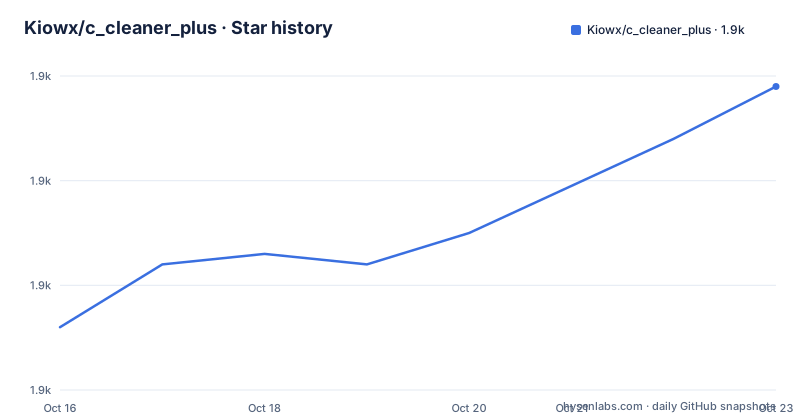
Star history
- Kiowx/c_cleaner_plus1,919 ★ · +23
| Repository | 2026-10-16 | 2026-10-23 |
|---|---|---|
| Kiowx/c_cleaner_plus | 1.9k | 1.9k |
23 Stars in the last 7 days, measured from the daily GitHub snapshot. Compare with other projects
Editorial analysis
Where Kiowx c_cleaner_plus fits on Windows
Kiowx c_cleaner_plus targets Windows 10 and Windows 11 systems where disk clutter has several different causes. Its scope is broader than empty Recycle Bin cleanup. The project documents routine removal of temporary files, system logs, thumbnail caches, browser caches, and package-manager caches. It also includes large-file discovery, duplicate-file finding, empty-folder detection, invalid-shortcut cleanup, uninstall registry scanning, right-click menu cleanup, and application uninstall workflows.
That range makes it relevant to Windows users who want several maintenance operations in one Python-based desktop interface. It is also relevant to developers and technically experienced users because rules can be customized, reordered, imported, exported, and obtained from remote rule packages. The rule categories include developer tools, AI tools, Android and mobile development tools, design, modeling, 3D, CAD, game platforms, media tools, and domestic software.
The project is Windows-only. The repository does not present Linux or macOS support, so the application is the wrong choice for a cross-platform cleanup workflow. Its installation also requires administrator elevation at startup. Although the interface includes high-risk interception and graded protection, the documented disclaimer still places the final selection and deletion responsibility on the user. A restore point or backup is the relevant preparation step for uncertain cleanup or uninstall operations.
The PySide6 interface behind the cleanup operations
Kiowx c_cleaner_plus is built with Python, PySide6, and PySide6-Fluent-Widgets. The Frameless window package and darkdetect package are also listed in `requirements.txt`. Based on the repository layout, `main.py` is the source entry point, while `i18n/`, `config/`, and the root `config_store.json` indicate separate presentation, configuration, and persistent-state areas.
The documented interface supports light, dark, and system-following themes, plus horizontal and vertical sidebar layouts. A new user does not need to define every operation through a command-line interface. The graphical workflow groups routine cleanup, large-file scans, additional cleanup, application uninstall, scheduled tasks, remote rules, and interface settings into separate areas.
Routine cleanup first estimates the amount that can be removed. Users can select items, change the order of rules, and choose Recycle Bin deletion or permanent deletion. Large-file scans can cover multiple partitions, apply a custom minimum file size, limit the result count, and sort by size, name, or path. These controls matter because an unrestricted scan result can contain files that are merely large rather than disposable.
Application removal has two documented modes. Standard uninstall can be followed by a residue scan. Strong uninstall is described as covering files, registry entries, services, and scheduled tasks. That operation is materially different from deleting an application directory, and the README specifically warns that cleanup and uninstall actions carry risk.
Installing Kiowx c_cleaner_plus and starting its first scan
The README recommends downloading a Windows release from the project's Releases page. A `*-setup.exe` package follows the installation wizard, while a `*.zip` package provides a no-installation runtime after extraction. The application requests administrator permission when it starts because some operations touch protected system areas. The repository does not document command-line switches, a headless mode, or a documented rollback procedure, so the tutorial stops at launching the application and beginning with an estimate.
For a source installation on Windows 10 or Windows 11 with Python 3.9 or later, clone the repository, install the pinned dependencies, and launch the entry point:
git clone https://github.com/Kiowx/c_cleaner_plus.git
cd c_cleaner_plus
pip install -r requirements.txt
python main.py
The `requirements.txt` file pins PySide6, PySide6-Fluent-Widgets, PySideSix-Frameless-Window, darkdetect, pyinstaller, and pywin32. After `python main.py`, Windows should display the application's elevation request. Accepting it is necessary for the documented administrative operations, although not every feature necessarily uses every protected location.
For the first use, open the routine cleanup area and request a size estimate before selecting deletions. Review the returned items and rules rather than immediately choosing permanent deletion. The README does not give exact button labels for this interaction, so it would be inaccurate to invent a step-by-step sequence of unlabeled screen controls.
After selection, choose the documented deletion mode. Recycle Bin deletion leaves deleted files in Windows Recycle Bin, while permanent deletion removes them directly. Given that the tool can also inspect registry entries, services, scheduled tasks, browser caches, and package-manager data, an initial run should be limited to categories whose deletion behavior the user understands.
Large files, duplicates, and residue scanning across partitions
The additional scanning tools address several distinct forms of disk occupation. Large-file scanning is configurable by partition, minimum size, and result limit, then permits sorting by size, name, or path. This is a discovery workflow rather than an automatic deletion decision. A large virtual disk, downloaded archive, media file, database, or backup can all appear in such a list without being junk.
Duplicate-file finding is separate. The README confirms the feature but does not document its matching algorithm, hashing method, comparison threshold, or duplicate-group presentation. It would therefore be unsafe to assume that it finds byte-identical files or every file with the same name. Users should inspect each proposed group in context before deleting either copy.
The additional cleanup categories include empty folders, invalid shortcuts, uninstall registry data, and right-click menu entries. These features can remove traces left behind after software removal, but the documentation does not describe rollback, quarantine, export of selected entries, or restoration after deletion. The absence of those mechanisms is a concrete limitation for cautious experimentation.
Uninstall residue handling is the most invasive area. Standard uninstall can be followed by a scan, while strong uninstall also addresses files, registry records, services, and scheduled tasks. A scheduled task can be a legitimate automation unrelated to the application being removed. The README says high-risk interception and graded protection are included, but it does not document the exact rules, allowlist behavior, dry-run output, or recovery process. Reviewing each selected entry is therefore more defensible than accepting a complete application cleanup automatically.
Scheduling cleanup through Kiowx c_cleaner_plus
Kiowx c_cleaner_plus can schedule daily, weekly, hourly, every-minute, login-time, and custom-interval tasks. Documented supported operations include routine cleanup, empty-folder cleanup, invalid-shortcut cleanup, uninstall registry cleanup, and standard application uninstall. It also supports starting with Windows.
This scheduling scope goes beyond deleting temporary files. Scheduling a standard application uninstall at login or on a fixed interval would remove software, not merely housekeeping artifacts. The README does not explain whether the interface warns about that distinction, whether each operation requires separate approval at run time, or how task failures are reported. A new user should not add an uninstall schedule without checking the resulting configuration.
Every-minute execution and broad cleanup rules also require attention to scope. The README says multi-partition scanning is available, but it does not state whether every scheduled task scans all volumes or preserves a per-volume selection. It likewise does not document concurrency behavior when a scheduled run overlaps another cleanup session. These omissions limit confidence in unattended operation.
Configuration is stored by default in the `configs` directory. The listed files are `configs\cdisk_cleaner_config.json`, `configs\cdisk_cleaner_custom_rules.json`, and `configs\cdisk_cleaner_global_settings.json`. Custom rules, ordering, and global settings are said to save automatically. The repository also contains `config_store.json`, but the README does not explain how the root file relates to the three `configs` files, so a source-based operator should inspect both before editing them.
Maintenance, distribution, and the cost of remote rules
The repository is not archived, and its last push was on 2026-09-08. Releases include `v0.8.0` on 2026-09-08, `v0.7.9` on 2026-08-30, and `v0.7.8` on 2026-08-26. That sequence indicates recent code and release activity. It does not by itself establish compatibility with every Windows cleanup target, so upgrades should still be treated as changes to a privileged maintenance application.
The source workflow has a straightforward cost for Python users because `requirements.txt` pins six dependencies and `main.py` is the documented entry point. The release workflow changes the operating model: users can install a packaged `*-setup.exe` or run an extracted `*.zip`, but the README does not document automatic update behavior or rollback to an earlier release. Exporting logs is supported by the interface, while custom cleanup rules can also be imported and exported. Those features help inspect state, although the documentation does not promise that they restore software or deleted files.
The project uses the Apache-2.0 license. That identifier permits broad use under its terms, but this review does not interpret the license or provide legal advice. Administrators should still review bundled components and distribution packages separately when their own compliance process requires dependency-level checks.
Remote rule packages introduce a separate trust boundary. The application supports downloads and imports, but the README does not identify signing, checksum verification, approval prompts, rule provenance, or rollback to a known rule set. Local review of imported rules is more defensible than applying a newly downloaded package automatically, particularly when those rules target startup entries, registry data, services, or scheduled tasks.
Why Windows Storage Sense is a different cleanup model
Windows Storage Sense is the more relevant alternative for a user who only needs built-in management of temporary files and system-defined storage categories. Its approach is to use facilities supplied by Windows. Kiowx c_cleaner_plus instead creates a separate Python desktop interface, adds multi-partition large-file discovery, duplicate-file scanning, custom rules, a remote rule store, strong uninstall, and user-defined schedules.
That difference creates the main adoption tradeoff. The built-in Windows path avoids introducing a third-party privileged maintenance application, but it does not provide the documented Kiowx c_cleaner_plus rule categories or extended scan controls. Kiowx c_cleaner_plus offers more visible selection and customization, but that flexibility also gives users more opportunities to select an item that should not be deleted.
Kiowx c_cleaner_plus is therefore the better fit when the requirement is a dedicated Windows GUI for custom cleanup, cross-partition scanning, residue inspection, and application removal. It is the less suitable choice when the requirement is a small, standard cleanup task with minimal configuration. In either case, the relevant first check is the selected rule or file, because both approaches can remove data.
Editorial conclusion
Adopt Kiowx c_cleaner_plus if you want a Windows-only graphical application that combines routine cleanup, disk scans, scheduled tasks, and uninstall residue management. Do not adopt it as a cross-platform maintenance utility, an automatic bulk-deletion tool, or a replacement for a tested application removal process without reviewing its rules. Before the first cleanup, inspect the documented requirements, create a restore point or back up important data, review every selected rule and file, and confirm that the available administrator privileges match the operation being performed.
Frequently asked questions
Does Kiowx c_cleaner_plus support Windows 10 and Windows 11?
Yes. The documented requirements are Windows 10 or Windows 11 and Python 3.9 or later when running from source. The project is Windows-only, and some features require administrator permission.
How do I install and run Kiowx c_cleaner_plus from source?
Clone the repository, change into the project directory, run `pip install -r requirements.txt`, and then run `python main.py`. The application requests administrator permission at startup.
Can Kiowx c_cleaner_plus remove large files, duplicates, and application residue?
The README documents large-file scanning across multiple partitions, duplicate-file finding, empty-folder detection, invalid-shortcut cleanup, and uninstall registry scanning. Strong uninstall is also documented as covering files, registry records, services, and scheduled tasks, so selected entries require careful review.
Official sources
Add this badge to your README
If you maintain this project, the badge below links readers to this analysis and shows its maintenance status from the daily GitHub snapshot. Paste the markdown into your README; add ?metric=license or ?metric=stars to the image URL for a different field.

[](https://hysenlabs.com/projects/kiowx-c-cleaner-plus)Star history chart for your README
[](https://hysenlabs.com/projects/kiowx-c-cleaner-plus)Was this useful?