Kitura: a Swift web framework and HTTP server, and what the 3.0.0 NIO switch means for adopters
A Swift web framework and HTTP server.
At a glance
- What is it?
- Kitura is a server-side Swift framework with routing, Codable handlers, SSL/TLS and FastCGI support. The 3.0.0 release made Kitura-NIO the default network stack, and the README still documents the environment variable that reverts to the old Kitura-net engine.
- Who is it for?
- Adopt Kitura if your service is already written in Swift and you want routing, Codable handlers and middleware in one package under Apache-2.0, and if you are prepared to read the kitura.dev guides because the README itself only points there. Do not adopt it if you need a framework with a documented support policy.
- Can I use it commercially?
- Yes. Apache-2.0 is a permissive licence: you can use, modify and sell software built on it, as long as you keep its copyright and licence notices.
- Is it still maintained?
- Yes. The repository last received commits 179 days ago.
- What is it written in?
- Mainly Swift, according to GitHub's language statistics.
Answers come from the project's GitHub data, last synced on November 14, 2026, and from our analysis. They are not legal advice.
Star history
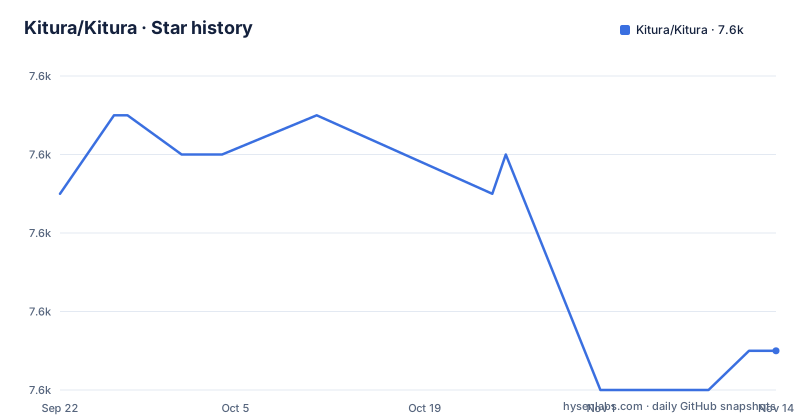
- Kitura/Kitura7,577 ★ · -4
| Repository | 2026-09-22 | 2026-11-14 |
|---|---|---|
| Kitura/Kitura | 7.6k | 7.6k |
-4 Stars in the last 53 days, measured from the daily GitHub snapshot. Compare with other projects
Editorial analysis
What Kitura solves for server-side Swift teams
Kitura is a web framework and web server built for web services written in Swift. The README states that plainly, and the feature list is the shape of the problem it addresses: URL routing for GET, POST, PUT, DELETE and PATCH, Codable routing, URL parameters, static file serving, FastCGI support, SSL/TLS support and pluggable middleware. That combination is aimed at a specific reader, a Swift developer who wants to keep one language across the client and the service, and who would otherwise be writing the HTTP layer by hand or stitching together a server library, a router and a serializer.
The repository carries a vagrantfile and a docker-compose.yml that builds inside an Ubuntu Swift image. It is licensed under Apache-2.0. The project is not archived, and the last push to the default branch was on 2026-05-19. That is a recent commit date, but the release history tells a different story: 3.0.0 shipped on 2022-09-18, 2.9.200 on 2021-01-27 and 2.9.1 on 2019-11-04. Commits continue; tagged releases are sparse. Treat the two signals separately when you plan upgrades.
Kitura is not a general-purpose application platform. It is the HTTP and routing layer. Anything beyond the listed features is documented at kitura.dev rather than in this repository.
Routing, Codable handlers and the middleware chain
The README lists URL routing, URL parameters, static file serving and pluggable middleware among its features, without describing how a request moves through them.
Codable routing is the part that distinguishes Kitura from a plain HTTP router. Instead of reading raw request bodies and writing raw response bodies, a handler can declare a type that conforms to Swift's Codable protocol, and the framework handles the conversion between the wire format and that type. The practical effect is that the same struct you use elsewhere in a Swift service can be the request and response type of an endpoint, with the compiler checking the shape of the data at build time. The README lists it as a feature without elaborating, and the API reference on kitura.dev is where the details live.
The network engine underneath changed with release 3.0.0, whose release note reads "NIO is now the default network stack". Kitura-NIO is now the engine used by default. The README notes that the old Kitura-net package can still be enabled by setting the environment variable KITURA_NIO=0 during build. That is a build-time switch, not a runtime one, so it has to be present when the package is compiled. Anyone upgrading across the 3.0.0 boundary should know that the socket handling, and therefore the failure modes under load, are not the same code as before.
Installing Kitura and serving a first route
The README does not contain an install walkthrough. It says to visit https://www.kitura.dev for a Getting Started guide, tutorials and API reference documentation, and the Getting Started section here is a single link. What the repository does show is how the project itself is built and tested, which is the closest thing to a verified command sequence in the README.
The contributing notes give a clone followed by a test run:
git clone https://github.com/Kitura/Kitura
swift test
That builds the framework and runs its test suite on your machine. Expect the Swift Package Manager to resolve dependencies and compile a large Swift codebase, so the first run takes a while. If it fails immediately, check your Swift version before anything else: the README notes that most Kitura packages now require at least Swift 5.2.
The repository also ships a docker-compose.yml that runs the same build and test cycle inside a Linux container, though its image, ibmcom/swift-ubuntu:4.0.3, predates the Swift 5.2 minimum the README now states:
test:
  image: ibmcom/swift-ubuntu:4.0.3
  volumes:
    - ./:/Kitura
  command: bash -c "cd /Kitura && swift package  --build-path .build-ubuntu clean && swift build  --build-path .build-ubuntu && swift test  --build-path .build-ubuntu"
For an actual application, add Kitura as a dependency in your own Package.swift and import it in your target. The README does not print that manifest, so copy the dependency declaration from the kitura.dev Getting Started page rather than guessing at a version requirement.
If you need the legacy network engine, the README specifies the environment variable to set during build:
KITURA_NIO=0 swift buildSetting it after the build has no effect on an already-compiled binary.
FastCGI, SSL/TLS and where the documentation stops
Two features deserve a closer look because they change deployment shape rather than code style. SSL/TLS support means Kitura can terminate TLS itself, so you can run it directly behind a load balancer without a separate reverse proxy handling certificates. FastCGI support means it can sit behind a FastCGI-speaking front end instead. The README links a separate FastCGI document in the Documentation directory rather than explaining the protocol handling here, which is the right call for a README but means you should read that file before designing a deployment around it.
The honest limitation is documentation depth inside this repository. The README is short. It lists features, points at kitura.dev, and gives contributing instructions. The README has no configuration reference, no explanation of how middleware ordering interacts with error handling, and no rollback procedure for a bad release. The repository has Documentation/, docs/ and a .jazzy.yaml, so generated API documentation is part of the project's workflow. If your team evaluates frameworks by reading the source repository end to end, Kitura will send you elsewhere for most answers.
The second limitation is release cadence. The gap between 2.9.200 in January 2021 and 3.0.0 in September 2022 is a long stretch for a major version that swapped the network stack. Nothing in the README states a support window or a deprecation policy for the Kitura-net engine, so if you depend on KITURA_NIO=0 you are relying on an option the README documents but does not promise to keep.
Kitura vs Vapor: two answers to the same question
Kitura is often weighed against Vapor, and the difference is worth stating in terms of approach rather than popularity. Both are server-side Swift frameworks. Kitura's strength in the same comparison is its age inside a corporate environment: it came out of IBM's server-side Swift work, and the repository carries the tooling of a project that has been run in CI for years, including a pinned Linux container image, a Travis configuration and a Jazzy documentation setup.
The technical split that matters most after 3.0.0 is the network layer. Kitura's default engine is now Kitura-NIO, with the legacy Kitura-net engine still selectable at build time through KITURA_NIO=0. That gives you an escape hatch that a framework with a single engine does not offer, and it also gives you a second code path to reason about when you debug connection behaviour.
Codable routing is the other axis. If your service is already built around Swift's Codable types, Kitura's request and response handling fits that style directly. If you want a framework where the surrounding packages for database access, authentication and templating are documented in one place, the Kitura README will not help you and you will be following links into the kitura.dev package index.
Maintenance cost, licensing and what to verify before you commit
Kitura is licensed under Apache-2.0, and the repository includes LICENSE.txt and NOTICES.txt at the top level. Apache-2.0 permits commercial use and modification and includes an express patent grant, which is a common reason teams pick it over more restrictive licences. The NOTICES file is worth reading if you redistribute the framework, since it records third-party attributions. This is a description of the licence text, not legal advice; your own counsel decides how it applies to your distribution.
The upgrade cost has two components. The first is the Swift toolchain: the README states that most Kitura packages require at least Swift 5.2, so a project on an older toolchain has to move before it can move Kitura. The second is the 3.0.0 network stack change. Because Kitura-NIO is now the default, an upgrade from 2.x changes the code handling your sockets, and the KITURA_NIO=0 variable exists precisely because that change can be disruptive. Budget time for connection-level testing after the upgrade rather than assuming a version bump is cosmetic.
What you should verify first: whether the kitura.dev Getting Started guide covers the Swift version you are on, whether your deployment needs TLS terminated by Kitura or by something in front of it, and whether any part of your code depends on behaviour specific to the old Kitura-net engine. The repository's own test path, swift test, is the fastest way to confirm the framework builds in your environment before you write application code against it.
Editorial conclusion
Adopt Kitura if your service is already written in Swift and you want routing, Codable handlers and middleware in one package under Apache-2.0, and if you are prepared to read the kitura.dev guides because the README itself only points there. Do not adopt it if you need a framework with a documented support policy. Before committing, verify that your toolchain is Swift 5.2 or newer, decide whether you want the default Kitura-NIO engine or the legacy Kitura-net engine selected through KITURA_NIO=0, and check the release history: 3.0.0 dates from 2022-09-18 and the most recent push to the repository was on 2026-05-19.
Frequently asked questions
What is the Kitura framework?
Kitura is a web framework and web server for web services written in Swift, distributed under Apache-2.0. Its feature list includes URL routing for GET, POST, PUT, DELETE and PATCH, Codable routing, URL parameters, static file serving, FastCGI support, SSL/TLS support and pluggable middleware.
How does Kitura compare with Vapor?
Both are server-side Swift frameworks, but Kitura's default network engine is Kitura-NIO as of release 3.0.0, with the older Kitura-net engine still selectable at build time via KITURA_NIO=0. The README points to kitura.dev for guides and API reference rather than documenting the surrounding packages itself.
Which Swift version does Kitura require?
The README notes that most Kitura packages have been updated to require at least Swift 5.2 in order to maintain backward compatibility. The repository also includes a .swift-version file and a docker-compose.yml pinned to the ibmcom/swift-ubuntu:4.0.3 image for Linux builds.
How do I install Kitura?
The README does not give install steps; it directs readers to https://www.kitura.dev for a Getting Started guide, tutorials and API reference documentation. To build the framework itself from source, the contributing notes give git clone followed by swift test.
Can I still use the old Kitura-net network stack?
Yes. The README states that Swift-NIO is now the default network engine via the Kitura-NIO package, and that if you require the old Kitura-net package you can enable it by setting the environment variable KITURA_NIO=0 during build.
Official sources
Add this badge to your README
If you maintain this project, the badge below links readers to this analysis and shows its maintenance status from the daily GitHub snapshot. Paste the markdown into your README; add ?metric=license or ?metric=stars to the image URL for a different field.

[](https://hysenlabs.com/projects/kitura-kitura)Star history chart for your README
[](https://hysenlabs.com/projects/kitura-kitura)Was this useful?