kluctl: one command line over a Kubernetes deployment built from many parts
The missing glue to put together large Kubernetes deployments, composed of multiple smaller parts (Helm/Kustomize/...) in a manageable and unified way.
At a glance
- What is it?
- kluctl is the glue layer for Kubernetes deployments assembled from Helm charts, Kustomize overlays and third party components, and it gives that whole assembly a single set of verbs, deploy, diff, prune, delete, across as many targets as you have. The interesting part is the target model, and the constraint is that everything has to be expressible as a Kustomize deployment.
- Who is it for?
- kluctl fits a platform team that has assembled a Kubernetes estate out of many small pieces, Helm charts here, Kustomize overlays there, and wants one command that reports the state of all of it and can remove what is no longer wanted.
- Can I use it commercially?
- Yes. Apache-2.0 is a permissive licence: you can use, modify and sell software built on it, as long as you keep its copyright and licence notices.
- Is it still maintained?
- Yes. The repository last received commits 1 day ago.
- What is it written in?
- Mainly Go, according to GitHub's language statistics.
Answers come from the project's GitHub data, last synced on November 7, 2026, and from our analysis. They are not legal advice.
Star history
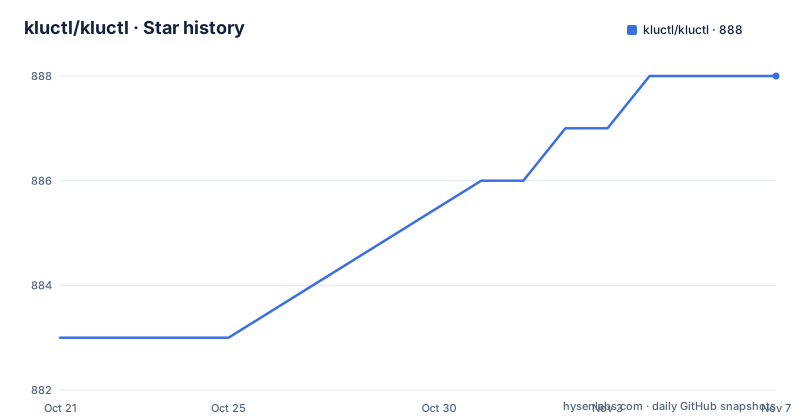
- kluctl/kluctl888 ★ · +5
| Repository | 2026-10-21 | 2026-11-07 |
|---|---|---|
| kluctl/kluctl | 883 | 888 |
5 Stars in the last 17 days, measured from the daily GitHub snapshot. Compare with other projects
Editorial analysis
The target is the unit of work, not the cluster
kluctl is described as the missing glue that puts your deployments and any third party deployments into one large declarative Kubernetes deployment, while making it fully manageable through one unified command line interface.
The concept that carries the whole design is the target. Kluctl is centred around targets, which can be a cluster or a specific environment such as test, dev or prod, on one or multiple clusters. Targets can be deployed, diffed, pruned, deleted, and so on. The stated idea is to have the same set of operations for every target, no matter how simple or complex the deployment or the target is.
That last clause is the point. Without a target abstraction, a deployment tool is either a cluster tool or an environment tool, and a fleet with three environments on four clusters needs twelve invocations. With targets, it is one invocation with a different name.
The structure above the target is a project that defines deployments and sub-deployments, and each deployment defines Kustomize deployments. The project also defines the targets themselves, which represent the target environments and clusters. The CLI then operates on the whole thing.
The project's own summary table is the most compressed statement of the design, and one line in it deserves attention. Kluctl tries to not interfere with any other tools or operators, and the documentation says this is possible due to its use of server-side-apply. That is a design commitment, not a feature list item: the tool is meant to coexist with whatever else touches the cluster, which is what makes it usable in a team where not everybody runs kluctl.
It composes Kustomize and Helm instead of replacing them
The approach to existing tooling is explicit. Kluctl tries to be as flexible as possible while remaining as simple as possible, and it reuses established tools such as Kustomize and Helm, making it possible to reuse a large set of available third party deployments.
So this is not a new templating engine that wants to be the only thing in your pipeline. A Helm chart stays a Helm chart. A Kustomize overlay stays a Kustomize overlay. kluctl is the layer that knows how to render both, stitch them into a single deployment, and then act on the result with one set of verbs.
The feature list gives the specifics. The Helm and Kustomize integrations allow you to reuse plenty of third party charts and kustomizations. Templating is allowed in nearly all places, making it easy to have dynamic configuration. Native Git support is integrated, meaning it can easily deploy remote kluctl projects or externalize parts of a kluctl project, such as configuration, into a separate repository.
That last capability is the one that changes how a team works. Configuration can live outside the deployment repository, which is what makes a single kluctl project usable across many environments with different values, and what lets a platform team own the structure while an application team owns the values.
The alternative to this approach is obvious and worth naming. A team that already runs everything through one of the mature tools, Argo CD or Flux for example, has solved the same problem with a different shape, a controller that watches Git and reconciles. kluctl is the pull based complement to that, not a replacement for it, and the documentation is explicit about both being available.
GitOps through a controller, or the same project from your laptop
The two delivery models are described separately, and the difference matters for how you adopt it.
The pull based GitOps route uses the Kluctl Controller, which lets you define kluctl deployments as KluctlDeployment custom resources. The push based route is the CLI, and the documentation makes a point of independence from a controller. Kluctl does not strictly depend on a controller and allows you to use the same deployment wherever you want, as long as access to the kluctl project and clusters is available. That means you can use it from your local machine, from your CI/CD pipelines, or any automation platform that allows calling custom tools.
The same set of operations therefore works in both models, and the Webui sits on top of both. The Webui allows you to visualise and control your kluctl deployments, and the documentation says it works for deployments performed by the CLI and for deployments performed via GitOps, with a blog post and tutorial linked for the introduction.
The second theme in the feature list is visibility, and it is the part that is easy to underestimate. See what's different, by running diffs on the whole deployment. See what happened, by always knowing what you actually changed after performing a deployment. And know what went wrong, because kluctl will show you which part of your deployment failed and why.
Those three are different capabilities and they are the ones that justify the tool in a large estate. A diff on the whole deployment, rather than per resource, is what tells you that a Helm chart upgrade changed a value in a way that matters. And per-part failure reporting is what turns a failed deploy from a rollback question into a diagnosis.
Secrets from cloud vaults, and clusters you prune clean
Two features in the summary table deal with the parts of a deployment that are operationally different from the rest.
The first is encrypted secrets. Kluctl manages encrypted secrets for multiple target environments and clusters, and the dependency list shows how that is done. The getsops/sops library is a direct dependency, so SOPS is the encryption layer, and the Dockerfile comment says gpg is needed for SOPS, with tini needed to reap gpg-agent zombies. Alongside that there are the cloud secret managers, with cloud.google.com/go/secretmanager, the AWS SDK v2 with its secretsmanager service, Azure Key Vault through azsecrets, and the HashiCorp Vault API client. filippo.io/age is also there, which is the modern Go encryption library. So a secret can be defined once and resolved per target from whichever vault that target uses.
The second is pruning. Keep your clusters clean by issuing regular prune calls. In a deployment assembled from many sources, resources accumulate, because a third party chart you stopped using left objects behind and nobody knows they are there. A prune operation that knows the full set of what the project owns, and that is scoped to what the project owns, is a genuine answer to the problem of cluster drift, and it is one of the reasons the tool keeps track of the whole deployment rather than delegating to individual tools.
The rest of the list is about scope rather than mechanism. You can manage all your deployments with kluctl, including infrastructure related ones and your applications. Simple deployments are lightweight while complex deployments are easily manageable. You can deploy the same deployment to multiple environments with flexible differences in configuration, and you can manage multiple target clusters in multiple clouds or bare metal if you want.
Pruning deletes objects identified as prunable in the target cluster. Server-side apply alone does not guarantee that deletion is safe: review the target and proposed objects, and use the documented --dry-run option before pruning.
The container image makes a deliberate libc choice
The Dockerfile is short and the first comment explains the most interesting decision in it.
A glibc based distro is required because embedded Python does not support musl libc for aarch64, with only amd64 and musl being supported, and the base image is a pinned Chainguard wolfi-base digest rather than a floating tag. The comment explains how to find the latest multiarch sha256 if you want to move it.
The rest of the file is a list of reasons for specific packages. Git is needed for kustomize to support overlays from git. gpg is needed for SOPS, and tini is needed to reap gpg-agent zombies. There is also tzdata.
Two smaller details show the amount of care here. The go-git library was failing with no valid known_hosts file even when known hosts were provided in code, so the build creates /etc/ssh and touches ssh_known_hosts to work around it. And two cache locations are redirected into /tmp, HELM_CACHE_HOME and KLUCTL_CACHE_DIR, with the comment that helm must not be trying to access /.
The image then copies the single binary to /usr/bin, drops to a non root user with USER 65532:65532, and sets the entrypoint to that binary. The whole runtime surface is one file.
The Go module confirms the design at the library level. The module is github.com/kluctl/kluctl/v2 requiring Go 1.26.0, and there is a replace directive pointing the kluctl lib module at a local path, which tells you the library is versioned separately from the main module. The dependency list is long because the tool spans a lot of ground, with Helm and Kustomize libraries, the cloud SDKs for secrets, S3, the Docker client, a Go implementation of SOPS, and the tooling for the Webui such as gin and gorilla/mux.
Where kluctl is the wrong choice
Three situations rule it out.
The first is a small deployment. A single namespace with a couple of Deployments and a Service does not need a target abstraction, a project format, a controller option and a web interface. Helm alone, or plain manifests with kubectl, is fewer concepts to learn and one fewer thing to keep in step with the platform team's changes. The feature table actually makes this point itself, in the line that says simple deployments are lightweight, which is the same statement read as a caveat.
The second is if your deployment is not a Kustomize deployment. The documentation is explicit that each kluctl deployment defines Kustomize deployments, so the unit of work is a Kustomize output. A chart that produces resources kluctl cannot model, or an operator with its own lifecycle that does not fit the apply and prune model, will be awkward in a way that is not obvious until you try it.
The third is a team that has already standardised on a controller and is happy with it. If you already run Flux or Argo CD, the push based kluctl route duplicates capability you have, and the pull based route is a second controller to operate alongside the first. The documentation presents both routes as options without arguing that you need both.
On the maintenance side the record is current. The recent releases are a devel build tagged kluctl-v2.29.0-devel on 2026-09-29, then v2.28.2 and v2.28.1 both on 2026-06-25, and the last push to the repository was on 2026-10-19. The project is Apache-2.0 licensed, hosted under the kluctl organisation, with a community that uses GitHub Issues and Discussions and a channel in the CNCF Slack, which is worth noting for anyone who wants to ask a question before committing to a design.
Editorial conclusion
kluctl fits a platform team that has assembled a Kubernetes estate out of many small pieces, Helm charts here, Kustomize overlays there, and wants one command that reports the state of all of it and can remove what is no longer wanted. It is the wrong choice for a team with a single small deployment, where plain kubectl or Helm is less to learn, and it is the wrong choice if your deployment is not describable as a Kustomize deployment, because that is the unit the whole model is built on. Before adopting it, read the getting started guide and the installation document in the docs directory, and decide early whether you want the controller or the command line, because the documentation treats the pull based GitOps flow and the local push flow as two different products sharing a project format.
Frequently asked questions
What is kluctl and what problem does it solve?
Kluctl is the missing glue that puts your own deployments and any third party deployments into one large declarative Kubernetes deployment, managed through one unified command line interface. It reuses established tools such as Kustomize and Helm rather than replacing them, so existing charts and kustomizations can be reused.
What is a target in kluctl?
A target is a cluster or a specific environment such as test, dev or prod, on one or multiple clusters. Targets can be deployed, diffed, pruned and deleted, and the idea is that the same set of operations works for every target regardless of how complex the deployment or the target is.
Can kluctl be used with GitOps?
Yes, through the Kluctl Controller, which lets you define deployments with KluctlDeployment custom resources for a pull based GitOps flow. Kluctl does not strictly depend on a controller, so the same project can also be deployed from your local machine, from CI/CD pipelines, or from any automation platform that can call custom tools.
How does kluctl handle secrets across multiple environments?
It manages encrypted secrets for multiple target environments and clusters. The dependencies include SOPS, the age encryption library, and the clients for Google Secret Manager, AWS Secrets Manager, Azure Key Vault and HashiCorp Vault, so a secret can be resolved per target from whichever vault that target uses.
Is kluctl still being developed?
The last push to the repository was on 2026-10-19 and the repository is not archived, with a devel build tagged kluctl-v2.29.0-devel on 2026-09-29 and v2.28.2 and v2.28.1 released on 2026-06-25. The licence is Apache-2.0 and the documentation is at kluctl.io.
Official sources
Add this badge to your README
If you maintain this project, the badge below links readers to this analysis and shows its maintenance status from the daily GitHub snapshot. Paste the markdown into your README; add ?metric=license or ?metric=stars to the image URL for a different field.

[](https://hysenlabs.com/projects/kluctl-kluctl)Star history chart for your README
[](https://hysenlabs.com/projects/kluctl-kluctl)Was this useful?