Knative func: A CLI and Client Library for Deploying Functions to Knative
Knative Functions client API and CLI
At a glance
- What is it?
- Knative func provides a command-line interface and Go client library for developing and deploying functions on Knative. This review covers its architecture, command surface, and what to verify before adoption.
- Who is it for?
- Adopt Knative func if you are already invested in Knative and need a CLI and Go client library to develop and deploy functions as part of that ecosystem. Skip it if you want a standalone serverless platform without Knative dependencies.
- Can I use it commercially?
- Yes. Apache-2.0 is a permissive licence: you can use, modify and sell software built on it, as long as you keep its copyright and licence notices.
- Is it still maintained?
- Yes. The repository received new commits within the last day.
- What is it written in?
- Mainly Go, according to GitHub's language statistics.
Answers come from the project's GitHub data, last synced on November 15, 2026, and from our analysis. They are not legal advice.
Star history
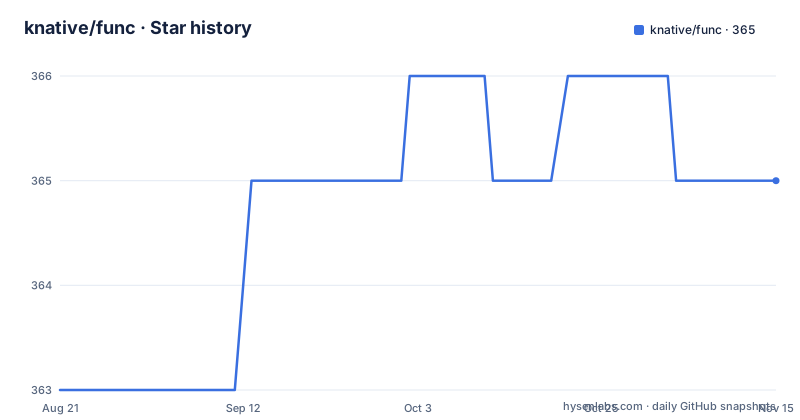
- knative/func365 ★ · +2
| Repository | 2026-08-21 | 2026-11-15 |
|---|---|---|
| knative/func | 363 | 365 |
2 Stars in the last 86 days, measured from the daily GitHub snapshot. Compare with other projects
Editorial analysis
What func Solves and Who It Serves
Knative func addresses the gap between writing a function and getting it running on a Knative cluster. The README describes it as a Client Library and CLI enabling the development and deployment of Functions. The target audience is developers who already use Knative as their serverless platform and want a tool that fits into that workflow. It is not a general-purpose serverless framework. If you are not on Knative, this tool has little to offer. The project is written in Go, which matters if you plan to extend the client library or contribute code. The recent releases, including v1.22.3 and v1.23.1, indicate active maintenance, but the README does not quantify users or adoption.
Architecture: Client Library and CLI in One Repo
The repository combines two layers: a Go client library and a CLI built on top of it. The README points to an ARCHITECTURE.md file for details. Based on the repository layout, the client library likely handles the logic for creating, building, and deploying functions, while the CLI exposes that logic as commands. This separation is common in Knative projects. It means you can embed function deployment into your own Go tools without invoking the CLI as a subprocess. The trade-off is that the CLI is not a thin wrapper; it depends on the library's API, which may change as the library evolves. The README does not specify the exact data flow, so you should read ARCHITECTURE.md before relying on internal behavior.
Command Surface and Documentation
The README references a Command Reference Documentation under docs/reference/ that covers all available commands, from creating and deploying functions to managing configurations and repositories. This suggests a broad command set, but the actual commands are not listed in the README. You will need to open that directory to see the full list. The README also links to a QuickStart on knative.dev and general Knative functions documentation. Without those external pages, you cannot know the exact syntax for commands like func create or func deploy. This is a documentation gap in the repository itself. The project relies on the Knative website for onboarding, which is fine for users already in the ecosystem but less convenient for outsiders.
Getting It Running: What the README Does Not Tell You
The README does not include installation instructions, a single command, or a configuration example. There is no go install line, no brew formula, and no binary download link. The only entry point is the QuickStart link on knative.dev. This is a real limitation for evaluation. You cannot try the tool without leaving the repository and reading external docs. Based on the Go language and the repository structure, installation likely involves building from source or downloading a release binary, but that is speculation. The README does mention releases, so prebuilt binaries may exist. To run it, you would need to fetch the release page and find the appropriate asset for your platform. The absence of a quickstart in the README is a barrier, especially for engineers who want to evaluate the tool quickly.
Limitations and Failure Modes
The most obvious limitation is the dependency on Knative itself. If your cluster does not run Knative, func cannot deploy anything. The README does not mention any fallback or local emulation mode. Another limitation is the documentation split: the README is thin, and the real substance lives in external links and the docs/reference/ directory. If those links rot or the docs diverge from the code, you are left with a CLI that is hard to use. The project also has a roadmap tracked via GitHub issues, which means features may be in flux. The README does not state any stability guarantees for the client library API. If you embed the library in your own tool, you should expect breaking changes between minor releases, as the version numbers (v1.22, v1.23) suggest a fast cadence.
Alternatives: Knative Serving and Other Function Frameworks
The primary alternative is using Knative Serving directly, without the func layer. Knative Serving provides a Kubernetes-native API for deploying serverless workloads, but it requires you to write YAML manifests and manage revisions manually. func abstracts that away. The difference in approach is that func adds a developer-friendly CLI on top of the raw Serving API, while Serving itself is a platform component. Another alternative is a framework like OpenFaaS or Fission, which are also function-as-a-service platforms but are not tied to Knative. Those tools have their own CLIs and deployment models. The choice depends on whether you want to standardize on Knative or prefer a standalone platform. func is the right choice only if you are already committed to Knative.
Maintenance and Upgrade Cost
The project has recent releases, with the latest push on 2026-08-26, so it is actively maintained. The license is Apache-2.0, which is permissive and allows commercial use, modification, and redistribution, with the condition of retaining the license notice. The maintenance cost is tied to the Knative release cycle. The version numbers (knative-v1.22.3, knative-v1.23.1) suggest that func is released in lockstep with Knative releases. That means you may need to upgrade func when you upgrade your Knative cluster, and vice versa. The README does not document a migration path or upgrade notes. You should check the release notes for each version to understand breaking changes. The project also has a contributing guide and a working group meeting, which indicates a community process, but that does not guarantee backward compatibility.
Editorial conclusion
Adopt Knative func if you are already invested in Knative and need a CLI and Go client library to develop and deploy functions as part of that ecosystem. Skip it if you want a standalone serverless platform without Knative dependencies. Before adopting, verify the command reference for your specific runtime and deployment target, and check the architecture document to understand how the client interacts with your cluster. The project is actively maintained with recent releases, but the README does not describe installation or a quickstart, so you must consult the Knative documentation to get started.
Frequently asked questions
What is knative/func?
It is the client library and CLI for Knative Functions, enabling the development and deployment of functions. The command surface covers creating and deploying functions as well as managing configurations and repositories, and the Go module is knative.dev/func. Quickstart and function documentation live on knative.dev.
How does knative/func determine its version?
The Makefile reads git twice with two tag patterns, matching v* for the client version and knative-* for the platform release line, then injects both plus the commit hash into knative.dev/func/pkg/version through linker flags. If the current commit has no semver tag the value falls back to tip unless a TAG environment variable is set.
Which platforms does the func binary get built for?
Seven targets: Darwin on amd64 and arm64, Linux on amd64, arm64, ppc64le and s390x, and Windows on amd64. The Go toolchain floor declared in go.mod is 1.26.0.
What are the key dependencies in knative/func?
Image building runs through buildpacks, the Docker and Moby clients and containerd. Cluster access uses manifestival, events use the CloudEvents Go SDK, autoscaling couples to the KEDA HTTP add-on. There is also a dependency on functions-dev/func-operator, on the Model Context Protocol Go SDK, and on openshift-pipelines/pipelines-as-code.
Why does knative/func replace the mergo dependency?
The module file carries a replace directive pointing github.com/imdario/mergo at dario.cat/mergo v1.0.1, with a comment attributing it to a bad dependency inside openshift-pipelines/pipelines-as-code. The import path is unchanged so no source changes, but the code comes from the maintained continuation at an exact pinned version.
Official sources
Add this badge to your README
If you maintain this project, the badge below links readers to this analysis and shows its maintenance status from the daily GitHub snapshot. Paste the markdown into your README; add ?metric=license or ?metric=stars to the image URL for a different field.

[](https://hysenlabs.com/projects/knative-func)Star history chart for your README
[](https://hysenlabs.com/projects/knative-func)Was this useful?