AzGovViz: documenting an Azure tenant's governance from PowerShell
Azure Governance Visualizer aka AzGovViz is a PowerShell script that captures Azure Governance related information such as Azure Policy, RBAC (a lot more) by polling Azure ARM, Storage and Microsoft Graph APIs.
At a glance
- What is it?
- Azure Governance Visualizer is a PowerShell script that walks an Azure tenant's Management Group hierarchy, polls ARM, Storage and Microsoft Graph, and produces CSV, HTML, Markdown and JSON exports of policies, RBAC and related settings. It suits a cloud engineer documenting or reviewing a large tenant, and it needs read permissions across the hierarchy.
- Who is it for?
- Adopt AzGovViz when you need to know what governance a tenant actually has, because the exports are a documentation artefact you can diff between runs and a snapshot you can restore from, and the hierarchy walk means you get the whole tenant rather than one subscription. Do not adopt it as a compliance scanner, because it reports what is configured rather than whether it is right.
- Can I use it commercially?
- Yes. MIT is a permissive licence: you can use, modify and sell software built on it, as long as you keep its copyright and licence notices.
- Is it still maintained?
- Yes. The repository last received commits 57 days ago.
- What is it written in?
- Mainly PowerShell, according to GitHub's language statistics.
Answers come from the project's GitHub data, last synced on November 7, 2026, and from our analysis. They are not legal advice.
Star history
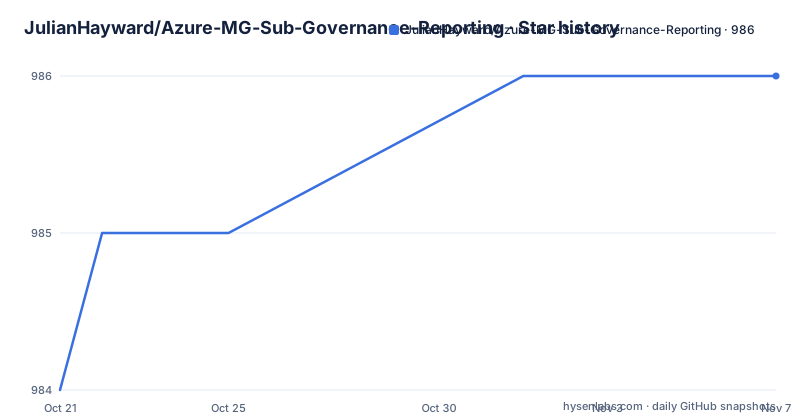
- JulianHayward/Azure-MG-Sub-Governance-Reporting986 ★ · +2
| Repository | 2026-10-21 | 2026-11-07 |
|---|---|---|
| JulianHayward/Azure-MG-Sub-Governance-Reporting | 984 | 986 |
2 Stars in the last 17 days, measured from the daily GitHub snapshot. Compare with other projects
Editorial analysis
What the script walks, and what it reads
Azure Governance Visualizer, short for AzGovViz, is a PowerShell script that iterates through your Azure tenant's Management Group hierarchy, starting from the root Management Group down to the Subscription, Resource Group and Resource level. It collects data from various Azure APIs, including Azure ARM, Microsoft Graph and Storage.
From the collected data it generates enriched insights for capabilities such as Azure Policy, RBAC and a lot more. The mission section names the two problems it addresses: a holistic overview on the governance implementation, and connecting the dots. That second phrase is the point of the tool, because the reason a governance review is hard is rarely that any single policy is unreadable, it is that the effective configuration is spread across thousands of scopes with inheritance and explicit assignments on top of each other.
The outputs are listed in the feature summary. In the HTML output there is visibility on the HierarchyMap, a TenantSummary, DefinitionInsights, and granular ScopeInsights built on Azure Management Groups and Subscriptions.
Then there are the file exports. CSV exports with enriched information per capability, and detailed JSON files documenting the entire tenant setup for Management Groups, Subscriptions, Azure RBAC definitions and assignments, Azure policy definitions and assignments. The README is explicit about their use: they come in handy for change tracking scenarios, for redeployment of configuration such as a tenant migration, and they can serve as a backup.
The technical requirements and the required permissions are described as minimal, and you can run the script either for your tenant root Management Group or any other Management Group. The primary language is PowerShell, the licence is MIT, and the last push to the master branch was on 2026-09-11, with 6.7.4 published the same day.
A Microsoft Cloud Adoption Framework listing, and two deployment routes
AzGovViz is listed by Microsoft as a tool for the Govern discipline in the Microsoft Cloud Adoption Framework, and it is also referenced in the framework's non-microsoft-tooling page for the landing zone governance design area. That is a useful signal for anyone choosing a tool, because it means the output is aligned with how Microsoft itself frames governance work.
The deployment instructions live in a separate setup.md in the repository, and the README says to follow them to run AzGovViz from your terminal, GitHub Codespaces, Azure DevOps or GitHub. So the script runs in all four of the places a team would plausibly want it to run, and the choice of host is yours rather than the tool's.
The alternative is the Azure Governance Visualizer accelerator, a separate repository under the Azure organisation. It provides an easy and fast deployment process that automates the creation and publishing of AzGovViz to an Azure Web Application, and it provides automation for configuring the prerequisites. The Azure Architecture Center's landing zones section carries the deployment guidance for the accelerator.
The accelerator is the route for teams who want the tool hosted rather than run from a workstation, and the difference is one of where the credentials live. Running the script locally means the credentials are in the operator's session; deploying it to a web application means there is a service identity with the permissions instead.
The repository itself also carries a .devcontainer/ directory, a .vscode/ directory, a .azuredevops/ directory, a setup/ directory, a pwsh/ directory, slides/ for presentations, an img/ directory for the images used in the README, and the usual SECURITY.md, contributionGuide.md and history.md.
What 6.7.4 changed, including a linter and an AG Grid rewrite
The release history for 6.7.4, dated 2026-09-11, is a good window into what the tool does now.
The new Azure Policy Linter feature analyses custom Policy definitions with the Azure Policy Linter, and reports findings with severity, rule, description, JSON path and line in the TenantSummary and in an exported PolicyLinter CSV. In Azure DevOps and GitHub Actions the linter binary, Microsoft.Azure.Policy.PolicyLinter.Cli, is installed on the fly, while on other hosts an installed policylinter is used, and if the linter is not available the feature is skipped and the report states why. That last behaviour is the right one, a report that silently omits a section is worse than one that says the section could not be produced.
The second new feature is Model Deployment Insights for Azure OpenAI and Azure AI Services, Foundry, model deployments including usage metrics. The TenantSummary and each management group and subscription scope in ScopeInsights get an aggregated model view and a detailed model by Cognitive Services account view, plus a CSV export. Collection runs by default and can be skipped with -NoFoundryModelDeployments, and the metrics time range is set with -FoundryModelDeploymentsDays, default 7.
Then a rendering change with a wide effect. The large tables, Policy assignments, Role assignments and Resource Providers detailed, are now rendered with AG Grid, with row virtualization, per column filters, CSV export that respects the applied filters and column order, and a Pop out grid action. The -HtmlTableRowsLimit parameter is now obsolete and has no effect, because AG Grid virtualizes the rows, and it is kept anyway so existing pipelines do not break.
The last change is a quiet fix worth noting. PIM Eligible assignments are now collected from ARM, using roleEligibilityScheduleInstances, rather than the Microsoft Graph beta privilegedAccess endpoints. The consequences are that scopes no longer need to be PIM onboarded, and tenants without a Microsoft Entra ID P2 licence no longer fail the run, they just get a report without PIM eligibility data.
Running it and the reporting surface
The README has a Parameters section and an API reference section, and it points to technical documentation for the permissions overview, the required permissions in Azure, the required permissions in Microsoft Entra ID, and a PowerShell section. The permissions are the part to read first, because the script polls several APIs across every scope in the hierarchy.
The output formats are the reason the tool is usable in a governance review. CSV for the machine processing, JSON for the full tenant configuration as a backup or migration source, HTML for the visual review with the hierarchy map and the summary pages, and Markdown for the version that goes into a document. A governance conversation usually needs the HTML for the people who do not read JSON, and the CSV for the people who want to filter it in a spreadsheet.
The ScopeInsights structure is what makes the HTML worth reading. Rather than a flat list of assignments, the output is organised by scope, so a reviewer can ask what applies at a given Management Group and see the inheritance chain, which is exactly the question that a flat export makes hard to answer.
There is also a Stats section in the table of contents, with a How and What subsection, and a Features section, plus a Demo section and a Media section holding presentations. The Demo is the practical check before you point the script at a real tenant, because the shape of the output is easier to judge from a sample than from a description.
Integration with other tooling, and the security posture
Two integrations are named in the table of contents and both matter for how the tool fits a pipeline.
AzOps has its own integration section in the table of contents, so the governance exports can feed a change-management workflow rather than being a document someone reads once. PSRule for Azure is the other, and the pairing is a natural one: AzGovViz gives you the configuration to check.
Together they address the weakness of any snapshot tool. A snapshot tells you what the tenant looked like, and a rule set tells you whether that snapshot is acceptable, and the export format is what connects them.
The Security section is separate from the permissions section, which is the right distinction. The permissions are what the script needs to read your tenant. The security section covers the script itself, and the repository carries a SECURITY.md at the top level.
Two other things in the table of contents suggest the project has grown beyond a single script. AzAdvertizer and AzADServicePrincipalInsights are separate capabilities, and the AzAdvertizer is described as a related project rather than a feature of this one. The Known issues section and the Facts section are both present, and Facts is a useful one in a project like this, because it is where you would find the boundaries of what has been tested against which subscription types and clouds.
Editorial conclusion
Adopt AzGovViz when you need to know what governance a tenant actually has, because the exports are a documentation artefact you can diff between runs and a snapshot you can restore from, and the hierarchy walk means you get the whole tenant rather than one subscription. Do not adopt it as a compliance scanner, because it reports what is configured rather than whether it is right. Before you run it, read the permissions section for both Azure and Microsoft Entra ID, decide whether to run from the tenant root Management Group or a narrower one, and expect the first run to be slow, since it polls several APIs across every scope.
Frequently asked questions
What does AzGovViz actually collect from an Azure tenant?
It iterates through the tenant's Management Group hierarchy from the root down to Subscription, Resource Group and Resource level, collecting data from Azure ARM, Microsoft Graph and Storage APIs. It then generates enriched insights for capabilities such as Azure Policy and RBAC, with an HTML hierarchy map, a TenantSummary, DefinitionInsights and ScopeInsights per scope, plus CSV exports and detailed JSON files covering Management Groups, Subscriptions, RBAC definitions and assignments, and policy definitions and assignments.
How do I deploy the Azure Governance Visualizer?
The deployment instructions are in the setup.md file in the repository, and they cover running AzGovViz from your terminal, GitHub Codespaces, Azure DevOps or GitHub. The alternative is the Azure Governance Visualizer accelerator in a separate repository, which automates creation and publishing of AzGovViz to an Azure Web Application and configures the prerequisites.
What new features came in AzGovViz 6.7.4?
An Azure Policy Linter feature that analyses custom policy definitions and reports severity, rule, description, JSON path and line, with results in the TenantSummary and a PolicyLinter CSV export. And Model Deployment Insights for Azure OpenAI and Azure AI Services model deployments including usage metrics, skippable with -NoFoundryModelDeployments, with the range set by -FoundryModelDeploymentsDays. The large tables also moved to AG Grid, which makes -HtmlTableRowsLimit obsolete.
Does AzGovViz need a Microsoft Entra ID P2 licence?
Not any more for the run to complete. Since 6.7.4 the PIM eligible assignments are collected from ARM through roleEligibilityScheduleInstances instead of the Microsoft Graph beta privilegedAccess endpoints, so scopes no longer need to be PIM onboarded and tenants without a P2 licence no longer fail the run, they get a report without PIM eligibility data.
Official sources
Add this badge to your README
If you maintain this project, the badge below links readers to this analysis and shows its maintenance status from the daily GitHub snapshot. Paste the markdown into your README; add ?metric=license or ?metric=stars to the image URL for a different field.

[](https://hysenlabs.com/projects/julianhayward-azure-mg-sub-governance-reporting)Star history chart for your README
[](https://hysenlabs.com/projects/julianhayward-azure-mg-sub-governance-reporting)Was this useful?