knqyf263/pet: a Go CLI snippet manager for commands you keep forgetting
Simple command-line snippet manager
At a glance
- What is it?
- pet stores command-line snippets in a TOML file, expands <param> placeholders, and searches them from a shell keybinding. It targets developers who keep re-Googling the same long commands, and it stays out of the way otherwise.
- Who is it for?
- Adopt pet if you work across several stacks and keep pasting the same kubectl, ffmpeg or curl invocations, and if a single TOML file you can edit by hand is an acceptable source of truth. Skip it if you need a team-shared snippet service with access control, or if you want a full knowledge manager with notes and code files rather than shell lines.
- Can I use it commercially?
- Yes. MIT is a permissive licence: you can use, modify and sell software built on it, as long as you keep its copyright and licence notices.
- Is it still maintained?
- Activity is slowing. The repository last received commits 8 months ago.
- What is it written in?
- Mainly Go, according to GitHub's language statistics.
Answers come from the project's GitHub data, last synced on November 15, 2026, and from our analysis. They are not legal advice.
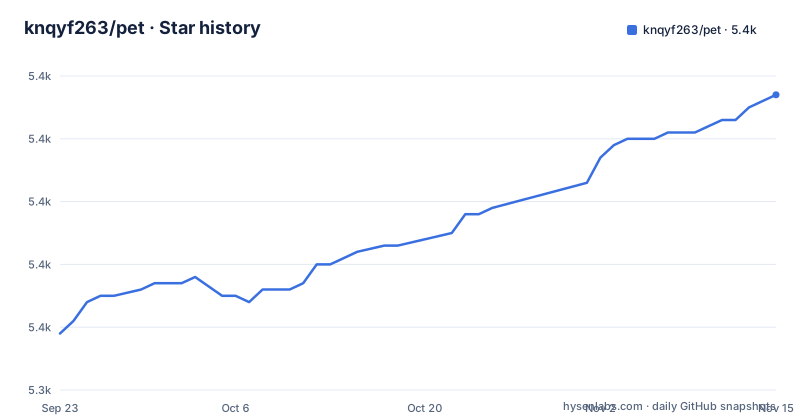
Star history
- knqyf263/pet5,387 ★ · +38
| Repository | 2026-09-23 | 2026-11-15 |
|---|---|---|
| knqyf263/pet | 5.3k | 5.4k |
38 Stars in the last 53 days, measured from the daily GitHub snapshot. Compare with other projects
Editorial analysis
The problem pet solves, and who it is for
Shell history answers the question "what did I run five minutes ago." It is bad at answering "what was that ffmpeg invocation with the right codec flags that I figured out last year." The README states the motivation directly: complex commands or rarely used ones are hard to remember, and they are difficult to find in shell history. pet is the author's answer to that, inspired by memo, and it has existed for nearly eight years according to its own README.
The audience is narrow and specific. You write commands for a living, you touch several toolchains (the README gives backend, frontend and infrastructure as the example), and you would rather store a command once with a description than reconstruct it from tab completion. If you only ever run a handful of commands, shell aliases already cover you and pet adds a layer you will not use.
How pet stores and finds snippets
The repository layout is small and legible: cmd/, config/, dialog/, path/, snippet/ and sync/ sit next to main.go and go.mod. The config is a TOML file, and the README calls that out as a feature rather than an implementation detail, because it means you can edit snippets in any editor without going through the tool.
Search runs through a terminal UI. The README's recommended setup binds a key in your shell to a function that calls pet search, takes the selected snippet and writes it back into the current input line. That design choice matters: pet does not execute the command for you in that mode. The README says this lets you execute it yourself, which adds it to shell history, and calls this "basically the only way we can manipulate shell history." It also allows chaining commands. A separate pet search --raw mode skips the built-in parameter dialog and leaves the placeholders in the buffer so your shell can expand them with its own completion and highlighting.
Snippets accept parameters written as <param> or <param=default_value>. Defaults cannot end with spaces. Multiple defaults use a pipe-and-underscore syntax, for example Hello <subject=|_John_||_Sam_||_Jane Doe = special #chars_|>, where the values become John, Sam and Jane Doe = special #chars. That syntax is unusual enough that it is worth reading twice before you rely on it.
Installing pet and registering your first snippet
pet is written in Go, and the README says you can grab the binary releases and drop the binary in your $PATH. Package managers are listed for macOS/Homebrew, RedHat/CentOS, Debian/Ubuntu and Archlinux. Building from source uses the Makefile targets, which run go mod download, go build and go install.
make dep
make build
make install
The build target produces a binary named pet from main.go. If you prefer to skip the Makefile, go install from the module root does the same thing.
Creating a snippet is interactive. pet new prompts for the command and a description, and the README shows the two prompts as Command> and Description>. Multiline commands need the --multiline flag.
pet new
# Command> echo Hello world!
# Description> print Hello world
To make that searchable from the prompt, add the function below to .bashrc. It binds Ctrl-x Ctrl-r so the current line is passed to pet search as a query and the result is written back into the buffer.
function pet-select() {
  BUFFER=$(pet search --query "$READLINE_LINE")
  READLINE_LINE=$BUFFER
  READLINE_POINT=${#BUFFER}
}
bind -x '"\C-x\C-r": pet-select'
After reloading your shell, typing part of a command and pressing the binding opens the selector. The README notes you can narrow the search with options such as -t or --tags, for example pet search -t myjob, which restricts results to snippets carrying that tag. The zsh equivalent uses zle, CURSOR and bindkey '^s', and the README pairs it with stty -ixon.
Where pet stops being the right tool
pet is a personal store. The README documents sync via Gist or GitLab Snippets, including an auto-sync option, but that is a transport for one person's TOML file, not a shared library with permissions, review or conflict handling. If three engineers need the same canonical set of deploy commands, pet gives you three copies of a file and a merge problem.
Shell integration is also uneven. bash and zsh get full examples in the README, while both fish sections point to https://github.com/otms61/fish-pet for fish details, so fish support lives outside this repository. And the parameter syntax has sharp edges: defaults cannot end with spaces, and the multi-default pipe syntax is easy to mistype. If a snippet needs real branching logic, a script in your repository is a better home than a stored one-liner.
Finally, the project's own release history is thin. The latest release listed is v1.0.1 from 2024-12-08, and the last push to the default branch was on 2026-03-13. That is a repository that still receives commits, but the versioned releases have not moved in a long time, so do not expect a steady stream of tagged builds.
pet compared with shell aliases and Justfile
The nearest alternative is not another snippet manager, it is your shell's alias and function mechanism. Aliases are zero-install, they participate in completion, and they live in a file you already version. What they lack is search: once you have two hundred of them, finding the right one means grepping your dotfiles. pet's selector is the answer to that specific failure, and it is the reason to add a dependency at all.
Justfile is a different shape of solution and shows up in searches around this topic. A Justfile defines named recipes with arguments, dependencies and per-recipe shell settings, and it is committed with the project so every contributor gets the same commands. pet is the inverse: snippets are personal, stored outside the repository, and meant for commands that may never belong to a project. If your commands are project-scoped and should be shared, a Justfile fits better. If they are yours and span many projects, pet fits better.
Licence, maintenance and upgrade cost
pet is MIT licensed, and the README carries the MIT badge pointing at the LICENSE file. MIT is permissive: you can use, modify and redistribute it, including in commercial settings, provided the copyright notice and permission notice are preserved. That is the general shape of the licence, not legal advice for your situation.
Upgrade cost is low by design. The state is a TOML file you own, so replacing the binary does not migrate or lock your data. The binary is a single Go executable with no runtime dependency, which is why the README can recommend dropping it into $PATH. The main upgrade risk is behavioural: the parameter syntax and the search interface are the parts most likely to change between versions, and the README has a migration section. Read that section before jumping a major version.
Editorial conclusion
Adopt pet if you work across several stacks and keep pasting the same kubectl, ffmpeg or curl invocations, and if a single TOML file you can edit by hand is an acceptable source of truth. Skip it if you need a team-shared snippet service with access control, or if you want a full knowledge manager with notes and code files rather than shell lines. Before committing, check that your shell is bash, zsh or fish, since the README points fish users at the otms61/fish-pet project rather than in-tree fish integration, and confirm that the search keybinding does not collide with one you already use.
Frequently asked questions
What is knqyf263/pet used for?
It is a command-line snippet manager. You save commands with descriptions and optional tags, search them interactively, and either run them yourself or paste the selected snippet back into the prompt.
How do I install pet?
The README says you can download the binary releases and drop the binary in your $PATH, or install through Homebrew on macOS, or the RedHat/CentOS, Debian/Ubuntu and Archlinux packages. Building from source uses the Makefile targets dep, build and install.
Does pet support parameters in snippets?
Yes. Parameters are written as <param> or <param=default_value>, and a snippet can carry several default values. Default values cannot end with spaces.
Can pet sync snippets between machines?
The README lists sync via Gist or GitLab Snippets, with an auto-sync option in the configuration. The synced artifact is your TOML snippet file.
Is pet available for fish?
The README's fish sections point to the separate otms61/fish-pet project rather than giving in-tree fish integration, so fish users depend on that external project.
Official sources
Add this badge to your README
If you maintain this project, the badge below links readers to this analysis and shows its maintenance status from the daily GitHub snapshot. Paste the markdown into your README; add ?metric=license or ?metric=stars to the image URL for a different field.

[](https://hysenlabs.com/projects/knqyf263-pet)Star history chart for your README
[](https://hysenlabs.com/projects/knqyf263-pet)Was this useful?