Wails: Go backends and web frontends in one desktop binary, across two stable major versions
Create beautiful applications using Go
At a glance
- What is it?
- Wails packages Go code and an HTML, JS and CSS frontend into a single desktop executable rendered by the operating system's own web engine. It is MIT licensed and active, but it currently asks you to choose between v2 and v3, each with its own CLI name and documentation site.
- Who is it for?
- Wails fits Go programmers who want a desktop UI written in familiar web tooling without running a local server or shipping a bundled browser, including teams adding a frontend to an existing Go program. It fits less well if you need one rendering engine across every platform, or if a framework with two stable majors and daily nightlies is more churn than your team can absorb.
- Can I use it commercially?
- Yes. MIT is a permissive licence: you can use, modify and sell software built on it, as long as you keep its copyright and licence notices.
- Is it still maintained?
- Yes. The repository last received commits 1 day ago.
- What is it written in?
- Mainly Go, according to GitHub's language statistics.
Answers come from the project's GitHub data, last synced on November 13, 2026, and from our analysis. They are not legal advice.
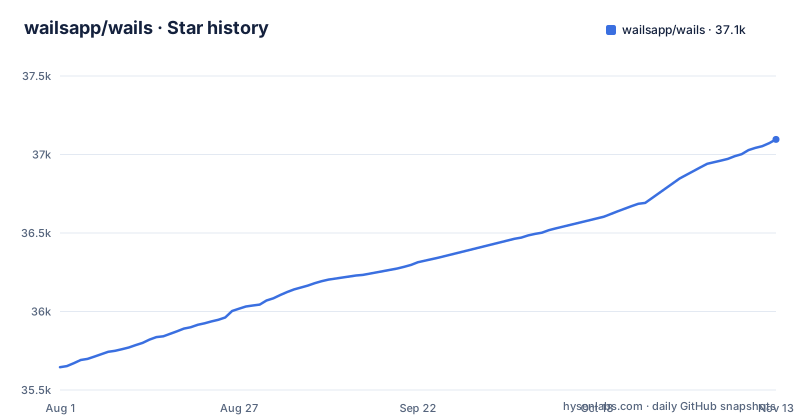
Star history
- wailsapp/wails37,096 ★ · +1,451
| Repository | 2026-08-01 | 2026-11-13 |
|---|---|---|
| wailsapp/wails | 35.6k | 37.1k |
1,451 Stars in the last 104 days, measured from the daily GitHub snapshot. Compare with other projects
Editorial analysis
One binary replaces the built-in web server
The usual way to put a web interface on a Go program is to start an HTTP server inside it and send the user to a browser. Wails drops that arrangement. It wraps the Go code and the web frontend into a single binary, and its tooling handles project creation, compilation and bundling so you are not assembling those steps by hand.
The target audience is Go programmers who want to bundle an HTML, JS and CSS frontend with an application without creating a server and opening a browser to view it. That covers new desktop apps and existing Go programs that need a UI added. Because nothing listens on a port, there is no local server for the user to reach in a browser tab, and no address to document or firewall. The backend stays standard Go, and the frontend can use whichever web technology you already know, with pre-built templates to start from.
Go methods called from JavaScript, with TypeScript types generated for you
The bridge between the two halves is where Wails does most of its work. Frontend code can call Go methods directly from JavaScript, and Wails auto-generates TypeScript definitions for your Go structs and methods. When a Go struct gains a field, the generated definitions carry that change to the frontend, so the compiler on the TypeScript side catches mismatches that would otherwise surface at runtime.
For communication that is not a simple call and return, there is a unified eventing system shared by Go and JavaScript, so either side can emit and listen for the same events. On top of that, Wails exposes native dialogs and menus, native dark and light mode support, and translucency and frosted window effects. These are the pieces that make a webview window behave like a desktop application rather than a page in a frame.
No embedded browser means the operating system renders your UI
Wails uses native rendering engines and does not embed a browser. That is the basis of its claim to be lightweight, and it is also a constraint you inherit. Your frontend is drawn by whatever web engine the host platform provides, not by a single engine you ship and control.
The practical result is that a layout or a JavaScript feature that works on your development machine has to be checked on each operating system you distribute to, since you are not guaranteed the same engine everywhere. If your product depends on identical rendering across all platforms, or on a specific browser feature, that is a reason to look harder before committing. The README's own answer to whether Wails replaces Electron is that it depends on your requirements, and that with native menus and dialogs it could be considered a lightweight Electron alternative.
v2 and v3 are both stable, with different CLI names and docs sites
Wails has two active versions, and both are marked stable. They install as different commands. Version 2 installs a CLI called `wails`:
go install github.com/wailsapp/wails/v2/cmd/wails@latestVersion 3 installs a CLI called `wails3`:
go install github.com/wailsapp/wails/v3/cmd/[email protected]The documentation is split too: v2 lives at v2.wails.io and v3 at wails.io. The repository keeps both trees side by side in `v2/` and `v3/` directories. For a new user, this means the first decision is not how to install Wails but which Wails to install, and search results or tutorials you find may be written for the other one. Check which documentation site a guide belongs to before following it, because commands for one CLI name do not apply to the other.
The v3 install line is pinned behind the latest release
The two install commands are not pinned the same way. The v2 command uses `@latest`, so it follows new v2 releases. The v3 command is fixed at `@v3.0.0`. Meanwhile v3.1.0 was published on November 1, 2026, and nightly builds tagged v3.2.0-nightly appeared on November 1 and November 2.
If you copy the v3 command as written, you get v3.0.0, not the newest stable v3. That is a reasonable default for reproducibility, but it is easy to miss, and a bug report or a doc page written against v3.1.0 may not match what you installed. Decide which v3 release you want, change the version suffix on purpose, and record it in your build scripts. Treat the nightly tags as previews of v3.2.0 rather than releases to ship on.
Multiplatform is claimed without a platform list on the front page
The feature list says Multiplatform but does not name which operating systems each major version targets, and installation details are sent to the v2 and v3 documentation sites. The repository does carry an `IOS_ARCHITECTURE.md` file at the top level, which tells you mobile work is at least being written about, but that file name is not a support statement.
The consequence for anyone planning a release is that the target list has to come from the versioned docs, not from the README. If you need a specific platform, especially a mobile one, confirm it in the documentation for the exact version you pinned before writing code, since v2 and v3 are separate codebases and an answer for one does not carry over to the other.
Feature changes go through Wails Enhancement Proposals
Wails does not take feature requests as ordinary issues. New functionality and public behaviour changes go through a WEP, a Wails Enhancement Proposal, submitted as a draft pull request. The roadmap sits in GitHub discussion 1484. If you want a capability added, the expected path is to write the proposal, not to open an issue and wait.
Documentation for v3 is written with M-Press, and the contributor guide for it covers downloads, installation, preview and submitting a PR. The repository also includes `CONTRIBUTING.md`, `SECURITY.md`, a `CHANGELOG.md`, translated READMEs in eleven languages beyond English, and a `Taskfile.yaml` at the root. The most recent push landed on November 2, 2026, the same day as the latest nightly tag. The name comes from Webview on Rails, and it is also a homophone of Wales, the author's country.
Editorial conclusion
Wails fits Go programmers who want a desktop UI written in familiar web tooling without running a local server or shipping a bundled browser, including teams adding a frontend to an existing Go program. It fits less well if you need one rendering engine across every platform, or if a framework with two stable majors and daily nightlies is more churn than your team can absorb. Before starting, pick v2 or v3 deliberately, check that the version pinned in your install command is the one you want, and confirm your target operating systems in that version's docs.
Frequently asked questions
What is Wails?
Wails is an MIT-licensed framework for building desktop applications with Go and web technologies. It wraps Go code and a web frontend into a single binary and renders the UI with native engines instead of an embedded browser.
How do I install the Wails CLI?
For v2, run go install github.com/wailsapp/wails/v2/cmd/wails@latest. For v3, run go install github.com/wailsapp/wails/v3/cmd/[email protected], which installs a CLI named wails3.
How does Wails work?
Wails bundles a standard Go backend and a web frontend into one binary, with no local web server. JavaScript calls Go methods directly, Wails generates TypeScript definitions for Go structs and methods, and both sides share an event system.
What are the key differences between Wails and Electron?
Wails uses the platform's native rendering engine instead of an embedded browser and is aimed at Go programmers. Its own FAQ says whether it replaces Electron depends on your requirements, and that with native menus and dialogs it could be considered a lightweight Electron alternative.
What does the Wails name mean?
It started as a play on words for Webview on Rails, tooling around building a WebView app much like Rails is to Ruby. It is also a homophone of Wales, the author's home country.
Official sources
Add this badge to your README
If you maintain this project, the badge below links readers to this analysis and shows its maintenance status from the daily GitHub snapshot. Paste the markdown into your README; add ?metric=license or ?metric=stars to the image URL for a different field.

[](https://hysenlabs.com/projects/wailsapp-wails)Star history chart for your README
[](https://hysenlabs.com/projects/wailsapp-wails)Was this useful?