PYSearch: A CocoaPods-ready replacement for UISearchController on iOS 7 and later
GitHub describes it as 🔍 An elegant search controller which replaces the UISearchController for iOS (iPhone & iPad) .. The repository metadata lists Objective-C as its primary language. The metadata lists the MIT license. This article stays within the project description and details documented in the GitHub repository README.
At a glance
- What is it?
- PYSearch is an Objective-C search controller that replaces UISearchController with configurable hot search, history, and suggestion views. It targets iOS 7 and later, but its last release was in 2018, so verify compatibility with modern Xcode and iOS versions.
- Who is it for?
- Adopt PYSearch if you support iOS 7 or 8 and need a search controller with built-in hot search, history caching, and multiple display styles, and you are comfortable with Objective-C and CocoaPods. Do not adopt it if you target iOS 11 or later, because UISearchController has matured and PYSearch has not been updated since 2018.
- Can I use it commercially?
- Yes. MIT is a permissive licence: you can use, modify and sell software built on it, as long as you keep its copyright and licence notices.
- Is it still maintained?
- Probably not. The repository last received commits 73 months ago, on September 30, 2020.
- What is it written in?
- Mainly Objective-C, according to GitHub's language statistics.
Answers come from the project's GitHub data, last synced on October 22, 2026, and from our analysis. They are not legal advice.
Star history
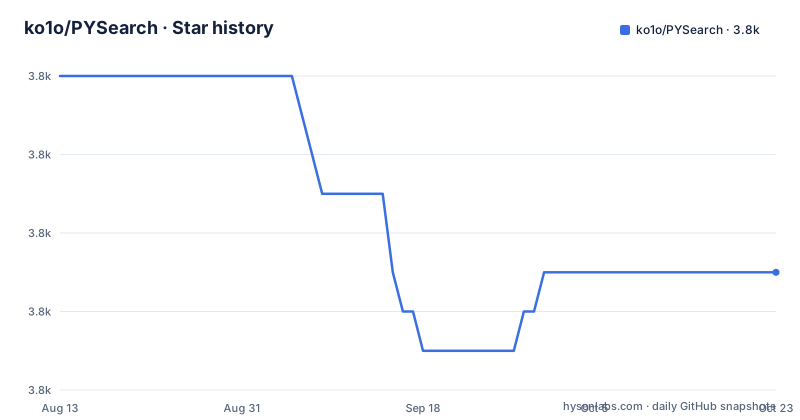
- ko1o/PYSearch3,773 ★ · -5
| Repository | 2026-08-13 | 2026-10-22 |
|---|---|---|
| ko1o/PYSearch | 3.8k | 3.8k |
-5 Stars in the last 70 days, measured from the daily GitHub snapshot. Compare with other projects
Editorial analysis
What PYSearch solves and who it is for
PYSearch is a drop-in replacement for UISearchController, aimed at iOS developers who want a search interface with more visual variety out of the box. The README lists features such as multiple hot search styles, multiple search history styles, search suggestions, and search history caching. The target audience is Objective-C developers working on iPhone or iPad apps that need to support iOS 7 or later, which is older than the current minimum iOS versions for many apps. It is especially useful for apps that want to show popular search terms or recent user queries without building those views from scratch. The project provides a single view controller, PYSearchViewController, that manages the search bar, the suggestion list, and the result display, so it replaces the need to coordinate multiple UIKit components.
Architecture and main components
The repository is organized around a few key classes. The main class is PYSearchViewController, which acts as the central controller. It works with PYSearchSuggestionViewController to display suggestions and history. There is also PYSearchConst, which likely holds constants and configuration keys, though the README does not detail its contents. The project includes categories on UIColor, UIView, and NSBundle, which are used for styling and localization. The architecture is straightforward: you create a search view controller with an array of hot searches and a placeholder string, then you present it or push it. The search result display can be embedded directly or shown in a separate controller, depending on the searchResultShowMode property. This design keeps the customization points visible and simple, but it also means you are tied to the view controller lifecycle that PYSearch defines.
Getting it running: CocoaPods and manual import
The README gives two installation methods. The first is CocoaPods: add `pod "PYSearch"` to your Podfile, run pod install, and then import the main header with `#import <PYSearch.h>`. The second is manual: drag all files in the PYSearch folder into your Xcode project and import `#import "PYSearch.h"`. The basic usage example creates an array of hot searches, such as programming language names, and then creates a search view controller with that array and a placeholder. A didSearchBlock is provided to handle the search action. The README shows the beginning of that block but does not show the full implementation, so you would need to look at the example project PYSearchExample for the complete code. The requirements state iOS 7.0 or later and Xcode 7.0 or later, which suggests the code uses APIs that are available in those versions.
Customization options and their defaults
PYSearch exposes several properties to change the look and behavior. The hotSearchStyle property defaults to PYHotSearchStyleNormalTag, and you can set it to something like PYHotSearchStyleColorfulTag. The searchHistoryStyle defaults to PYSearchHistoryStyleCell, with options like PYSearchHistoryStyleBorderTag. The searchHistoriesCachePath defaults to PYSEARCH_SEARCH_HISTORY_CACHE_PATH, which is a constant defined in the project. The searchHistoriesCount defaults to 20, and you can set it to a different number, as shown with a value of 6. The searchResultShowMode defaults to PYSearchResultShowModeCustom, and you can change it to PYSearchResultShowModeEmbed to show results in an embedded controller. There is also a searchSuggestionHidden property that defaults to NO, meaning suggestions are shown by default. These options give you control over the visual style and the behavior, but the exact visual differences are not described in the README, only shown in screenshots that are not included in the text.
Limitations and potential failure modes
The most obvious limitation is the lack of updates. The last release was 0.9.1 in October 2018, and the repository has not been archived, but there is no activity since then. This means the code has not been tested against newer iOS versions, and it may not compile with the latest Xcode without modifications. Since the requirements mention Xcode 7, the code likely uses APIs that are deprecated or removed in modern iOS. Another limitation is that the README is incomplete in places. For example, the didSearchBlock example is cut off, and the renderings section has empty image placeholders. This makes it harder to evaluate the visual quality before integrating. The README also mentions localization support, but it does not list which languages are included, so you may need to provide your own translations. For apps that need to support iOS 13 or later, where UISearchController has improved significantly, PYSearch may be unnecessary and could introduce maintenance overhead.
Alternative approaches and comparison
The direct alternative is Apple's UISearchController, which is built into UIKit and available since iOS 8. UISearchController provides a standard search interface with a search bar and a results controller. The key difference is that UISearchController does not include hot search or search history views; you have to implement those yourself. PYSearch bundles those features, which can save development time if you need them. However, UISearchController is maintained by Apple and updated with each iOS release, while PYSearch is static. Another alternative is to use a third-party library like DZNEmptyDataSet for empty states, but that does not provide a full search controller. If you need a modern, actively maintained solution, you might look at open source projects that are updated regularly, but the README does not mention any specific alternatives. The choice depends on whether you value built-in hot search and history over long-term compatibility.
Maintenance and license implications
The project is licensed under the MIT License, which per the README means all source code is under that license. MIT is permissive, allowing you to use, modify, and distribute the code with attribution, but this is not legal advice. The maintenance cost is a concern because the project is not actively developed. You may need to fork it and fix compatibility issues yourself if you adopt it. The README's 'Hope' section encourages users to report bugs via issues and to submit pull requests, but there is no evidence of recent maintainer activity. The last push was in 2018, so the issue tracker may not be monitored. For a production app, you would need to budget time for testing and potential code fixes. The dependency on CocoaPods is standard, but if you use Swift Package Manager, you would need to manually integrate the source files.
Editorial conclusion
Adopt PYSearch if you support iOS 7 or 8 and need a search controller with built-in hot search, history caching, and multiple display styles, and you are comfortable with Objective-C and CocoaPods. Do not adopt it if you target iOS 11 or later, because UISearchController has matured and PYSearch has not been updated since 2018. Before adopting, verify that the project compiles with your Xcode version, that the localization files match your languages, and that the cache path behavior meets your data privacy requirements.
Frequently asked questions
What is PYSearch?
An Objective-C search controller for iOS that replaces the system search controller on iPhone and iPad. It supports hot-search and history styles, search suggestions, a cached search history, a delegate or block callback, localisation, and both orientations, and it is distributed through CocoaPods or by dragging its folder into a project.
How do I install PYSearch?
Either add it as a CocoaPods dependency and import the umbrella header, or drag all the files from its folder into the project and import the header directly. A pod specification is included in the repository root alongside the library and an example application.
What settings can I configure in PYSearch?
The readme documents a default for each: a tag style for hot searches, a cell style for history, a named cache-path constant, twenty saved searches, a custom result display mode, and suggestions shown by default. Each is set as a property on the search view controller.
Is PYSearch still maintained?
The default branch was last pushed on 2020-09-30 and the newest release is 0.9.1 from 2018-10-28, with two others from earlier in 2018. The stated requirements are iOS 7 or later and a development tool version 7, and the repository is not marked as archived.
How do I report a bug in PYSearch?
The readme links a new-issue form, but the link points at the same project name under a different account than the one that owns this repository, so a report filed from there will not reach this copy.
Official sources
Add this badge to your README
If you maintain this project, the badge below links readers to this analysis and shows its maintenance status from the daily GitHub snapshot. Paste the markdown into your README; add ?metric=license or ?metric=stars to the image URL for a different field.

[](https://hysenlabs.com/projects/ko1o-pysearch)Star history chart for your README
[](https://hysenlabs.com/projects/ko1o-pysearch)