Allsky turns a Raspberry Pi into a 24-hour sky monitor with a module system
A Raspberry Pi operated allsky camera
At a glance
- What is it?
- Allsky is software for a Raspberry Pi with a ZWO ASI or Raspberry Pi HQ fisheye camera that captures the whole sky, builds timelapses, keograms and startrails, detects meteors and runs hardware modules through a web interface. It suits patient amateur astronomers who want unattended overnight capture, and it does not suit anyone without a fisheye camera and a Pi that can sit outside through the winter.
- Who is it for?
- Adopt Allsky if you already own a ZWO ASI or Raspberry Pi HQ fisheye lens and can give the Pi a fixed outdoor spot with power and network, because the value comes from unattended nights rather than from the interface. Do not adopt it as a desktop application or a general timelapse tool, and do not expect the software alone to replace a weatherproof enclosure.
- Can I use it commercially?
- Yes. MIT is a permissive licence: you can use, modify and sell software built on it, as long as you keep its copyright and licence notices.
- Is it still maintained?
- Yes. The repository received new commits within the last day.
- What is it written in?
- Mainly HTML, according to GitHub's language statistics.
Answers come from the project's GitHub data, last synced on October 23, 2026, and from our analysis. They are not legal advice.
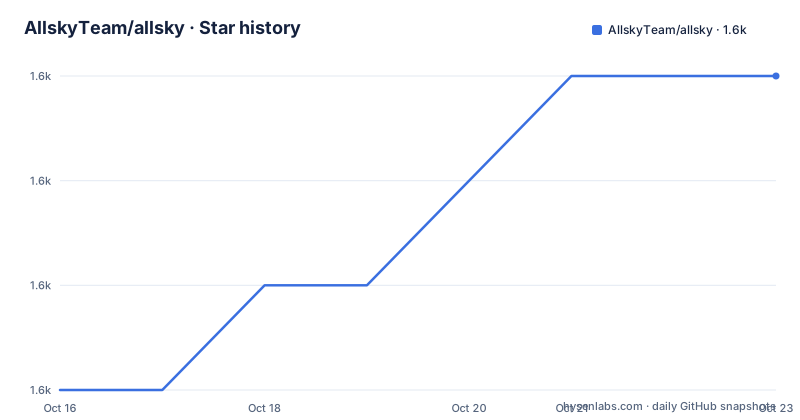
Star history
- AllskyTeam/allsky1,644 ★ · +3
| Repository | 2026-10-16 | 2026-10-23 |
|---|---|---|
| AllskyTeam/allsky | 1.6k | 1.6k |
3 Stars in the last 7 days, measured from the daily GitHub snapshot. Compare with other projects
Editorial analysis
What problem Allsky solves: unattended capture of the entire sky
An allsky camera is a fisheye lens pointed straight up, usually on a Raspberry Pi, left running overnight so nothing is missed while nobody is watching. Allsky is the software layer for that rig. It watches, records and processes every frame in real time, and it targets meteors, satellites, aurora and passing cloud as things worth catching automatically rather than by luck.
The origin is specific. The software was originally created by Thomas Jacquin, a developer and astrophotography enthusiast in Canada, who released the first version around 2018 to run on a Raspberry Pi with a ZWO ASI or Raspberry Pi HQ camera, capturing images of the whole sky, creating timelapses and keograms automatically, and detecting meteors. It now lives under the Allsky Team organisation on GitHub, with Thomas still recognised as founder and original author while the team maintains it collaboratively. The current maintainers named in the README are Eric Claeys and Alex Greenland.
The audience is somebody who already knows they want this. The README assumes you have a camera and points readers to a separate installation guide before doing anything else. That framing matters, because Allsky is not a viewer for images you already have and not a general-purpose capture tool. It is a daemon for a specific hardware arrangement that someone has chosen to build.
What the frame pipeline produces: timelapses, keograms, keolapses and startrails
The outputs are the reason the software exists, and each one reads the same image stream differently.
A timelapse stitches a night into a video. A mini-timelapse does the same thing on a shorter window, built from the last X captured images. A keogram collapses the night onto a single image by shifting each frame so bright objects such as stars stay fixed while moving objects such as satellites and aircraft draw trails, which is how a keogram makes orbital passes legible in one picture. A keolapse is the animation counterpart. Startrails stack every frame of the night into one long-exposure-style image.
Beyond the local files, the project supports a remote website or server that automatically receives capture images, timelapses, startrails and keograms, so data can be shared without handing out SSH access. Allsky Map is a global map of Allsky cameras with sharing, so a single installation can opt into a public directory.
What is missing from that list is telling. Nothing in the documented output set covers still-frame calibration, stacking of faint deep-sky targets or lens distortion correction. If you want long focal length astro images, this is the wrong category of software.
The WebUI is a control panel, not just a viewer
The web interface does more than display results. According to the README it lets you monitor the system live, review captured events, design custom overlays, visualise sensor data and automate the setup. Specifically, it can control capture and image-processing settings, manage Allsky services, and control the Pi directly. There are user-defined buttons for adding custom functions, a light and dark mode, built-in access to documentation, and a support view.
The overlay system is the part with the most design surface. Overlays are fully custom and can be split into separate day and night versions, edited with a drag-and-drop layout interface. You pick which data fields to display from a dynamic list, group related fields so they move together, and fine-tune with left align, equal vertical spacing and layering controls. Predefined blocks, such as all Sun-related data, insert in one click. Fonts are freely chosen, each field's format is customisable, and you can drop your own images, logos or icons in. Separate day and night overlays is a detail that only matters if you run a camera that keeps imaging through sunrise, which many do.
The direct Pi control in the UI is a convenience with a security consequence. Exposing an interface with host-control capabilities to an untrusted network may create security risks.
Modules run on flows, not on a schedule you define
The module system is the architecture that separates Allsky from a fixed script. It is described as modular, so you add only the features you need, and developers can write new modules against provided documentation or contribute them to the main project. A package manager assists with installation.
The key mechanism is the flow. Rather than every module running continuously or on one timer, several flows decide when a module executes: Daytime Capture, Nighttime Capture, Day to Night, Night to Day, and Periodic, which runs at regular intervals. A star counter therefore only runs at night, and a daytime-only module does not wake up at 2am.
Hardware integration is also first class. There is a built-in i2c database to ease device selection and a built-in GPIO pin selector for choosing pins, plus diagnostic tools for connected hardware. The listed modules include Star Count for counting stars in captured images, Meteor Detection, Environment for sensor or API data, Dew Heater for controlling an external heater, Hardware Status for CPU temperature, memory and disk usage, Cloud Detection via sensors or AI methods, ADSB for aircraft from local or online sources, Fans for cooling, Solar System for Sun, Moon, planet and satellite calculations, Power for measuring consumption such as dew-heater usage, SQM reporting Lux and an estimated Bortle class, and GPS to set location and time from an external receiver.
The README flags that some modules require external hardware or third-party services. That qualifier applies broadly: SQM needs the meter, ADSB needs a source, Dew Heater needs a relay and heater.
Supported sensors and third-party services, itemised
The integration table is the fastest way to judge whether your existing hardware is supported. Sensors listed as temperature sensors are SHT31, SHT4x, DHT22, DHT11, AM2302, BME280, HTU21, AHTx0, DS18B20 and the SCD30. Weather and environment integrations are OpenWeather as a data provider and Ecowitt, including a local variant.
The rest are operational rather than meteorological. Home Assistant is listed as an external integration, S.M.A.R.T for hard disk monitoring, and INA219 for one-channel power measurement. S.M.A.R.T is worth a note for anyone running this on an SD card or a Pi with a spinning disk, because storage health matters during unattended capture.
Notably absent is any listed support for DSLR or mirrorless cameras, or for sensors other than the two named camera families in the project's origin story. The camera choice is the decision that constrains everything downstream, and it is made before you install anything.
Installing: the repository ships scripts, not a package index
There is no apt, brew or pip entry in the README. Instead, the README sends you to the online installation instructions before installing or upgrading, and to the upgrade notes for what changed in the current version. The repository itself carries the mechanism.
The top level holds `install.sh`, `upgrade.sh`, `uninstall.sh`, `support.sh`, `allsky.sh`, `variables.sh`, a `Makefile`, and directories for `src/`, `scripts/`, `html/`, `server/`, `config_repo/` and `docs/`. There are also `remoteWebsiteInstall.sh` for the remote server side, `.gitmodules`, and a `version` file.
The Makefile is the entry point and it refuses to run unprivileged. It detects the machine architecture with `uname -m`, checks `id -u`, and if you are not root it prints that you must run `sudo make install` instead of doing anything:
sudo make installRun as root, the `install` target recurses into `src` and `config_repo`. The default goal is `all`, and invoking it without arguments prints a message directing you to `sudo make install` instead. The Makefile coordinates the install targets and has a root requirement.
First real use is: complete the online installation instructions, run `sudo make install`, and open the WebUI on the Pi to confirm the camera is being captured and that the services listed in the interface are running.
Limitations to weigh before buying hardware
Three constraints deserve blunt statement. First, the hardware prerequisite is steep. A Pi SBC, a ZWO ASI or Raspberry Pi HQ camera, a fisheye lens, and in most climates a weatherproof housing with a heater and power. The dew heater module exists because condensation on the dome, not software, is what usually ends a run.
Second, uptime is the product. A camera left pointing at the sky for months generates a large image stream, and the S.M.A.R.T module suggests storage wear is a known concern. The README does not document a retention policy for local captures, a disk-space threshold, or what the software does when storage fills. Anyone deploying this unattended should decide that themselves before the first long run.
Third, some functionality depends on outside services. ADSB can consume online data, and the ADSB source's availability and terms are outside this project. The README does not document offline behaviour for those modules, so treat them as best effort.
One more note on scope. The README describes the project as an ecosystem and a fusion of astrophotography, automation and discovery, which reads well but does not mean image calibration or scientific-grade photometry. If your goal is quantitative sky brightness work, the SQM module's Lux reading and estimated Bortle class are the honest limit of what is documented.
Editorial conclusion
Adopt Allsky if you already own a ZWO ASI or Raspberry Pi HQ fisheye lens and can give the Pi a fixed outdoor spot with power and network, because the value comes from unattended nights rather than from the interface. Do not adopt it as a desktop application or a general timelapse tool, and do not expect the software alone to replace a weatherproof enclosure. Before buying any hardware, read the installation instructions the README links to and confirm your specific Pi model and camera are listed, since the build keys its behaviour off `uname -m` and the README documents no fallback path when a step fails.
Frequently asked questions
What hardware does Allsky need to run?
It runs on a variety of Raspberry Pi Single Board Computers with a ZWO ASI or Raspberry Pi HQ camera. The original design was built around capturing images of the entire sky with a fisheye lens.
How do I install Allsky on a Raspberry Pi?
The README directs you to the online installation instructions before installing or upgrading. In the repository itself, installation runs through the Makefile, which requires root and prints a message telling you to run `sudo make install` if you are not privileged.
What is a keogram and does Allsky make one automatically?
Keogram creation is listed as a built-in feature alongside timelapses, mini-timelapses, keolapses and startrails. The WebUI lets you view the captured keograms as well as the other outputs.
Can Allsky detect meteors without me watching the stream?
Yes. Meteor Detection is listed as a key module that detects meteors automatically, and Star Count counts stars in captured images. The original 2018 version already performed meteor detection.
Which temperature sensors are supported?
The README lists SHT31, SHT4x, DHT22, DHT11, AM2302, BME280, HTU21, AHTx0, DS18B20 and the SCD30. There is also a built-in i2c database and a GPIO pin selector to ease selection.
Who maintains Allsky now?
Thomas Jacquin created the original version around 2018 and remains recognised as founder and original author. The Allsky Team maintains it collaboratively, with Eric Claeys and Alex Greenland named as the current maintainers.
Official sources
Add this badge to your README
If you maintain this project, the badge below links readers to this analysis and shows its maintenance status from the daily GitHub snapshot. Paste the markdown into your README; add ?metric=license or ?metric=stars to the image URL for a different field.

[](https://hysenlabs.com/projects/allskyteam-allsky)Star history chart for your README
[](https://hysenlabs.com/projects/allskyteam-allsky)Was this useful?