Konsta UI: iOS and Material components in Tailwind, for React, Vue and Svelte
Mobile UI components made with Tailwind CSS
At a glance
- What is it?
- A component library that ships the same set of phone-shaped widgets three times over, once per framework, styled with utility classes instead of a themed runtime.
- Who is it for?
- Konsta's bet is that mobile interface work is mostly about fidelity to a platform's own conventions, and that the fastest way to get there is to reimplement those conventions as Tailwind utilities rather than as a runtime theme. That bet is visible in the fix history, where most of the recent work is Safari rendering, hairline positioning, and Material divider behaviour, the unglamorous details that decide whether a screen looks native or looks translated.
- Can I use it commercially?
- Yes. MIT is a permissive licence: you can use, modify and sell software built on it, as long as you keep its copyright and licence notices.
- Is it still maintained?
- Yes. The repository last received commits 7 days ago.
- What is it written in?
- Mainly JavaScript, according to GitHub's language statistics.
Answers come from the project's GitHub data, last synced on October 21, 2026, and from our analysis. They are not legal advice.
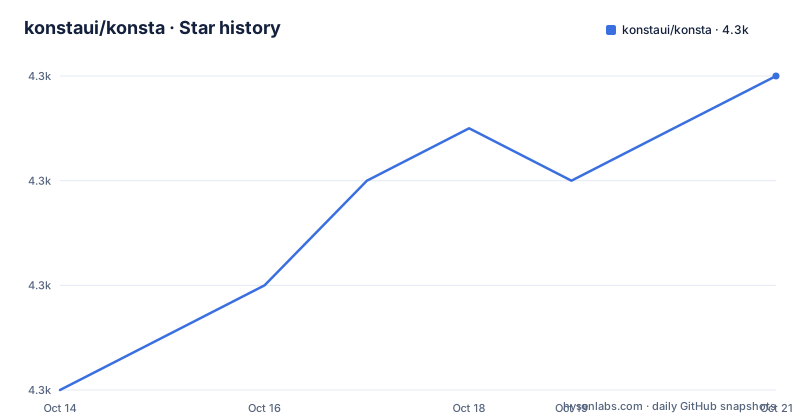
Star history
- konstaui/konsta4,274 ★ · +6
| Repository | 2026-10-14 | 2026-10-21 |
|---|---|---|
| konstaui/konsta | 4.3k | 4.3k |
6 Stars in the last 7 days, measured from the daily GitHub snapshot. Compare with other projects
Editorial analysis
Three frameworks, one component set
The one-sentence description is the clearest statement of the project: pixel perfect mobile UI components built with Tailwind CSS, with iOS and Material Design components for React, Vue and Svelte. Every word in that sentence is doing work. Mobile, not responsive web. iOS and Material, not a neutral design system. Tailwind, not runtime CSS-in-JS or a precompiled stylesheet. And three frameworks rather than one.
The repository is set up as a workspace root rather than a single publishable package. The root `package.json` is marked `"private": true`, which is the marker for that, and it carries the version 5.4.0 that matches the latest release tag. Its scripts are organised by framework, with a dev server and a production build for each kitchen sink app:
"react": "cross-env NODE_ENV=development vite ./kitchen-sink/react",
"build-react-ks": "cross-env NODE_ENV=production vite build ./kitchen-sink/react",
"vue": "cross-env NODE_ENV=development vite ./kitchen-sink/vue",
"build-vue-ks": "cross-env NODE_ENV=production vite build ./kitchen-sink/vue",
"svelte": "cross-env NODE_ENV=development vite ./kitchen-sink/svelte",
"build-svelte-ks": "cross-env NODE_ENV=production vite build ./kitchen-sink/svelte"
The `kitchen-sink/` directory in the tree is the visible half of that, holding one demo application per framework. That is the fastest way to see what exists, and it is the pattern the project uses rather than a storybook.
The three-framework claim is backed unevenly in the build configuration. There is a `babel.config.react.js` and a `babel.config.vue.js`, and the Svelte path goes through `@sveltejs/vite-plugin-svelte` instead, since Svelte needs no Babel transform of its own. Same components, three toolchains.
Why the README is a wall of sponsor logos
This is the first thing a reader encounters, and it deserves a direct explanation rather than a workaround. The README body opens with a heading and a single descriptive sentence, and then devotes most of its visible length to a table of sponsor badges linking to online casinos, sports betting sites, SEO services, a sudoku site, a 2048 site, a calculator, and a YouTube transcript tool.
There is a mechanical reason for it. The root `package.json` contains a `build-sponsors` script running `node ./scripts/build-sponsors.js`, and the repository has a `BACKERS.md` file, so the sponsor block is generated and injected rather than hand-maintained. The `scripts/` directory in the tree is where that generator lives. There is also a marker comment around the table, which is what a generated block looks like before replacement.
What this costs a reader is real. The project's homepage is konstaui.com, and that is where the component catalogue, installation instructions, and live examples live. The README is a pointer plus a funding appeal, not documentation. For a library at 4,256 stars with 156 forks, that is a deliberate trade, and the honest way to describe it is that the project is sponsor-funded and the documentation lives on the site rather than in the repository.
It is also worth noting what is absent from the root. There is a `tailwind.config.js.old` file, which is a leftover from before the Tailwind major version change, and the dev dependencies pin `@tailwindcss/vite` at a 4.x version. The project migrated to Tailwind 4 and kept the old config around rather than deleting it.
Release notes read like a list of Safari bugs
The three most recent releases are all bug fixes, and their content is unusually revealing about what this library actually is.
Version 5.4.0, published 2026-08-25, contains exactly one fix: a check that a background element reference exists in the Svelte navbar scroll handling. That is a framework-specific fix in a library whose headline claim is one component set across three frameworks, and it suggests the Svelte path is maintained but sees proportionally less traffic than React.
Version 5.3.0, from 2026-07-28, is the more revealing one. It supports transparent and arbitrary colours in the `hairline-*` utility, which is a theming feature. It hides closed overlays so that Safari restores its translucent address bar, closing issue 280. It prevents a crash in the React form inputs when `cls()` receives null. And it renders iOS hairlines on table cells so they position correctly in Safari, closing issue 279.
Read those together and you get a picture: a large share of the work is making hairline separators land on the right subpixel in Safari. Hairlines are the thin one-pixel dividers that distinguish an iOS table from an Android one, they render differently depending on whether they are attached to a cell or to a container, and they break visibly when the browser's translucent chrome is involved. Fixing that across three frameworks is not glamorous work and it is exactly the work that determines whether a screen reads as native.
Version 5.2.0, from 2026-06-29, adds an exported Glass component with customizable colours, fixes missing `.js` extensions in `cls` imports in the Fab and Progressbar classes, and renders Material list dividers edge to edge. The Glass component is the only feature addition in the three releases, which says where the project's energy goes.
Utility classes as the theming mechanism
The architectural choice that explains the fix history is styling with Tailwind rather than with a theming runtime. There is no theme provider, no context, and no generated stylesheet to import. A component receives classes, and the caller decides.
The practical consequences follow directly. Overriding a component is a matter of passing different utility classes rather than extending a theme object, which is why a `hairline-*` utility accepting transparent and arbitrary colours is a feature release rather than a rewrite. It also means a component library cannot impose a design system on you, which is the appeal for a project whose whole purpose is to reproduce two specific design systems faithfully.
The cost is bundle-level knowledge. Because the styling surface is utilities, what you can pass to a component is bounded by what its implementation spreads through, and a component that forwards classes generously is easier to restyle than one that does not. The README does not document the class-forwarding contract for any individual component, so that is something you verify per component on the site rather than once for the library.
The repository topics list the intended audience plainly: android, ios, material-design, mobile, react, svelte, tailwindcss, ui-components, vue. The language on GitHub is reported as JavaScript rather than TypeScript, which is a fair description of a component library that publishes types alongside a JavaScript API.
Project health and where to actually start
The numbers here are unusually good. 4,256 stars, 156 forks, and 11 open issues. That ratio is not proof of quality but it is a signal that whatever the maintainers are doing, it is absorbing incoming reports. The last push was 2026-09-02, and releases have landed roughly monthly across the recent history: 5.2.0 at the end of June, 5.3.0 at the end of July, 5.4.0 in late August.
The license is MIT and the package author is recorded as Vladimir Kharlampidi. The homepage is konstaui.com, and the repository also carries the usual set of community files: `CODE_OF_CONDUCT.md`, `CONTRIBUTING.md`, `CHANGELOG.md`, and a Prettier configuration with a matching ignore file.
The starting point is therefore not the repository. It is the site, where you pick a framework, read the install command for the package you need, and open the kitchen sink for that framework to see every component in both iOS and Material styling. The repository becomes relevant once you want to know what changed in a version, since the changelog and the release notes are more informative about this library's character than its README is.
Editorial conclusion
Konsta's bet is that mobile interface work is mostly about fidelity to a platform's own conventions, and that the fastest way to get there is to reimplement those conventions as Tailwind utilities rather than as a runtime theme. That bet is visible in the fix history, where most of the recent work is Safari rendering, hairline positioning, and Material divider behaviour, the unglamorous details that decide whether a screen looks native or looks translated. The three-framework approach is the other half of the pitch and it is maintained seriously, with a kitchen sink app per framework and separate Babel configs per React and Vue. The cost is that the repository is a workspace root marked private, so the root package.json is not the artifact you install, and the site's own installation pages are where the package names and imports actually live. Start at konstaui.com, pick the framework you already have, and read the release notes for your version before assuming the newest behaviour is present.
Frequently asked questions
What is Konsta UI used for?
It provides mobile interface components that follow iOS and Material Design closely, built with Tailwind CSS instead of a runtime theme. The same component set is published for React, Vue and Svelte. It is aimed at phone and tablet screens rather than at responsive web pages, which is the distinction that separates it from a general purpose component library.
Which frameworks does Konsta UI support?
React, Vue and Svelte, each with its own kitchen sink demo application under the kitchen-sink directory and its own build script in the root package.json. React and Vue use separate Babel configuration files, while the Svelte build goes through the Vite Svelte plugin, since Svelte needs no Babel transform.
How does Konsta style its components?
With Tailwind CSS utilities rather than a theme provider or a generated stylesheet. Components accept classes and the caller decides which apply, which is why restyling is a matter of passing different utilities and why the hairline utilities in recent releases accept arbitrary and transparent colours.
Is Konsta related to Framework7?
They are separate projects serving the same goal, which is why Framework7 appears alongside Konsta in searches for mobile UI frameworks. Framework7 builds its own rendering layer and ships its own themes, while Konsta renders through the framework you already use and expresses styling as Tailwind utilities. Either can produce iOS and Material interfaces; they differ in how much of the UI layer you hand over to the library.
Where are Konsta's installation instructions?
On the project site at konstaui.com, not in the repository. The README opens with a descriptive sentence and then a generated block of sponsor badges, so the component catalogue and the per-framework install commands live on the site. The repository is where the changelog, the kitchen sink applications, and the release notes are.
Official sources
Add this badge to your README
If you maintain this project, the badge below links readers to this analysis and shows its maintenance status from the daily GitHub snapshot. Paste the markdown into your README; add ?metric=license or ?metric=stars to the image URL for a different field.

[](https://hysenlabs.com/projects/konstaui-konsta)Star history chart for your README
[](https://hysenlabs.com/projects/konstaui-konsta)