Kotlin kotlinx-io: Multiplatform I/O Primitives and Buffer Design
Kotlin multiplatform I/O library
At a glance
- What is it?
- kotlinx-io gives Kotlin projects mutable buffers, byte sources and sinks, immutable byte strings, and experimental file-system APIs across supported targets. It suits multiplatform code that needs to move bytes without tying its I/O layer to one platform API.
- Who is it for?
- Adopt kotlinx.io when shared Kotlin code needs Buffer, Source, Sink, ByteString, or basic file-system operations across targets. Do not treat it as a drop-in Okio replacement or a stable API without reviewing migration needs.
- Can I use it commercially?
- Yes. Apache-2.0 is a permissive licence: you can use, modify and sell software built on it, as long as you keep its copyright and licence notices.
- Is it still maintained?
- Yes. The repository last received commits 2 days ago.
- What is it written in?
- Mainly Kotlin, according to GitHub's language statistics.
Answers come from the project's GitHub data, last synced on November 7, 2026, and from our analysis. They are not legal advice.
Star history
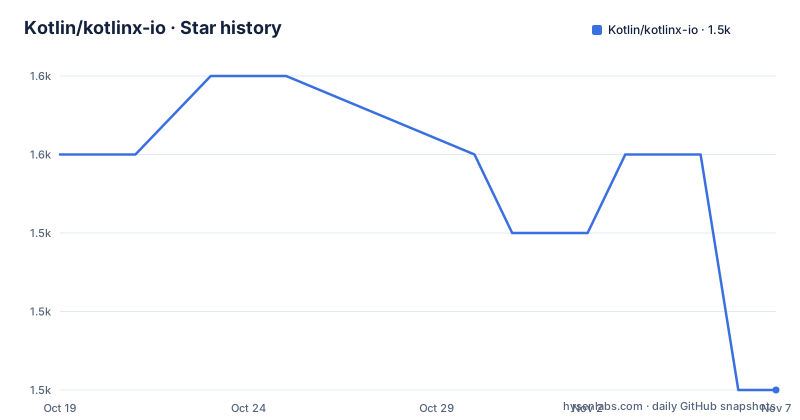
- Kotlin/kotlinx-io1,547 ★ · -3
| Repository | 2026-10-19 | 2026-11-07 |
|---|---|---|
| Kotlin/kotlinx-io | 1.6k | 1.5k |
-3 Stars in the last 19 days, measured from the daily GitHub snapshot. Compare with other projects
Editorial analysis
Why kotlinx-io Exists for Shared Kotlin Code
kotlinx-io addresses the gap between platform-specific I/O models and code that should remain portable across Kotlin targets. The repository describes it as a multiplatform Kotlin library of basic I/O primitives, with a design based on Okio. That basis does not create source or binary compatibility with Okio. Existing code written against Okio cannot be assumed to move directly to kotlinx-io.
The primary audience is a Kotlin developer building common code that reads, writes, transforms, or transfers byte sequences. The central abstraction is `Buffer`, a mutable sequence of bytes. Its queue-like organization allows bytes to be removed from the head and appended at the tail. The library also defines `Source` and `Sink` for data sources and destinations, while `ByteString` represents an immutable sequence of bytes.
This is a foundational library rather than a complete networking stack. The repository overview does not claim an HTTP client, URL connection layer, protocol implementation, socket framework, or application-level transfer scheduler. Those responsibilities remain outside the documented scope. Projects needing only a common abstraction for bytes can use the core module, while projects dealing with files must also account for the experimental status of `kotlinx.io.files`.
The Apache-2.0 license covers the project. That matters for reuse and distribution, but this review does not interpret legal obligations or compatibility with a particular product. License obligations should be checked against the actual `LICENSE` and `NOTICE` files when integrating the library.
How Buffer, Segments, Source, and Sink Move Data
The documented data model begins with `Buffer` as the mutable center of the library. Built-in type functions read and write data, and buffer-to-buffer functions copy bytes between mutable sequences. Platform-specific extension functions can exchange data with platform types, depending on the target.
Internally, a `Buffer` is described as a linked list of segments. This arrangement is intended to reduce allocations while a buffer expands. Copy operations can also reduce work by delegating or sharing ownership of the underlying segments with another buffer. That makes ownership behavior an adoption concern: sharing segments is an allocation strategy, not an instruction to copy every buffer eagerly. The README does not document a complete buffer ownership or retention policy, so callers should consult the API documentation before sharing mutable state across concurrency boundaries.
`Source` and `Sink` separate data origins from destinations. This is useful for designing transformations around byte streams instead of a specific file, socket, or platform object. However, the README does not show a complete streaming example, cancellation model, backpressure policy, or resource-closing tutorial. It would be a mistake to infer those details merely from the interface names.
The filesystem layer uses `FileSystem`, its default implementation `SystemFileSystem`, and `Path`. The repository labels this filesystem support experimental. That label applies to a meaningful part of the public surface, so a production decision should distinguish between the general byte primitives and the file-system package rather than treating every API as having the same maturity.
Module Boundaries for Core, ByteString, and Okio Integration
The repository separates the library into modules with different dependency and compatibility roles. `kotlinx-io-bytestring` provides `ByteString`. `kotlinx-io-core` provides `Buffer`, `Source`, and `Sink`, includes filesystem support, and depends on `kotlinx-io-bytestring`. `kotlinx-io-okio` bridges kotlinx-io and Okio types.
The integration module is specific. According to the README, it bridges Okio `ByteString`, `kotlinx.io.RawSource`, and `okio.Source`, as well as `kotlinx.io.RawSink` and `okio.Sink`. This makes it relevant to projects that already expose Okio-based APIs and need an explicit boundary. It does not make kotlinx-io backward compatible with Okio.
That difference affects migration planning. Source code may need renamed imports, type conversions, or changes in interface expectations. Binary compatibility should not be inferred from the shared design lineage. A codebase that treats kotlinx-io as a drop-in replacement would be relying on a compatibility promise that the README explicitly withholds.
JVM applications also receive JPMS module names: `kotlinx.io.bytestring` for `kotlinx-io-bytestring`, `kotlinx.io.core` for `kotlinx-io-core`, and `kotlinx.io.okio` for `kotlinx-io-okio`. The README directs users to Kotlin documentation for configuring Gradle with Java Modules enabled. It does not provide module-path commands, so none can be safely inferred.
Gradle, Maven, and Multiplatform Setup
The current documented version is 0.9.1. For Gradle, the README first requires `mavenCentral()` in the repository list. Kotlin multiplatform projects should put the dependency in `commonMain`, which makes the core API available to shared source code rather than adding it independently to each platform.
For a conventional Gradle dependency setup, add this repository declaration:
repositories {
    mavenCentral()
}
After adding the repository, declare the core dependency:
dependencies {
    implementation("org.jetbrains.kotlinx:kotlinx-io-core:0.9.1")
}
In a multiplatform build, place the same dependency under `commonMain`:
kotlin {
    sourceSets {
        commonMain {
            dependencies {
                implementation("org.jetbrains.kotlinx:kotlinx-io-core:0.9.1")
            }
        }
    }
}
The repository also gives Maven users the JVM artifact. Its coordinates are `org.jetbrains.kotlinx:kotlinx-io-core-jvm:0.9.1`:
<dependency>
    <groupId>org.jetbrains.kotlinx</groupId>
    <artifactId>kotlinx-io-core-jvm</artifactId>
    <version>0.9.1</version>
</dependency>
These snippets install the dependency, but they are not a complete first-program tutorial. The README links to KDoc for the API reference and does not provide a first `Buffer` program. As an adoption check, resolve version 0.9.1 and confirm that the intended targets can import the required module before writing broader integration code.
JVM Segment Pooling and Android Constraints
On some platforms, `Buffer` segments may be pooled. When a buffer needs a segment, the implementation can take a preallocated segment instead of immediately allocating one. Unneeded segments return to the pool unless it is already full. The README currently limits pooling to JVM and Android.
The JVM pool has two levels. A smaller first-level pool handles requests quickly, while a larger second-level pool provides additional capacity. The first-level size cannot currently be configured. The second-level size is controlled by the `kotlinx.io.pool.size.bytes` system property, which accepts numeric values only. The documented defaults are 4,194,304 bytes on JVM and 0 on Android.
Configuration timing is restrictive. The property is read during pool initialization, so changing it after the first `kotlinx-io` API call does not resize the pool. On JVM, the README recommends passing `-Pkotlinx.io.pool.size.bytes=XXX` on the command line before library use.
Android needs different handling because its second-level pool starts at zero. The documented approach sets the property in `Application.onCreate`, before calling `super.onCreate`:
System.setProperty("kotlinx.io.pool.size.bytes", "2097152" /* or whatever value suites your case */)The README also says that this application class must be registered in the manifest. Android compatibility is stated as API level 21 and later, but the project is not tested on Android on a regular basis. That combination supports cautious use, not a claim of routine Android verification.
Experimental APIs, Compatibility, and Release Planning
The clearest limitation is stated directly: the library is experimental and its API is subject to change. This is especially relevant to `kotlinx.io.files`, where both the package support and its default implementation are part of the experimental surface. An upgrade may therefore require source changes even when the dependency coordinate remains straightforward.
Recent release entries show 0.8.2 on 2025-11-24, 0.9.0 on 2026-02-20, and 0.9.1 on 2026-06-26. The repository's last push was on 2026-10-13. These facts indicate recent repository and release activity, but they do not guarantee API stability or compatibility between releases. The README's warning remains the governing constraint for planning upgrades.
There are two additional boundaries for adopters. First, the project is based on Okio without preserving backward compatibility. The `kotlinx-io-okio` module provides an explicit bridge, which is a different approach from assuming source compatibility. Second, the repository contains changelog files, but the README excerpt does not define a migration guide for every API change. Upgrade notes cannot be summarized beyond the documented release history and compatibility warning.
For a library consuming kotlinx-io across JVM, Android, and other Kotlin targets, compatibility testing should cover imports, platform extensions, filesystem availability, Okio bridge boundaries, and any configured pool behavior. The repository supports those checks as adoption criteria, but it does not state that every module behaves identically on every target.
Editorial conclusion
Adopt kotlinx.io when shared Kotlin code needs Buffer, Source, Sink, ByteString, or basic file-system operations across targets. Do not treat it as a drop-in Okio replacement or a stable API without reviewing migration needs. Verify target coverage, experimental API exposure, buffer ownership rules, segment-pool settings, and the implications of the Apache-2.0 license before committing a production codebase.
Frequently asked questions
Is kotlinx-io backward compatible with Okio?
No. The README says kotlinx-io is based on Okio but does not preserve backward compatibility with it. Projects must treat the APIs as distinct rather than substituting kotlinx-io as a drop-in replacement.
Which kotlinx-io module should a Kotlin project depend on?
Most projects that need `Buffer`, `Source`, `Sink`, or filesystem support can depend on `kotlinx-io-core:0.9.1`, which depends on `kotlinx-io-bytestring`. Use `kotlinx-io-okio` only when the project needs its documented bridge to Okio types.
Is the kotlinx-io filesystem API stable?
No stability commitment is documented for it. The README describes `kotlinx.io.files`, `FileSystem`, `SystemFileSystem`, and `Path` as experimental support, and it also states that the library API is subject to change.
Can kotlinx-io segment-pool size be changed after startup?
Not after pool initialization. The `kotlinx.io.pool.size.bytes` value is read during initialization, so the README says it must be set before any `kotlinx-io` API call.
Official sources
Add this badge to your README
If you maintain this project, the badge below links readers to this analysis and shows its maintenance status from the daily GitHub snapshot. Paste the markdown into your README; add ?metric=license or ?metric=stars to the image URL for a different field.

[](https://hysenlabs.com/projects/kotlin-kotlinx-io)Star history chart for your README
[](https://hysenlabs.com/projects/kotlin-kotlinx-io)Was this useful?