KOOM: Kwai's Android leak monitors for Java heap, native heap and threads
KOOM is an OOM killer on mobile platform by Kwai.
At a glance
- What is it?
- KOOM is a set of Android modules from Kwai that watches Java heap, native heap and thread leaks in production and produces a report when something goes wrong. The shared C++ runtime is the part that tends to break a build.
- Who is it for?
- Adopt KOOM if you ship an Android app, need leak data from production devices and can accept a library whose last tagged release is from April 2024. Skip it for iOS, since only Android is supported.
- Can I use it commercially?
- Check first. The repository uses a licence we do not classify automatically, so read its LICENSE file before any commercial use.
- Is it still maintained?
- Yes. The repository last received commits 5 days ago.
- What is it written in?
- Mainly C++, according to GitHub's language statistics.
Answers come from the project's GitHub data, last synced on November 7, 2026, and from our analysis. They are not legal advice.
Star history
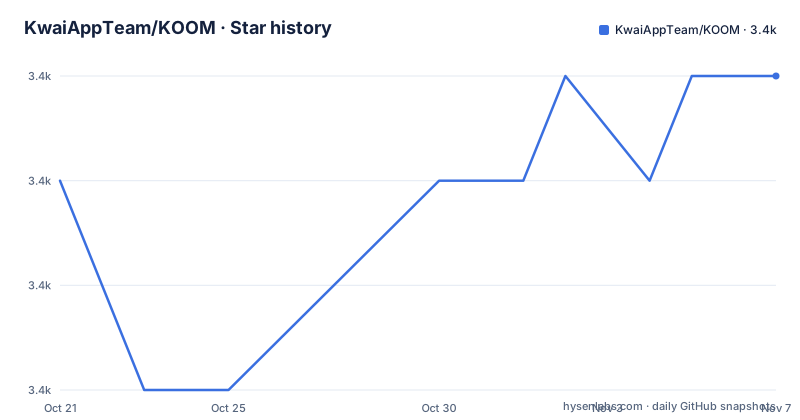
- KwaiAppTeam/KOOM3,387 ★ · +1
| Repository | 2026-10-21 | 2026-11-07 |
|---|---|---|
| KwaiAppTeam/KOOM | 3.4k | 3.4k |
1 Stars in the last 17 days, measured from the daily GitHub snapshot. Compare with other projects
Editorial analysis
OOM crashes at Kuaishou scale could not be prevented, so KOOM monitors them online
KOOM, short for an OOM killer on a mobile platform, comes from Kwai. It builds a high-performance online memory monitoring solution that supplies a detailed report when OOM-related problems are detected. The team says it has solved a large number of OOM issues in the Kwai application, and that it is currently available on Android only.
The motivation is stated in operational terms. As mobile business logic grows more complex, and scenarios with high memory demands such as 4K codec and AR magic watch become popular, OOM became the number one problem in stability management of the Kuaishou client. During daily version iteration, OOM surges happen from time to time. The online environment is very complicated, with thousands of AB experiments running, so pre-prevention and post-recovery cannot be achieved. That is the argument for monitoring on real user devices rather than only in the lab.
Today KOOM can monitor leaks in three areas: Java Heap, Native Heap and Threads. The team says it will build multi-dimensional, multi-business scenario monitoring in the future. That future work is a plan, with no dates and no named areas, so judge the library on the three monitors that exist now.
koom-java-leak forks a child process so the app does not freeze during a heap dump
The `koom-java-leak` module watches the Java heap. Dumping a heap normally pauses the app, and a long pause on a user's phone is a visible failure. KOOM's approach is to use the Copy-on-write mechanism: it forks a child process and lets the child dump the Java heap. The parent keeps running, which is how the module avoids the long freeze during the dump.
The design has a clear cost. A fork duplicates the process address space lazily, so the child is a snapshot of the app at the moment of the fork. Any leak that shows up in the dump describes that instant, not the minutes before it. The project documents the mechanism and not the thresholds that decide when a dump starts, so those are in the module's own README under `koom-java-leak`.
That module README is the document to read before integration, because it holds the details this overview points to. Several parts of the setup, including the dump trigger conditions and the shape of the report, are not spelled out in the top-level text. A team that needs the dump to be rare or silent should check those settings before shipping to production devices, since a dump that runs often wastes the benefit of the fork.
koom-native-leak borrows tracing garbage collection to find leaked native memory
Native memory has no garbage collector, so leaks there are harder to find. The `koom-native-leak` module addresses this by applying the tracing garbage collection mechanism to analyze the entire Native Heap. Tracing means starting from known roots and marking what is reachable. Native allocations that nothing can reach count as leaked.
The output is concrete. KOOM directly reports the leaked memory information, such as size and allocating stacks. The project says this greatly reduces the cost of analyzing and fixing memory leaks for business students, meaning the engineers who own the product code and are not memory specialists. An allocating stack points at the line that asked for the memory, which is usually the shortest route to a fix.
Two limits follow from the description. First, the analysis covers the native heap as a whole, so a leak inside a Java object is a job for the Java module instead, and neither module covers the other. Second, native modules are C++, so they depend on the STL choices covered below. If your app has no native code of its own, the native monitor still looks at memory allocated by libraries you bundle, but whether that is useful for you depends on how much native memory your app really holds. Details sit in the `koom-native-leak` README.
koom-thread-leak hooks the thread life cycle and reports leaked threads on a timer
The third monitor is `koom-thread-leak`. It hooks the life cycle functions of threads and periodically reports leaked thread information. A thread that is created and never finished keeps its stack and any objects it references, so thread leaks show up as slow memory growth and eventually as an OOM that the heap dump alone cannot explain.
Two words in the description deserve attention. Hooks means the module intercepts functions that start and end threads, which is invasive in the way any native hook is. Periodically means the report arrives on a schedule and not at the moment of the leak. If you need a stack at the exact moment a thread is created, check the module README, since the top-level text names the periodic report and nothing else.
Of the three modules, this one is the narrowest. It tracks thread objects and their life cycle, and does not look inside the heap. Pair it with the Java module when a growing thread count is suspected, since threads that hold large objects will appear in both views.
The repository also holds shared pieces: `koom-common`, `koom-monitor-base` and `koom-fast-dump` beside a `koom-demo` app and a `tools` directory. The class names in the manifest line later in this article, such as `com.kwai.koom.fastdump` and `com.kwai.koom.base`, come from these shared modules.
c++_shared saves package size but can fail with a missing symbol such as __emutls_get_address
All native modules support two access modes, c++_shared and c++_static, which follow Android's NDK C++ support guide. The dependency line is the same for either one, with the coordinates under `com.kuaishou.koom`:
dependencies {
  // In shared mode, multiple modules share the same libc++_shared.so (STL), and the package
  // size is small, but when multiple modules depend on different STL versions, the final
  // compilation will conflict. For example, you might get "dlopen failed: cannot locate symbol
  // "__emutls_get_address" referenced by" errors.
  implementation "com.kuaishou.koom:koom-java-leak:${latest_version}"
}
Shared mode makes several modules use one `libc++_shared.so`, which keeps the package small. The failure appears when modules depend on different STL versions. The final compilation conflicts, and at runtime you can see `dlopen failed: cannot locate symbol "__emutls_get_address"` errors. Static mode gives each module its own STL, with a larger package and no compilation or runtime problems.
The price is size against safety. If your app already ships other native libraries built against different runtimes, static mode is the conservative choice, and you pay for it in megabytes. The version to substitute for `${latest_version}` is not stated in the top-level text, so check the releases page.
pickFirst resolves the shared-STL conflict, with a warning attached
If you stay on shared mode and hit the conflict, the project offers a workaround: add `pickFirst` in the root `build.gradle`.
packagingOptions {
  // Select the first libc++_shared.so when packaging apk, it may encounter unpredictable bugs
  // at runtime, use it with caution!
  pickFirst 'lib/*/libc++_shared.so'
}
The comment in the snippet is worth reading twice. The rule selects the first `libc++_shared.so` it finds when packaging the APK and discards the others. If the discarded copies were built against a newer STL than the one that wins, the app can run into bugs at runtime that the project calls unpredictable, with a recommendation to use it with caution. Such bugs do not show up in the build, so only tests on real devices will reveal them.
A sensible order of preference follows from this. Use static mode if size allows, align STL versions across your modules if you control them, and treat `pickFirst` as a last resort that needs a run through every native feature of the app. A crash report that mentions a missing symbol after you add pickFirst is the expected failure, not a surprise.
minSdk is 18, the last tag is 2.2.2 from April 2024, and the license field is unclear
The minSdk of every module is 18. An app with a lower minSdk must be compatible through `overrideLibrary` in the manifest:
<uses-sdk tools:overrideLibrary="com.kwai.koom.fastdump, com.kwai.android.base, com.kwai.koom.base" />That override only silences the manifest merger. It does not make the library work on an older platform, so on a device below API 18 you are on your own.
On maintenance, the repository is not archived and the last push was on 2026-10-20. The most recent tagged releases are 2.2.2 on 2024-04-16, 2.2.1 on 2022-08-30 and 2.2.0 on 2022-05-23. A release gap of more than two years from the latest tag to the last push means fixes may sit on the master branch without a tag, so read `CHANGELOG.md` and decide whether to build from source.
Licensing needs a careful check. The README says KOOM is under the Apache license 2.0 and points at the LICENSE file, while the repository metadata reports the license as not asserted. Confirm the LICENSE file yourself before shipping. Feedback goes through GitHub issues or a WeChat group, and a Chinese README sits beside the English one.
Editorial conclusion
Adopt KOOM if you ship an Android app, need leak data from production devices and can accept a library whose last tagged release is from April 2024. Skip it for iOS, since only Android is supported. Before wiring it in, decide between c++_shared and c++_static and confirm your minSdk, because those two settings cause the build and runtime failures the project warns about.
Frequently asked questions
What is KOOM?
KOOM is an OOM killer on mobile platform by Kwai. It is a high-performance online memory monitoring solution that supplies a detailed report when OOM-related problems are detected, and it is currently available on Android.
Does KOOM support iOS?
No. KOOM is currently available on Android only, and all of its modules have a minSdk of 18.
Which KOOM module finds Java heap leaks?
The koom-java-leak module monitors Java heap leaks. It forks a child process using the Copy-on-write mechanism to dump the heap, so the app does not freeze for long during the dump.
Official sources
Add this badge to your README
If you maintain this project, the badge below links readers to this analysis and shows its maintenance status from the daily GitHub snapshot. Paste the markdown into your README; add ?metric=license or ?metric=stars to the image URL for a different field.

[](https://hysenlabs.com/projects/kwaiappteam-koom)Star history chart for your README
[](https://hysenlabs.com/projects/kwaiappteam-koom)Was this useful?