JavaScript at the top, and six language toolchains underneath the monorepo
A framework for building native applications using React
At a glance
- What is it?
- React Native renders native Android and iOS UI from JavaScript, but the repository that produces it is a private yarn monorepo whose metadata reports C++ as its primary language and whose format check chains six separate language toolchains. The project also steers you toward a Framework rather than the bare library, and the latest stable release is v0.88.1.
- Who is it for?
- Use React Native when you want platform native UI and behavior from one JavaScript codebase, and go through a Framework unless you have a specific reason not to, because the project names navigation, native dependencies, and platform tooling as the problems a Framework exists to solve.
- Can I use it commercially?
- Yes. MIT is a permissive licence: you can use, modify and sell software built on it, as long as you keep its copyright and licence notices.
- Is it still maintained?
- Yes. The repository received new commits within the last day.
- What is it written in?
- Mainly C++, according to GitHub's language statistics.
Answers come from the project's GitHub data, last synced on November 13, 2026, and from our analysis. They are not legal advice.
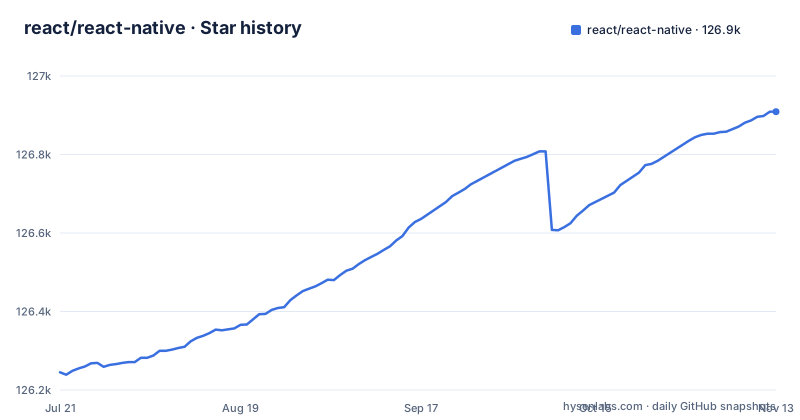
Star history
- react/react-native126,909 ★ · +664
| Repository | 2026-07-21 | 2026-11-13 |
|---|---|---|
| react/react-native | 126.2k | 126.9k |
664 Stars in the last 115 days, measured from the daily GitHub snapshot. Compare with other projects
Editorial analysis
The repo says C++ and the README says JavaScript, and both are load bearing
The product description is one sentence: written in JavaScript, rendered with native code. The repository metadata reports C++ as the primary language. Neither is wrong, and the gap between them is the shape of the project.
The JavaScript side is what an app author touches, with declarative UI, components, hooks, and Suspense reused across Android, iOS, and other platforms. The C++ side is the renderer underneath, and the top level of the tree shows how much native surface there is: build.gradle.kts, settings.gradle.kts, gradle.properties, gradle/, gradlew and gradlew.bat for Android, runXcodeTests.sh and a Gemfile with Gemfile.lock for the iOS toolchain, and .clang-format alongside .swift-format.
The consequence is for contributors rather than app authors. A change to React Native core is not a JavaScript change, and the checkout expects a full native toolchain on your machine. The stated benefit for app authors is that primitives render to the same native platform APIs other apps use, so gestures, text scaling, and accessibility behave the way users expect on each OS, but you get that by having the native side built for you.
The root manifest is private and versioned 1000.0.0
The manifest at the root of the repository is not the package you install. It is named `@react-native/monorepo`, it is marked `private`, and its version is `1000.0.0`, which is a placeholder rather than a release number. The package that reaches npm is `react-native`.
The package manager is pinned too, at `[email protected]`, which is the classic Yarn 1 line rather than a modern release, and the install artifact is the committed `yarn.lock`. If you are used to a different package manager or to a newer Yarn, this is the first place your assumptions will diverge from the project.
The scripts describe the build in terms of monorepo packages rather than one library. `android` runs the example app with `yarn --cwd packages/rn-tester android`, `build` delegates to `node ./scripts/build/build.js`, and `build-android` goes straight at the Gradle project with `./gradlew :packages:react-native:ReactAndroid:build`. The practical consequence for a reader trying to reason about versions is that the number in the repository tells you nothing about the published package, so check the npm listing or the release tags instead of the checkout.
The three newest tags are all 0.88.0 release candidates
The release list is worth reading closely: v0.88.1 on 2026-10-27, v0.88.0 on 2026-10-15, and v0.88.0-rc.6 on 2026-10-27. The list mixes stable releases and a release candidate, and it is not ordered by date, so the suffix in the tag is the signal that distinguishes them. The last push to the repository is 2026-11-02.
What that means for a reader is that the newest thing in the list is not automatically the thing to install. A release candidate exists so that people exercise the change before a stable cut, and the suffix in the tag is the only signal that distinguishes it. If you follow a link to the latest release and install whatever it points at, you may be running a candidate rather than a supported build.
The record of what changed is in the tree rather than in the tag list. There is a current CHANGELOG.md plus archived CHANGELOG-0.5x.md, CHANGELOG-0.6x.md, and CHANGELOG-0.7x.md, so the history is kept in the repository and the older files are frozen by minor line. The Upgrading page in the documentation is the other place to look when a version bump is going to affect you.
Fast Refresh skips the native rebuild, which is exactly where the claim stops
The velocity claim is precise and narrow: see local changes in seconds, with changes to JavaScript code applied by Fast Refresh without rebuilding the native app. That is a real and large win, and it is scoped to JavaScript.
The consequence is that the moment you cross into native code, the loop is the traditional one. A change to a Native Module, to a native dependency, or to anything in the Gradle or Xcode project means a native rebuild, and the build scripts for those paths are exactly the ones named in the manifest, `./gradlew :packages:react-native:ReactAndroid:build` and the Xcode test script.
This is also why the framework question matters more than it first appears. Native dependencies are named as one of the problems the ecosystem has already solved, and the reason is structural: every native dependency is a place where the fast loop stops being fast. If your work is mostly UI in JavaScript, the seconds-long loop is what you will feel. If your work is in the bridge layer, you are in the native build loop regardless of which framework you picked, and that is a fact about the architecture rather than about the tooling choice.
Native Modules are synchronous and type-safe, and they are the extension seam
The extension story is one sentence with a lot in it: Native Modules let you call platform code directly from JavaScript, synchronously and type-safe. The alternative is thousands of existing libraries, indexed at reactnative.directory.
The project's own position is that navigation, native dependencies, and platform tooling are problems the ecosystem has already solved, and that most developers benefit from a Framework.
So the reader's real question is not whether Native Modules are capable but where your dependency graph comes from. If you are writing platform code yourself, synchronous typed calls are a reasonable contract to build on. If you are assembling an app, the three named problems are the ones to budget time for if you go without a Framework.
The project steers you to a Framework, and names Expo as the one
There is a section titled Using a Framework and a position in it: the best way to experience React Native is through a Framework, defined as a toolbox with all the necessary APIs to let you build production ready apps. The one named is Expo, described as a production-grade React Native Framework with file-based routing, a standard library of native modules, and much more. The creation step is one command:
npx create-expo-app@latestand then you follow Expo's own getting started guide.
The bare path exists and is documented, in a section titled Without a Framework, which says you can use React Native without one but that most developers benefit from one, and gives you Getting Started Without a Framework if a Framework does not suit your app.
The consequence is a decision you are expected to make on day one and will pay for later. Choosing bare React Native means owning navigation, native dependency management, and platform tooling yourself, which is precisely the list the project names as already solved elsewhere. That is a legitimate choice for a team that wants that control. It is a poor choice to make by accident, and the README's structure is designed to make sure you do not.
The C++ API is generated and validated by a Python parser, not hand-written
Two scripts in the manifest define how the native surface is kept honest, and they are easy to miss because the interesting one is not JavaScript:
"cxx-api-build": "python -m scripts.cxx-api.parser",
"cxx-api-validate": "python -m scripts.cxx-api.parser --validate"
The pattern is a parser that can build the C++ API surface and a second mode that only validates it. The JavaScript side has the same shape, with `build-types` running `node ./scripts/js-api/build-types` and `flow-check` running `flow full-check`, backed by the .flowconfig and flow-typed/ in the tree.
The manifest names these scripts but does not say what the parser produces or when each mode should be run.
The format check runs six tools, and the docs live in another repository
The manifest chains the format check across six languages, and the chain is the clearest statement of what this codebase is:
"format-check": "yarn format-check-javascript && yarn format-check-cpp && yarn format-check-kotlin && yarn format-check-java && yarn format-check-python && yarn format-check-swift"Each has its own driver script under scripts/, with clang-format for C++, a dedicated formatter for Kotlin, Java, Python, and Swift, and Prettier for the JavaScript and Markdown glob. So a green check means six formatters agreed, and a red one tells you which language you touched.
The documentation is a separate concern entirely, hosted in its own repository, react/react-native-website. The README here is an index of links to that site, and the governance conversation is spread across two more: larger discussions and proposals go to react-native-community/discussions-and-proposals, and release discussion goes to reactwg/react-native-releases. The practical consequence is that a documentation fix, a design debate, and a release question each have a different destination. Development is supported by many companies and individual core contributors, and further information is on the React Foundation website.
Editorial conclusion
Use React Native when you want platform native UI and behavior from one JavaScript codebase, and go through a Framework unless you have a specific reason not to, because the project names navigation, native dependencies, and platform tooling as the problems a Framework exists to solve. Pin a stable version rather than a tag ending in rc, remember that the root manifest version 1000.0.0 is not the published package version, and expect to keep Node, a C++ toolchain, Python, Kotlin, Java, Swift, and Ruby tooling around if you contribute rather than just consume.
Frequently asked questions
What is React Native vs ReactJS?
React is the library and React Native is the framework built on it for native apps. React Native lets you build native apps using React, written in JavaScript and rendered with native code, so primitives render to the same native platform APIs other apps use, and declarative UI, components, hooks, and Suspense are reused across Android, iOS, and other platforms.
Is React Native a coding language?
No, it is a framework, and the language is JavaScript. The repository that implements it reports C++ as its primary language, and the format check in the root manifest chains toolchains for JavaScript, C++, Kotlin, Java, Python, and Swift.
Is React Native frontend or backend?
It is the app side. React Native builds native applications for Android, iOS, and more, and the extension mechanism described is Native Modules, which let you call platform code directly from JavaScript rather than hosting a service. The repository does not describe a server component.
Is React Native easy to learn?
There is a Learn the Basics guide, but the project's own framing is that navigation, native dependencies, and platform tooling are the hard parts and are problems the ecosystem has already solved, which is why it steers new apps toward a Framework such as Expo rather than the bare library.
how to install react native
Follow the Getting Started guide for a new app, or Integration with Existing Apps to adopt it incrementally. The recommended path goes through a Framework, and for Expo you run npx create-expo-app@latest. If you do not want a Framework, the repository provides a Getting Started Without a Framework guide, and no bare CLI install command is given in the README.
how to use react native
Write UI in JavaScript using declarative components, hooks, and Suspense, and use Fast Refresh to see JavaScript changes in seconds without rebuilding the native app. When you need platform capabilities, call native code through Native Modules, which are synchronous and type-safe, or take an existing library from the thousands indexed on reactnative.directory.
Official sources
Where this project is recommended
Where developers are discussing it
Posts on Hacker News, dev.to and Lobsters that link to this repository, found by our scan of those communities. 1 in the last 30 days; newest first.
- This Week In React #301 : TanStack Start, React Aria, Base UI, Next.js | RN Web, Tamagui, One, Skia | Deno, Bun, TS, JPEG XLdev.to · Oct 16, 2026 · 2 points · 0 comments
Add this badge to your README
If you maintain this project, the badge below links readers to this analysis and shows its maintenance status from the daily GitHub snapshot. Paste the markdown into your README; add ?metric=license or ?metric=stars to the image URL for a different field.

[](https://hysenlabs.com/projects/react-react-native)Star history chart for your README
[](https://hysenlabs.com/projects/react-react-native)Was this useful?