ttl traceroute and mtr-style diagnostics for network operators
Fast, modern traceroute with real-time TUI, per-hop stats, ASN/geo lookup, ECMP detection, and MPLS label parsing. A better mtr.
At a glance
- What is it?
- ttl is a Rust command-line traceroute and continuous path monitor with a Ratatui terminal interface, multi-flow discovery, path statistics, enrichment, exports, and Prometheus output. It suits operators who need more than a one-shot hop list, but raw-socket privileges and optional network lookups affect deployment.
- Who is it for?
- Adopt ttl when an operator needs an interactive or continuous mtr-style view with path comparison and machine-readable output. Do not choose it when unprivileged raw sockets are mandatory, external enrichment calls are unacceptable, or a minimal one-shot traceroute is sufficient.
- Can I use it commercially?
- Yes. Apache-2.0 is a permissive licence: you can use, modify and sell software built on it, as long as you keep its copyright and licence notices.
- Is it still maintained?
- Yes. The repository last received commits 1 day ago.
- What is it written in?
- Mainly Rust, according to GitHub's language statistics.
Answers come from the project's GitHub data, last synced on October 23, 2026, and from our analysis. They are not legal advice.
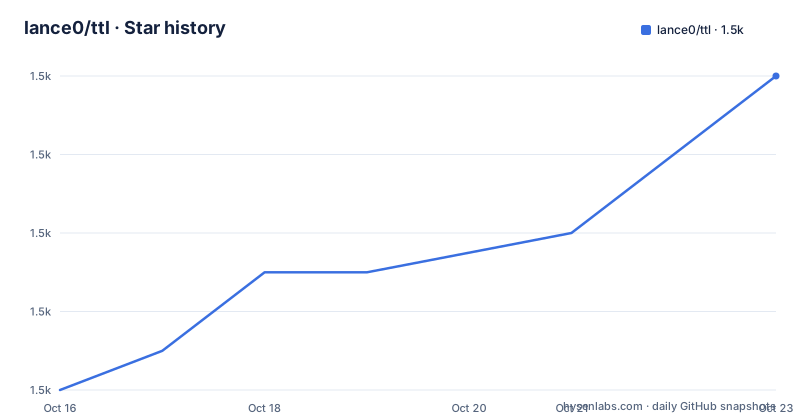
Star history
- lance0/ttl1,486 ★ · +8
| Repository | 2026-10-16 | 2026-10-23 |
|---|---|---|
| lance0/ttl | 1.5k | 1.5k |
8 Stars in the last 7 days, measured from the daily GitHub snapshot. Compare with other projects
Editorial analysis
ttl's scope beyond one-shot traceroute
ttl addresses a specific gap between conventional traceroute and long-running mtr-style monitoring. Conventional traceroute reveals a route at one moment, while operators often also need repeated loss and latency observations, path changes, protocol selection, and exports suitable for incident records or monitoring systems. ttl places those functions in one Rust binary with an interactive terminal interface and headless output modes.
The intended users are network operators, support engineers, and developers diagnosing reachability or routing behavior from a terminal. A command such as `ttl 8.8.8.8` starts a live view, while the README documents per-hop loss, latency, jitter, sparklines, ASN data, reverse DNS, and a hop detail view. Multiple targets can be traced in the same session, which is useful when the question is whether several destinations share or diverge across a path.
This is not a general packet capture suite or a programmable network automation platform. Its scope is path diagnosis. It adds ICMP, UDP, and TCP probing, ECMP flow enumeration, Path MTU discovery, NAT detection, route flap warnings, MPLS parsing, interface identification, and exchange identification. Those features make it more demanding to interpret than a basic hop listing, but they also answer questions that a static traceroute cannot answer alone.
Probing, enrichment, and terminal data flow
Based on the documented commands and repository dependencies, ttl resolves targets, sends probes through raw sockets, receives ICMP responses, and organizes replies by hop. The command accepts ICMP, UDP, or TCP probes, with automatic detection also listed as a feature. Paris or Dublin multi-flow probing supports ECMP path discovery, allowing separate flows to expose different forwarding paths. The README also states that ttl classifies whether balancing is per flow or per packet, although the complete classification rules are not included in the available documentation.
The Rust stack fits the architecture. `tokio` and `futures::join_all` support asynchronous network work and parallel DNS resolution, while `CancellationToken` provides cancellation. `socket2`, `pnet`, and `libc` provide the low-level networking and packet access needed for raw-socket diagnostics. Responses can be enriched with ASN and GeoIP data through `maxminddb`, reverse DNS through the Hickory resolver, and exchange information through PeeringDB over an HTTP client configured with `rustls`.
Presentation is split between an interactive Ratatui and Crossterm interface and non-interactive report formats. JSON, CSV, text, and line-delimited JSON cover export and streaming needs. A separate daemon mode exposes `/metrics` and `/healthz`, with Prometheus integration provided by the documented `--daemon --prometheus :9090` configuration. This makes the same path collection model usable at a workstation, during an incident, or inside a monitoring deployment.
Installing ttl and granting packet privileges
The README recommends installing the published crate with Cargo. Source builds require Rust 1.88 or newer, as declared in `Cargo.toml`, and the repository also publishes prebuilt archives, Homebrew packages, distribution packages, and multi-architecture container images.
For a Cargo installation, install Rust if necessary, load the Cargo environment, and install the `ttl` package:
curl --proto '=https' --tlsv1.2 -sSf https://sh.rustup.rs | sh
source ~/.cargo/env
cargo install ttl
The first two commands install Rust and update the current shell. The last command installs ttl through crates.io. The README also offers `brew install ttl` for macOS and Linux, but it identifies Homebrew core and the tap as separate distribution routes.
Linux raw sockets require elevated privileges. Granting the file capability once avoids running every trace through `sudo`:
sudo setcap cap_net_raw+ep $(which ttl)
ttl 8.8.8.8
The capability must match the installed binary path, so reinstallation can require repeating this step. On macOS and BSD, the README instead shows `sudo ttl 8.8.8.8` and says elevation is always required. This platform difference is a real adoption constraint for unattended installations. The quick install script exists, but the README warns that piping a remote script to `sh` bypasses prior review; a release archive with `SHA256SUMS` provides a more explicit installation path.
First traceroute, ECMP trace, and PMTU check
The shortest documented starting point is a destination name or address. With `CAP_NET_RAW` configured on Linux, this launches the interactive traceroute against Google's public resolver address:
ttl 8.8.8.8The terminal view begins collecting route observations rather than printing a single transient trace. It is intended to show hop statistics and enrichment over time. A hostname exercises DNS resolution, and multiple destinations can be supplied in one invocation:
ttl 8.8.8.8 1.1.1.1 9.9.9.9ECMP discovery sends multiple flows toward a host so that different routes become visible. Eight flows are shown in the quick start, while the advanced examples also document a shorthand for a single `--flow` invocation:
ttl --flows 8 cloudflare.comPath MTU discovery uses a binary search for the largest unfragmented packet size accepted along the path. Its documented invocation is:
ttl --pmtud 1.1.1.1These modes answer different questions. The ordinary trace is for route and timing observations, multi-flow tracing is for equal-cost path discovery, and PMTU probing checks packet-size boundaries. If the route appears stable but traffic fails only for larger packets, the PMTU mode is the relevant first check rather than another standard trace.
Reports, Prometheus monitoring, and container deployment
ttl is not limited to the interactive TUI. A bounded collection can be emitted as a text report, JSON document, or CSV file by selecting an output option and probe count. The JSON format also participates in replay, animated replay, and trace diffing, which turns the binary into a short-lived diagnostic tool as well as a live monitor.
For continuous headless operation, daemon mode publishes Prometheus metrics and health information:
ttl 1.1.1.1 -c 100 --json
ttl 1.1.1.1 --stream-json
ttl --diff before.json after.json
ttl --daemon --prometheus :9090 1.1.1.1
The first command requests 100 probes and JSON output. The second streams line-delimited events, the third compares saved JSON sessions, and the fourth starts a headless service with metrics bound to port 9090. The documentation does not state the complete metric names or the exact schema of every export, so an integration should inspect those outputs before depending on field stability.
The published container image can reproduce the daemon deployment. Multi-architecture `amd64` and `arm64` images are documented:
docker pull ghcr.io/lance0/ttl:latest
docker run -d -p 9090:9090 ghcr.io/lance0/ttl --daemon --prometheus :9090 8.8.8.8
The runtime image is Alpine-based and contains CA certificates for ASN, exchange, and update lookups. Its `ENTRYPOINT` is `ttl`, so destination arguments follow the image name. The default container capability set includes `NET_RAW`, but stricter runtimes may require `--cap-add NET_RAW`. The included Dockerfile also documents a `/healthz` probe at the configured metrics port.
Limits, dependencies, and maintenance cost
The largest constraint is privileged packet access. ttl uses raw sockets, so Linux needs `CAP_NET_RAW`, macOS and BSD documentation calls for `sudo`, and restricted container environments must explicitly grant the capability. A host or policy that forbids raw sockets removes ordinary ttl tracing even though the executable itself can be installed successfully. It is therefore the wrong tool for an unprivileged shared service account that cannot receive such a grant.
Enrichment also depends on external resources. Reverse DNS requires resolution, exchange detection uses the PeeringDB API, ASN and GeoIP lookups depend on MaxMind databases, and update checks call the GitHub releases API. The README points to `docs/FEATURES.md` for optional GeoIP and exchange setup, but the available repository summary does not specify database filenames or download procedure. The default `update-check` feature can be removed with `--no-default-features`, disabled at runtime with `--no-update-check` or `DO_NOT_TRACK`, or controlled through configuration.
License handling is permissive. `Cargo.toml` declares `MIT OR Apache-2.0`, and the repository includes `LICENSE-MIT` and `LICENSE-APACHE`. That declaration describes the available licensing choice, not legal advice about a particular distribution.
The repository is not archived, and its last push was on 2026-10-16. Releases v0.21.0, v0.22.0, and v0.23.0 were published in July, August, and September 2026, respectively. Upgrade work is therefore recent, but rapid release cadence can still impose configuration review: the crate uses edition 2024 and Rust 1.88, optional features alter network behavior, and output consumers may need to check JSON or Prometheus changes in `CHANGELOG.md`.
Editorial conclusion
Adopt ttl when an operator needs an interactive or continuous mtr-style view with path comparison and machine-readable output. Do not choose it when unprivileged raw sockets are mandatory, external enrichment calls are unacceptable, or a minimal one-shot traceroute is sufficient. Verify first that the target platform can grant `CAP_NET_RAW`, that the chosen build has Rust 1.88 or newer, and that DNS, MaxMind, PeeringDB, and update-check network access fit the deployment policy.
Frequently asked questions
How do I install ttl on Linux with permission to send traceroute probes?
Install it with `cargo install ttl`, then run `sudo setcap cap_net_raw+ep $(which ttl)` so the installed binary can use raw sockets without `sudo` for each trace.
Can ttl discover different ECMP routes to the same destination?
Yes. ttl documents Paris and Dublin multi-flow probing, and the quick start uses `ttl --flows 8 cloudflare.com` for ECMP path discovery.
Can ttl run continuously and expose Prometheus metrics?
Yes. In daemon mode, the documented command `ttl --daemon --prometheus :9090 1.1.1.1` provides a Prometheus endpoint and also documents `/healthz` alongside `/metrics`.
Official sources
Add this badge to your README
If you maintain this project, the badge below links readers to this analysis and shows its maintenance status from the daily GitHub snapshot. Paste the markdown into your README; add ?metric=license or ?metric=stars to the image URL for a different field.

[](https://hysenlabs.com/projects/lance0-ttl)Star history chart for your README
[](https://hysenlabs.com/projects/lance0-ttl)Was this useful?