keifu: a commit graph where checking out a remote branch overwrites your local one
Git genealogy, untangled. A TUI for navigating commit graphs with color and clarity.
At a glance
- What is it?
- A Rust terminal UI that draws the commit graph with per-branch colours and adds checkout, staging, commit and push on top. It is deliberately small, and its sharpest edge is documented rather than hidden: checking out a remote branch force-updates an existing local branch to match.
- Who is it for?
- keifu fits somebody who reads graphs in split panes and wants branch switching to be visual rather than typed, especially if a narrow window is the constraint. Skip it if you need hunk-level staging, tags as a first-class workflow, or a client that will not touch a branch you did not ask it to touch, because checking out a remote branch will force-update a same-named local branch.
- Can I use it commercially?
- Yes. MIT is a permissive licence: you can use, modify and sell software built on it, as long as you keep its copyright and licence notices.
- Is it still maintained?
- Yes. The repository last received commits 33 days ago.
- What is it written in?
- Mainly Rust, according to GitHub's language statistics.
Answers come from the project's GitHub data, last synced on November 13, 2026, and from our analysis. They are not legal advice.
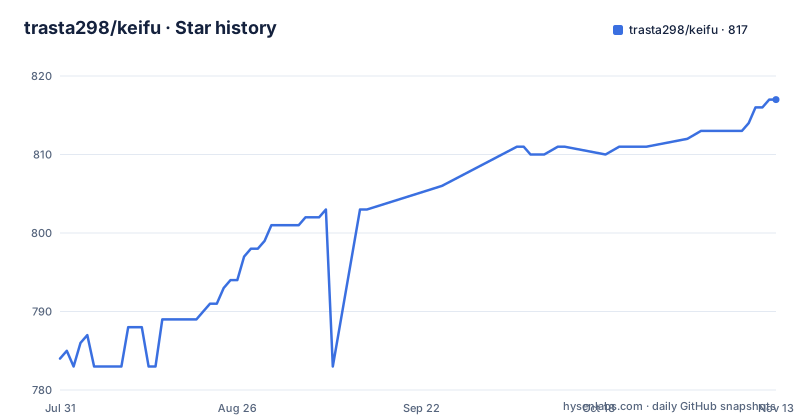
Star history
- trasta298/keifu817 ★ · +33
| Repository | 2026-07-31 | 2026-11-13 |
|---|---|---|
| trasta298/keifu | 784 | 817 |
33 Stars in the last 105 days, measured from the daily GitHub snapshot. Compare with other projects
Editorial analysis
A commit graph first, a Git client second
The name is the Japanese word for genealogy, and it sets the priority. keifu is a terminal interface for reading the shape of a repository's history: a colour-coded commit graph, a commit detail panel with the full message and change stats, a diff view with syntax highlighting, and branch operations layered on top.
The motivation section is honest about the comparison it is making. `git log --graph` is hard to read, and the pitch is a cleaner, colour-coded rendering. The second reason is speed of branch switching, with an explicit nod to the way working on several branches in parallel has become normal. The third reason is a limit rather than a feature: only basic Git operations are supported, and this is not a full-featured Git client.
Two more constraints shaped the interface. Narrow terminals are a first-class target, so fields such as author or date may be hidden when there is no room, which is why split panes and small windows work. And no image protocol is required, so it runs anywhere Unicode line drawing and colour are available.
It is written in Rust with ratatui, published on crates.io, and there is a Japanese README alongside the English one at `docs/README_JA.md`.
The operations it does cover are checkout, branch creation and deletion, fetch, staging and unstaging, commit with a message dialog, and push.
Four install routes, one requirement that is easy to miss
Installation is offered four ways, and they are all one-liners.
cargo install keifuThat is the crates.io route. A second is mise, which installs the latest tagged build globally, and a third is Homebrew through the author's tap. Building from source means cloning and running `cargo install --path .`, which is the only route that needs a Rust toolchain.
The requirements list has four entries and one of them is easy to skim past. keifu must run inside a Git repository, and it finds one by walking up from the current directory rather than taking a path argument. It needs a terminal with Unicode line drawing and colour. It needs `git` on the PATH, and that requirement is scoped rather than general: the command itself is only needed for fetch and push. And the Rust toolchain applies only to source builds.
Running it is a single command with no arguments, because the repository is discovered rather than named. There is no `keifu <path>` form in the documented usage, which means running it from the wrong directory does nothing useful rather than pointing at the wrong repository.
Configuration lives in a separate document, and since the crate depends on a TOML parser and a directories helper, configuration is presumably read from a per-user config directory rather than from inside the repository. What lives there is documented at `docs/configuration.md` rather than in the README.
The graph loads 500 commits and stops, and 50 files
The limitations section is where this project is most useful, because the caps are the kind of thing you only learn after waiting for a slow load.
The graph loads up to 500 commits across the visible branches. Merge commits are diffed against the first parent rather than against a combined view, and the initial commit is diffed against an empty tree, so the very first commit shows every file as added. Changed files are capped at 50 per commit, and binary files appear in the list without line statistics.
The working tree gets its own entry. If there are staged, unstaged or untracked changes, an uncommitted changes row appears at the top, and that row is where staging keys apply.
Labels have a collapse rule worth knowing. When several branches point at the same commit, the graph shows a single name with a count suffix, something like `main +2`, and you switch between the hidden ones with the left and right keys rather than by opening a menu.
Visibility defaults are worth checking before you conclude something is missing. Remote branches are shown by default and tags are shown by default, each with a single key to hide. Hiding remote branches also removes from the graph any commit reachable only from a remote, which changes the history you are looking at and not just the labels on it.
Checking out a remote branch force-updates a matching local branch
This is the line in the documentation that deserves to be read twice before you use the tool on real work.
Checking out something like `origin/xxx` creates or updates a local branch. Upstream is set only when you are creating a new branch, so an existing branch that is merely moved does not acquire a tracking configuration as a side effect. And if the local branch already exists but points at a different commit, it is force-updated to match the remote.
In practice that means a checkout of a remote branch will discard whatever your local branch was pointing at, without asking, and without a merge. If you had local work on a branch named after the remote one, that ref moves. The safety habit is to rename or stash before you browse, or to work on branches whose names you do not reuse for remote tracking.
The other operations are narrower. Deletion works only on local branches, and it excludes the current HEAD. Fetch and push both require an `origin` remote to be configured. Staging is per file, with no hunk-level staging, so selecting part of a change means staging the whole file. Commits include only what is staged, which is the same rule plain `git commit` follows, and that is a point in the tool's favour rather than a limitation.
Mouse capture means you need a modifier to select text
Mouse support is complete rather than partial. Clicking a commit row selects it and a double-click opens the file list, clicking a file row selects it and a double-click opens the diff, clicking a pane focuses it, and clicking a status bar hint runs that action. Wheel scrolling affects whichever pane the cursor is over.
That completeness has a cost the documentation names directly. Since keifu captures mouse input, the terminal's own text selection no longer works by dragging, so you need the modifier key: Shift with drag in most terminals, and Fn with drag on iTerm2.
One terminal-specific defect is documented with a workaround. Ghostty fans a single wheel notch out into several scroll events for mouse-mode applications, referenced as an open discussion, so a mouse click can scroll a few extra lines. The fix is a configuration value rather than a code change: lowering the mouse scroll multiplier in the Ghostty config.
Worth noting for anyone automating against this tool: there is a remote-control debug server plus file logging, described in a separate debugging document and aimed at agent-driven debugging. That is a deliberate affordance, since a TUI is otherwise hard to drive from a script or an agent, and it means the same binary that renders the graph can be stepped through remotely.
The keymap is Vim motions wrapped around seven operation groups
Navigation is where the design shows. Up and down move through the list and scroll the detail pane when it has focus, Tab switches focus between the graph and the commit detail, square brackets jump to the next or previous commit that carries branch labels, and left and right select a branch among the labels collapsed at the same commit. There is a jump to HEAD, paging with the usual control keys, and Space opens the file diff for the selected commit.
Operations are six keys: Enter checks out the selected branch or commit, `b` creates a branch at the selected commit, `d` deletes a local non-HEAD branch, `f` fetches from origin, `c` opens a commit dialog for staged changes, and `p` pushes the current branch.
Staging applies when the uncommitted changes row is selected, with keys for stage and unstage one file, stage all, unstage all, and commit. Search is incremental fuzzy matching over branch names opened with `/`, navigated with the control and arrow keys, and cancelled with Escape or Backspace on an empty query.
The diff view has its own set: horizontal scrolling, full page and half page movement, jump to a line start, bracket keys to move between hunks, and `n` and `N` to move between files. Elsewhere, `y` and `Y` copy a commit hash or a branch name to the clipboard through OSC 52, `R` refreshes from the repository, `o` toggles remote branches, `t` toggles tags, `?` toggles help, and `q` quits, returning focus to the graph first if the detail pane had it.
Release builds abort on panic and vendor their own OpenSSL
The dependency list explains several behaviours you would otherwise have to guess at.
`git2` is pinned with a vendored OpenSSL feature, so the binary does not depend on whatever TLS library the host happens to have, at the cost of a longer build. `similar` is used for diffs with its inline feature enabled, which is what makes the word-level emphasis inside a changed line possible rather than only whole-line highlights. `syntect` is included with default features turned off and a single grammar feature on, which is the cheaper way to get syntax highlighting. `unicode-width` is there so the graph aligns on characters that occupy two cells, and `fuzzy-matcher` powers the branch search dropdown.
The release profile is tuned hard: link-time optimization on, a single codegen unit, and `panic = 'abort'`, so a panic terminates rather than unwinding. That keeps the binary smaller and faster, and it also means a crash cannot leave a half-written state for an unwinding handler to clean up.
For the repository itself, version 0.6.0 on edition 2021, with a `cliff.toml` for changelog generation, `tests/`, a `docs/` directory, and both `AGENTS.md` and `CLAUDE.md` alongside `.agents/` and `.claude/` directories.
On cadence and adoption: v0.4.0 on 2026-06-10, v0.5.0 on 2026-06-19, v0.6.0 on 2026-07-30, and the last push to main was 2026-07-30. With 806 stars, 25 forks and 7 open issues, this is a well-read small project rather than a widely deployed one, and two months without a commit is normal for that shape.
Editorial conclusion
keifu fits somebody who reads graphs in split panes and wants branch switching to be visual rather than typed, especially if a narrow window is the constraint. Skip it if you need hunk-level staging, tags as a first-class workflow, or a client that will not touch a branch you did not ask it to touch, because checking out a remote branch will force-update a same-named local branch. Before you use it on a work branch, rename or stash first, and read the limitations list, which is unusually complete for a project this young.
Frequently asked questions
What does keifu do that git log does not?
It renders the commit graph as a colour-coded terminal UI with per-branch colours, a commit detail panel with change statistics, a syntax-highlighted diff view, and Git operations such as checkout, staging, commit and push, with full mouse support.
How do I install keifu?
With cargo install keifu from crates.io, mise use -g pointing at the GitHub repository, brew install through the author's tap, or cargo install --path . from a clone. Only the source build needs a Rust toolchain.
Does checking out a remote branch in keifu overwrite my local branch?
Yes, that is the documented behaviour: if the local branch exists and points at a different commit it is force-updated to match the remote, and upstream is only set when a new branch is created.
How many commits and files does keifu display?
Up to 500 commits across the visible branches, and up to 50 changed files per commit. Merge commits are diffed against the first parent and the initial commit against an empty tree, and binary files are listed without line statistics.
Can I select text with the mouse in keifu?
Not by dragging, because keifu captures mouse input. Use the terminal modifier instead, Shift with drag in most terminals or Fn with drag on iTerm2. In Ghostty, a wheel notch can fan out into several scroll events, which the mouse scroll multiplier setting works around.
Official sources
Add this badge to your README
If you maintain this project, the badge below links readers to this analysis and shows its maintenance status from the daily GitHub snapshot. Paste the markdown into your README; add ?metric=license or ?metric=stars to the image URL for a different field.

[](https://hysenlabs.com/projects/trasta298-keifu)Star history chart for your README
[](https://hysenlabs.com/projects/trasta298-keifu)Was this useful?