adw-gtk3: porting libadwaita's look to GTK3 applications in GNOME
The theme from libadwaita ported to GTK-3
At a glance
- What is it?
- adw-gtk3 is an unofficial GTK3 port of libadwaita, designed to close the visual gap between legacy GTK3 applications and modern GTK4 apps running on GNOME. Installation is straightforward for native packages, but Flatpak and Snap sandboxing require separate configuration steps.
- Who is it for?
- adw-gtk3 is worth installing if your GNOME desktop mixes GTK3 and GTK4 libadwaita apps and the visual gap is noticeable. GTK3 apps pick up the theme once it is active; Flatpak and Snap apps require additional steps, and the Flatpak Flathub option excludes non-libadwaita GTK4 apps.
- Can I use it commercially?
- Yes, with conditions. LGPL-2.1 is a weak copyleft licence: you can use it inside commercial and closed-source software, but if you distribute changes to its own files, you must publish those changes under the same licence.
- Is it still maintained?
- Yes. The repository last received commits 169 days ago.
- What is it written in?
- Mainly SCSS, according to GitHub's language statistics.
Answers come from the project's GitHub data, last synced on October 23, 2026, and from our analysis. They are not legal advice.
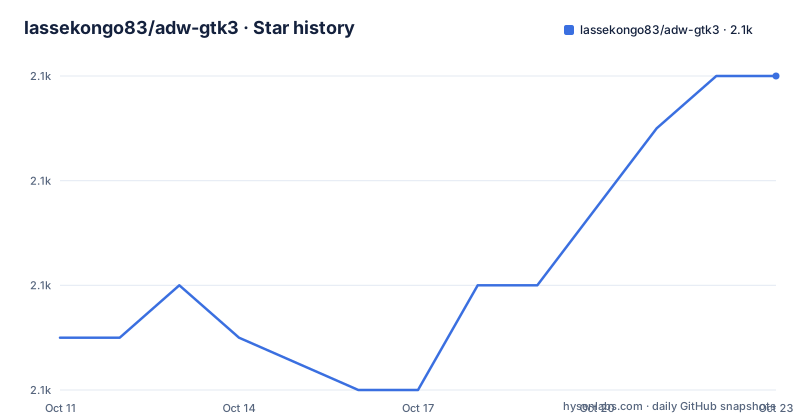
Star history
- lassekongo83/adw-gtk32,072 ★ · +5
| Repository | 2026-10-11 | 2026-10-23 |
|---|---|---|
| lassekongo83/adw-gtk3 | 2.1k | 2.1k |
5 Stars in the last 12 days, measured from the daily GitHub snapshot. Compare with other projects
Editorial analysis
adw-gtk3 fills the visual gap between legacy GTK3 apps and libadwaita's GTK4 look
GNOME desktops that use libadwaita for GTK4 applications create a visible inconsistency when GTK3 apps still render with the old Adwaita styling. adw-gtk3 addresses this by porting libadwaita's CSS to GTK3, so legacy applications adopt a look closer to what GTK4 apps produce.
It is distributed under LGPL-2.1. Nine repository topics (adw-gtk3, adwaita, gnome, gtk-theme, gtk3, gtk3-theme, libadwaita, linux, theme) reflect the project's focused scope: this is a GNOME desktop GTK3 theme, not a general Linux desktop theme.
The README is explicit about one boundary: "This port does not claim to be a 100% look-a-like of libadwaita. There are some limitations to what GTK3 can do." Users who expect pixel-perfect parity with libadwaita will find gaps, particularly in widgets or effects that have no GTK3 equivalent. adw-gtk3 closes the most visible inconsistencies, not all of them.
Written in SCSS and built with Meson: how the GTK3 CSS theme is structured
SCSS is the primary language, a CSS preprocessor that compiles down to plain CSS files GTK3 can read as a theme. Source lives under src/, which has its own README.md for contributors who want to build from source. At the repository root, meson.build drives the installation, placing compiled CSS in the correct system or user directories.
Of the 11 top-level entries (.gitattributes, .github/, .gitignore, LICENSE, README.md, images/, meson.build, scripts/, snap/, src/, version), the version file is notable: it holds the current version string separately from any tag or meson.build constant, which is an uncommon layout for a theme project. Pre-built packages handle the SCSS compilation and Meson installation for most users, so the build toolchain is only relevant for contributors or those building from source.
Installing via Fedora, Arch, Manjaro and other distribution packages
For Fedora, Arch and Manjaro, the README gives package manager commands. On Fedora:
dnf install adw-gtk3-themeOn Arch:
pacman -S adw-gtk-themeOn Manjaro:
pamac install adw-gtk3Note the package name difference: Fedora uses `adw-gtk3-theme`, Arch uses `adw-gtk-theme` (no trailing digit), and Manjaro uses `adw-gtk3`. Getting the name wrong returns a package-not-found error. Debian users are directed to a third-party repository.
A tarball download from the releases page is also available: extract its contents to `~/.local/share/themes/` for a user-level install that does not require root. Snap users can install the theme Snap with:
sudo snap install gtk-theme-adw-gtk3After installing, activate the theme in gnome-tweaks under Appearance > Legacy Applications. For dark themes, switch the color scheme in gnome-control-center > Appearance.
Switching between light and dark modes with gsettings and the GTK4 dark theme fix
gnome-tweaks is the graphical route, but gsettings works from the terminal and is scriptable. To activate the light theme:
gsettings set org.gnome.desktop.interface gtk-theme 'adw-gtk3' && gsettings set org.gnome.desktop.interface color-scheme 'default'For dark mode:
gsettings set org.gnome.desktop.interface gtk-theme 'adw-gtk3-dark' && gsettings set org.gnome.desktop.interface color-scheme 'prefer-dark'To revert to the system default:
gsettings set org.gnome.desktop.interface gtk-theme 'Adwaita' && gsettings set org.gnome.desktop.interface color-scheme 'default'If dark mode still does not apply to some GTK4 apps after switching, the README gives a fallback: add these 2 lines to `~/.config/gtk-4.0/settings.ini` and then relog:
[Settings]
gtk-application-prefer-dark-theme=1
gtk-theme-name=adw-gtk3-dark
The relog step is easy to miss. Without it, some apps may ignore the settings.ini change.
Flatpak apps need a separate installation path, and the 2 options have different trade-offs
Flatpak sandboxing prevents apps from reading the host theme by default, so installing adw-gtk3 on the host alone does nothing for Flatpak apps. Two installation paths address this.
Installing from Flathub is simpler:
flatpak install org.gtk.Gtk3theme.adw-gtk3 org.gtk.Gtk3theme.adw-gtk3-darkHowever, the README adds a constraint: the Flathub version does not work with non-libadwaita GTK4 apps. For a mix of GTK3, libadwaita GTK4 and non-libadwaita GTK4 apps, the flatpak override approach is needed instead:
sudo flatpak override --filesystem=xdg-data/themes
sudo flatpak mask org.gtk.Gtk3theme.adw-gtk3
sudo flatpak mask org.gtk.Gtk3theme.adw-gtk3-dark
This override approach requires the theme to also be present in `~/.local/share/themes`, meaning the tarball install is a prerequisite. The 2 flatpak mask commands prevent the Flathub theme packages from overriding the local copy. Choosing the wrong option here means some apps still render with their default styling.
What adw-gtk3 cannot replicate: the GTK3 ceiling
GTK3 and GTK4 share a stylesheet model but GTK4 supports newer CSS properties, widgets and drawing primitives that GTK3 does not. adw-gtk3's SCSS theme works within GTK3's subset of CSS support, so any libadwaita widget that depends on GTK4-only features has no equivalent. How visible this gap is depends on which apps are running: apps that use only standard GTK3 widgets benefit fully, while apps that do unusual things with custom drawing or non-standard widgets may not benefit at all.
There is also no guarantee that a future GNOME update to libadwaita will be immediately reflected in adw-gtk3. Package maintainers for Fedora, Arch and other distributions are listed separately in the credits section, which means package freshness depends on each contributor's cadence rather than on the upstream repository alone.
11 companion projects for applications outside the GTK3 scope
adw-gtk3 covers GTK3 apps; the README's related projects table lists 11 separate ports for other application frameworks and environments. GTK2 is covered by adw-gtk2-colorizer. Gimp 3 has adw-gimp3. KDE has a Libadwaita-KDE port and a Kvantum variant. adw-colors provides accent color customization for GNOME 47 and later through a CLI program.
For browser-based and Electron-style apps, separate theme projects exist for Firefox (firefox-gnome-theme), Thunderbird (thunderbird-gnome-theme), VSCode (vscode-adwaita), Discord (discord-gnome-theme) and Obsidian (obsidian-adwaita-theme). Steam has Adwaita-for-Steam. Window decoration for xfwm4 is handled by adw-xfwm4.
These projects are independent. adw-gtk3 does not bundle or manage them, and none of the 11 companion projects are listed as dependencies. Anyone who wants a fully unified libadwaita look across all desktop surfaces needs to install and update each one separately.
Editorial conclusion
adw-gtk3 is worth installing if your GNOME desktop mixes GTK3 and GTK4 libadwaita apps and the visual gap is noticeable. GTK3 apps pick up the theme once it is active; Flatpak and Snap apps require additional steps, and the Flatpak Flathub option excludes non-libadwaita GTK4 apps. Before activating, confirm your package is current: v6.5, published on 2026-04-13, is the latest version. On a non-GNOME desktop the theme's reach is unpredictable. To undo the change, the gsettings revert command returns the desktop to the default Adwaita theme without rebooting.
Frequently asked questions
How do I install adw-gtk3?
adw-gtk3 is available as a distribution package (Fedora, Arch, Manjaro), as a Flatpak from Flathub, as a tarball extracted to ~/.local/share/themes/, and as a Snap. After installing, activate it in gnome-tweaks under Appearance > Legacy Applications, or use the gsettings command.
Will adw-gtk3 style my Flatpak applications?
Flatpak apps are sandboxed and will not pick up the host theme automatically. Install the theme via Flathub or use the flatpak override approach. The Flathub option does not work with non-libadwaita GTK4 apps; the override approach works with those apps when the theme is also present in ~/.local/share/themes.
Does adw-gtk3 look exactly like libadwaita?
The README states that adw-gtk3 is not a 100% look-alike of libadwaita. GTK3 has limitations that prevent some libadwaita features from being replicated, so a visual gap remains for widgets that rely on GTK4-only capabilities.
Can I customize adw-gtk3 colors?
adw-gtk3 and libadwaita can be customized with GTK named colors. The adw-colors project provides more information and accent color presets. For GNOME 47 and later, a CLI program named accent-color-changer is available in the adw-colors repository.
How do I switch back to the default GNOME theme from adw-gtk3?
Run the gsettings command to revert: `gsettings set org.gnome.desktop.interface gtk-theme 'Adwaita' && gsettings set org.gnome.desktop.interface color-scheme 'default'`. This requires no reboot.
Official sources
Add this badge to your README
If you maintain this project, the badge below links readers to this analysis and shows its maintenance status from the daily GitHub snapshot. Paste the markdown into your README; add ?metric=license or ?metric=stars to the image URL for a different field.

[](https://hysenlabs.com/projects/lassekongo83-adw-gtk3)Star history chart for your README
[](https://hysenlabs.com/projects/lassekongo83-adw-gtk3)Was this useful?