TexLab: Language Server Protocol for LaTeX, with no TeX distribution bundled
An implementation of the Language Server Protocol for LaTeX
At a glance
- What is it?
- TexLab implements the Language Server Protocol for LaTeX in Rust, pairing with any LSP-capable editor through a background server process. It ships without a TeX distribution, so compilation depends on one you install or configure separately.
- Who is it for?
- TexLab is worth using if you edit LaTeX across multiple editors and want completion, cross-references and build feedback without maintaining a separate plugin per tool. Skip it if you need compilation bundled: TexLab cannot compile without a separately installed TeX distribution, and that gap is invisible until the first build attempt fails.
- Can I use it commercially?
- Yes, with conditions. GPL-3.0 is a copyleft licence: if you distribute software that includes it, you must release that software's source code under the same licence. Running it internally without distributing it does not trigger that obligation.
- Is it still maintained?
- Yes. The repository last received commits 4 days ago.
- What is it written in?
- Mainly Rust, according to GitHub's language statistics.
Answers come from the project's GitHub data, last synced on October 23, 2026, and from our analysis. They are not legal advice.
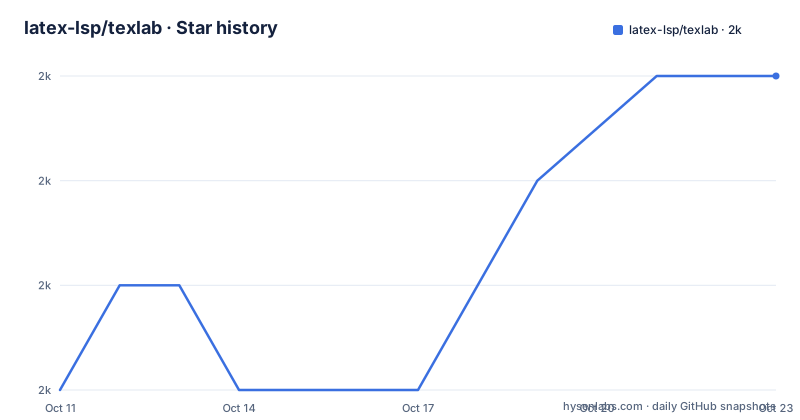
Star history
- latex-lsp/texlab2,030 ★ · +3
| Repository | 2026-10-11 | 2026-10-23 |
|---|---|---|
| latex-lsp/texlab | 2k | 2k |
3 Stars in the last 12 days, measured from the daily GitHub snapshot. Compare with other projects
Editorial analysis
LSP as the architecture that decouples LaTeX editing from any single editor
LaTeX authors who switch editors face a specific problem: each editor traditionally needs its own LaTeX plugin, and the feature set varies by tool and maintainer. The Language Server Protocol addresses this by separating editing intelligence from the display layer, moving it to a background server that any LSP-capable editor can connect to for completion, cross-references and build feedback.
TexLab is that background server, implemented in Rust and designed to pair with any editor that implements the protocol. It handles completion, cross-references and diagnostics across all files in an open workspace, covering VS Code, Neovim, Emacs and any other LSP host. Windows, Linux and macOS are all supported, and precompiled binaries are available on GitHub, making setup straightforward without needing a Rust toolchain on the target machine.
Three install paths, and why crates.io silently delivers an outdated build
Installation has three documented paths. The first is a precompiled binary from the GitHub releases page, which ships for Windows, Linux and macOS and requires no build toolchain. System package managers are the second option, and a Repology listing tracks packaging status across Linux distributions and macOS package managers, so the specific command depends on the system.
Building from source requires a recent, stable Rust installation, with the Cargo.toml workspace specifying a minimum rust-version of 1.89. Run this in the project folder:
cargo build --releaseCargo.toml's optimised build profile enables thin link-time optimisation and incremental builds.
One path looks natural for Rust developers but silently delivers the wrong version. Installing from crates.io will succeed and produce a binary, but the project stopped publishing new versions there. To install a specific version from source, use:
cargo install --git https://github.com/latex-lsp/texlab --locked --tag <insert version here>Passing --locked pins the build to the exact dependency versions in Cargo.lock rather than resolving them afresh.
What the Cargo.toml workspace reveals, and the CTAN distribution the README does not explain
Two authors appear in the Cargo.toml workspace metadata, Eric Förster and Patrick Förster, while the Maintainers section names only Patrick Förster. This means one person currently maintains the project, with a second listed as an original contributor. The Cargo.toml workspace version is 5.26.0, matching the most recent tagged binary. For the LSP wire protocol, the workspace lists lsp-server at 0.8.0 and lsp-types at 0.97.0; for text parsing, it includes logos at 0.15.1 and rowan at 0.16.1. The workspace groups its codebase under a crates/ directory with the resolver set to 2.
A texlab.tex file sits at the top level of the repository, and a CTAN badge in the README links to ctan.org/pkg/texlab. CTAN is the Comprehensive TeX Archive Network, the standard distribution channel for LaTeX packages. What that CTAN package installs, and whether it has any relationship to the Rust binary, is not documented in the README or the top-level repository files. Anyone finding TexLab through a TeX distribution's package manager encounters a distribution channel that the standard install instructions never address, and what gets installed by that route remains unexplained in the project's own documentation.
Compilation requires a TeX distribution not included with the server, with Tectonic as one alternative
LSP editing features work without any TeX distribution on the machine. Completion, cross-references and diagnostics all function independently of whether a TeX engine is available. Only when building a document does the external installation matter, and this boundary is easy to miss until the first compile attempt fails with an unhelpful error.
For compilation, Tectonic is a supported alternative to a traditional TeX distribution. Tectonic fetches packages from the internet on demand rather than requiring a full local installation up front, and an example configuration lives on the project wiki at github.com/latex-lsp/texlab/wiki/Tectonic. For environments where managing a full distribution is impractical, or where builds need to pull only what each document uses, Tectonic is the back-end the project has documented. Build configuration for other back-ends, along with forward-search setup, is covered on the wiki rather than in the README itself.
Workspace-level dependency resolution, and where automatic detection breaks down
Once TexLab starts, it analyses every file in the open workspace and maps dependencies between them without manual configuration. No magic comments like %!TEX root are required in source files, and the server determines file relationships from the workspace structure alone.
Multi-folder projects are the stated exception. Some of them require the texlab.rootDirectory option to be set; which configuration format to use depends on the editor, and the wiki covers the specific syntax for supported tools. Beyond rootDirectory, TexLab offers configuration for building and forward search, none of which is documented inline. Treating the setup as complete without checking rootDirectory against the actual workspace layout is the one oversight that consistently causes silent cross-file reference failures.
The Windows-only runtime dependency that breaks startup on clean machines
On Windows, the TexLab binary depends on the Microsoft Visual C++ Redistributable for Visual Studio 2015. On a machine where nothing else has installed this runtime library, the binary will not start. Whether it is already present depends entirely on what other software has been set up on that machine.
Many developer workstations carry it from other applications. On a clean machine built from a minimal base image, it needs a separate installation before TexLab will run. A download link for it appears on the Microsoft site. No comparable runtime dependency is documented for Linux or macOS builds. Confirming its presence before declaring the setup complete avoids a startup failure that resembles a broken binary rather than a missing system library.
Debug builds, the test suite, and how to connect a local binary to the VS Code extension
For a faster debug build used during development, drop the optimisation flags:
cargo buildConnecting this build to the VS Code extension during development requires adding the absolute path of the target/debug folder to the PATH environment variable, after which the extension picks up the local build instead of any system-wide binary. This path setup is specific to the VS Code extension; other editors have their own mechanisms for pointing to a custom server binary.
An extensive test suite covering unit and integration tests runs with:
cargo testCONTRIBUTING.md documents the pull request process and the code of conduct for anyone submitting changes. No specific test count is given in either the README or the Cargo.toml workspace.
Editorial conclusion
TexLab is worth using if you edit LaTeX across multiple editors and want completion, cross-references and build feedback without maintaining a separate plugin per tool. Skip it if you need compilation bundled: TexLab cannot compile without a separately installed TeX distribution, and that gap is invisible until the first build attempt fails. The wiki at github.com/latex-lsp/texlab/wiki is the only reference for build configuration and forward-search setup beyond what the README summarises. Before committing to it, verify the rootDirectory option for any multi-folder workspace and confirm the Windows Visual C++ Redistributable requirement against the machines your team actually uses.
Frequently asked questions
What is TexLab?
TexLab is a cross-platform implementation of the Language Server Protocol for LaTeX, written in Rust. It runs as a background server process, providing completion, cross-references and build feedback to any editor that implements the LSP protocol.
How do I install TexLab?
Three paths are documented: precompiled binaries from the GitHub releases page, a system package manager tracked on Repology, or building from source with Rust 1.89 or newer using cargo build --release. Installing from crates.io is explicitly not recommended because the project stopped publishing new versions there.
Does TexLab work with Neovim or Emacs?
It works with any editor that implements the Language Server Protocol. No specific non-VS Code editors are named in the README, but the protocol compatibility covers any LSP-capable host.
Why should I not install TexLab from crates.io?
The project stopped publishing new versions to crates.io. An install from there will succeed but produce an outdated binary. The correct source-based install uses cargo install with the --git flag and a specific release tag pointing to the GitHub repository.
Does TexLab include a TeX distribution for compiling documents?
No. LSP editing features work without a TeX distribution, but building documents requires one installed separately. Tectonic is supported as an alternative compilation back-end, with an example configuration on the project wiki.
Official sources
Add this badge to your README
If you maintain this project, the badge below links readers to this analysis and shows its maintenance status from the daily GitHub snapshot. Paste the markdown into your README; add ?metric=license or ?metric=stars to the image URL for a different field.

[](https://hysenlabs.com/projects/latex-lsp-texlab)Star history chart for your README
[](https://hysenlabs.com/projects/latex-lsp-texlab)Was this useful?