Leo: a language whose unit of work is a circuit, not a process
🦁 The Leo Programming Language. A Programming Language for Formally Verified, Zero-Knowledge Applications
At a glance
- What is it?
- The ProvableHQ compiler for private applications on Aleo, shipped as three coordinated Rust crates, still marked alpha after a hundred minor releases.
- Who is it for?
- Leo is worth a weekend if the Aleo ecosystem is on your horizon and you want to stop hand-writing constraint systems. The tooling around the language is real: a formatter, a language server, a package system, an ABI, and a disassembler all ship in the same workspace.
- Can I use it commercially?
- Yes, with conditions. GPL-3.0 is a copyleft licence: if you distribute software that includes it, you must release that software's source code under the same licence. Running it internally without distributing it does not trigger that obligation.
- Is it still maintained?
- Yes. The repository last received commits 15 days ago.
- What is it written in?
- Mainly Rust, according to GitHub's language statistics.
Answers come from the project's GitHub data, last synced on October 23, 2026, and from our analysis. They are not legal advice.
Star history
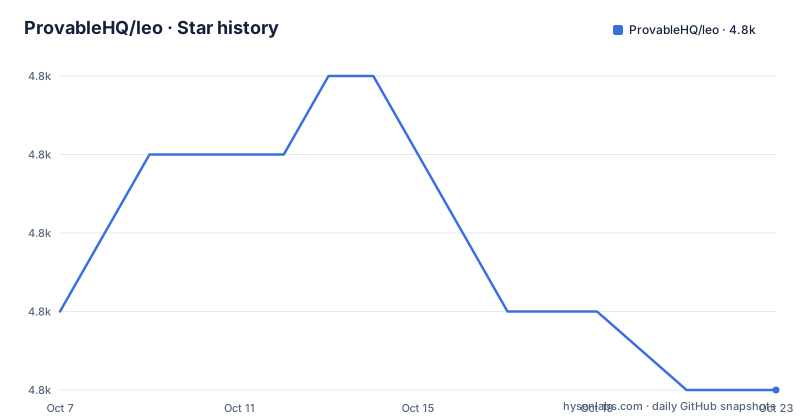
- ProvableHQ/leo4,821 ★ · -1
| Repository | 2026-10-07 | 2026-10-23 |
|---|---|---|
| ProvableHQ/leo | 4.8k | 4.8k |
-1 Stars in the last 16 days, measured from the daily GitHub snapshot. Compare with other projects
Editorial analysis
A language whose unit of work is a circuit
Most languages hand you a program and ask you to trust it at runtime. Leo inverts that. It compiles your source into a circuit, and the circuit is what anyone verifies. The README puts it plainly: Leo provides a high-level language that abstracts low-level cryptographic concepts, and it compiles to circuits making zero-knowledge proofs practical. The word that matters there is abstracts. Constraint systems are normally written by hand or by way of a library that still leaks field arithmetic into your code, and Leo's pitch is that a developer writing an application should not have to think about the witness computation at all.
The syntax is deliberately conventional. The README says it is influenced by JavaScript, Scala, and Rust, with a strong emphasis on readability, and that emphasis shows in the type surface rather than in any exotic control flow. What sits underneath is the standard-library and proving layer: the workspace pins `aleo-std` at 1.0.3, and every program ultimately becomes Aleo instructions that run inside the Aleo execution environment.
The project also cares about the unglamorous half of compiler work. The README notes that Leo ships unit tests, integration tests, and console functions so you can sanity check circuits rather than discovering a bad constraint after a long proving run. For a language whose output is a proof, a fast failing test is worth more than it usually is.
One tension is worth naming early. The repository description markets Leo as a language for formally verified, zero-knowledge applications, while the README describes an abstraction layer over cryptographic concepts and then states that the language is currently in an alpha stage and is subject to breaking changes. Both are the project's own words. The practical reading is that the cryptography underneath is not experimental, but the language surface on top of it still moves. Judge the maturity of your dependencies, not of the proving stack.
Installing the compiler and its two companions
Leo is distributed on crates.io, which means a Rust toolchain is the only prerequisite. The README recommends rustup, and on macOS and Linux that is the usual one-line bootstrap. Windows gets an executable to download and run instead.
The released compiler comes as three crates rather than one, because the formatter and the language server have their own release cadence and their own binary names:
cargo install leo-lang leo-fmt leo-lspOnce that finishes, `leo` with no arguments starts the CLI. From there, `leo update` moves you and both plugins to the newest released version, and `leo --version` tells you where you stand. The README flags one sharp edge worth internalising: if you had a prerelease installed, `leo update` overwrites it with the latest stable. Given the alpha status, that is a habit worth building deliberately rather than reflexively.
Working on the compiler itself is a different path, and it installs only two of the three things:
git clone https://github.com/ProvableHQ/leo
cd leo

cargo install --path crates/leo
cargo install --path crates/fmt
The `crates/lsp` project is absent from that list. If you build from source expecting a language server binary and it is not there, the source build is the reason, not a broken checkout. The repository default branch is `master` rather than `main`, which trips up tooling that assumes the other convention when you clone it blind.
One command does the whole proof pipeline
The quick start is short enough to quote in full, and the brevity is the interesting part:
leo new helloworld
cd helloworld

leo run main 0u32 1u32
`leo new` scaffolds a project directory with a given name. `leo run` takes a function and its arguments, where `0u32` and `1u32` are typed literals carrying an explicit 32-bit unsigned width, and it compiles the program into Aleo instructions and runs it.
That one subcommand covers four distinct stages that would otherwise be four commands. It builds the program, generates and constrains the witness, produces the proof, and verifies it. For someone arriving from conventional languages, the gap between writing a function and shipping a verified artifact is the entire reason this project exists, and the CLI closes it in a single invocation. The `u32` suffixes are a small but real reminder that you are writing a circuit: integer widths are part of the constraint system, not an implementation detail of a machine word.
For anything beyond a first run, the CLI surface is documented at docs.leo-lang.org, and the language has a formal grammar in a separate ABNF file maintained under the ProvableHQ grammars repository. Having the grammar outside the implementation is unusual and useful: when a compiler error message and the specification disagree, you have a third source to consult.
Three crates, one pinned dependency set
The release structure is the part of this project that tells you how to use it safely. Each Leo release publishes matching `leo-lang`, `leo-fmt`, and `leo-lsp` tags, and every release body opens with a compatibility table naming exact versions of `snarkvm` and `snarkOS`. The 4.4.4 line, published in September 2026, pairs with snarkVM 4.10.0 and snarkOS 4.9.0.
That table is a promise about the dependency graph. It means the compiler, the standard library, the prover, and the node are expected to move together, and a Leo upgrade is really an Aleo stack upgrade wearing a different name. If you pin snarkVM yourself, pinning the matching Leo version is not optional bookkeeping.
The workspace manifest states the same discipline from the inside. Every first-party crate is pinned to an exact version rather than a compatible range:
leo-compiler        = { path = "./crates/compiler", version = "=4.4.4" }
leo-parser          = { path = "./crates/parser", version = "=4.4.4" }
leo-lsp             = { path = "./crates/lsp", version = "=4.4.4" }
Those `=` pins are what make the compatibility table trustworthy. A caret requirement would let a patch-level pull in something the release was never tested against.
Recent release notes show a project absorbing change from the stack below it rather than inventing direction. Version 4.4.4 fixes a constructor checksum panic when Leo dependencies are local, and 4.4.3 adds CLI support for Aleo bytecode inputs and bytecode upgrades, along with a warning on cross-program external record conversions. That warning is a good example of the kind of change that only becomes necessary when the layer underneath gains a capability Leo has to reason about.
One small inconsistency is worth noting if you script releases: at the time of the 4.4.4 publication, `leo-lang` and `leo-fmt` were both at 4.4.4 while the newest `leo-lsp` tag was 4.4.3. The formatter and language server do not always ship in the same breath, so an automated installer that assumes three identical versions will need a fallback.
Reading the workspace layout before you read any code
The tree tells you what the compiler actually is. Fifteen first-party crates under `crates/` map onto the standard compiler pipeline: `ast` and `parser` for the front end, `parser-rowan` for a lossless syntax tree, `passes` for the phases that run between parsing and lowering, `span` for source locations, `package` for project manifests, `abi` and `abi-types` for the interface between programs, `disassembler` for working backwards from Aleo instructions, and `test-framework` for the harness the README's testing claims rest on.
Three top-level directories are worth more attention than the crate names. `examples` is a committed example project rather than a directory of snippets, so it doubles as a fixture the test suite runs against. `documentation` holds the docs site that docs.leo-lang.org serves. And `tree-sitter/` means there is a grammar for editor tooling that is separate from the compiler's own parser, which is what makes syntax highlighting reliable even when the compiler is mid-refactor.
The supporting files are the ones that predict maintenance quality. There is an `ARCHITECTURE.md`, a `DEVELOPMENT.md`, a `RELEASING.md`, a `rust-toolchain.toml` that pins the toolchain so every contributor builds with the same compiler, a `rustfmt.toml`, `.codecov.yml`, and CircleCI configuration. The `release-plz.toml` file indicates releases are cut by automation rather than by hand, which lines up with the volume of tags and the machine-generated compatibility tables.
`crates/compiler/benchmarks` is listed as a workspace member alongside `crates/*`, and `criterion` appears in the third-party dependencies. Benchmarks being in the default workspace rather than a separate tree is the honest choice for a language where compile time and proving time are the metrics people feel, and it means you can run them without restructuring anything.
Who should adopt it, and who should wait
Adoption looks reasonable in two situations. If you are building on Aleo and want to write constraints in something that reads like code rather than arithmetic, Leo removes the layer you would otherwise hand-write, and its package system, formatter, and language server mean you are not assembling that stack yourself. If you are working on tooling rather than applications, the disassembler, the ABI crates, and the separately maintained ABNF grammar are useful public interfaces regardless of whether you ever deploy a Leo program.
Waiting looks reasonable in three others. If your application needs chain-agnostic proofs, Leo targets Aleo specifically. If your dependencies cannot tolerate the alpha status the README declares, the risk is real, though note that the crate version has reached 4.4.4 with a long history behind it, so alpha here means an unstable surface rather than an unstable artifact. And if you need production guarantees about release cadence, read the tag history yourself: the repository shows 171 open issues and a default branch of `master`, and the presence of a separate preview-style prerelease channel in the updater suggests the project already expects you to choose a channel deliberately.
The lockstep version pairing is the single most useful fact for planning. When snarkVM moves, your Leo version has a matching target, and the release notes tell you which. Plan upgrades around that pairing rather than around the calendar, and you avoid the class of problem where a standard library change arrives without a compiler change to accommodate it.
Editorial conclusion
Leo is worth a weekend if the Aleo ecosystem is on your horizon and you want to stop hand-writing constraint systems. The tooling around the language is real: a formatter, a language server, a package system, an ABI, and a disassembler all ship in the same workspace. The two things to check before committing are stated plainly by the project itself. The README calls the language alpha and subject to breaking changes, so pin exact crate versions rather than tracking the top of tree, and the release notes tie each Leo version to a specific snarkVM and snarkOS release, so upgrading the Aleo stack and upgrading Leo are one decision rather than two.
Frequently asked questions
What is the Leo programming language used for?
Leo is used to write private applications on Aleo. It is an imperative, statically-typed language that abstracts low-level cryptographic concepts and compiles your code into circuits, so the program is verified as a zero-knowledge proof rather than trusted at runtime. Its syntax is influenced by JavaScript, Scala, and Rust.
How do I install the Leo compiler?
Install Rust with rustup, then run `cargo install leo-lang leo-fmt leo-lsp`. That gives you the `leo` CLI along with the formatter and language server. Use `leo update` to move to the newest released version and `leo --version` to confirm which one you have.
Is Leo stable enough for production?
The README states that the language is currently in an alpha stage and is subject to breaking changes, even though the crate version has reached 4.4.4. Read that as an unstable language surface over a mature proving stack, and pin exact crate versions rather than tracking the top of tree.
Which snarkVM and snarkOS versions does a Leo release support?
Each release body lists them in a compatibility table at the top. The 4.4.4 line pairs with snarkVM 4.10.0 and snarkOS 4.9.0. Upgrading Leo and upgrading the Aleo stack are effectively one decision, so check that table before bumping anything.
What license is Leo released under?
GPL-3.0. Both the license field on the repository and the license badge in the README say so, and the license text lives at LICENSE.md in the root.
Official sources
Add this badge to your README
If you maintain this project, the badge below links readers to this analysis and shows its maintenance status from the daily GitHub snapshot. Paste the markdown into your README; add ?metric=license or ?metric=stars to the image URL for a different field.

[](https://hysenlabs.com/projects/provablehq-leo)Star history chart for your README
[](https://hysenlabs.com/projects/provablehq-leo)Was this useful?