doubao-downloader: Installing and Using the Doubao Media Downloader
一键批量下载豆包/Dola无水印图片/视频资源、强制生成15秒视频的浏览器扩展/油猴脚本。
At a glance
- What is it?
- LauZzL/doubao-downloader is a React and TypeScript browser extension and userscript for collecting Doubao or Dola media resources. Version 2 supports images and videos, but its README warns that the rewritten release may still contain bugs.
- Who is it for?
- Users who frequently need to save their own Doubao images or videos may find version 2.1.1 useful if they can accept platform-specific failures and a possible return to the less capable 1.x line for stability. Users who require predictable operation across accounts, image-editing modes and browsers should verify watermarked-resource handling, CSP behavior and the available resource format first, because the README does not promise consistent extraction in every case.
- Can I use it commercially?
- Yes, with conditions. GPL-3.0 is a copyleft licence: if you distribute software that includes it, you must release that software's source code under the same licence. Running it internally without distributing it does not trigger that obligation.
- Is it still maintained?
- Yes. The repository last received commits 13 days ago.
- What is it written in?
- Mainly TypeScript, according to GitHub's language statistics.
Answers come from the project's GitHub data, last synced on October 23, 2026, and from our analysis. They are not legal advice.
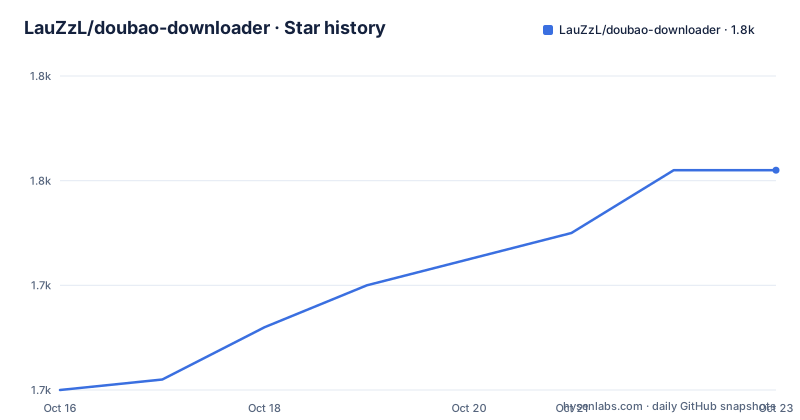
Star history
- LauZzL/doubao-downloader1,751 ★ · +21
| Repository | 2026-10-16 | 2026-10-23 |
|---|---|---|
| LauZzL/doubao-downloader | 1.7k | 1.8k |
21 Stars in the last 7 days, measured from the daily GitHub snapshot. Compare with other projects
Editorial analysis
Why doubao-downloader targets Doubao resource collection
LauZzL/doubao-downloader addresses a specific gap in Doubao and Dola workflows: collecting generated images and videos without relying on normal in-page save controls. The README describes it as a batch downloader delivered as either a browser extension or a Tampermonkey userscript. Its intended audience is people who regularly work with generated media in the browser and need to gather original resources rather than manually handle each item.
The project supports downloading both images and videos, and it can read items found under the platform's “AI创作” area. According to the README, this includes media from conversations that have already been deleted but whose videos remain in “AI创作”. The extension panel must be opened after visiting that area, with its category changed to “我的创作”.
This is a platform-specific tool, not a general-purpose downloader for arbitrary sites. Its usefulness depends on the browser session exposing media resources in a form the extension can capture. That boundary matters because the project does not document an API contract, cross-browser compatibility matrix or guarantee that every generated item can be saved in a watermark-free form.
The repository is licensed under GPL-3.0. Code reuse therefore needs attention to the repository's LICENSE file and applicable obligations, but this review does not provide legal advice. The README also states that the project is for learning and exchange and should not be used for commercial or illegal purposes. That is a stated usage restriction rather than a substitute for a separate legal review.
How the extension and userscript handle media
The repository layout and dependency set point to a browser-side interface rather than a server application. `manifest.json`, `popup.html` and the `src` directory support the browser extension form, while `vite-plugin-monkey` is used to build the userscript form. The UI uses React 19 and TypeScript, with Semi UI components and Tailwind CSS 4. No backend service or hosted homepage is identified in the repository information.
The visible workflow is session based. A user opens Doubao, interacts with the extension panel and selects media resources for download. The README also describes saved-image status markers in the panel, although the TODO list still leaves changing the unique identifier from a URL to a key or another scheme unfinished. That suggests the panel maintains some local knowledge of previously downloaded items.
The package dependencies indicate client-side storage through `dexie` and `dexie-react-hooks`, browser file saving through `file-saver`, and stream-oriented saving through `streamsaver`. `p-limit` is included for limiting concurrent work. These dependencies fit a batch-download workflow that collects resources and triggers browser downloads, but the README does not describe the internal extraction algorithm or claim how these libraries are used in every code path.
Version 2 was described as a completed rewrite in the README, and the release list includes video extraction, playback and video downloading as completed roadmap items. However, the repository does not provide a technical description of how requests are intercepted or how media URLs are classified. Any account whose response is absent or inaccessible to the extension remains a documented failure case.
Installing doubao-downloader as an extension or userscript
The simplest documented path is the Releases page. Users who prefer a browser extension can drag the provided `.zip` file into the browser's extension page. Developer mode must be enabled. For an unpacked installation, select “加载未打包的扩展程序” and choose the built `dist` directory.
The `.crx` route is not a dependable alternative. The README says that dragging in a `.crx` file currently may not work correctly even after installation, so it should not be the first choice.
For Tampermonkey, download `doubao-downloader.user.js` from Releases. The README says that opening this file should redirect to the installation page, then add the script to Tampermonkey. Network conditions may affect that redirect.
For source development, the documented installation and startup commands are:
pnpm install
pnpm dev
The first command installs dependencies from the pnpm workspace. The second starts the Vite development environment for the userscript-oriented workflow. The README does not document a separate development command for loading an unpacked extension.
The production build is produced with:
pnpm buildThis runs the TypeScript compiler followed by the Vite build. The README says the generated `dist` directory contains the browser-extension files and the main script. Select that directory under “加载未打包的扩展程序” when using the unpacked extension path.
A first media-saving pass through the Doubao panel
After installing the extension or userscript, open Doubao and start or locate a conversation containing generated media. The README does not provide a button-by-button API, so a precise first-click sequence cannot be confirmed from the README. The confirmed interface element is the Doubao downloader panel, from which the project exposes downloadable resources.
For a first image pass, select the image items the panel offers and initiate the download. The dependency on `file-saver` supports ordinary browser saves, while `streamsaver` is present for stream-oriented output. The README does not specify which image format is chosen or whether users can select output directories.
For video, version 2 is documented as supporting watermark-free video downloads. The package includes `streamsaver`, which is consistent with handling larger browser-saved files, but the README does not explain buffering, resume support or filename rules. A user should therefore treat the first successful video save as confirmation only for that item and account, not as a universal guarantee.
If a conversation has been deleted but the video remains in “AI创作”, visit “AI创作” first. Open the downloader panel, switch its category to “我的创作”, and select the surviving resource. This is a recovery path for a specific documented case, not a general browser cache recovery tool.
Watermarks, edited images and extraction limits
The most important limitation is that “no watermark” does not mean every account or every generation mode behaves identically. The README says it is unclear why some accounts cannot obtain watermark-free images. It suggests switching accounts or environments, which is a workaround rather than an explanation or a deterministic fix.
Several editing operations also fail to return watermark-free images. The listed modes are “图像生成的区域重绘”, “智能编辑” and “变清晰”. For a second edit, the README recommends saving the image locally and submitting it again, or describing the requested change in the conversation instead of using those feature-panel controls. Asking for the same operation conversationally may produce the edited original according to the project's guidance, but it does not guarantee that every prompt returns an unwatermarked file.
A proposed stitching solution for certain watermark cases was considered for `2.0.0` but marked with strikethrough in the README. It therefore should not be treated as an available feature.
Downloads can also remain stuck despite a success message. The documented workaround is to disable CSP with an extension that has a `DISABLE CSP` capability, although the README says refreshing the page is sufficient in most cases. Disabling CSP changes browser security behavior, so that step carries a separate security cost and is not a harmless preference. The project's README does not establish a narrower configuration-based fix.
Version 2.1.1 versus the stability-first 1.x branch
The repository's release history gives users a real maintenance and upgrade decision. Version 2.1.1 was released on 2026-10-10, alongside v2.1.0 on 2026-09-20 and v2.0.6 on 2026-09-17. The last push was also on 2026-10-10, and the repository is not archived.
The README nevertheless warns that version 2 completed a rewrite and may still contain undiscovered bugs. It explicitly advises users who prioritize stability to choose 1.x. The trade-off is equally explicit: video extraction was not supported in 1.x. A stable image-only workflow may therefore justify an older line, while a user needing video support has to assess the newer code despite the warning.
The upgrade burden also includes browser and platform behavior that the project does not fully specify. There is no documented migration procedure from 1.x to 2.x, compatibility matrix or rollback command in the README. Keeping separate browser profiles or manually retaining release files would be operational work, not an officially documented feature. The project does provide tests through Vitest, but no test commands beyond `pnpm test` are discussed, and the README does not describe test coverage.
Where doubao-downloader differs from manual saving
The clearest alternative is manual saving through Doubao's own interface and browser controls. Manual saving is less dependent on extension injection and panel behavior, but it does not offer the project's batch-oriented panel, saved-item marking or access to selected resources through “我的创作”. The distinction is workflow based, not a claim that manual saving can recover every resource.
Another alternative is writing a browser-side script against the media requests visible in a session. Such a script could be narrowly tailored to one account and browser, but the README does not describe an API, request schema or stable hook. That makes it a poor default for non-developers and a maintenance burden when the platform changes.
doubao-downloader is more useful when a user accepts a browser automation layer tied to Doubao's current interface. It is the wrong choice when lossless access is mandatory under unknown account conditions, when CSP must remain strictly enforced, or when the required media comes from one of the editing modes known to return watermarked results.
Editorial conclusion
Users who frequently need to save their own Doubao images or videos may find version 2.1.1 useful if they can accept platform-specific failures and a possible return to the less capable 1.x line for stability. Users who require predictable operation across accounts, image-editing modes and browsers should verify watermarked-resource handling, CSP behavior and the available resource format first, because the README does not promise consistent extraction in every case.
Frequently asked questions
How do I install doubao-downloader?
Download a build from Releases. For the extension, enable developer mode and either drag in the `.zip` file or select the built `dist` directory under “加载未打包的扩展程序”; for Tampermonkey, add `doubao-downloader.user.js`.
Can doubao-downloader download videos?
Yes. Version 2 supports watermark-free video downloading. Version 1.x does not support video extraction, according to the README.
Why does doubao-downloader still show a watermark?
The README says some accounts cannot obtain watermark-free images and suggests switching accounts or environments. Region repainting, smart editing and image enhancement also do not return watermark-free images according to the project README.
Official sources
Add this badge to your README
If you maintain this project, the badge below links readers to this analysis and shows its maintenance status from the daily GitHub snapshot. Paste the markdown into your README; add ?metric=license or ?metric=stars to the image URL for a different field.

[](https://hysenlabs.com/projects/lauzzl-doubao-downloader)Star history chart for your README
[](https://hysenlabs.com/projects/lauzzl-doubao-downloader)Was this useful?