h5player's stated purpose includes saving video off streaming sites, and its README never mentions terms
This software supports all audio and video websites, such as TikTok, YouTube, Bilibili, TED, Instagram, Twitter, etc. Features include: variable playback speed, screen capture, video download, custom settings, and extensions, etc., providing you with a pleasant online audio and video playback experience.
At a glance
- What is it?
- h5player is a browser user script that enhances HTML5 video and also stores audio and video files offline, with a download shortcut marked experimental and live stream extraction listed as a feature. The README sells paid customisation work from the same page, the manifest pins the licence as a bare word, and one of its build scripts watches two bundles with a single ampersand.
- Who is it for?
- Start by reading the terms of every site you would point this at, because the README's own list of intended uses includes saving video off streaming services, skipping pre-roll and post-roll, extracting live streams and watching series without the waiting, and the project says nothing about whether any of that is permitted. That is not a technical judgement, it is a per-site question, and it is the only one that matters before you install anything.
- Can I use it commercially?
- Yes, with conditions. GPL-3.0 is a copyleft licence: if you distribute software that includes it, you must release that software's source code under the same licence. Running it internally without distributing it does not trigger that obligation.
- Is it still maintained?
- Yes. The repository last received commits 85 days ago.
- What is it written in?
- Mainly TypeScript, according to GitHub's language statistics.
Answers come from the project's GitHub data, last synced on November 15, 2026, and from our analysis. They are not legal advice.
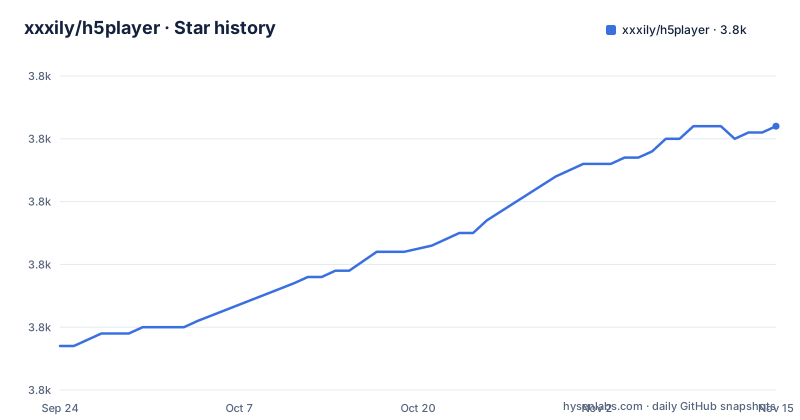
Star history
- xxxily/h5player3,802 ★ · +35
| Repository | 2026-09-24 | 2026-11-15 |
|---|---|---|
| xxxily/h5player | 3.8k | 3.8k |
35 Stars in the last 52 days, measured from the daily GitHub snapshot. Compare with other projects
Editorial analysis
What the README says the script is for
The features are not hidden, and they are worth reading before anything else. The technical list includes offline storage of audio and video files and extraction of live video streams. The usage scenarios include a line about viewing a series without the tedium and another about skipping the wait on short films. The introduction adds the ability to fast forward past short pre-roll and post-roll, to speed through tutorials, and to store audio and video files offline privately. So the script is described as a way to take media away from the site it is playing on, not only as a player with nicer keys. Nowhere in the file does it say whether that is allowed, and that question is answered by each site's terms rather than by the code, so it has to be checked per site before anything is installed.
Two distribution shapes and no releases
The project is a user script, which means it is not an application you run but code a browser extension injects into pages, and the README's title names the extension it expects. The repository also carries a browser extension directory, so the same features are built in a second shape. That is the practical reason there are two one-click paths in the file: one script URL hosted on the author's own domain and one listing on a user script directory. The manifest is marked private, so nothing is published to a package registry, and the repository has no GitHub releases at all. Which means the version number in the manifest, four point three point five, exists in exactly one place in the world and is not published anywhere a user would look for it.
The licence is pinned as one word in the manifest
The repository metadata declares version three of the GNU General Public Licence and there is a licence file at the root. The manifest says the same thing as a single bare word without a version, which is not a valid SPDX expression and is the kind of thing that makes automated licence checks give up. It matters a little more here than usual, because the README also advertises paid work. The code is free software under a copyleft licence, and a paid customisation engagement is not covered by it: if someone pays the author to change the script, what they own and what they must publish back are questions the licence file answers for the original and says nothing about for the modification. That is worth settling in writing before paying anyone.
Forty global key bindings and one toggle to stop them
The shortcut table is the longest part of the README and it is worth reading as a design decision. Almost every binding is an unmodified letter or an arrow key: one letter for speed, three for zoom, two each for brightness, contrast, saturation, hue and blur, and others for reset, rotation and flipping. Screenshot and the save shortcut sit next to a toggle for automatic resume, all three on the same modifier plus a single letter. Because the letters are unbound everywhere else on the page, the script includes one binding that asks whether its shortcuts should apply across the whole page or only within the player, defaulting to the former. One more binding, to disable the plugin itself, is shown with its text struck through rather than deleted, which means it no longer works and the table has not been tidied.
Two interface stacks and a server-side renderer
The manifest declares five runtime dependencies and two of them are interface toolkits that do not overlap. One is a component framework and the other is a library of ready-made web components in a different ecosystem, so the settings panel is assembled from both. The third is the server-side renderer for the component framework, which has no use in a browser context and looks like a leftover from a project the code was extracted from. The remaining two are a storage wrapper and a general utility library. Five dependencies for a script that mostly drives a video element is a light footprint, and the fact that the two heavier ones are unused or duplicated is the interesting part rather than the total.
One bundler config, five bundles, one ampersand
The build is a single bundler configuration invoked with an environment variable that selects which bundle to produce. Five of those targets are in the manifest: the script itself, its interface, a JSON editor, an injected variant, and the plain watch mode. The start command runs the two watch builds at once using a single ampersand rather than the two that wait for each other, which is a shell habit that behaves differently depending on the platform and leaves neither build waiting on the other. Two more scripts are about deployment: the documentation build copies the finished script into the documentation output so the docs site ships it, and one release script publishes to either the documentation host or a Chinese Git host depending on an environment variable.
Paid customisation is sold from the same page
The readme tells you that if you cannot program and want something more complex, you can pay the author for customisation work, and it says to make contact over a messaging app or the chat service. The contact instruction points upward at a section further down the file, and that section is a two-column table whose cells contain images. The images are not there. So the paid offer is real and the handle it refers to is not visible anywhere in the document. Elsewhere the same file promotes the author's other projects at the top, including a listing of thousands of AI open source projects hosted on a related domain. It is a small project with a commercial edge, and the readme does not separate the two.
Editorial conclusion
Start by reading the terms of every site you would point this at, because the README's own list of intended uses includes saving video off streaming services, skipping pre-roll and post-roll, extracting live streams and watching series without the waiting, and the project says nothing about whether any of that is permitted. That is not a technical judgement, it is a per-site question, and it is the only one that matters before you install anything. On the engineering side this is a large feature surface in a small wrapper: five bundles from one bundler configuration, roughly forty global key bindings, two user interface stacks, and a download shortcut that the documentation itself marks experimental. Treat it as something to try on a spare browser profile rather than something to add to a machine you rely on, and note that the paid help the author offers is not covered by the code licence.
Frequently asked questions
What is h5player and what kind of software is it?
A browser user script, loaded through the Tampermonkey extension, that enhances HTML5 video playback on any page with a video element, including inside frames and shadow DOM. It adds speed control, about forty keyboard shortcuts, picture-in-picture, screenshots, image adjustments and offline storage of audio and video files. The repository also contains a browser extension build of the same code.
Which sites does h5player support?
It says all sites that use HTML5 video, and the README names a list of Chinese video platforms, YouTube, TED, Instagram and Twitter, plus two cloud storage services. That last pair is why the feature list is about storing files offline rather than only about playback, and why the shortcut table has a key for saving audio and video files.
Is it legal to save video using h5player?
The project does not address it. The README says the script can store audio and video files offline, extract live streams, skip short pre-roll and post-roll, and lists watching series without the tedium and skipping the wait on short films among its intended uses. Whether any of that is permitted comes from each site's terms rather than from the script, so it has to be checked per site.
How much does h5player cost?
The user script is free and the project is licensed under version three of the GNU General Public Licence. The README also advertises paid customisation work for people who cannot program, with contact offered over a messaging app and a chat service, and the code licence does not cover that paid work.
What keyboard shortcuts does h5player use?
Around forty, mostly unmodified letters and arrow keys: speed up and down by a tenth, zoom steps, brightness, contrast, saturation, hue, blur, rotation and flipping, picture-in-picture, screenshot, full screen, frame stepping, and a key for saving audio and video files that the table marks experimental. One binding asks whether the shortcuts apply across the whole page, and the binding for disabling the plugin is shown struck through, so it no longer works.
Official sources
Add this badge to your README
If you maintain this project, the badge below links readers to this analysis and shows its maintenance status from the daily GitHub snapshot. Paste the markdown into your README; add ?metric=license or ?metric=stars to the image URL for a different field.

[](https://hysenlabs.com/projects/xxxily-h5player)Star history chart for your README
[](https://hysenlabs.com/projects/xxxily-h5player)Was this useful?