Lavalink 4 Audio Node Architecture, Setup, and Limits
Standalone audio sending node based on Lavaplayer.
At a glance
- What is it?
- Lavalink is a standalone Java audio node for Discord applications, built on Lavaplayer and Koe. It supports REST control, authentication, plugins, stream sources, metrics, and several deployment targets, but Java 17 and JVM platform compatibility are immediate constraints.
- Who is it for?
- Adopt Lavalink when a Discord bot needs a separately operated audio process with an HTTP control surface, plugin support, and documented Linux deployment options. Do not adopt it for an unsupported JVM, a host without Java 17, or a use case that requires sending audio through a bot shard instead of keeping that traffic outside the shard.
- Can I use it commercially?
- Yes. MIT is a permissive licence: you can use, modify and sell software built on it, as long as you keep its copyright and licence notices.
- Is it still maintained?
- Yes. The repository last received commits 3 days ago.
- What is it written in?
- Mainly Kotlin, according to GitHub's language statistics.
Answers come from the project's GitHub data, last synced on October 23, 2026, and from our analysis. They are not legal advice.
Star history
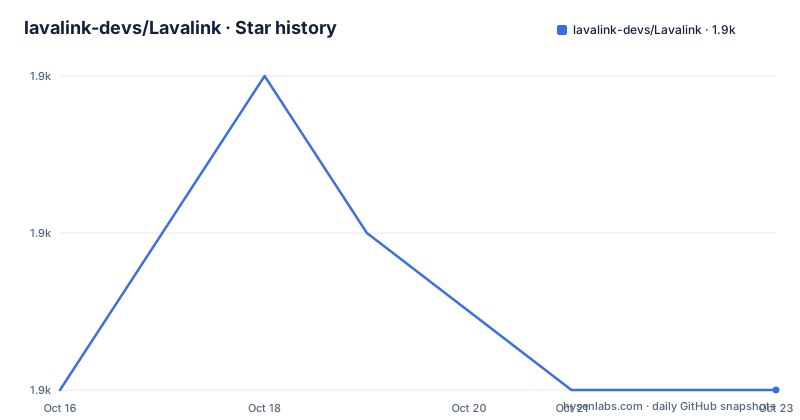
- lavalink-devs/Lavalink1,924 ★ · +0
| Repository | 2026-10-16 | 2026-10-23 |
|---|---|---|
| lavalink-devs/Lavalink | 1.9k | 1.9k |
0 Stars in the last 7 days, measured from the daily GitHub snapshot. Compare with other projects
Editorial analysis
Why Lavalink Runs Audio Outside Discord Shards
Lavalink solves a specific Discord bot architecture problem: audio can be delivered without the bot process itself receiving the audio stream. The README describes it as a standalone audio sending node based on Lavaplayer and Koe, with the central property that it allows audio to be sent without the audio ever reaching any shards. This is useful to bot developers who want voice playback to remain separate from shard handling, especially when operating multiple shards or moving the audio workload to another machine.
The intended users are developers connecting a Discord bot through an up-to-date client or implementing a client against Lavalink's API. The README points advanced users to the API documentation rather than presenting Lavalink as a complete Discord bot framework. Lavalink handles the audio node and exposes a REST interface for resolving Lavaplayer tracks, controlling players, and performing related operations. The bot application remains responsible for deciding what to play and when to change tracks. Lavalink provides the separate audio process and control plane.
Lavalink also supports seeking, volume control, an event system, statistics, basic authentication, Prometheus metrics, and Docker images. Twitch and YouTube stream support is available through a separate YouTube source plugin. This puts Lavalink closer to an infrastructure component for a Discord bot deployment than to an application with its own command interface.
Lavalink's Request Path Through Lavaplayer, Koe, and REST
The repository identifies Lavaplayer as the audio engine and Koe as the other basis for the standalone sending node. The REST API is the visible control surface between a client and the server. According to the README, that API can resolve Lavaplayer tracks and control players, among other operations. This separation means a client does not need to embed the playback engine in the same process as the Discord shard application.
The documented feature set also covers operational concerns that usually matter for a long-running audio service. Statistics are described as useful for load balancing, while Prometheus metrics expose machine-observable data. An event system allows surrounding software to react to server or player events. Basic authentication is available for protecting the interface, although the README does not specify the authentication mode, token format, or default network exposure. Those details must come from the linked server configuration documentation before deployment.
The DAVE protocol is supported, and Lavaplayer remains the core playback layer. Stream sources are extensible rather than assumed to be built into every installation. YouTube support, for example, is associated with a separate plugin. This is a meaningful architectural choice for operators: source availability can depend on plugin selection, so installing the server alone does not establish which remote services can be resolved.
Preparing a First Lavalink 4 Deployment
The README does not include a complete installation command, JAR download command, server configuration file, or first playback request. It directs users to the server configuration documentation, the client list, the API documentation, and the plugins directory. A reliable first deployment therefore begins with those project-specific documents rather than an improvised Gradle invocation from the repository root. The included `gradlew` and `gradlew.bat` files belong to the Gradle build, but the README does not state that contributors should run either wrapper as the normal server installation path.
For an initial use, first choose an up-to-date Lavalink client from the linked client directory. Next, use the server configuration documentation to create the server configuration, including its REST and voice settings. The README confirms Java 17 LTS or newer is required and recommends the latest LTS version or newer. After configuration, select any required plugins and start Lavalink according to the server documentation. Finally, connect the bot through the chosen client and use the client or API to resolve a track and control playback.
That sequence is as concrete as the README permits. It does not identify a port, password environment variable, configuration filename, launch command, or readiness endpoint, so reproducing any such value here would be invention. An operator should expect to consult the linked configuration page for the exact first-run values and should verify that the chosen client supports the same Lavalink major version.
Java, Architecture, and DAVE Deployment Boundaries
Lavalink 4 requires Java 17 LTS or newer. OpenJDK or Zulu on Linux AMD64 is the officially supported combination. Other JVMs can work on a best-effort basis, but the README specifically warns that periodic CPU utilization statistics may not work everywhere. This distinction matters when choosing a Java distribution for monitoring, load-balancing, or container deployment.
The hardware table is more nuanced than a simple list of operating systems. DAVE, Lavaplayer, JDA-NAS, Timescale, and AVX2 are listed separately because support varies by architecture. Linux AMD64 is the fully documented baseline. Linux x86 and x86-64 include support across all listed components. ARM and aarch64 entries show AVX2 as unsupported, while armhf and aarch32 lack JDA-NAS and Timescale support in the table. Windows and Darwin combinations also contain exceptions, including Windows on ARM behavior that depends on an x86-64 JVM and emulation.
DAVE adds a separate operating-system boundary. The minimum supported glibc version is 2.35, with Ubuntu 22.04 given as the example. That requirement can affect container images, older enterprise hosts, and custom Linux distributions. Periodic CPU statistics may also be unavailable on non-official JVM combinations, which limits the value of an otherwise useful monitoring signal.
Where Lavalink Is the Wrong Node
The clearest wrong-tool case is a deployment that cannot meet the Java or platform requirements. Java 17 is mandatory, and combinations outside the officially supported OpenJDK or Zulu on Linux AMD64 baseline may lose features or produce misleading CPU statistics. A host with an older glibc cannot satisfy the documented DAVE minimum of 2.35. Recommending Lavalink without checking those boundaries would ignore concrete compatibility constraints.
Lavalink is also the wrong choice for a team seeking an all-in-one Discord bot application. It is not presented as a bot command framework, and its client documentation is explicitly separate from the server repository. A team that does not want to operate or integrate an external audio service will not get that experience from this component alone.
Twitch and YouTube support is tied to plugins rather than stated as an unconditional server guarantee. Remote source behavior can also change outside the repository, but no operational claims about individual streaming services are documented here. Teams requiring a specific source should confirm that the corresponding plugin is available, compatible with the selected release, and included in the deployment plan.
Maintenance, Versioning, and the MIT Boundary
The repository is not archived, and its last push was on 2026-10-03. The listed releases include 4.2.2 on 2026-03-06, 4.2.1 on 2026-03-01, and 4.2.0 on 2026-02-28. These dates indicate recent release activity, although maintenance status should be judged from the repository state rather than release volume alone. The changelog is the project's documented place for release-specific changes, so an upgrade review should begin there.
Lavalink follows Semantic Versioning. Its version format assigns MAJOR to breaking API changes, MINOR to backward-compatible features, PATCH to backward-compatible fixes, and optional prerelease and build components to their respective release forms. This gives operators a useful compatibility boundary: a major change may require client or integration work, while a patch is intended to remain compatible. The API documentation and selected client's release compatibility still need to be checked for each upgrade.
The repository is licensed under the MIT License. That matters when integrating Lavalink into a bot deployment or redistribution workflow, although this review does not provide legal advice. The license file governs the actual permissions and conditions. Operators should also account for the configuration, JVM, plugin, container image, and source-specific dependencies that surround the server rather than treating the server repository as the entire operational stack.
Editorial conclusion
Adopt Lavalink when a Discord bot needs a separately operated audio process with an HTTP control surface, plugin support, and documented Linux deployment options. Do not adopt it for an unsupported JVM, a host without Java 17, or a use case that requires sending audio through a bot shard instead of keeping that traffic outside the shard. Before deployment, verify Java, CPU architecture, the required glibc version for DAVE, voice and REST connectivity, authentication settings, and compatibility between the selected client and the chosen Lavalink release.
Frequently asked questions
What is Lavalink used for?
Lavalink is a standalone audio sending node for Discord applications. It sends audio without the audio reaching the bot shards and exposes a REST API for track resolution and player control.
What are Lavalink's Java and hardware requirements?
Java 17 LTS or newer is required. OpenJDK or Zulu on Linux AMD64 is officially supported, while other JVMs and hardware combinations are best-effort, with periodic CPU utilization stats particularly exposed to compatibility issues.
Does Lavalink support YouTube and Twitch streams?
Yes, but the README identifies a separate YouTube source plugin for Twitch and YouTube stream support. A deployment must therefore include and configure the relevant plugin rather than assuming every source is built in.
How should a new user install and start Lavalink?
The README directs users to the server configuration documentation, the client directory, the API documentation, and the plugins directory. It does not provide a launch command, configuration filename, port, or environment variable, so those details must be taken from the linked project documentation.
Official sources
Add this badge to your README
If you maintain this project, the badge below links readers to this analysis and shows its maintenance status from the daily GitHub snapshot. Paste the markdown into your README; add ?metric=license or ?metric=stars to the image URL for a different field.

[](https://hysenlabs.com/projects/lavalink-devs-lavalink)Star history chart for your README
[](https://hysenlabs.com/projects/lavalink-devs-lavalink)Was this useful?