LDC 1.43.0: LLVM-based D compiler for portable native builds
The LLVM-based D Compiler.
At a glance
- What is it?
- LDC is an open source compiler for D that combines the official DMD frontend with LLVM Core libraries. It suits developers who want portable D2 compilation across major operating systems and Android, subject to its package and source-build requirements.
- Who is it for?
- Adopt LDC when your project needs D2 compilation through LLVM across common platforms and you can work within its packaging or source-build constraints. Do not choose it if you require D1 or expect every community package to match official releases.
- Can I use it commercially?
- Check first. The repository uses a licence we do not classify automatically, so read its LICENSE file before any commercial use.
- Is it still maintained?
- Yes. The repository last received commits 5 days ago.
- What is it written in?
- Mainly D, according to GitHub's language statistics.
Answers come from the project's GitHub data, last synced on November 7, 2026, and from our analysis. They are not legal advice.
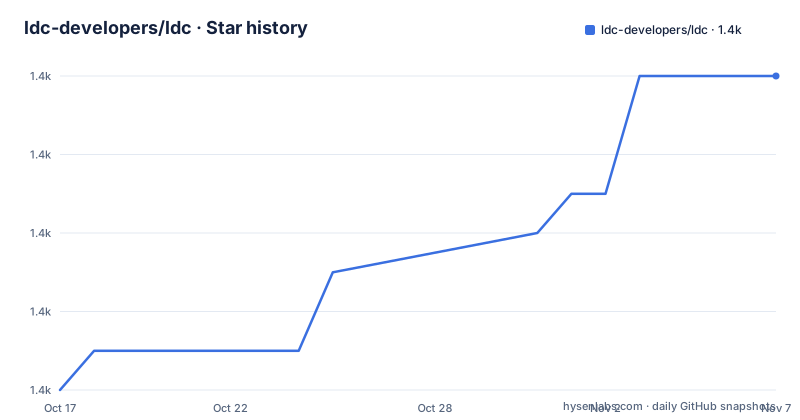
Star history
- ldc-developers/ldc1,384 ★ · +8
| Repository | 2026-10-17 | 2026-11-07 |
|---|---|---|
| ldc-developers/ldc | 1.4k | 1.4k |
8 Stars in the last 21 days, measured from the daily GitHub snapshot. Compare with other projects
Editorial analysis
LDC's DMD frontend and LLVM code generation
LDC solves a specific compiler problem: it provides a portable implementation of the D programming language while using LLVM for optimization and native code generation. The project is intended for D developers who need to compile applications for Linux, macOS, Windows, FreeBSD, and Android, and for teams that want a compiler based on LLVM rather than treating D compilation as an isolated toolchain decision.
The repository description identifies LDC as the LLVM-based D compiler. The README states that LDC uses the official DMD frontend to support the latest version of D2, then relies on LLVM Core libraries for code generation. That division matters for project design. LDC does not replace the language frontend with a separate parser. It connects DMD-compatible language processing to LLVM's compilation infrastructure.
This arrangement makes LDC different from a D source formatter or editor tool. It is a native compiler backend with a focus on optimization and code generation. The README also describes LDC as portable and says that it has modern optimization and code generation capabilities. It does not publish benchmark figures, compiler flags, or generated binary sizes, so those properties should not be treated as quantified guarantees.
LDC's scope is D2. The README states that D1 is no longer available and directs users to the `d1` Git branch for the last version supporting it. A team whose existing code still depends on D1 cannot use the current release line for that purpose without checking the historical branch separately.
Official packages, community packages, and source prerequisites
The documented installation path depends on whether you need an official binary package, a community distribution, or a compiler built from the repository. The README calls the pre-built packages on the GitHub release page portable stand-alone builds. It lists Linux, macOS, Windows, FreeBSD, and Android among the common platforms, with a Windows installer also available.
The official `dlang.org` install script is the shortest documented starting point on systems where that script is appropriate. This command downloads and executes the official package installation path from the project documentation:
curl -fsS https://dlang.org/install.sh | bash -s ldcThe script selects LDC packages from GitHub according to the install script's own behavior. The README does not document how to verify a checksum after running this command, so that check must come from the release or installation documentation rather than being invented here.
Several package managers are listed. The commands are convenient, but the README directly warns that these packages are community-maintained, might be outdated, and might not offer the full feature set of official GitHub packages. Examples include `apk add ldc` on Alpine Linux, `pacman -S ldc` on Arch Linux, `apt install ldc` on Debian and Ubuntu, `dnf install ldc` on Fedora, `brew install ldc` on Homebrew, and `nix-env -i ldc` on Nix/NixOS. For Android in Termux, the documented command is `pkg install ldc`. The Docker route is `docker pull dlang2/ldc-ubuntu`.
Building from source requires a working C++ or D build environment, CMake, and a recent LLVM version, with the README specifying LLVM 18 or newer. The Phobos submodule must also be initialized. Before starting a source build, check those prerequisites and initialize the repository dependencies:
cd ldc
git submodule update --init
The `cd ldc` command assumes the repository has already been downloaded and that the shell starts in its parent directory. The README does not give a complete first-build invocation in this section. It instead points to separate wiki guides for Linux, macOS, BSD, and Android, with another guide for Windows and MSVC. For bootstrapping, the README recommends GDC through the `gdmd` wrapper, while also noting that DMD, GDC, and LDC are supported as host compilers.
LDC installation as a first concrete use
The README does not include a sample D program or a documented `hello world` compile command. Because inventing a compiler invocation would create an unverified tutorial step, the first use supported by the README is selecting and installing an LDC package.
For a documented package-manager path on Debian or Ubuntu, the command is:
apt install ldcAfter that command succeeds, the system should provide an LDC installation according to the distribution package. The README does not document the executable name, default output path, or a subsequent version-check command, so this page cannot claim what output or binary name a reader will see. The next project-specific step is to consult the platform's package documentation or the official GitHub release package before compiling an existing D project.
On Homebrew, the documented alternative is:
brew install ldcThe same boundary applies. Homebrew may provide a package that is convenient for a local development setup, but the README warns that community-maintained packages might be outdated or lack features found in official GitHub packages. For reproducible releases, an organization may therefore need to compare the package version against the official release version before accepting the installed compiler.
The repository also publishes continuous integration builds under the `CI` release tag. The README says those builds have LLVM and LDC assertions enabled and may increase compile times by roughly 50%. They are intended for bleeding-edge users, not the default choice for a stable application build. This is a concrete tradeoff between newer compiler snapshots and predictable build behavior.
Cross-compilation and Android as LDC use cases
The README presents cross-compilation as a natural capability of LDC because it follows the approach of other LLVM-based compilers. It says that full instructions and example invocations are on the dedicated `Cross-compiling_with_LDC` wiki page. The repository README does not reproduce the target-selection flags, linker configuration, sysroot requirements, or a sample command, so those details cannot safely become examples here.
Android is treated as a distinct target. The README links to `Build_D_for_Android` for instructions covering native Android compilation and cross-compilation. It also lists `pkg install ldc` as the Termux installation command. Those two paths address different situations. Termux provides a package installation route for an Android environment, while cross-compiling may require a host compiler, Android runtime files, linker setup, and target-specific configuration described by the linked wiki.
LDC also offers a Docker image, `dlang2/ldc-ubuntu`. That can be relevant when a build needs a repeatable Ubuntu-based environment or when developers do not want to install LDC directly on the host. The README does not document image tags, supported architectures, expected image size, or the exact compiler binary available inside it, so a deployment should verify those details before standardizing on the image.
The practical limitation is documentation depth. LDC's broad platform support is stated, but the repository README delegates detailed cross-compilation and Android setup to external wiki pages. A team adopting LDC for a new target should treat target runtime availability and linker configuration as part of adoption, not as automatic consequences of choosing LLVM.
Maintenance, licensing, and upgrade boundaries
The repository is not archived, and the last push was on 2026-10-15. That is recent activity for judging maintenance purposes, but it does not by itself guarantee compatibility with a particular LLVM version or D2 feature set. Release history includes `v1.43.0` dated 2026-08-30, `v1.43.0-beta1` dated 2026-08-05, and `v1.42.0` dated 2026-03-01. The presence of a beta release is a reason to distinguish prereleases from stable packages when choosing an installation source.
LDC is described as fully open source. The README adds an important licensing qualification: source code not taken or adapted from other projects is BSD-licensed, while the `LICENSE` file contains the applicable details. The repository metadata classifies the overall license as a custom license that GitHub cannot classify. A company should therefore inspect `LICENSE` and the provenance of adapted files before making a compliance decision. This article does not interpret the legal meaning of those terms.
Upgrades can affect both the compiler and the language toolchain. The README says LDC supports the latest D2 through the official DMD frontend, while source builds require a recent LLVM, specifically version 18 or newer. Moving from an official package to a community package, or from a stable release to a CI build, may change version availability and assertion behavior. The repository's `CHANGELOG.md` is listed as a source file, but its contents are not included in the README, so release-specific migration notes cannot be summarized here.
The CI build tradeoff is explicit: assertions are enabled and compile times can rise by roughly 50%. That is useful for finding compiler or LLVM issues, but it is a different operating profile from a normal release build. A production upgrade should compare the selected artifact, its LLVM dependency, and the expected build-time cost.
LDC compared with DMD and source-built alternatives
The clearest alternative identified by the README is DMD, the official frontend family used alongside LDC. DMD and LDC overlap in the basic goal of compiling D, but their compiler implementations differ. LDC uses the official DMD frontend and LLVM Core libraries for code generation, whereas the README does not describe DMD's backend architecture in detail. The important adoption difference is therefore the choice of D compiler implementation and backend, not a claim that either project is suitable for every codebase.
Another alternative is building another LLVM-based compiler environment from source. LDC's own source-build requirements are concrete: a working C++ or D build environment, CMake, LLVM 18 or newer, and an initialized Phobos submodule. Compared with installing an official binary, source building adds dependency management and build configuration. Compared with a generic package-manager installation, it gives the builder control over the checkout and build configuration, but the README does not document the complete build commands or the resulting installation layout.
For teams that need a conventional binary package, LDC is more directly aligned with its documented release artifacts than with a self-managed LLVM toolchain. For teams that need to debug compiler internals or work against a particular LLVM version, source construction may be necessary, but the extra setup cost is real. LDC is the wrong choice when a team needs D1, a fully documented Android cross-compilation setup without consulting the wiki, or confidence that an arbitrary community package contains the same feature set as the official release.
Its strongest fit is a D2 project that needs LLVM-backed code generation and works within the documented package, platform, and cross-compilation boundaries. Its main adoption cost is not the frontend, which LDC reuses from DMD, but the surrounding LLVM, packaging, release, and target configuration decisions.
Editorial conclusion
Adopt LDC when your project needs D2 compilation through LLVM across common platforms and you can work within its packaging or source-build constraints. Do not choose it if you require D1 or expect every community package to match official releases. Verify the selected package version, LLVM requirement for source builds, Phobos submodule state, and target platform before migrating a build.
Frequently asked questions
What is LDC used for?
LDC is a portable D2 compiler that uses the official DMD frontend and LLVM Core libraries for code generation. The README lists support targets including Linux, macOS, Windows, FreeBSD, and Android.
How do I install LDC on Linux?
The README documents the official installer command `curl -fsS https://dlang.org/install.sh | bash -s ldc`. It also lists distribution commands such as `apt install ldc` on Debian and Ubuntu, while warning that community-maintained packages may differ from official GitHub packages.
Does LDC still support D1?
The current README says D1 is no longer available. It directs users to the `d1` Git branch for the last version supporting D1, so current LDC releases should not be assumed to compile D1 code.
What is required to build LDC from source?
The README requires a working C++ or D build environment, CMake, and a recent LLVM version, with LLVM 18 or newer specified. It also requires updating the Phobos submodule with `git submodule update --init`.
Can LDC cross-compile for Android?
The README says LDC supports Android compilation and points to the `Build_D_for_Android` wiki page for native and cross-compilation instructions. It does not include the full Android command sequence or target configuration in the repository README.
Official sources
Add this badge to your README
If you maintain this project, the badge below links readers to this analysis and shows its maintenance status from the daily GitHub snapshot. Paste the markdown into your README; add ?metric=license or ?metric=stars to the image URL for a different field.

[](https://hysenlabs.com/projects/ldc-developers-ldc)Star history chart for your README
[](https://hysenlabs.com/projects/ldc-developers-ldc)Was this useful?