MineBackup: A Minecraft Save Backup Tool That Knows Its Limits
A simple but useful GUI program to backup and restore your MC saves.
At a glance
- What is it?
- MineBackup is a cross-platform GUI for backing up and restoring Minecraft worlds, with hotkeys, incremental Smart Mode, and a headless CLI. It works on any folder, but its maintenance future is explicitly tied to a successor project.
- Who is it for?
- Adopt MineBackup if you want a native, GPL-3.0 backup tool for Minecraft saves on Windows, Linux, or macOS and you accept that the author prioritizes the FolderRewind successor. Do not adopt it if you need HMCL auto-discovery, a notarized macOS build, or long-term feature growth.
- Can I use it commercially?
- Yes, with conditions. GPL-3.0 is a copyleft licence: if you distribute software that includes it, you must release that software's source code under the same licence. Running it internally without distributing it does not trigger that obligation.
- Is it still maintained?
- Yes. The repository last received commits 19 days ago.
- What is it written in?
- Mainly C++, according to GitHub's language statistics.
Answers come from the project's GitHub data, last synced on October 4, 2026, and from our analysis. They are not legal advice.
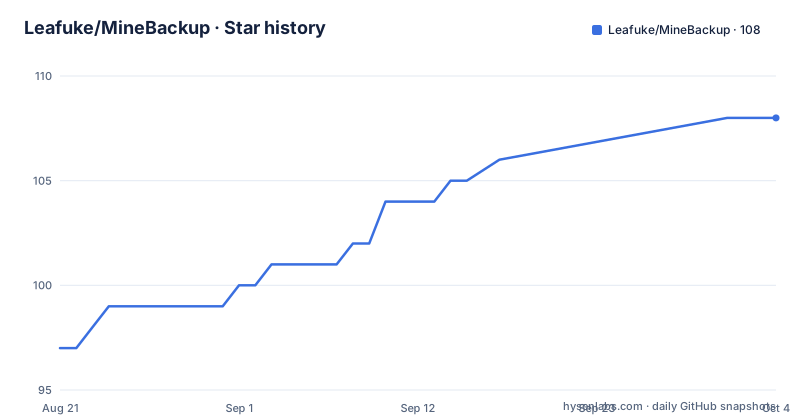
Star history
- Leafuke/MineBackup108 ★ · +11
| Repository | 2026-08-21 | 2026-10-04 |
|---|---|---|
| Leafuke/MineBackup | 97 | 108 |
11 Stars in the last 44 days, measured from the daily GitHub snapshot. Compare with other projects
Editorial analysis
What MineBackup Actually Solves
MineBackup addresses a narrow but real problem: Minecraft worlds vanish when a save corrupts, a mod update breaks a world, or a mistaken deletion happens. The tool gives you a one-click backup and restore path for those saves. It is built for players who want a GUI, not a command line, and who play on Windows, Linux, or macOS. The README also notes that it can back up any folder on your PC, so it is not strictly limited to Minecraft. The intended user is someone who wants a native executable with a simple interface, not a web service or a plugin framework. The project explicitly recommends a different tool for Windows 10+ users, which is an unusual and honest positioning that I will discuss later.
How It Works: From World Detection to KnotLink Messaging
The core mechanism is a GUI built with ImGui that manages backup and restore operations. On first launch, a setup wizard scans standard Java and Bedrock locations, plus clues from PCL2's active directory or workspace. Scanning only produces candidates; it does not create configuration until you confirm selection. Each Minecraft instance gets its own Config entry and a backup subdirectory. The default backup root is Documents/MineBackup-Backups, with a fallback to a backups folder under the application data directory. Backups are stored as .7z files using the built-in 7-Zip core, which gives high compression. Smart Mode is described as git-like incremental backups, meaning it saves only changes rather than full copies each time. For live use, the program integrates with a companion mod through KnotLink v2 messaging. The protocol is strict: payloads are key=value pairs with RFC 3986 percent-encoding, and old positional commands are rejected. This allows the tool to request a save before backup, detect the active world, and trigger hotkey operations.
Getting It Running: Downloads, Setup, and Build Commands
You get MineBackup from the latest release page. Download the Windows x64 executable, the Ubuntu .deb, the Linux AppImage, or the macOS arm64 DMG. Verify the asset against SHA256SUMS before running. On macOS, the build is not notarized, so you may need to use Privacy and Security, then Open Anyway, without disabling Gatekeeper or running xattr commands. First-time setup involves the wizard scanning for Minecraft directories. You can also add a directory manually or use the advanced fallback for a regular folder. After setup, basic actions are simple: select a world and click Backup or Restore. To build from source, you need CMake 3.22+, a C++20 compiler, and platform packages. The commands are: git clone, then cmake --preset with one of windows-msvc-x64, linux-x64, or macos-arm64, then cmake --build --preset windows-msvc-x64-release on Windows, or cmake --build build/<preset> --parallel on Linux or macOS. The setup wizard is asynchronous, so it does not block the UI while scanning.
Power Features: Hotkeys, Exit Detection, and the Headless CLI
MineBackup offers several features beyond basic backup. The hotkey backup, Alt+Ctrl+S, detects the currently active world, broadcasts a save request, and runs a backup in the background. Hotkey restore, Alt+Ctrl+Z, restores the active world to the last backup, but this requires the MineBackup-Mod integration. Exit Detection backs up automatically when Minecraft closes, which is useful if you forget to back up manually. There is also a headless server CLI, minebackup-cli, that can initialize a profile from a manifest, run staged Jobs, create Full or Smart backups, verify archive chains, and perform confirmed cold restores without starting the GUI. This is a significant feature for server administrators or users who want to script backups. The CLI is not described in detail in the README, but its existence suggests a serious approach to automation. The documentation mentions that rclone is optional and not bundled, and it is downloaded only after explicit confirmation with version and hash validation, which is a good security practice.
Limitations and Failure Modes You Should Know
The most obvious limitation is the project's own recommendation. The README tells Windows 10 and above users to prefer FolderRewind plus the MineRewind Plugin, calling it the Second Generation Time Machine with a more modern UI and more powerful features. MineBackup will still be maintained for critical bugs and security issues, but updates will lag behind. That is a direct signal that this is not the primary development focus. Another limitation is platform-specific: HMCL automatic discovery is not supported, so users of that launcher must add their directory manually. The macOS build is not notarized, which may trigger security prompts. The setup wizard scans for PCL2 directories, but it is not guaranteed to enumerate every historical custom directory, so you may need to run PCL2 and rescan. Windows Service Mode is deprecated and cannot be newly installed or started, which could affect users who relied on that feature. The 1.14.0 release introduced breaking changes, and the README strongly recommends running Auto-Verify Core Functions after upgrading. This suggests that version upgrades can break existing setups, so you must test before relying on it.
Alternatives and the FolderRewind Successor
The main alternative is FolderRewind, also by the same author, which is positioned as the successor. FolderRewind, combined with the MineRewind Plugin, offers a more modern UI and more powerful functionality, and it is the main focus of future maintenance. The key difference in approach is that FolderRewind is a second-generation tool, likely with a different architecture and a broader scope beyond Minecraft. MineBackup is simpler and more focused, but it is explicitly not the future. Other alternatives exist in the Minecraft backup space, such as manual file copying or cloud sync tools, but those lack the game-aware features like hotkey integration and world detection. The README does not name any other specific backup tool, so I cannot compare it to them. The practical choice for a new user on Windows is to skip MineBackup and go straight to FolderRewind, unless they need the Linux or macOS support that MineBackup provides, since FolderRewind's platform coverage is not described.
Maintenance, Upgrade Cost, and License Implications
MineBackup is licensed under GPL-3.0, which means if you distribute modified versions, you must make the source available under the same license. The project is actively maintained, with the last push in August 2026 and several releases in the same year. The upgrade cost is real: version 1.14.0 introduced breaking changes, and the README advises running Auto-Verify Core Functions after upgrading. There is also a data migration document for moving an existing installation, because data is stored in a platform profile, not beside the executable. This means you cannot simply copy the executable to a new machine and expect your configurations to follow. Logging defaults to Info-level rotating logs at logs/minebackup.log, and you can change the level at runtime. The log panel can export a diagnostic copy with known paths redacted, which is useful for bug reports. The maintenance stance is clear: the author will fix critical bugs and security issues, but feature development will slow down. For a user who values long-term feature growth, this is a cost to weigh.
Editorial conclusion
Adopt MineBackup if you want a native, GPL-3.0 backup tool for Minecraft saves on Windows, Linux, or macOS and you accept that the author prioritizes the FolderRewind successor. Do not adopt it if you need HMCL auto-discovery, a notarized macOS build, or long-term feature growth. Before relying on it, verify the SHA256SUMS of the release asset, run the Auto-Verify Core Functions tool after upgrading from 1.14.0, and test several backup and restore cycles on a non-critical world. Also check the data-and-migration doc before moving an existing installation, since data lives in a platform profile, not beside the executable.
Frequently asked questions
Where can I find my Minecraft backup files?
The default backup root is Documents/MineBackup-Backups, and if Documents is not available MineBackup falls back to a backups folder under its application data directory. You can change the location in Settings, and the data lives in a platform profile rather than beside the executable.
Is there a Minecraft mod that automatically backs up my world?
There is a companion mod for MineBackup, and it must be version 3.0.0 or newer. It talks to the application over the KnotLink v2 contract, which is also what the Alt+Ctrl+Z hotkey restore needs, and a separate exit-detection option backs up automatically when Minecraft closes.
How long does a Minecraft backup take?
No duration is stated anywhere in the documentation. What it does describe is the work involved: a built-in 7-Zip core does the compression, Smart Mode makes repeat backups incremental, and a hotkey backup broadcasts a save request to the running game before it starts.
What does backing up your Minecraft world do?
It produces a backup you can restore a world from later, either a .7z file or a local backup directory, and the restore is a separate action on the selected world. Smart Mode keeps repeat backups incremental, and the same application can point at any folder rather than only Minecraft worlds.
Official sources
Add this badge to your README
If you maintain this project, the badge below links readers to this analysis and shows its maintenance status from the daily GitHub snapshot. Paste the markdown into your README; add ?metric=license or ?metric=stars to the image URL for a different field.

[](https://hysenlabs.com/projects/leafuke-minebackup)Star history chart for your README
[](https://hysenlabs.com/projects/leafuke-minebackup)