Fintunes: a native Jellyfin audio client for iOS and Android
🎵 A gorgeous Jellyfin audio streaming app for iOS and Android
At a glance
- What is it?
- Fintunes turns a Jellyfin server into a mobile audio library with streaming, downloads, search, AirPlay, and Chromecast support. It fits listeners who want a dedicated phone player, although release packaging and native build requirements require attention.
- Who is it for?
- Fintunes is appropriate for Jellyfin subscribers who want a dedicated mobile music player with offline playback and wireless speaker support. It is less suitable for people who need a documented source-only setup with no native toolchains or want a stable release channel rather than a beta build.
- Can I use it commercially?
- Yes. MIT is a permissive licence: you can use, modify and sell software built on it, as long as you keep its copyright and licence notices.
- Is it still maintained?
- Yes. The repository last received commits 113 days ago.
- What is it written in?
- Mainly TypeScript, according to GitHub's language statistics.
Answers come from the project's GitHub data, last synced on November 6, 2026, and from our analysis. They are not legal advice.
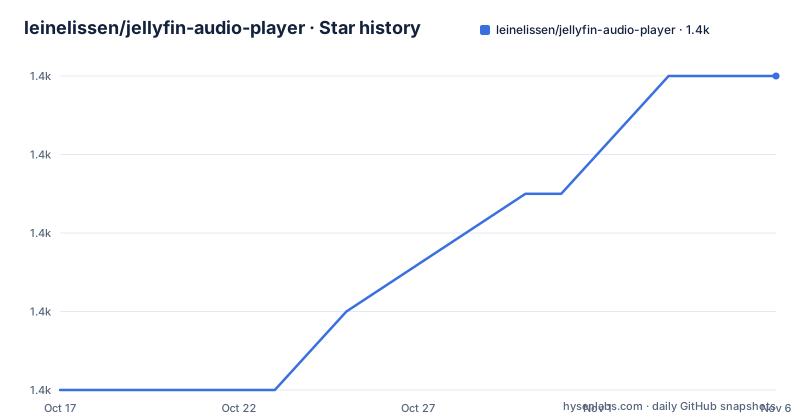
Star history
- leinelissen/jellyfin-audio-player1,426 ★ · +8
| Repository | 2026-10-17 | 2026-11-06 |
|---|---|---|
| leinelissen/jellyfin-audio-player | 1.4k | 1.4k |
8 Stars in the last 20 days, measured from the daily GitHub snapshot. Compare with other projects
Editorial analysis
Why Fintunes exists beside the Jellyfin server
Fintunes addresses a focused gap between a general-purpose Jellyfin interface and a dedicated phone music player. The Jellyfin server remains the source of the user's audio library, while the mobile app presents tracks, albums, playlists, search results, downloads, and the current playback screen. Its intended users are listeners who already organize media through Jellyfin and want to carry that library to iOS or Android devices.
The README states that Fintunes streams audio in full quality, supports wireless playback through AirPlay or Chromecast, and stores selected tracks for offline playback. It also follows the operating system's dark or light appearance setting. These features make the project more specifically an audio client than a general video dashboard.
The project is distributed as Fintunes even though the repository remains named `jellyfin-audio-player`. The package identifier shown for the Android release is `nl.moeilijkedingen.jellyfinaudioplayer`. That naming history matters when searching release pages or store listings: the GitHub repository name, application name, and Android package identifier are not identical.
The React Native structure behind Fintunes playback
Based on the repository layout, Fintunes has one React Native codebase with native projects under `ios/` and `android/`. The root `index.js` is the application entry point, while application code is organized under `src/`. Platform configuration is handled through files such as `app.json`, `babel.config.js`, `metro.config.js`, and `react-native.config.js`.
The dependency list gives a reasonably clear view of the implementation. React Navigation supplies bottom-tab and stack navigation. Redux Toolkit provides application state management, FlashList handles long list-style views, and Fuse.js is included for fuzzy search. Other packages connect the interface to native platform capabilities, including networking state, filesystem access, AirPlay, auto-play, fast images, blur, localization, date selection, gestures, and Skia rendering.
The documented connection flow begins in the Settings tab. Choosing `Set Jellyfin server` opens a modal for the server URL. Fintunes then presents a browser view where the user enters credentials, and the README says detected credentials are remembered for future use. The repository includes `AsyncStorage`, but the README does not explain which specific values are persisted, how long they remain stored, or whether server credentials can be removed from within the interface.
Once connected, the app reads the audio-oriented parts of the Jellyfin library. The visible screens cover albums, playlists, recent albums, search, downloads, and now playing. Playback can move from the handset to speakers or televisions through the two casting paths named in the README.
Installing Fintunes and completing the first server connection
For ordinary users, the README points to the App Store, Google Play, F-Droid, and the GitHub release page. It says Google Play and F-Droid were still in the process of being released when the documentation was written, so the availability shown by the store badges and the current listing should be checked separately. GitHub also offers APK and IPA release artifacts through its releases page.
Building from source requires NodeJS, PNPM, and either Xcode for iOS or Android Studio with the Android SDK for Android. After cloning the repository, install the JavaScript dependencies as follows:
pnpm installThis command installs the dependencies represented by `pnpm-lock.yaml`. Start the appropriate React Native build after the platform prerequisites are present:
pnpm ios
pnpm android
The iOS script uses the `Fintunes` scheme, while the Android script delegates to `react-native run-android`. The first launch should open to the application interface. Go to Settings, select `Set Jellyfin server`, enter the Jellyfin server URL, and complete authentication in the displayed browser view. The server URL must be reachable from the device, which can matter when the Jellyfin server uses a private network or a hostname that is not available on the phone's connection.
After authentication, Fintunes says it remembers the credentials. Confirm that tracks, albums, and playlists appear before attempting a download or wireless playback session.
Offline files and casting impose device-level dependencies
Offline playback is more than a user-interface feature. Fintunes includes `react-native-fs`, and the repository has separate `ios/` and `android/` implementations, so downloaded audio depends on native filesystem access and on each platform's permission and storage model. The README does not document download quality selection, file-size limits, storage quotas, download cleanup, or whether partial downloads resume after an interruption. Those omissions matter when selecting Fintunes for a large library.
Wireless playback has a different constraint. The documentation names AirPlay and Chromecast, but it does not describe discovery behavior, unsupported audio formats, network isolation rules, or what happens when the mobile device loses connectivity while casting. A speaker or television can be discoverable on the same Wi-Fi network without Fintunes having permission to reach the Jellyfin server, particularly when the server and playback destination are on different subnets.
The app also exposes fast lists and image-heavy library views. That is appropriate for browsing albums and playlists, but package dependencies alone do not establish library size limits or playback memory behavior. The README contains no capacity guidance, so large collections should be treated as an unverified case rather than assuming that every library view and download workflow has documented limits.
Fintunes release state changes the upgrade decision
The repository is not archived, and its last push was on 2026-07-17. That is recent repository activity, but the release list does not show a stable `v2.5.0` artifact. Its newest listed versions are `v2.5.0-beta.2` from 2026-02-07 and `v2.5.0-beta.1` from 2026-01-25. The repository's `package.json` identifies the application version as `2.5.0`, which can make the package metadata appear more stable than the published GitHub release names.
This discrepancy is a concrete upgrade concern. Someone following the README's link to the latest GitHub release may receive a beta build, while someone building `main` may be working from source that does not correspond exactly to that artifact. The README does not document rollback, release-channel policy, database migrations, or compatibility between successive app versions. It also does not explain whether a user can move downloaded files or settings between versions.
Native development adds another maintenance cost. React Native dependencies, Xcode, Android Studio, Ruby, Bundler, and Fastlane all participate in producing release artifacts. The presence of `Gemfile`, `Gemfile.lock`, `.ruby-version`, and `fastlane/` indicates that installation of the complete release toolchain is a separate operation from `pnpm install`. Teams maintaining a private fork should therefore treat JavaScript packages, native projects, and packaging configuration as one upgrade surface.
MIT licensing and the browser-client alternative
Fintunes is licensed under the MIT License, and the README credits Lei Nelissen as its author. The repository also includes a `LICENSE.md` and a `CHANGELOG.md`. MIT licensing generally permits use, modification, distribution, and sublicensing under its stated conditions, while derived software must retain the required license notice. Anyone preparing a fork or redistributed build should review the actual `LICENSE.md` and preserve its notices.
A browser-based Jellyfin client is the clearest architectural alternative for a user who does not want a native installation. A browser client runs inside the mobile browser and relies on the Jellyfin web experience, whereas Fintunes is a React Native application with dedicated library, download, now-playing, AirPlay, and Chromecast interfaces. The browser route reduces local build and store concerns, but the Fintunes README does not provide a feature comparison proving that every browser client lacks offline files or casting. Conversely, choosing Fintunes means accepting platform permissions, native builds, and separate iOS and Android release artifacts.
Another reasonable choice is the official Fintunes store build rather than compiling from source. That approach avoids local React Native prerequisites but gives the user less control over the exact source revision used for development. Source compilation is more appropriate for contributors or organizations that need to inspect and modify the native project.
Where Fintunes is the wrong mobile choice
Fintunes is a poor fit for a user who cannot reach the Jellyfin server from the phone and does not need previously downloaded music. The initial setup requires a working server URL and browser-based credential entry. A browser client may be more convenient for occasional administration, while a prebuilt store installation is easier than installing Xcode or the Android SDK.
It is also a questionable choice when obtaining beta artifacts is unacceptable. The documented latest releases include beta versions, and no stable `v2.5.0` release is identified in the release list. The README does not identify those release-process requirements.
Large offline collections are another uncertain case. The README promises track downloads, but it gives no storage calculation, supported-file matrix, or download-resume behavior. Likewise, it does not explain how AirPlay and Chromecast behave across network boundaries. Fintunes should not be selected on the assumption that every Jellyfin deployment and every household network configuration is supported.
Editorial conclusion
Fintunes is appropriate for Jellyfin subscribers who want a dedicated mobile music player with offline playback and wireless speaker support. It is less suitable for people who need a documented source-only setup with no native toolchains or want a stable release channel rather than a beta build. Before adoption, verify the distribution version for the required platform, confirm that the Jellyfin server is reachable from the device, and inspect the app's behavior with the library formats and access rules that matter most.
Frequently asked questions
How do I install Fintunes for iOS or Android?
Install the prebuilt app from the App Store, Google Play, or F-Droid where available, or obtain an APK or IPA from the GitHub release page. To build from source, install NodeJS, PNPM, Xcode or Android Studio, and then run `pnpm install`.
How do I connect Fintunes to a Jellyfin server?
Open the Settings tab, select `Set Jellyfin server`, enter the Jellyfin server URL, and enter your credentials in the browser view. The README says Fintunes remembers credentials after detecting them.
Does Fintunes support offline playback, AirPlay, and Chromecast?
The README states that Fintunes can download tracks for offline playback and stream to speakers and TVs through AirPlay or Chromecast. It does not document download limits, casting discovery requirements, or supported audio formats.
Official sources
Add this badge to your README
If you maintain this project, the badge below links readers to this analysis and shows its maintenance status from the daily GitHub snapshot. Paste the markdown into your README; add ?metric=license or ?metric=stars to the image URL for a different field.

[](https://hysenlabs.com/projects/leinelissen-jellyfin-audio-player)Star history chart for your README
[](https://hysenlabs.com/projects/leinelissen-jellyfin-audio-player)Was this useful?