Blade 2.1: A Netty-based Java 8 MVC framework that trades ecosystem for speed
GitHub describes it as :rocket: Lightning fast and elegant mvc framework for Java8. The repository metadata lists Java as its primary language. The metadata lists the Apache-2.0 license. This article stays within the project description and details documented in the GitHub repository README.
At a glance
- What is it?
- Blade is a lightweight Java 8 MVC framework built on Netty 4, promising a small footprint and a RESTful routing DSL. It suits small services and learning projects, but its sparse documentation and 2022 release cadence demand careful verification before production use.
- Who is it for?
- Adopt Blade if you need a minimal Java 8 web service that starts from a main method, values a small dependency footprint, and you are comfortable reading source code when docs fall short. Avoid it if you require a large ecosystem, active maintenance, or production-grade security guarantees beyond built-in CSRF and XSS helpers.
- Can I use it commercially?
- Yes. Apache-2.0 is a permissive licence: you can use, modify and sell software built on it, as long as you keep its copyright and licence notices.
- Is it still maintained?
- Yes. The repository last received commits 160 days ago.
- What is it written in?
- Mainly Java, according to GitHub's language statistics.
Answers come from the project's GitHub data, last synced on October 22, 2026, and from our analysis. They are not legal advice.
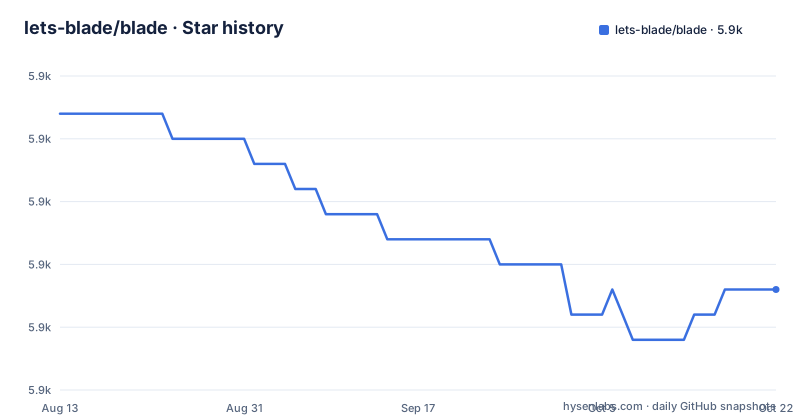
Star history
- lets-blade/blade5,869 ★ · -7
| Repository | 2026-08-13 | 2026-10-22 |
|---|---|---|
| lets-blade/blade | 5.9k | 5.9k |
-7 Stars in the last 70 days, measured from the daily GitHub snapshot. Compare with other projects
Editorial analysis
What Blade actually solves
Blade targets a specific complaint: traditional Java web frameworks like SSH (Spring, Struts, Hibernate) are bloated and layered. The README says Blade is a new generation MVC framework that depends on no other libraries, with source under 500kb. It is for developers who want a web server that starts from a plain main method, no webapp directory, no external servlet container. The target user is someone who wants to learn a framework in a single day and write small RESTful services quickly. The emphasis on simplicity is not marketing fluff; the quick start shows a one-line route registration that returns text. This is a deliberate contrast to Spring Boot's auto-configuration and dependency graph. Blade's value proposition is speed of development and minimal conceptual overhead, not feature depth.
Architecture: Netty underneath, a DSL on top
Blade is built on Java 8 and Netty 4. The README states this directly. Netty handles the event loop and HTTP protocol, while Blade adds a routing layer and a fluent API. The core abstraction is the Blade instance, which exposes methods like get, post, put, delete. Each method takes a path and a handler that receives a RouteContext. The context object bundles request and response operations: query parameters, form data, path variables, text output. There is also an annotation-based controller style using @Path, @GET, @POST, with method parameters annotated as @Query or @Form. This dual approach means you can write tiny one-off routes in the main method or organize handlers into classes. The framework also includes middleware, a cron task scheduler, and built-in CSRF and XSS defense, according to the feature list. The design keeps the standard library close, avoiding the layer indirection that plagues larger frameworks.
Getting it running: Maven, Gradle, and a main method
Setup is straightforward. The README instructs you to create a standard Maven or Gradle project, explicitly telling you not to create a webapp project. For Maven, add the dependency com.hellokaton:blade-core:2.1.2.RELEASE. For Gradle, use compile 'com.hellokaton:blade-core:2.1.2.RELEASE'. Then write a main method: Blade.create().get("/", ctx -> ctx.text("Hello Blade")).start(). This starts a server on port 9000 by default. The README also shows how to change the server port and configure SSL, though the truncated material does not include those exact commands. The key insight is that Blade runs as a standalone JAR, no external container. This is a major simplification for deployment: you package a jar and run it. The framework handles the HTTP server internally via Netty. This is both a strength (no container config) and a constraint (you cannot drop it into an existing servlet environment).
Routing and parameter handling: the practical core
The routing system supports both hardcoded routes and annotation-based controllers. For hardcoded routes, you chain methods on the Blade instance. Path parameters use a colon syntax, such as /user/:uid, and you retrieve them with ctx.pathInt("uid"). The README shows a two-parameter route /users/:uid/post/:pid, which is a typical RESTful pattern. Query parameters come via ctx.queryInt("age") or the @Query annotation. Form parameters use ctx.fromInt("age") or the @Form annotation. Body parameters and model parsing are mentioned in the table of contents, but the truncated section does not show the code. This is a real gap: if you need to parse a JSON request body into a POJO, the README does not show you how. The framework has a ResponseType.JSON enum in the controller example, but the actual serialization mechanism is not explained in the visible material. You will need to consult the full documentation or read the source.
Rendering and templates: flexible but with a learning curve
Blade supports multiple output types: text, HTML, JSON, and template rendering. The README lists default template support and Jetbrick template integration. The controller example shows a method returning "login.html", which suggests a convention-based view resolution. For JSON, the @POST annotation has a responseType attribute set to ResponseType.JSON, and the method returns a RestResponse object. The README does not show how RestResponse is serialized or whether Jackson is bundled. The template engine support is a plug-in style, meaning you add an extra dependency and configure it. This flexibility is useful, but the documentation is thin on specifics. A developer coming from Spring MVC will miss the extensive view resolver configuration. For simple text or JSON responses, Blade is immediate. For complex view logic, you will likely spend time reading the Jetbrick integration docs separately.
Where Blade falls short: maintenance, docs, and ecosystem
The most concrete limitation is the maintenance status. The last push was May 9, 2022, and the latest release is 2.1.2.RELEASE from that same date. The project is not archived, but it is dormant. No new commits in over a year means security patches and Netty version updates are not coming. The README claims high performance with a figure of 100 concurrent qps 20w/s, but that is a vendor claim, not an independent benchmark. You should not rely on it without your own load tests. Another limitation is the documentation. The README is a quick start, not a reference. The table of contents lists many topics, but the truncated material cuts off before sections like Web Hook, Basic Auth, and Custom Exception Handler. The official site and a Baeldung guide are linked, but you will need to cross-reference them. The framework's small size means fewer community-contributed examples and fewer Stack Overflow answers. For a team that values long-term support, this is a red flag.
Alternatives: Javalin and Spring Boot take different paths
A direct alternative is Javalin, another lightweight Java web framework that also runs on Jetty and offers a similar fluent routing API. Javalin is actively maintained and has a larger ecosystem of plugins. The difference in approach is that Javalin does not bundle its own HTTP server; it uses Jetty, which is a mature servlet container. Blade uses Netty, which is a lower-level network library, giving Blade more control but also more responsibility for HTTP edge cases. If you want a framework that stays current with Java releases and has a vibrant community, Javalin is a safer bet. On the other end, Spring Boot solves the same problem with a massive dependency graph, auto-configuration, and a huge ecosystem. Spring Boot is heavier and slower to start, but it offers production-ready features like metrics, health checks, and configuration management out of the box. Blade's trade-off is clear: you sacrifice ecosystem and maintenance for a small, understandable codebase. Choose Blade if you value reading the entire framework in a day; choose Javalin if you want active development; choose Spring Boot if you need enterprise features.
Licensing and upgrade cost
Blade is licensed under Apache-2.0, which is permissive. You can use it in commercial projects without copyleft obligations, though you must retain the license notice. The upgrade cost is low in terms of dependency count: there is essentially one core artifact, blade-core. The README shows no transitive dependencies, which simplifies upgrades. However, the lack of releases after 2.1.2 means there is no upgrade path to a newer version. If you adopt Blade, you are locking yourself to the 2.1.x line. The source is small enough that you could fork it and patch issues yourself, but that is a maintenance burden. The project also has a donation link, indicating it is community-supported. Before adopting, check the Netty version used in the 2.1.2.RELEASE artifact and compare it against known CVEs. Since the project is dormant, any Netty vulnerability discovered after 2022 will not be patched by the project. You would need to either upgrade Netty yourself (risky) or accept the risk.
Editorial conclusion
Adopt Blade if you need a minimal Java 8 web service that starts from a main method, values a small dependency footprint, and you are comfortable reading source code when docs fall short. Avoid it if you require a large ecosystem, active maintenance, or production-grade security guarantees beyond built-in CSRF and XSS helpers. Before adopting, verify the current release (2.1.2.RELEASE) against your Java version, confirm the Netty version matches your deployment environment, and test the template engine integration you plan to use. The project's last push was May 2022, so treat it as a stable but dormant codebase, not an evolving one.
Frequently asked questions
What is lets-blade/blade used for?
It is a Java 8 MVC web framework built on Netty 4. You add one blade-core dependency, register routes in code or with annotations, and run the result as a jar that answers on port 9000.
Which version of blade-core should a new project depend on?
The version shown in both the Maven and Gradle snippets is 2.1.2.RELEASE, and it is also the newest published release, dated 2022-05-09. The repository default branch is named v2.1.3, so the two are not the same thing.
Does Blade need a webapp project or a servlet container?
No. The quick start says not to create a webapp project, and the feature list says running the jar package opens the web service. No WAR packaging or existing container deployment is shown.
How do you read a query parameter in a Blade route?
Inside a lambda route use ctx.queryInt("age"), and in an annotated controller method use an `@Query Integer age` parameter. Form fields use ctx.fromInt or `@Form`, and path values such as /user/:uid are declared with a colon and read with ctx.pathInt.
Official sources
Add this badge to your README
If you maintain this project, the badge below links readers to this analysis and shows its maintenance status from the daily GitHub snapshot. Paste the markdown into your README; add ?metric=license or ?metric=stars to the image URL for a different field.

[](https://hysenlabs.com/projects/lets-blade-blade)Star history chart for your README
[](https://hysenlabs.com/projects/lets-blade-blade)