Visual Boy Advance M builds with Ninja, CMake and a triplet you have to pick
The continuing development of the legendary VBA gameboy advance emulator.
At a glance
- What is it?
- visualboyadvance-m/visualboyadvance-m is the continuing development of a Game Boy and Game Boy Advance emulator written in C++, with SDL, wxWidgets and libretro front ends and separate dependency paths for vcpkg, MSYS2 packages and the Android NDK. Its own build page tells you to delete your config before reporting a bug, without saying where that file lives.
- Who is it for?
- This is a source build worth doing if you want the libretro core, the wxWidgets port or a current nightly rather than a store package, and if you are prepared to choose a dependency triplet before CMake configures anything.
- Can I use it commercially?
- Yes, with conditions. GPL-2.0 is a copyleft licence: if you distribute software that includes it, you must release that software's source code under the same licence. Running it internally without distributing it does not trigger that obligation.
- Is it still maintained?
- Yes. The repository last received commits 1 day ago.
- What is it written in?
- Mainly C++, according to GitHub's language statistics.
Answers come from the project's GitHub data, last synced on October 21, 2026, and from our analysis. They are not legal advice.
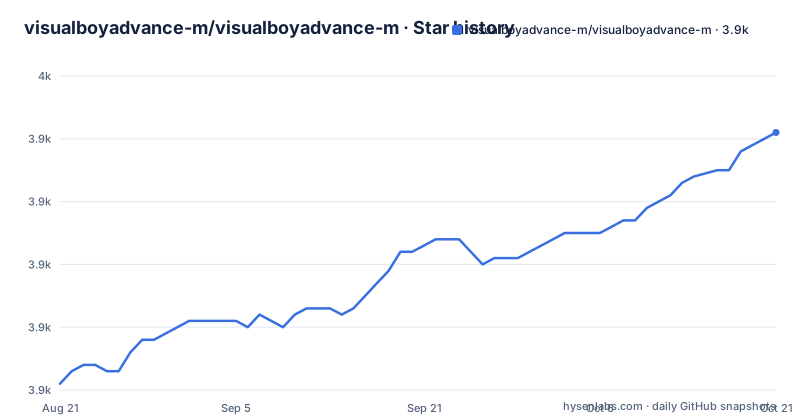
Star history
- visualboyadvance-m/visualboyadvance-m3,941 ★ · +40
| Repository | 2026-08-21 | 2026-10-21 |
|---|---|---|
| visualboyadvance-m/visualboyadvance-m | 3.9k | 3.9k |
40 Stars in the last 61 days, measured from the daily GitHub snapshot. Compare with other projects
Editorial analysis
The build formula is a dependency script and a Ninja generator
The documented source build is short enough to copy in one go, and every step of it matters.
git clone https://github.com/visualboyadvance-m/visualboyadvance-m
cd visualboyadvance-m

./installdeps # On Linux, macOS or MSYS2

mkdir build
cd build
cmake .. -DCMAKE_BUILD_TYPE=Release -G Ninja
ninja
The out of tree build directory is not optional in practice, since the configure step is run from inside `build` with `..` as the source path. The dependency script is the part with an escape hatch: the page says that if `./installdeps` does not work you may have to install the dependencies by hand, and that the script also works on MSYS2. The required set for every platform is a C and C++ toolchain with binutils, CMake, zlib, Gettext with its tools, SDL3 or SDL2, wxWidgets, bzip2 and xz or lzma. FFmpeg, OpenAL-Soft, Lua, FAudio and Vulkan are optional, Linux adds glibc-devel, mesa, GTK3, XOrg and Wayland, and macOS needs MoltenVK if you want Vulkan there. Windows XP or newer, macOS and Linux are the supported systems.
The vcpkg triplet is the one setting you usually have to supply
Dependency resolution is the part that differs per platform, and the switch is a single CMake variable. On Windows vcpkg is the default and the page says it is handled automatically. Everywhere else you have to name the triplet yourself:
cmake .. -DVCPKG_TARGET_TRIPLET=**<SYSTEM>** -DCMAKE_BUILD_TYPE=Release -G NinjaThe system values offered are `x64-linux`, `arm64-macos` and `x64-macos`. Android is the same variable with a different list, and it also expects `ANDROID_HOME` and `ANDROID_NDK_HOME` to be set: `arm64-android`, `arm-neon-android`, `x64-android`, `x86-android` and `riscv64-android`. That list is the practical way to see which architectures the project actually carries, since it names five Android ABIs rather than one. The same triplet variable appears twice more in the options table with defaults that mirror this split, on for Windows and off everywhere else: `VCPKG_BINARY_PACKAGES`, which downloads and uses prebuilt packages, `VCPKG_SOURCE_PACKAGES`, which builds dependencies from source when a binary package is missing, and `NO_VCPKG_UPDATES`, which freezes the ports tree and defaults to off, meaning a configure run will pull updated ports unless you stop it.
Inside MSYS2 the default is the opposite of Windows
The dependency story inverts itself under MSYS2, which is the easiest thing to get wrong from the table alone. If you are in an MSYS2 shell, the packages that `./installdeps` installed are the default, not vcpkg, and you have to pass the triplet variable explicitly to switch. The two MSYS2 environment values are `x64-mingw-static`, used for the MINGW64, UCRT64 and CLANG64 environments, and `x32-mingw-static`, used for Windows XP builds using a MINGW32 toolchain. The page also points out where to get that older toolchain: a MINGW32 archive linked from the page, to be extracted to `C:\msys64`. Windows XP support therefore depends on a specific 32 bit toolchain choice rather than on a runtime setting, and the XP prerequisites are given separately as the DirectX June 2010 redistributable and an all in one pack of Visual C++ runtimes. One more environment fact: a `VCPKG_ROOT` is created automatically as a sibling of the project directory unless your environment already sets one, so a build can write next to your checkout without asking.
One checkout compiles several front ends and switches most of them off
The options table shows that this is not a single program with a single interface. `ENABLE_SDL` builds the SDL port and defaults off on Windows and on everywhere else, while `ENABLE_WX`, the wxWidgets port, is on by default, and `ENABLE_SDL3` decides whether SDL3 is used instead of SDL2 whenever SDL3 is detected. `DISABLE_OPENGL` turns off OpenGL support, and `ENABLE_GENERIC_FILE_DIALOGS` switches macOS to the generic file open and selection dialogs, which matters on a system where the native panel is the thing being tested. Three options are about what the build is allowed to do beyond drawing pixels: `ENABLE_LINK`, on by default, enables GBA and GB linking functionality, `ENABLE_LIBRETRO` builds the libretro core and is also on by default, and `BUILD_TESTING` builds the tests. The release tasks are separate again: `UPSTREAM_RELEASE` is off and covers codesigning and zip creation, `TRANSLATIONS_ONLY` builds nothing but the translations archive, `ENABLE_LTO` turns on link time optimization for release builds, and `VBAM_STATIC` tries to link as many libraries statically as possible, defaulting on for Windows and MSYS2 and off elsewhere.
Bug reports are supposed to begin with a factory reset of a file the page never locates
The page's first instruction to anyone with a problem is not a bug report, it is a reset. In capitals it asks that the nightly or master build be tested with a factory reset before issues are reported, and the next paragraph repeats it in the shape of a default action: if you are having issues, try resetting the config file first, through Help and then Factory Reset. The gap is that the page never says where that configuration file is, what format it uses, or what a factory reset costs you, so the advice is only actionable from inside the running emulator. For a project whose configuration carries per system audio and video options, feature toggles and saved state paths, that is a large surface to clear blind, and it also means the reset path cannot be scripted or inspected by anyone reporting a problem. The related advice for distinguishing a real defect from a local artifact is the opposite: the page points you at the nightly builds for Windows, macOS, Libretro and Android first, and tells you to search your own distribution for packages named `visualboyadvance-m` or `vbam` before assuming you need to build anything.
The clone step has no submodule step, while the tree carries .gitmodules
The documented formula starts with a plain `git clone` of the repository URL and nothing else. The top level of the project, however, contains a `.gitmodules` file alongside a `third_party` directory, which is the shape of a checkout that expects its dependencies to be initialized separately. Nothing in the build sequence covers that case: the next step is `cd` into the directory, then `./installdeps`, then an out of tree configure. So a first time builder following the page exactly can reach a configure step with an empty or incomplete `third_party` and no hint that the cause was the missing submodule step. The rest of the tree explains where the work lives: `src/` for the emulator, `cmake/` for the build scripts, `data/` for resources, `po/` for translations with a `.tx/` configuration for the translation platform, `doc/` for documentation next to a `DEVELOPER-MANUAL.md`, `tools/`, a `win32-deps` directory for Windows dependency material, `Testing/` for the test tree, `CMakePresets.json` beside `CMakeLists.txt`, and a `default.nix` for a Nix build.
The newest tag is eleven months behind the last push
Version numbers here move slowly while the branch does not. The three most recent releases are v2.2.1 on 2025-07-19, v2.2.2 on 2025-07-30 and v2.2.3 on 2025-10-25, and the branch itself was last pushed on 2026-10-04. That is roughly eleven months between the newest tag and the newest commit, which means the code a user builds from the default branch is far ahead of what any release archive contains, and that a bug report against master describes something no user has received through the releases tab. The project's answer to that gap is the nightly channel, hosted on its own subdomain and covering Windows, macOS, Libretro and Android, with the Windows and macOS release archives in the repository's releases tab. Two other distribution routes sit inside HTML comments in the page and are therefore not links a reader ever sees, one of them for Flathub and one for Snapcraft, and the project forum link is commented out too. The project is GPL-2.0 licensed with the license text at the root, and its homepage is the project domain rather than the GitHub repository.
The page's own editing state is visible in the prose
The README is generated in part and edited by hand in part, and the seam shows. It opens with a table of contents block bracketed by instructions not to edit that section and to re-run doctoc instead, and that block is the only place the anchors are guaranteed to exist, since the rest of the file is written by hand. The seams between the generated and the manual parts are visible in the punctuation: several code blocks are followed by a lone full stop on its own line, the vcpkg paragraph ends with a comma before the word where, and the sentence introducing the Android triplets begins with a full stop. Those are cosmetic, but they are the kind of detail that makes it unclear whether a sentence was left incomplete or deliberately short. The Visual Studio Code section is the most complete of the manual parts, and it asks for two Microsoft extensions, the C/C++ one and CMake Tools, plus a settings.json with `cmake.configureOnOpen` set to true and Ninja as the preferred generator, which matches the generator the Linux and macOS build commands already assume.
Editorial conclusion
This is a source build worth doing if you want the libretro core, the wxWidgets port or a current nightly rather than a store package, and if you are prepared to choose a dependency triplet before CMake configures anything. It is not worth doing for a quick install: the newest tag, v2.2.3 from 2025-10-25, is about eleven months older than the last push on 2026-10-04, so anything you compile from the branch is ahead of every release, and the project pushes users toward the nightly site for Windows, macOS, Libretro and Android. Before you file a bug, do what the page asks and reset the configuration from the Help menu, because a large share of reported problems are configuration state, and note that the page never tells you where the file lives, so a factory reset is the only cleanup path it documents. And before you clone, decide whether you need submodules: the repository carries a .gitmodules file and a third_party directory, while the documented clone command is a plain clone with no submodule step. Package managers may already carry it under the names `visualboyadvance-m` or `vbam`.
Frequently asked questions
How do I download VBA-M?
Windows and macOS builds sit in the repository's releases tab, and nightly builds for Windows, macOS, Libretro and Android are published on the project's nightly subdomain. Your own distribution may package it already, under the name visualboyadvance-m or vbam.
What is visualboyadvance m?
It is the continuing development of a Game Boy and Game Boy Advance emulator, written in C++ and licensed GPL-2.0. The same checkout builds an SDL port, a wxWidgets port and a libretro core, for Windows, macOS and Linux.
How do I build visualboyadvance-m from source?
Clone the repository, run ./installdeps on Linux, macOS or MSYS2, create a build directory, and configure with cmake .. -DCMAKE_BUILD_TYPE=Release -G Ninja followed by ninja. If the dependency script does not work, the page lists the libraries to install by hand: zlib, Gettext, SDL3 or SDL2, wxWidgets, bzip2 and xz or lzma.
Does visualboyadvance-m still support Windows XP?
Yes, Windows XP or newer is listed among the supported systems. It needs the DirectX June 2010 redistributable and an all in one pack of Visual C++ runtimes, and an XP build is made with the x32-mingw-static triplet from a MINGW32 toolchain extracted to C:\msys64.
Which visualboyadvance-m CMake options are off by default?
Several: ENABLE_SDL is off on Windows only, UPSTREAM_RELEASE is off, TRANSLATIONS_ONLY is off, NO_VCPKG_UPDATES is off, DISABLE_OPENGL is off and ENABLE_GENERIC_FILE_DIALOGS is off. The three vcpkg options are on for Windows and off elsewhere, and ENABLE_WX, ENABLE_LINK, ENABLE_LIBRETRO and BUILD_TESTING are on.
Official sources
Add this badge to your README
If you maintain this project, the badge below links readers to this analysis and shows its maintenance status from the daily GitHub snapshot. Paste the markdown into your README; add ?metric=license or ?metric=stars to the image URL for a different field.

[](https://hysenlabs.com/projects/visualboyadvance-m-visualboyadvance-m)Star history chart for your README
[](https://hysenlabs.com/projects/visualboyadvance-m-visualboyadvance-m)