Leviidev/Husk for running Android apps and games on iOS
Run Android on iOS. Natively or Emulated.
At a glance
- What is it?
- Husk is an iOS-side Android runner with two execution paths: a translation layer for supported 64-bit apps and QEMU-based emulation for a full LineageOS system. It is aimed at users who sideload APKs on iOS, but its JIT requirement and GPL licensing limit deployment options.
- Who is it for?
- Husk is appropriate for iOS users with supported 64-bit APK bundles who accept sideloading, JIT setup and GPL distribution terms. It is not a general iOS deployment method for ordinary 32-bit or Java-only apps.
- Can I use it commercially?
- Yes, with conditions. GPL-2.0 is a copyleft licence: if you distribute software that includes it, you must release that software's source code under the same licence. Running it internally without distributing it does not trigger that obligation.
- Is it still maintained?
- Yes. The repository received new commits within the last day.
- What is it written in?
- Mainly Java, according to GitHub's language statistics.
Answers come from the project's GitHub data, last synced on October 23, 2026, and from our analysis. They are not legal advice.
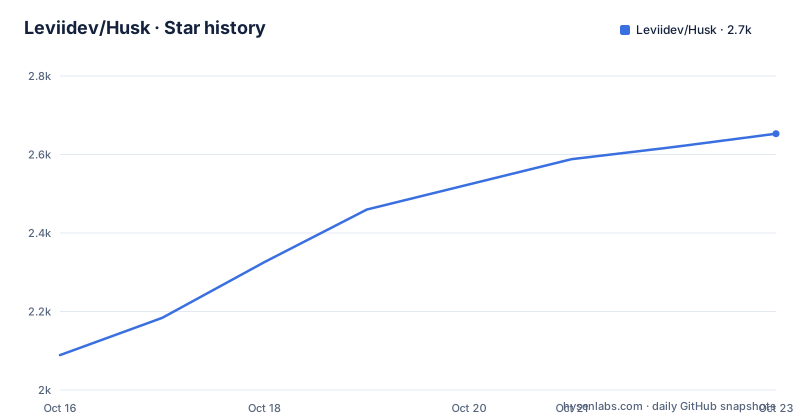
Star history
- Leviidev/Husk2,653 ★ · +564
| Repository | 2026-10-16 | 2026-10-23 |
|---|---|---|
| Leviidev/Husk | 2.1k | 2.7k |
564 Stars in the last 7 days, measured from the daily GitHub snapshot. Compare with other projects
Editorial analysis
Why Husk uses two Android execution paths
Husk addresses a narrow gap between Android software and Apple's iOS. An Android app or game cannot simply be installed on an iPhone because it expects Android APIs, an Android runtime, graphics drivers and platform services. Husk offers two paths inside the same iOS application. The translation layer is intended for faster execution of supported games, while Emulation boots a full LineageOS system for apps that the translation layer cannot handle.
The split matters because the two paths have different compatibility and performance characteristics. The README states that the translation layer executes the game's own 64-bit Android code on the iPhone processor rather than emulating that code. Its compatibility is tied to supported engines and Android-facing components. Emulation is more general from an Android-system perspective, but the iOS environment provides no hypervisor, so QEMU must emulate the processor. The README explicitly describes that mode as much slower.
The project is for people who already work with APKs or split application bundles and can use SideStore, AltStore, TrollStore, or another installation method described by Husk. It is also relevant to users who want Android itself available on an iPhone, rather than only a particular game. Husk is not presented as a conventional App Store application distribution system. The documentation says that it needs `get-task-allow` and a debugger attaching at runtime, and that GPL licensing also prevents App Store distribution.
Translation-layer architecture and APK compatibility
The translation layer is Husk's own compatibility layer. It substitutes an Android environment around the application's existing 64-bit code. The documented components include the C library, Java calls made by a game, OpenGL ES through ANGLE, Vulkan through MoltenVK, sound, touch input and controllers. This design attempts to avoid booting Android for a supported title, which the README associates with startup in seconds.
Compatibility is tied to engines for which Husk has drivers. The README lists Unity, Unreal Engine 4 through Vulkan, cocos2d-x, Godot 3 and 4 with GLES2, GLES3 and the Compatibility renderer, SDL2 and SDL3 including LÖVE games, GameActivity and NativeActivity, and Rockstar's own engine for GTA: San Andreas. Geometry Dash is also documented as able to load Geode mods. These are engine-level compatibility statements, not a guarantee that every release of every game behaves identically.
The APK format is another boundary. Husk accepts APKs and split bundles with the `.xapk`, `.apkm` and `.apks` extensions, as well as separate split APKs and asset packs from a Play download. The native library must be 64-bit `arm64-v8a`. An APK containing only 32-bit ARM libraries cannot run through the translation layer because iPhones cannot execute that code. Apps written only in Java, with no native engine, are also excluded from this path. Those applications need Husk's Emulation mode instead.
Google Play services are presented as installed but signed out. Applications that merely check for the service can start, but Play Games sign-in, cloud saves and purchases are not available. That limitation affects games whose progress or monetization depends on those services.
Husk installation through SideStore and AltStore
Husk documents two installation routes. For SideStore, AltStore and other sideloaders, the documented workflow is to add Husk's update source. The sideloader then offers Husk updates as they become available.
https://raw.githubusercontent.com/Leviidev/Husk/main/altsource.jsonIn SideStore or AltStore, open Sources, add the source with the plus control, and paste that address. The README does not give a command-line installation procedure for the IPA, so there is no supported `curl` or package-manager example to reproduce here.
The manual route is to download `Husk.ipa` from the repository's Releases page and install it with SideStore, AltStore or TrollStore. The README states that one IPA is used for all three. It carries Husk's entitlements for TrollStore, while a sideloader re-signs it with the user's own signing identity. Husk requires iOS 16.0 or later.
After installation, Husk still needs JIT. On iOS 26 and later, the README describes built-in StikJIT, which Husk enables itself. On iOS 27, it says the feature pairs with the iPhone from Settings without a computer. For earlier versions, it lists StikDebug, TrollStore, or a Dopamine jailbreak with the `Allow JIT in Apps` option. On iOS 26, the README states that only a debugger can grant JIT. Husk guides the setup through Settings › JIT & Sideload.
Building Husk from a Mac checkout
Building is documented as a Mac and Xcode process, not as a simple local package installation. The build scripts call `meson`, `ninja`, `pkg-config`, `python3`, `xcodegen`, `qemu-img`, and a Rust toolchain targeting `aarch64-apple-ios`. The repository provides a single build entry point:
./scripts/ci_build.shFrom a clean checkout, the README says this fetches and cross-compiles QEMU and dependencies, ANGLE and virglrenderer, MoltenVK, and the on-device pairing library. It then builds Husk and writes the IPA to `build/Husk.ipa`. The first run is documented as taking a couple of hours, while later runs reuse existing build artifacts. The article cannot independently confirm the runtime of that build on a particular Mac.
For an incremental application build, the repository documents this command:
./scripts/package_ipa.shIt rebuilds the app and writes `~/Desktop/Husk.ipa`. The repository also contains `tools/regress/run.sh`, which the README says plays selected games through the translation layer on the Mac and compares each with a reference screenshot. The cases and their requirements are documented at the top of `tools/regress/cases.txt`.
This build path has a high entry cost. It assumes Xcode, a Rust target and several native build tools, and the README does not describe a prebuilt Linux or Windows development environment. The distributable IPA route is more accessible for users who only need to run Husk.
Save backups, crash reports and single-game operation
Husk is designed around a library of locally added applications rather than a remote catalog. The README says that users add an APK or supported bundle and tap it to open full-screen. One game runs per Husk launch. Switching games requires choosing `Close Husk to Play` on the other game's page, then reopening Husk so the selected game starts.
That restriction simplifies the runtime model but limits simultaneous play. It also means users should keep the library arrangement clear if they switch frequently. The documentation does not describe multi-instance execution or running multiple games in the background.
Save data is not limited to one device for backup purposes. A game's saves can be exported as a `.zip` from its page and restored later on the same iPhone or another. This is a documented backup mechanism, not a claim of automatic cloud synchronization.
Crash handling is also specific. If a game crashes Husk, the next launch is said to show what happened and provide a shareable report. The README does not describe a command for collecting logs from a production installation, nor does it document a rollback procedure. Users who need forensic debugging beyond the in-app report would have to inspect the repository's tests and scripts, which are not described here as a user support workflow.
GPL-2.0-or-later licensing and maintenance status
Husk is distributed under `GPL-2.0-or-later`. The README explains that Husk links QEMU, which is GPLv2, and that the shipped binary is therefore a combined GPLv2 work with public source. The translation layer is also described as Husk's own code under the same license. This is a distribution condition that affects anyone who packages or redistributes Husk. It is not legal advice, and the repository points to `docs/01-licensing.md` for the project's licensing details.
The repository is not archived. Its last push was on 2026-10-15, so it is recent relative to the project record. That fact does not establish API stability or compatibility with every future iOS release. The README itself contains several version-sensitive dependencies, particularly JIT behavior on iOS 26 and iOS 27, which means a user should distinguish repository activity from compatibility confidence.
Upgrade cost is tied to the side-loaded release channel. SideStore and AltStore can offer each update through `altsource.json`, while manual users download a new `Husk.ipa`. The release list includes versions 2.0, 1.1.0 and 1.0.1, but the README does not provide a formal upgrade or migration guide for saves, configured JIT settings or previously added bundles. A backup made with the `.zip` save export is the only documented precaution for preserving game data across devices or installations.
Choosing Husk against a conventional iOS deployment
Husk's practical alternative is not another Android runner with the same interface. Its two internal modes already show the main architectural choice: native-code translation for supported games, or full Android emulation for broader Android system compatibility.
Compared with translation, Emulation boots LineageOS under QEMU. That can accommodate applications outside the translation layer, including Java-only apps, but processor emulation is explicitly much slower on iOS. Compared with a native iOS port, Husk preserves existing Android packages instead of requiring the software to be rewritten for iOS. The trade-off is that the original app still expects Android-facing interfaces and may depend on services that Husk presents only as installed and signed out.
Husk is the wrong tool when the target is 32-bit only, has no native engine on the translation path, requires Play Games or cloud saves, or must be distributed through the App Store under ordinary App Store constraints. It is also unsuitable for someone who needs a documented production deployment process, since the project depends on sideloading, entitlements and runtime JIT access. For a supported 64-bit game, the translation layer is the relevant path. For an ordinary Android application that cannot use that layer, Emulation is available but should be evaluated for the slower execution model.
Editorial conclusion
Husk is appropriate for iOS users with supported 64-bit APK bundles who accept sideloading, JIT setup and GPL distribution terms. It is not a general iOS deployment method for ordinary 32-bit or Java-only apps. Before adopting it, check the app's native architecture, the required JIT method for the installed iOS version, and whether the intended workflows depend on Google Play services.
Frequently asked questions
How do I install Husk on iOS?
Husk's README recommends adding `https://raw.githubusercontent.com/Leviidev/Husk/main/altsource.json` in SideStore or AltStore, or downloading `Husk.ipa` from Releases for manual installation. Husk requires iOS 16.0 or later and needs a JIT-granting method.
Can Husk run a Java-only Android app?
Not through the translation layer. The README says apps written only in Java, with no native engine, need Husk's Emulation mode, where a LineageOS system runs under QEMU and processor emulation is much slower.
What Android file formats does Husk support?
Husk accepts APKs and split bundles using `.xapk`, `.apkm` and `.apks`, as well as separate split APKs and asset packs from a Play download. The translation layer requires 64-bit `arm64-v8a` native code.
Official sources
Add this badge to your README
If you maintain this project, the badge below links readers to this analysis and shows its maintenance status from the daily GitHub snapshot. Paste the markdown into your README; add ?metric=license or ?metric=stars to the image URL for a different field.

[](https://hysenlabs.com/projects/leviidev-husk)Star history chart for your README
[](https://hysenlabs.com/projects/leviidev-husk)Was this useful?