ADBKeyBoard: Unicode Text Input for Android ADB Automation
Android Virtual Keyboard Input via ADB (Useful for Test Automation)
At a glance
- What is it?
- ADBKeyBoard is a Java-based Android virtual keyboard that accepts text and key commands through ADB broadcast intents. It fills a specific automation gap around Unicode input, but it requires installation, explicit IME selection, and careful handling of Android shell encoding behavior.
- Who is it for?
- ADBKeyBoard is appropriate for developers and testers who need deterministic Unicode input, editor actions, key events, modifier keys, or field clearing through ADB. It is a poor fit for ordinary interactive typing, environments where installing a third-party IME is unacceptable, or automation that assumes `adb shell input text` handles every Unicode string.
- Can I use it commercially?
- Yes, with conditions. GPL-2.0 is a copyleft licence: if you distribute software that includes it, you must release that software's source code under the same licence. Running it internally without distributing it does not trigger that obligation.
- Is it still maintained?
- Yes. The repository last received commits 75 days ago.
- What is it written in?
- Mainly Java, according to GitHub's language statistics.
Answers come from the project's GitHub data, last synced on October 23, 2026, and from our analysis. They are not legal advice.
Star history
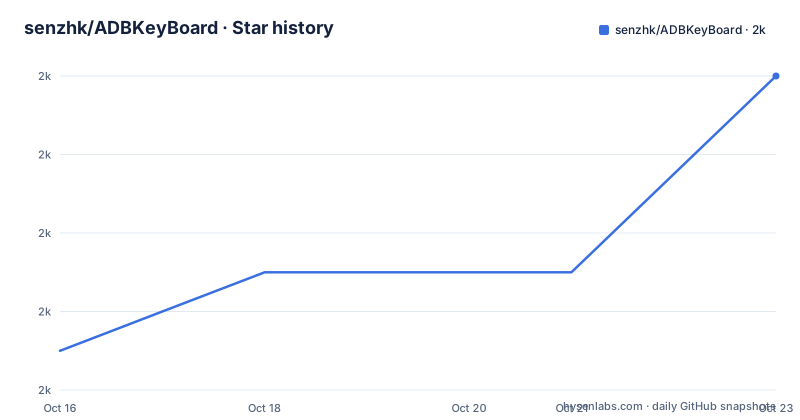
- senzhk/ADBKeyBoard1,972 ★ · +7
| Repository | 2026-10-16 | 2026-10-23 |
|---|---|---|
| senzhk/ADBKeyBoard | 2k | 2k |
7 Stars in the last 7 days, measured from the daily GitHub snapshot. Compare with other projects
Editorial analysis
Why ADBKeyBoard Exists for Android Text Automation
ADBKeyBoard targets a narrow but real problem in Android automation. The normal shell command can send basic text and key events, but the README states that it cannot send Unicode characters as intended. Its example says a command containing `你好嗎` will not work, so a test script that depends on Chinese text, emoji, or other non-ASCII characters cannot rely on that interface alone.
The project is for developers running device or emulator automation, especially tests that need to populate text fields without manually invoking the on-screen keyboard. It can receive ordinary text, base64-encoded text, explicit Unicode code points, editor actions, key events, modifier combinations, and a command to clear a field. These capabilities go beyond entering one string. A test can switch to ADBKeyBoard, send several input operations, and then restore the device's previous input method.
ADBKeyBoard is not a general Android keyboard intended for everyday messages. Its purpose depends on ADB or another Android service sending broadcast intents to the installed input method. Its usefulness also comes with a requirement that can affect test environment policy: the automation runner must be able to install an APK and select the `AdbIME` service as the active keyboard.
ADB Broadcast Actions and Input Data Flow
ADBKeyBoard implements a virtual input method that listens for system broadcast intents. The host sends an intent through `adb shell am broadcast`, specifying an action and extras. ADBKeyBoard interprets that action as an input operation, while the focused Android field remains the destination.
Text can travel through several paths because shell encoding is not uniform across Android releases. `ADB_INPUT_TEXT` accepts a string in the `msg` extra. `ADB_INPUT_B64` accepts a base64 representation in `msg`, which gives scripts a way to encode Unicode before the shell command is processed. The README warns that the plain-text form may not work on Oreo and P because ADB commands there may reject UTF-8 strings.
For explicit Unicode, `ADB_INPUT_CHARS` takes an integer-array extra named `chars`. The example sends a cat emoji, a space, and three ASCII characters as numeric values. This avoids text encoding in the command itself, although callers must calculate the code points correctly.
Other actions control keyboard behavior rather than adding literal text. `ADB_INPUT_CODE` sends a key event, such as `67` for `KEYCODE_DEL`. `ADB_EDITOR_CODE` sends an editor action, such as `2` for `IME_ACTION_GO`. `ADB_CLEAR_TEXT` clears all text, while the `mcode` extra on `ADB_INPUT_TEXT` supplies modifier states such as Ctrl before a key event. This action-based interface is straightforward for a test runner, but it is an application-specific contract rather than a general substitute for every Android input path.
Building and Installing the Android IME
The repository includes `gradlew`, `gradlew.bat`, the `keyboardservice/` module, and Android build configuration. The README directs users with one connected device or emulator to clone the repository, enter its directory, set `ANDROID_HOME` or edit `local.properties`, and build with the Gradle wrapper.
The following commands reproduce the documented source build. The first command downloads the repository, the second changes into its directory, the third points the build at the local Android SDK, and the final command builds and installs the debug APK on the connected target.
git clone https://github.com/senzhk/ADBKeyBoard.git
cd ADBKeyBoard
export ANDROID_HOME=$HOME/Android/Sdk
./gradlew installDebug
A build is not enough to route ADB input through ADBKeyBoard. The IME must be enabled and selected. The package and component identifiers in the documented commands are `com.android.adbkeyboard` and `.AdbIME`.
adb install ADBKeyboard.apk
adb shell ime enable com.android.adbkeyboard/.AdbIME
adb shell ime set com.android.adbkeyboard/.AdbIME
The first command in this sequence installs the bundled APK, assuming it is available in the current directory. The remaining commands enable and select the service. If the build-and-install route succeeded, a separate `adb install` may be unnecessary, although the README presents installation as a separate setup step. The README does not document any additional permissions or manifest configuration.
First Unicode and Key Operations Through ADB
A useful first check is ordinary text sent to a focused field. The following documented action supplies `msg` as a string. After the field gains focus, the text should appear according to the behavior of the application under test.
adb shell am broadcast -a ADB_INPUT_TEXT --es msg '你好嗎? Hello?'The README explicitly warns that this may fail on Oreo and P. For those cases, encode the UTF-8 bytes with the platform `base64` command and send them through `ADB_INPUT_B64`.
adb shell am broadcast -a ADB_INPUT_B64 --es msg `echo -n '你好嗎? Hello?' | base64`The numeric Unicode action provides another path when shell string handling is undesirable. Each value represents one Unicode code point in the example.
adb shell am broadcast -a ADB_INPUT_CHARS --eia chars '128568,32,67,97,116'Key-level and editor-level operations use separate actions, so callers should not conflate text insertion with editor submission.
adb shell am broadcast -a ADB_INPUT_CODE --ei code 67
adb shell am broadcast -a ADB_EDITOR_CODE --ei code 2
The first sends `KEYCODE_DEL`, and the second requests `IME_ACTION_GO`. Clearing a field is equally explicit.
adb shell am broadcast -a ADB_CLEAR_TEXTThese broadcasts only make sense while ADBKeyBoard is the active IME and an appropriate editable field has focus. The README does not define success responses or exit codes for these commands.
IME Selection, Modifier Keys, and Test Cleanup
ADBKeyBoard can be selected globally or for a particular `EditText`, according to the README. Test code that changes the global IME must account for cleanup. `adb shell ime list -a` shows available virtual keyboards, and `adb shell ime reset` restores the device's default selection without requiring the script to remember a previous package.
For environments where resetting the default is too broad, the documentation also shows setting a known prior IME directly.
adb shell ime list -a
adb shell ime reset
The reset command should return IME selection to Android's default state. The README does not document an automatic switch back after a single broadcast, so cleanup belongs in the test harness rather than being assumed.
Modifier keys use the `mcode` extra with `ADB_INPUT_TEXT`. The first documented value combines `META_CONTROL_ON` with `KEYCODE_A`, corresponding to Ctrl+A. A plus sign separates two simultaneous meta states in the second form.
adb shell am broadcast -a ADB_INPUT_TEXT --es mcode '4096,29'
adb shell am broadcast -a ADB_INPUT_TEXT --es mcode '4096+8192,29'
Android `input` Commands Versus ADBKeyBoard
The real alternative is Android's built-in `input` shell command. It offers a smaller interface with two documented forms: `input text <string>` for text and `input keyevent <event_code>` for key events. It is already available through ADB and does not require installing or selecting ADBKeyBoard.
The difference is Unicode handling and command scope. ADBKeyBoard adds broadcast actions for base64 input, numeric Unicode arrays, editor actions, modifier combinations, and field clearing. The built-in command remains preferable when the payload is plain ASCII and the extra IME is unnecessary. It also avoids changing the active input method, which reduces setup and cleanup in a test suite.
ADBKeyBoard becomes relevant when the test data contains characters that the shell's text path cannot transmit. Base64 or numeric actions can preserve Unicode intent, but they also move more application-specific behavior into the automation layer. The script must know which ADBKeyBoard action to use, how to encode its payload, and how to restore the IME.
This is also the project's main wrong-tool case. Manual users looking for a conventional keyboard, tests restricted to Android's platform input API, and pipelines that prohibit third-party input methods will get little value from it. The README does not document screen-reader behavior, accessibility testing suitability, physical-device security policy, or performance, so those areas cannot be treated as supported advantages.
Release Choice, Maintenance Signals, and GPL-2.0
The repository is not archived, and its last push was on 2026-08-09. Recent releases include `v2.5-dev`, published on 2026-04-23 with an Android 16 fix, and `v2.4-dev`, published on 2026-01-10 and labeled stable in the README. The release names themselves contain `dev`, so the naming does not support treating either artifact as a conventional stable semantic release.
For Android 16 environments, the README labels `v2.5-dev` as the release with the A16 fix. It separately calls the `v2.4-dev` download a stable APK. That distinction should be checked against the Android version and device images used by the test suite. The repository also retains an older `ADBKeyboard.apk`, but the release page provides newer downloads.
The project is primarily Java and uses `GPL-2.0`. That matters when the APK, source, or a modified build is distributed as part of another product or internal workflow. This is a licensing consideration rather than legal advice, and the repository's `LICENSE` file is the controlling source for the full terms. The README does not describe a separate commercial support policy, compatibility matrix, migration procedure, or upgrade guide.
Upgrading requires choosing a release artifact or rebuilding `master`, installing it, and confirming that the documented IME component remains enabled. The README does not document rollback or data migration, so neither should be assumed.
Editorial conclusion
ADBKeyBoard is appropriate for developers and testers who need deterministic Unicode input, editor actions, key events, modifier keys, or field clearing through ADB. It is a poor fit for ordinary interactive typing, environments where installing a third-party IME is unacceptable, or automation that assumes `adb shell input text` handles every Unicode string. Verify first that your Android version can receive the chosen broadcast format, that `com.android.adbkeyboard/.AdbIME` is enabled and selected, and whether v2.5-dev or v2.4-dev matches the device under test.
Frequently asked questions
How do I install and enable ADBKeyBoard?
Build and install it with `./gradlew installDebug`, or install `ADBKeyboard.apk` with ADB. Then enable and select `com.android.adbkeyboard/.AdbIME` using `adb shell ime enable` and `adb shell ime set`.
How does ADBKeyBoard send Unicode text on Android?
ADBKeyBoard accepts Unicode through `ADB_INPUT_B64`, with a base64-encoded `msg`, or through `ADB_INPUT_CHARS`, with numeric Unicode values in the `chars` extra. The base64 path is relevant when the documented Oreo and P shell text issue occurs.
How can a test restore the previous Android keyboard?
Run `adb shell ime reset` to return to Android's default input method without recording the previous IME. If the prior keyboard is known, the README also shows selecting its IME package and component with `adb shell ime set`.
Which ADBKeyBoard release should I use on Android 16?
The README labels `v2.5-dev` as the release with an A16 fix. It labels the separate `v2.4-dev` APK as stable, but its release name still contains `dev`, so the artifact selection should follow the target Android version documented by the project.
Official sources
Add this badge to your README
If you maintain this project, the badge below links readers to this analysis and shows its maintenance status from the daily GitHub snapshot. Paste the markdown into your README; add ?metric=license or ?metric=stars to the image URL for a different field.

[](https://hysenlabs.com/projects/senzhk-adbkeyboard)Star history chart for your README
[](https://hysenlabs.com/projects/senzhk-adbkeyboard)Was this useful?