html-ppt-skill: a static HTML deck toolkit that agents can drive
HTML PPT Studio — AgentSkill with 24 themes, 31 layouts, 20+ animations for building professional HTML presentations
At a glance
- What is it?
- lewislulu/html-ppt-skill is an AgentSkill of 36 themes, 36 layouts, 15 full decks and a two-window presenter mode, all plain HTML/CSS/JS with no build step. The trade-off is that an agent runtime, or a hand copy, has to put the folder where your tool scans.
- Who is it for?
- Adopt html-ppt-skill if you already run an AgentSkill-capable agent and want decks that are plain files you can hand-edit, and if you can accept Google Fonts as the one remote dependency or replace assets/fonts.css yourself. Skip it if you need a PowerPoint or Keynote file at the end, or if you want a hosted editor with a server-side render.
- Can I use it commercially?
- Yes. MIT is a permissive licence: you can use, modify and sell software built on it, as long as you keep its copyright and licence notices.
- Is it still maintained?
- Yes. The repository last received commits 62 days ago.
- What is it written in?
- Mainly HTML, according to GitHub's language statistics.
Answers come from the project's GitHub data, last synced on November 15, 2026, and from our analysis. They are not legal advice.
Star history
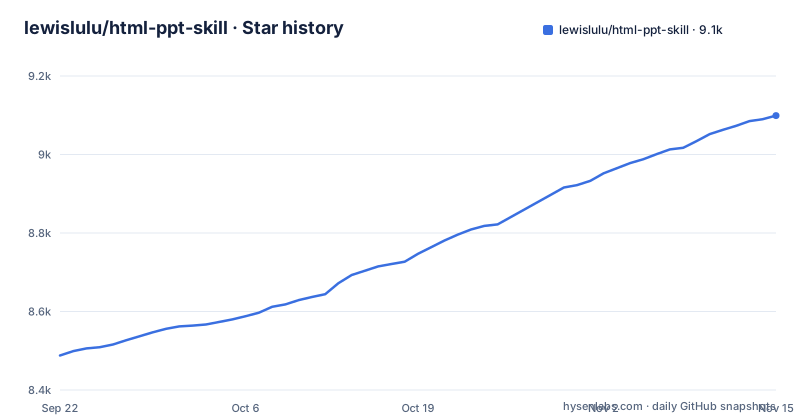
- lewislulu/html-ppt-skill9,099 ★ · +611
| Repository | 2026-09-22 | 2026-11-15 |
|---|---|---|
| lewislulu/html-ppt-skill | 8.5k | 9.1k |
611 Stars in the last 54 days, measured from the daily GitHub snapshot. Compare with other projects
Editorial analysis
The gap html-ppt-skill fills: decks an agent can write without a build step
Most slide tools assume a human clicking through a canvas, or a pipeline that compiles source into a binary format. html-ppt-skill assumes neither. It is packaged as an AgentSkill, so the intended author is an agent runtime that reads SKILL.md and then writes deck files. The README lists the counts it ships: 36 themes, 15 full-deck templates, 36 single-page layouts, 47 animations (27 CSS plus 20 canvas FX), and a presenter mode. Everything is static HTML, CSS and JS with no build step, which matters because the output is the artifact. There is no compile phase to break and no node_modules to install at author time.
The audience is narrow but real. You need an agent that supports AgentSkills, or you need to be willing to copy a folder by hand. In exchange you get decks that are ordinary files: diffable, editable in any editor, servable from any static host. Two of the README's three examples of what to ask an agent are in Chinese: a request for an 8-page technical sharing deck in the cyberpunk theme and a 9-image Xiaohongshu post in a soft white style. That tells you something about the intended users: people producing Chinese-language social and technical decks who would otherwise fight a design tool.
How the deck runtime works: one HTML file, a query param, and a BroadcastChannel
A deck is a single HTML document. Themes are pure CSS token files under `assets/themes/*.css`, so reskinning means swapping one `<link>`. Layouts live as separate HTML files under `templates/single-page/`, and full decks under `templates/full-decks/<name>/`.
The presenter mode is the part with an actual mechanism worth understanding. Pressing `S` opens a second window with four draggable, resizable cards: current slide, next slide, speaker script and timer. The two windows stay in sync through `BroadcastChannel`. Each preview card is an `<iframe>` that loads the same deck HTML with a `?preview=N` query parameter. The runtime detects that parameter and renders only slide N with no chrome, which is why the README claims the previews are pixel-perfect: the iframe uses the same CSS, theme, fonts and viewport as the audience view rather than a screenshot.
Navigation in the presenter window does not reload the iframe. It sends `postMessage({type:'preview-goto', idx:N})`, and the iframe toggles `.is-active` between slides. That is a small design decision with a visible consequence: no flicker when you advance, because the document is never torn down. The README also states three rules for speaker scripts: prompt signals rather than lines to read, 150 to 300 words per slide, and write it the way you speak. The `presenter-mode-reveal` template ships with scripts in that range on every slide.
Installing html-ppt-skill and building a first deck
The README gives a single command that registers the skill with your agent runtime:
npx skills add https://github.com/lewislulu/html-ppt-skillAfter that, an agent that supports AgentSkills can author presentations from a prompt. If the target machine has no network, the README offers three alternatives in decreasing order of network need. The first is to clone the repo and point the CLI at the local directory instead of the URL:
git clone https://github.com/lewislulu/html-ppt-skill
npx skills add ./html-ppt-skill
Note that `npx` still downloads the `skills` package once, so this is not fully air-gapped. The second method needs no Node and no CLI at all, because a skill is just a folder with `SKILL.md` at its root. You copy it into the directory your agent scans. For Claude Code at global scope, the README gives:
mkdir -p ~/.claude/skills
cp -R html-ppt-skill ~/.claude/skills/html-ppt
ls ~/.claude/skills/html-ppt/SKILL.md      # must exist
The README's table maps project and global paths for Claude Code, Codex, Cursor, OpenCode, Gemini CLI and Windsurf. It also notes that only `SKILL.md`, `assets/`, `templates/`, `references/` and `scripts/` are needed at runtime, and that `docs/` is roughly 4.6 MB of README artwork you can drop from an offline copy.
The third method skips the agent entirely, which is the fastest way to see what the templates look like:
./scripts/new-deck.sh my-talk
open examples/my-talk/index.html
That scaffolds a deck and opens it. If the browser shows a styled slide rather than unstyled text, the theme CSS resolved correctly.
Offline use and the one remote dependency
The README answers the network question directly and honestly, which is rarer than it should be. Themes, layouts, animations, presenter mode and PNG rendering are all local static HTML, CSS and JS with no build step and no runtime fetches. The single remote dependency is `assets/fonts.css`, which `@import`s Google Fonts.
Offline, those imports fail and the browser falls back to the system stack already declared in `assets/base.css`: `-apple-system`, Helvetica, Georgia, Menlo. Decks still render, just in different typefaces. If typography has to be pinned, the README's instruction is to replace `assets/fonts.css` with `@font-face` rules pointing at font files you ship yourself, or delete the imports and accept the system stack. That is a complete answer, and it is the kind of thing you want documented before you take a deck into a room with bad wifi.
Two things worth checking yourself are what happens to the presenter window when a browser blocks the popup, and how `BroadcastChannel` behaves when the two windows end up in different browser profiles. Those are the failure modes I would probe first, because presenter mode is the feature most likely to be used live in front of an audience.
Where html-ppt-skill is the wrong tool
The output is HTML. If the deliverable is a `.pptx` or a `.key` file that a colleague will edit in PowerPoint, note that the README describes the output as static HTML, CSS and JS and names PNG rendering as a local capability; check `scripts/` before relying on any other export format.
Second, the skill is agent-first. Without an agent runtime you are choosing among 15 full decks and 36 single-page layouts by hand, which is a fine way to build a deck but not obviously better than writing HTML yourself. The value of the skill packaging is that an agent can pick a theme and a layout and fill in content; if you remove the agent, you remove most of the advantage.
Third, the counts are large enough that selection becomes the work. Thirty-six themes and 36 layouts is not a small menu, and the README's answer is the showcase files: `templates/theme-showcase.html` renders each slide in an isolated iframe so themes do not bleed into each other. That is a reasonable browse experience, but it is still browsing. A team that wants one house style should pick one theme file and stop looking at the other 35.
Alternatives and the actual difference in approach
Reveal.js is the obvious comparison. Both produce an HTML deck you open in a browser. The difference is where the design system lives. Reveal.js gives you a slide framework and a plugin surface, and you bring your own CSS or a third-party theme. html-ppt-skill ships the themes, layouts and animations as files in the repository and packages the whole thing as an AgentSkill, so the selection step is a prompt rather than a search for a theme package. Reveal.js has a much longer history and a plugin ecosystem; html-ppt-skill has a fixed, curated set with counts the README can state exactly.
Marimo and similar notebook-to-slides tools solve a different problem: the deck is a view over a computation. If your slides need live numbers from a running kernel, that class of tool is the right one and a static HTML deck is not. Conversely, if the deck must survive being emailed as files and opened with no server, the static approach wins.
For the agent-driven workflow specifically, the alternative is often just asking an agent to write reveal.js markup directly. That works, and it puts the theme decisions back on you every time. html-ppt-skill's bet is that a fixed, browsable catalog of themes and layouts produces more consistent decks than free-form generation. That bet is testable: generate the same outline twice and see whether the two decks look like they came from the same studio.
Maintenance, upgrade cost and the MIT licence
The repository is not archived, and the last push was on 2026-09-14, which is recent enough that the project is being touched. The repository has no published GitHub releases, so there is no version number to pin and no changelog to read. Upgrading means pulling the repository again or re-running the install command, and because a skill is a folder rather than a package with a lockfile, the upgrade cost is mostly re-copying and re-checking that your agent still finds `SKILL.md`.
The practical upgrade risk sits in the templates. If you forked a full deck and edited it, a fresh copy will not merge your changes; you need to keep your edits in a separate directory or track them yourself. Themes are single CSS token files, so they are cheap to diff. The larger surface is `assets/animations/`, which includes 27 CSS animations in one file and 20 canvas FX scripts under `assets/animations/fx/`.
The licence is MIT. That is permissive and allows commercial use and modification, but this is not legal advice, and if you redistribute the templates you should keep the licence file with them. The README lists the author as lewis with the email [email protected], and there is a Chinese README at `README.zh-CN.md` alongside the English one.
Editorial conclusion
Adopt html-ppt-skill if you already run an AgentSkill-capable agent and want decks that are plain files you can hand-edit, and if you can accept Google Fonts as the one remote dependency or replace assets/fonts.css yourself. Skip it if you need a PowerPoint or Keynote file at the end, or if you want a hosted editor with a server-side render. Before committing, open templates/full-decks/presenter-mode-reveal/, press S to open the presenter window and confirm the BroadcastChannel sync works under your browser's popup rules, and check that your agent actually scans the skills directory you copied into.
Frequently asked questions
How do I install html-ppt-skill?
The README gives a single command, npx skills add https://github.com/lewislulu/html-ppt-skill, which registers the skill with your agent runtime. Offline, you can clone the repo and point the CLI at the local folder, or copy the folder by hand into the skills directory your agent scans.
Does html-ppt-skill work without a network?
Yes, with one caveat. Themes, layouts, animations, presenter mode and PNG rendering are local static files with no runtime fetches, but assets/fonts.css imports Google Fonts. Offline those imports fail and the browser falls back to the system stack declared in assets/base.css.
How do I use html-ppt-skill with Claude Code?
Copy the folder into the directory Claude Code scans. The README's table lists .claude/skills/html-ppt/ for project scope and ~/.claude/skills/html-ppt/ for global scope, and notes that SKILL.md must exist at the root of that folder.
What is HTML for PPT?
In this project, a presentation is a single static HTML document styled by a theme CSS file, with layouts and animations shipped as files in the repository. The README states there is no build step and that the output is plain HTML, CSS and JS.
What kind of skill is HTML?
html-ppt-skill is packaged as an AgentSkill, meaning it is a folder with SKILL.md at its root that an agent runtime reads. The README says any agent that supports AgentSkills can author presentations after the skill is registered.
Official sources
Add this badge to your README
If you maintain this project, the badge below links readers to this analysis and shows its maintenance status from the daily GitHub snapshot. Paste the markdown into your README; add ?metric=license or ?metric=stars to the image URL for a different field.

[](https://hysenlabs.com/projects/lewislulu-html-ppt-skill)Star history chart for your README
[](https://hysenlabs.com/projects/lewislulu-html-ppt-skill)Was this useful?