LFortran: An Interactive Fortran Compiler Built on LLVM
Official main repository for LFortran
At a glance
- What is it?
- LFortran is a BSD-licensed Fortran compiler that adds an interactive REPL and Jupyter support, aiming to make Fortran exploratory like Python or Julia. This review covers its architecture, setup, and where it still falls short.
- Who is it for?
- Adopt LFortran if you write Fortran and want a REPL, Jupyter integration, or a compiler that targets modern hardware like GPUs. Skip it if you need a battle-tested compiler for legacy code or if you cannot tolerate nightly builds and missing features.
- Can I use it commercially?
- Check first. The repository uses a licence we do not classify automatically, so read its LICENSE file before any commercial use.
- Is it still maintained?
- Yes. The repository last received commits 2 days ago.
- What is it written in?
- Mainly C++, according to GitHub's language statistics.
Answers come from the project's GitHub data, last synced on October 20, 2026, and from our analysis. They are not legal advice.
Star history
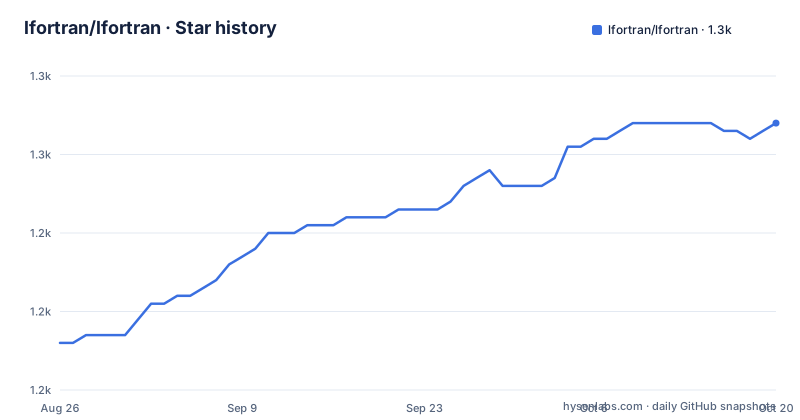
- lfortran/lfortran1,254 ★ · +28
| Repository | 2026-08-26 | 2026-10-20 |
|---|---|---|
| lfortran/lfortran | 1.2k | 1.3k |
28 Stars in the last 55 days, measured from the daily GitHub snapshot. Compare with other projects
Editorial analysis
What LFortran Solves and Who It Is For
LFortran targets a specific pain: Fortran development is often stuck in a compile-run-debug loop that feels archaic compared to Python or Julia. The README positions LFortran as an interactive compiler that executes code interactively, much like those languages, and also compiles to binaries for modern architectures such as multi-core CPUs and GPUs. The primary audience is Fortran programmers who want exploratory workflows, and researchers or engineers who need to prototype numerical code without leaving their editor. It is also for educators who want to teach Fortran in a Jupyter notebook. The project's existence signals a push to modernize Fortran's tooling, not just its language features.
How It Works: LLVM and Interactive Execution
LFortran is built on top of LLVM, which gives it a modern compiler infrastructure. The interactive mode is the core innovation: instead of compiling a whole program, you can feed statements one at a time and see results immediately, similar to a REPL. The README mentions JupyterLite, which means it can run in a browser via WebAssembly, though the details of that path are not described in the material. The architecture likely parses Fortran source, lowers it to LLVM IR, and then either JIT-compiles for interactive use or generates a native binary for production. The documentation, which is generated from the doc directory, presumably explains the design in depth, but the README alone does not give a data flow diagram. What is clear is that LLVM enables both the interactive JIT and the AOT compilation to target GPUs, though the GPU support is stated as a goal rather than a proven feature.
Getting It Running: Commands and Config
The README points to the website and documentation for installation instructions, but it does give one concrete command: to run the JupyterLite site locally, you use `pixi run lab` and then open http://localhost:8000/lab/index.html. That implies the project uses pixi, a package manager for conda and pypi packages, to manage its development environment. For a user who wants to try LFortran without installing anything, the README links to an online playground at dev.lfortran.org and a JupyterLite notebook. The build process from source is not detailed in the README, so you would need to consult the docs at docs.lfortran.org. The repository is the main development hub on GitHub, and contributions are made via pull requests. The release cadence is monthly, with v0.65.0 on 2026-08-27, so you can expect frequent updates.
Limitations and Failure Modes
LFortran is not a drop-in replacement for established compilers like gfortran or ifort. The version numbers are still below 1.0, and the README does not claim full language compliance. Interactive execution is a different model from batch compilation, so code that relies on static initialization or whole-program optimization may behave differently. The GPU support is mentioned as a goal, not a delivered feature, so you cannot assume it works for your kernel. The project moved from GitLab to GitHub in July 2022, which suggests a period of transition that might have disrupted some history. The license is listed as NOASSERTION on GitHub, which is odd for a project that claims BSD licensing in the README; that discrepancy is a red flag for legal review. If you need a compiler that handles legacy Fortran 77 or obscure vendor extensions, LFortran may fail to parse them, and the documentation is the only place to check.
Alternatives and How They Differ
The obvious alternative is gfortran, the GNU Fortran compiler, which is mature and supports a wide range of Fortran standards. The difference is that gfortran is a traditional batch compiler with no interactive REPL; you write a file, compile, and run. Another alternative is the Intel Fortran Compiler, which is optimized for Intel hardware and has deep integration with Intel's performance libraries. Neither offers the interactive exploratory workflow that LFortran aims for. A closer comparison is Julia, which is not Fortran but provides the same interactive feel with a JIT compiler. If your goal is interactive numerical work, you might switch to Julia entirely, but that means abandoning Fortran code. LFortran's bet is that you can keep your Fortran and get a modern interface. The real difference is the language: gfortran and ifort compile Fortran, while Julia is a different language. So the choice depends on whether you must stay in Fortran.
Maintenance and Upgrade Cost
The project is actively maintained, with releases every one to two months. The last push was on the same day as the latest release, v0.65.0, which indicates continuous development. The README mentions donations managed by NumFOCUS, a non-profit foundation, which suggests a community-funded model. That is a positive sign for long-term sustainability, but it also means the project relies on voluntary contributions, so feature development may be uneven. The documentation is generated from the doc directory, so upgrading to a new version might bring changes to the documentation that you need to track. The use of pixi for local development is a specific tool that you would need to learn if you contribute. For users, the upgrade cost is likely low because you can download binaries from releases, but you should test your code with each new version because the compiler is still evolving. The license is BSD, as stated in the README, which is permissive, but the GitHub metadata says NOASSERTION, so you should clarify that before using it in a project.
Editorial conclusion
Adopt LFortran if you write Fortran and want a REPL, Jupyter integration, or a compiler that targets modern hardware like GPUs. Skip it if you need a battle-tested compiler for legacy code or if you cannot tolerate nightly builds and missing features. Before adopting, verify that your specific Fortran dialect and libraries are supported by checking the documentation and testing your code in the online playground at dev.lfortran.org.
Frequently asked questions
What is lfortran and what can it do?
It is an open-source interactive Fortran compiler built on LLVM. It can execute code interactively for exploratory work, in the way Python, MATLAB or Julia do, and can also compile to binaries for modern architectures including multi-core CPUs and GPUs.
How do I try lfortran without installing it?
There is a hosted compiler, a JupyterLite notebook served from GitHub Pages, and a local lab you can start with `pixi run lab` and open on port 8000. The documentation for the lab also explains how to write tests for bugs found there.
How is lfortran built?
CMake is the build system, wrapped by several shell and batch scripts for Linux, Windows and WebAssembly. Dependencies are described four times: a pixi manifest, a spack package, and four conda environment files for Linux, Windows and the two WebAssembly roles.
Does the lfortran Docker image run the tests?
Yes. After building, the image runs ctest, then an integration test runner with an expected environment variable value, then a top-level test runner, so a completed image build has passed the suite.
Who manages lfortran donations and governance?
Donations go through NumFOCUS, Open Collective and GitHub Sponsors, and the page says they are managed by the NumFOCUS foundation, a 501(c)3 non-profit, so contributions are tax-deductible in the United States. The repository also carries a governance document.
Official sources
Add this badge to your README
If you maintain this project, the badge below links readers to this analysis and shows its maintenance status from the daily GitHub snapshot. Paste the markdown into your README; add ?metric=license or ?metric=stars to the image URL for a different field.

[](https://hysenlabs.com/projects/lfortran-lfortran)Star history chart for your README
[](https://hysenlabs.com/projects/lfortran-lfortran)