SSHFS: mounting a remote filesystem over SFTP, and what its maintenance status means for you
A network filesystem client to connect to SSH servers
At a glance
- What is it?
- SSHFS turns any SFTP-capable SSH server into a mountable filesystem with a single command and no server-side setup. It is mature, widely packaged, and maintained by one person who applies patches but does not develop new features.
- Who is it for?
- Adopt SSHFS when you want a remote directory to look like a local one and the server already runs standard OpenSSH with SFTP enabled; skip it when you need guaranteed throughput, POSIX locking semantics, or a project with active feature development, because the README states there are no active regular contributors and only high-impact issues are likely to get a response.
- Can I use it commercially?
- Yes, with conditions. GPL-2.0 is a copyleft licence: if you distribute software that includes it, you must release that software's source code under the same licence. Running it internally without distributing it does not trigger that obligation.
- Is it still maintained?
- Yes. The repository last received commits 3 days ago.
- What is it written in?
- Mainly C, according to GitHub's language statistics.
Answers come from the project's GitHub data, last synced on November 13, 2026, and from our analysis. They are not legal advice.
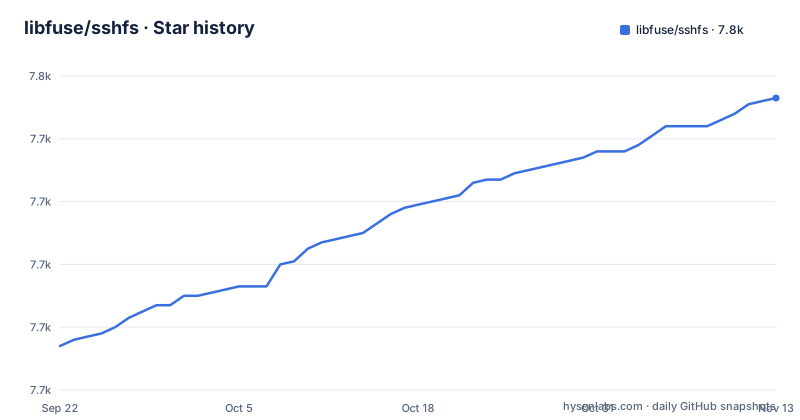
Star history
- libfuse/sshfs7,753 ★ · +79
| Repository | 2026-09-22 | 2026-11-13 |
|---|---|---|
| libfuse/sshfs | 7.7k | 7.8k |
79 Stars in the last 52 days, measured from the daily GitHub snapshot. Compare with other projects
Editorial analysis
What SSHFS solves, and who ends up using it
The problem is mundane and common. You have SSH access to a machine, that machine runs an SSH server, and you want its files to appear in your local file manager, editor, or build script without copying them back and forth. SSHFS answers this by mounting the remote tree at a local mountpoint. The README is explicit about why this is easy: most SSH servers support and enable SFTP access by default, so there is nothing to install or configure on the server side. That single property is the reason SSHFS has stayed useful for so long. You do not need an NFS export, a Samba share, or an administrator to change anything on the remote host. If you can ssh into it, you can probably mount it.
The audience follows from that. Developers who want to edit files on a build box or a lab machine with local tooling. People moving data between a laptop and a home server. Anyone who has a jump host and would rather browse it than scp from it. SSHFS is a client, written in C, and it does not care what the remote operating system is as long as SFTP is reachable. The README also notes the inverse: it is shipped by all major Linux distributions and has been in production use across a wide range of systems for many years. That distribution coverage matters more than any feature list, because it means the binary is usually one package install away.
How the SFTP mount actually works
SSHFS is a FUSE filesystem. The kernel forwards file operations on the mountpoint to a userspace process, and that process speaks SFTP to the remote host over an SSH connection. The README describes the password flow plainly: if you need to enter a password, sshfs will ask for it, and it notes that it actually just runs ssh, which asks for the password if needed. So authentication, host key checking, and configuration all go through your existing SSH setup, including ssh_config. That is why the README points at sftp(1) and ssh_config(5) for options, and why the remote port is set with -oport=PORT rather than a dedicated flag.
The repository layout reflects a fairly compact implementation: sshfs.c holds the bulk of the filesystem logic, cache.c and cache.h implement a cache, compat/ carries portability shims, and utils/ holds helper programs. The cache is worth understanding before you judge performance, because FUSE filesystems pay a round trip for metadata unless something is cached locally. The README does not document the cache's tuning knobs or its invalidation rules, so if your workload depends on seeing remote changes immediately, that is a gap you will have to probe yourself.
There is also a documented way to skip SSH entirely. The README describes a directport option that connects to an sftp-server process over a plain TCP socket, with the server side started via socat and the client connecting with -o directport=PORT. The README is blunt that this is insecure because the connection happens without encryption, and says to use it only on localhost or trusted networks. It also documents a vsock variant for connecting to sockets inside VMs on Linux, using -o vsock=CID:PORT. Both are escapes from the SSH layer for performance or for VM plumbing, not general-purpose deployment modes.
Installing SSHFS and making a first mount
The README's installation section points at the GitHub releases page for the latest SSHFS release, and states that you also need libfuse 3.1.0 or newer, or a similar library providing a libfuse3-compatible interface, plus the Glib library with development headers from your package manager. Building from source uses Meson 0.38 or newer and Ninja. After extracting the tarball, the README's sequence creates a build directory and configures it:
$ mkdir build; cd build
$ meson ..
If you want to change build options, the README shows mesonconf being used to list them and to set one, for example -D strip=true. Building, testing and installing then go through Ninja, with the test step requiring the py.test Python module:
$ ninja
$ python3 -m pytest test/    # optional, but recommended
$ sudo ninja install
For a first real mount, the README gives one form. Username defaults to your local username, and omitting the directory mounts the remote home directory:
sshfs [user@]hostname:[directory] mountpointThe README recommends running SSHFS as a regular user rather than root, and notes that for this to work the mountpoint must be owned by that user. If you omit the username, SSHFS uses the local username; if you omit the directory, it mounts the remote home directory. To unmount on Linux, the README gives fusermount -u mountpoint; on BSD and macOS it gives umount mountpoint instead. Those are the two commands worth memorizing before you experiment, because a hung mount is the most common way to lose time with any FUSE filesystem.
The maintenance status is the real constraint
The README's development status section is unusually direct, and it should shape how you evaluate the project. It states that SSHFS does not have any active, regular contributors and that there are a number of known issues in the bugtracker. The current maintainer applies pull requests and makes regular releases, but has no capacity for development beyond addressing high-impact issues. The README then tells bug reporters what to expect: unless you include a pull request or are reporting a critical issue, you will probably not get a response.
That is not the same as abandonment. Releases have continued, and the last push to the repository was on 2026-10-31. But it does mean feature requests and moderate bugs are unlikely to move. For a tool that already does one thing, that trade-off is more acceptable than it would be for a framework. The practical consequence is that you should treat SSHFS as a finished component rather than an evolving one. If your use case depends on a behaviour the documentation does not describe, assume the answer is in the code or the bugtracker, not in a future release. And if you hit a non-critical bug, the realistic path is to fix it and send a pull request, because that is the path the README says gets attention.
Where SSHFS is the wrong tool
The clearest failure mode is treating a mounted remote filesystem as if it were local storage. Every metadata operation can become a network round trip, and the README does not publish latency or throughput figures, so there is no documented performance envelope to plan against. Workloads that open many small files, or that rely on file locking, or that expect inotify-style change notification to fire for remote edits, are the ones most likely to disappoint. If your build system stats thousands of paths, the cost shows up as wall-clock time that has nothing to do with the CPU.
Availability is the second issue. The mount depends on the SSH connection staying up. A message such as "connection reset by peer" is the kind of symptom a dropped or idle-killed connection produces. The README does not document automatic reconnection behaviour or rollback semantics for interrupted writes, so you should not assume the mount self-heals. For long-running jobs, a copy-then-run workflow or a synchronizing tool is safer than a live mount.
The directport and vsock modes are a third boundary. They are documented as ways to bypass SSH, and the README states plainly that directport is insecure because the connection happens without encryption. Using them outside localhost or a trusted network is a decision the documentation warns against, not a supported deployment.
SSHFS compared with NFS, and how to choose
The obvious alternative is NFS, and the difference is not performance on paper but what each one requires. NFS is a dedicated network filesystem protocol with its own server daemon, export configuration, and port and firewall rules. It is designed for a trusted network and generally gives better throughput and more complete POSIX semantics than a FUSE filesystem layered over SFTP. The cost is that someone has to configure the server. SSHFS's entire pitch is that nobody does. It reuses the SSH service that is already running and the credentials you already have, which is why it works on machines you do not administer and over links you do not control.
So the choice is closer to an operational one than a technical one. If you own both ends, need the mount to behave as much like a local filesystem as possible, and can open the NFS ports, NFS is the more predictable answer. If you have SSH access and nothing else, or you need the mount to work from an untrusted network without exposing a filesystem daemon, SSHFS is the one that requires no server-side changes. The README's own framing supports this: it emphasizes that there is nothing to do on the server side, which is a statement about deployment friction, not about speed.
Licence and upgrade cost
SSHFS is GPL-2.0. That is a copyleft licence, and the practical implication is that if you redistribute a modified SSHFS, or ship a product that links against it in the way the licence treats as a derivative work, the GPL's source-availability terms apply. Using it as a separate userspace program on your own machines is a different situation from embedding it. This is not legal advice; if your product ships SSHFS or a modified version, have someone qualified read the licence against your distribution model.
Upgrade cost is low, and the release history shows why. The project publishes tarballs and distributions package it, so the usual path is your package manager. The README also notes that the default build options normally work fine, which means source builds rarely need configuration changes between versions. The real upgrade risk is not the build system but the dependency floor: libfuse 3.1.0 or newer is required, and a system stuck on libfuse 2 cannot build current SSHFS. Check that before you plan a source upgrade. Because the maintainer has no capacity for development beyond high-impact issues, you should not schedule work around a fix landing in a particular version.
Editorial conclusion
Adopt SSHFS when you want a remote directory to look like a local one and the server already runs standard OpenSSH with SFTP enabled; skip it when you need guaranteed throughput, POSIX locking semantics, or a project with active feature development, because the README states there are no active regular contributors and only high-impact issues are likely to get a response. Before committing to it, verify three things: that your libfuse is 3.1.0 or newer, that the mountpoint is owned by the user who will run sshfs, and that the connection survives your actual workload rather than a quick copy. The bugtracker is the place to look first for known issues, and the mailing list is where the README points for help.
Frequently asked questions
Is SSHFS the same as SFTP?
No. SFTP is the file transfer protocol that SSH servers expose, and SSHFS is a FUSE filesystem client that speaks SFTP to mount a remote tree at a local mountpoint. The README notes that SSHFS relies on SFTP being enabled, which most SSH servers do by default.
Is SSHFS still maintained?
The README states that SSHFS has no active, regular contributors, and that the current maintainer applies pull requests and makes regular releases but has no capacity for development beyond high-impact issues. The last push to the repository was on 2026-10-31.
Which is better, SSHFS or NFS?
NFS is a dedicated network filesystem protocol that needs server-side export configuration, while SSHFS mounts over the SFTP access your SSH server already provides with nothing to do on the server side. The README does not publish performance figures for SSHFS, so the decision usually comes down to whether you can configure the server or only reach it over SSH.
What is SSHFS used for?
It mounts a remote filesystem locally over SFTP so remote files appear at a local mountpoint. The README's usage line is sshfs [user@]hostname:[directory] mountpoint, and it recommends running it as a regular user with a mountpoint owned by that user.
How do I unmount an SSHFS mount?
On Linux the README gives fusermount -u mountpoint. On BSD and macOS it gives umount mountpoint instead.
Official sources
Add this badge to your README
If you maintain this project, the badge below links readers to this analysis and shows its maintenance status from the daily GitHub snapshot. Paste the markdown into your README; add ?metric=license or ?metric=stars to the image URL for a different field.

[](https://hysenlabs.com/projects/libfuse-sshfs)Star history chart for your README
[](https://hysenlabs.com/projects/libfuse-sshfs)Was this useful?