Wireshark isolates capture in dumpcap and shares its dissection code with TShark
Read-only mirror of Wireshark's Git repository at https://gitlab.com/wireshark/wireshark. You're welcome to submit pull requests there.
At a glance
- What is it?
- The GitHub repository is a read-only mirror of Wireshark's GitLab tree, and the design keeps raw packet capture inside dumpcap so neither the Qt interface nor TShark ever needs root. Compression support and several vendor trace formats are compile-time or telnet-era decisions, which narrows what the tool can do out of the box.
- Who is it for?
- Wireshark is the right pick for someone who wants one dissection engine shared by a Qt interface and a command line sniffer, with a capture file rewriter alongside, and who can live with a source repository that only mirrors. It is the wrong pick if your binary was built without the compression libraries your files use.
- Can I use it commercially?
- Yes, with conditions. GPL-2.0 is a copyleft licence: if you distribute software that includes it, you must release that software's source code under the same licence. Running it internally without distributing it does not trigger that obligation.
- Is it still maintained?
- Yes. The repository received new commits within the last day.
- What is it written in?
- Mainly C, according to GitHub's language statistics.
Answers come from the project's GitHub data, last synced on November 13, 2026, and from our analysis. They are not legal advice.
Star history
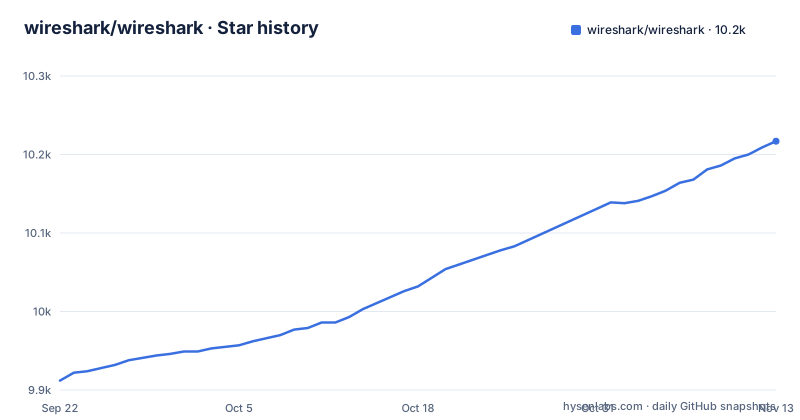
- wireshark/wireshark10,217 ★ · +305
| Repository | 2026-09-22 | 2026-11-13 |
|---|---|---|
| wireshark/wireshark | 9.9k | 10.2k |
305 Stars in the last 52 days, measured from the daily GitHub snapshot. Compare with other projects
Editorial analysis
dumpcap is the only binary that should ever hold capture privilege
To read packets from the network, either the dumpcap program has to be set-UID to root, or your account needs access to the appropriate entry under /dev. That second route is the one on BSD-derived systems and on systems such as Solaris and HP-UX that support DLPI. The project's guidance is explicit about the alternative: do not make the Wireshark or TShark executables setuid root, and do not run them as root. The capture process has been isolated into dumpcap precisely so that this small program is the only one that has to be trusted at that privilege level, since it is less likely to contain security holes. The consequence for you is a hard dependency on a single binary. If dumpcap cannot get the set-UID bit or the device access, the interface and TShark have nothing to read, and no preference inside the graphical side changes that. Checking the ownership and set-UID state of dumpcap is the first thing to do, not the last.
This repository is a mirror, so pull requests opened here go nowhere
Nothing is merged from this tree. It is a read-only mirror of Wireshark's Git repository at gitlab.com/wireshark/wireshark, and the project says you are welcome to submit pull requests there. The default branch is master, the license is GPL-2.0, and the code is C. The mirror also carries no GitHub releases, so version tracking from this side of the network gives you nothing, and the download subdirectory at wireshark.org is named as the place the latest distribution lives. Two consequences follow. A patch or an issue started here has no route into the project, so time spent on it is spent for nothing. And the top-level tree includes .gitlab-ci.yml, appveyor.yml, and a Vagrantfile. Clone from GitLab if you intend to build or modify anything.
Compression support is fixed at compile time, so a file you cannot open may not be broken
Wireshark reads packets from a number of different capture file types, and it can transparently read compressed versions of any of them if the required compression library was available when it was compiled. The supported compression formats are GZIP, LZ4, and ZSTD. Of those, GZIP and LZ4 support fast random seeking when they use independent blocks, which is the default, and that seeking is what offers much better graphical performance on large files. ZSTD carries no such claim. Each format can be taken out of the build by passing the corresponding option to cmake:
cmake -DENABLE_ZLIB=OFF
cmake -DENABLE_LZ4=OFF
cmake -DENABLE_ZSTD=OFF
The consequence is diagnostic and it costs people time. A capture file that refuses to open may not be corrupt at all, it may be a compression format your binary was never linked against, and nothing in the Preferences dialog will change that.
Reverse name resolution runs during decoding, so some names are not in the capture
Wireshark attempts to use the system's reverse name resolution capabilities when decoding IPv4 and IPv6 packets. That means a line in the packet list can show something your resolver returned rather than something the sender actually put on the wire. To turn it off for a session, start Wireshark with the -n option, which turns off all name resolution, including resolution of MAC addresses and of TCP, UDP, and SMTP port numbers to names. The narrower switch is -N mt, which turns off name resolution for all network-layer addresses, covering IPv4, IPv6, and IPX, and leaves the lower-layer names alone. Either can be made permanent through the Preferences dialog reached from the Preferences item in the Edit menu: select Name resolution, turn off the options you want gone, and click OK. The consequence is that names and raw values are two different views of the same packet, and on a busy capture the lookup work is not free.
The build needs Python 3, AsciiDoctor, GNU flex, and sometimes Perl
Building from source is a multi-tool job with one hard specification. Python 3 is needed to build Wireshark. AsciiDoctor is required to build the documentation, including the man pages. Perl and flex are required to generate some of the source code, and the flex requirement is exact: GNU flex, because vanilla lex will not work. You might need to install Perl as well. The platforms the project builds and tests regularly are Linux (Ubuntu), Microsoft Windows, and macOS / Mac OS X. Official installation packages exist for Windows and macOS, with standard or add-on packages for Debian, Ubuntu, Fedora, CentOS, RHEL, Arch, Gentoo, openSUSE, FreeBSD, DragonFly BSD, NetBSD, and OpenBSD, plus third-party systems such as pkgsrc, OpenCSW, Homebrew, and MacPorts. Two coverage gaps are named rather than hidden. Current versions do not support Windows XP, which is supported by Wireshark 1.10 and earlier, and on Solaris and HP-UX the standard package might simply be old.
Router trace support still runs through telnet, and the router never saves the file
Several vendor trace formats are supported, and the Lucent/Ascend, Toshiba and CoSine ones depend on a router that will not write the file for you. Lucent/Ascend support is limited to the debug trace output generated by the MAX and Pipeline series, and Wireshark reads the output of the `wandsession`, `wandisplay`, `wannext`, and `wdd` commands. Toshiba Compact Router ISDN gear, the TR-600 and TR-650, works after you telnet to the router and start a dump session with `snoop dump`. CoSine requires entering diags mode first, then `create-pkt-log-profile` and `apply-pkt-lozg-profile` under the layer-2 category, with `layer-2 create ?` and `layer-2 apply ?` for the details. For all three you must capture the trace output to a file on disk, because the trace is happening inside the router and the router has no way of saving it for you:
telnet <ascend> | tee <outfile>Or record the entire session, telnet included, with the script command:
$ script tracefile.out
$ telnet router
$ exit
AIX iptrace adds a distinct failure mode. The `iptrace` command starts a daemon you must kill in order to stop the trace, and sending a HUP signal to that daemon appears to cause a graceful shutdown with a complete packet written to the trace file. When a partial packet is saved at the end, Wireshark complains when reading that file but you can still read all other packets, and the project asks that you report it to [email protected] with a copy of the trace file if it is small and contains no sensitive data.
epan, capture, and app are three separate roots, which is why three programs ship together
The top level holds epan/, capture/ and app/ directories alongside the sources for the command-line tools. TShark is the line-oriented sniffer, similar to Sun's snoop or tcpdump, and it uses the same dissection, the same capture-file reading and writing code, and the same packet filtering code as Wireshark. editcap reads a capture file and writes the packets from it, possibly into a different capture file format, with some packets possibly removed. On disk that looks like epan/, capture/, and app/, next to a flat set of top-level sources including dumpcap.c, editcap.c, extcap.c, extcap_parser.c, capinfos.c, captype.c, dftest.c, file.c, and fileset.c. Build control is spread across CMakeLists.txt, CMakeOptions.txt, CMakePresets.json, ConfigureChecks.cmake, ConfigCPack.cmake, WiresharkConfig.cmake.in, CMakeGraphVizOptions.cmake, cmakeconfig.h.in, and doxygen.cfg.in. Feature detection is automatic in at least one place: CMake determines whether the libsmi library is on your system, and libsmi is what turns basic SNMP decoding into MIB-aware display of OIDs and variable binding values. fuzz/, fix/, doc/, .tx/, a ChangeLog, CONTRIBUTING.md, SECURITY.md, and CODE_OF_CONDUCT.adoc sit alongside.
Editorial conclusion
Wireshark is the right pick for someone who wants one dissection engine shared by a Qt interface and a command line sniffer, with a capture file rewriter alongside, and who can live with a source repository that only mirrors. It is the wrong pick if your binary was built without the compression libraries your files use. Before deploying anywhere, check three things: whether dumpcap actually holds capture privilege on your platform, whether your build has GZIP and LZ4 for fast seeking on large captures, and whether CMake found libsmi for readable SNMP.
Frequently asked questions
What is Wireshark used for?
Wireshark is a network traffic analyzer, or sniffer, for Linux, macOS, other Unix and Unix-like systems, and Windows. It uses Qt for the graphical interface and libpcap and npcap for packet capture and filtering, and the distribution also ships TShark and editcap.
Is Wireshark an IP sniffer?
It uses libpcap and npcap as its packet capture and filtering libraries, and TShark gives you the same dissection from a line-oriented sniffer similar to tcpdump. Capture still requires either dumpcap being set-UID to root or access to the appropriate entry under /dev.
how to install wireshark
Official installation packages are available for Microsoft Windows and macOS, and standard or add-on packages exist for Debian, Ubuntu, Fedora, CentOS, RHEL, Arch, Gentoo, openSUSE, FreeBSD, DragonFly BSD, NetBSD, and OpenBSD. Building from source needs Python 3, AsciiDoctor, and GNU flex, with Perl in some cases, and full instructions are in the INSTALL file and the Developer's Guide.
how to use wireshark
Either dumpcap is set-UID to root or your account has access to the appropriate entry under /dev, and you should not run the Wireshark or TShark executables as root. Name resolution can optionally be turned off by starting with -n (all name resolution) or -N mt (network-layer addresses: IPv4, IPv6, IPX).
how to use wireshark on linux
Linux (Ubuntu) is one of the three platforms Wireshark builds and tests regularly on, and packages are available for Debian, Ubuntu, Fedora, Arch, Gentoo, openSUSE, and the BSDs including FreeBSD, DragonFly BSD, NetBSD, and OpenBSD. Operating system specific steps live in README.linux, and the full procedure is in the INSTALL file and the Developer's Guide at wireshark.org.
Official sources
Add this badge to your README
If you maintain this project, the badge below links readers to this analysis and shows its maintenance status from the daily GitHub snapshot. Paste the markdown into your README; add ?metric=license or ?metric=stars to the image URL for a different field.

[](https://hysenlabs.com/projects/wireshark-wireshark)Star history chart for your README
[](https://hysenlabs.com/projects/wireshark-wireshark)Was this useful?