LibRaw for Camera RAW File Readers
LibRaw is a library for reading RAW files from digital cameras
At a glance
- What is it?
- LibRaw is a C++ library for reading digital camera RAW files, extracting pixel data and processing metadata, and accessing embedded previews. It suits RAW viewers, converters, analyzers, stitching tools, and other applications that need format handling separated from their own processing logic.
- Who is it for?
- Choose LibRaw when your application must ingest RAW files from digital cameras and you want a shared decoding and metadata layer rather than a full rendering pipeline. Do not adopt it as the sole solution for anonymous processing of specially constructed or unknown-origin files, because the project states that public snapshots are not sufficiently reliable for that use.
- Can I use it commercially?
- Check first. The repository uses a licence we do not classify automatically, so read its LICENSE file before any commercial use.
- Is it still maintained?
- Yes. The repository received new commits within the last day.
- What is it written in?
- Mainly C++, according to GitHub's language statistics.
Answers come from the project's GitHub data, last synced on November 7, 2026, and from our analysis. They are not legal advice.
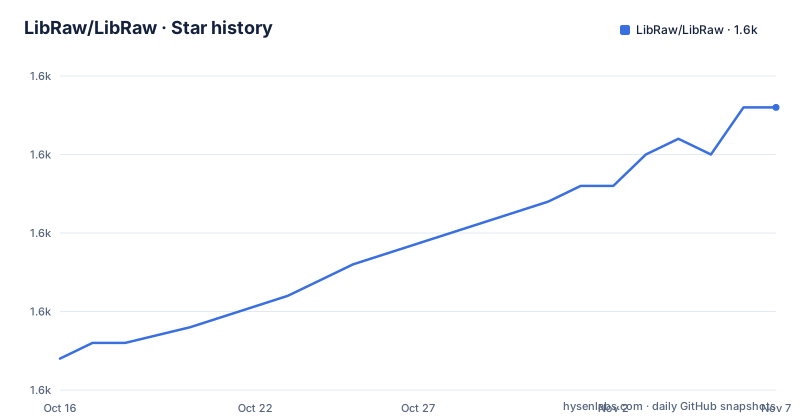
Star history
- LibRaw/LibRaw1,623 ★ · +16
| Repository | 2026-10-16 | 2026-11-07 |
|---|---|---|
| LibRaw/LibRaw | 1.6k | 1.6k |
16 Stars in the last 22 days, measured from the daily GitHub snapshot. Compare with other projects
Editorial analysis
What LibRaw Handles in a Camera RAW Workflow
LibRaw addresses the file-format problem that appears before an application can work with digital camera RAW data. A RAW file is not a single, uniform format. Cameras may use different containers, compression methods, layouts, and metadata conventions. The README says LibRaw provides a unified interface for extracting RAW pixel values, metadata needed for processing, and an embedded preview or thumbnail. This makes the library relevant to developers building RAW viewers, RAW converters, RAW data analyzers, and software that stitches or composites multiple frames, including panoramas and image stacks.
The intended user is an application developer who needs reliable access to camera files but does not want to maintain format-specific parsing across many camera models. LibRaw also allows an application to focus on its own processing after decoding. That boundary matters for applications that perform custom demosaicing, noise reduction, compositing, or analysis. The library does not eliminate the need to decide how extracted data should be interpreted. It centralizes access to the encoded RAW source and associated metadata.
The project history gives additional context. LibRaw began in 2008 as a library derived from Dave Coffin's dcraw.c. Its stated goals included removing global variables, improving structure, importing changes from dcraw.c, and expanding metadata extraction. Support for dcraw.c changes was reduced to a minimum in 2015 and ended in 2018. According to the README, new camera and format support has since been handled by the LibRaw team. That history explains why the library is positioned as a format reader rather than a complete modern image-processing framework.
LibRaw Data Extraction and Metadata Surface
The central design is an abstraction over RAW file decoding. According to the README, LibRaw exposes three related categories of output: RAW pixel values, metadata required for RAW processing, and an embedded preview. The metadata examples include geometry, the CFA or Bayer pattern, black level, and white balance. These are not interchangeable with rendered RGB pixels. They describe how the encoded sensor data should be interpreted.
That distinction gives an application a deliberate processing boundary. A viewer can use LibRaw to obtain a preview or decoded image data, while an analyzer can inspect raw values and metadata directly. A stitching application can rely on the library for file access and then apply its own alignment or compositing logic. The README specifically lists programs that stitch and composite multi-frame aggregates, so multi-frame use is within the stated audience, although the library does not claim to perform the complete stitching workflow.
LibRaw also provides basic RAW conversion methods inherited from dcraw.c. These are intended for situations where conversion is not the main purpose of the application, such as testing support for a file type or building a viewer that handles many graphic formats. The README explicitly says that further development of these methods is not currently planned because production-quality rendering is outside LibRaw's scope. The rendering code has received changes intended to speed it up and parallelize it, but the project still distinguishes compatibility and testing support from production rendering. Applications with strict color management, rendering quality, or performance requirements should not treat these inherited methods as a complete imaging pipeline.
Release Lines, Compatibility, and Upgrade Boundaries
LibRaw's release policy distinguishes major releases, minor updates, and public snapshots. The README says major releases such as 0.20 are intended to be published once every year and a half to three years. Once a public beta for a major release appears, the supported camera and format list is frozen. The project tries, but does not guarantee, to freeze the API and ABI at the same time. This is a stated boundary rather than a promise of complete binary compatibility.
Minor updates such as 0.20.1 and 0.20.2 do not change the API or ABI and do not add new cameras. They are generally bug fixes. The README gives stack overflow as an example of a serious error that may justify a minor version increment. Bug fixes are published in the public GitHub repository as soon as possible, but the project does not guarantee a response time for support requests.
Public snapshots are published every 9 to 18 months and may contain camera support added after the previous major release. Their API and ABI are not frozen and may change. This makes snapshots useful for known-origin files produced by digital cameras, but unsuitable as the sole basis for a service that accepts anonymous files of unknown provenance. The repository records recent releases 0.22.0, 0.22.1, and 0.22.2, with dates in 2026. The last push was on 2026-10-16. The repository is not archived, but its update policy still requires application owners to plan for changing compatibility rules when using snapshots.
Licensing and Distribution Constraints
The README presents LibRaw as open source under two offered licenses: GNU Lesser General Public License version 2.1 and Common Development and Distribution License version 1.0. It says users can choose the license that better suits their application. The repository also contains `LICENSE.LGPL` and `LICENSE.CDDL`, so those files are the appropriate starting point for reviewing the actual terms and notices.
The project adds a specific condition for contributions. If someone modifies, adds, or improves the LibRaw source code, patches can be included in the official source only if the contributor agrees to distribution under both licenses. The README also states that the licensing may change in future versions. That means the license selection made for one release should not automatically be treated as a permanent policy for every later upgrade. This is not legal advice, and the application owner should review the license files and any distribution obligations for the intended product.
The licensing choice interacts with the project's component history. LibRaw uses code from dcraw.c and includes DCB demosaic code identified in the README as BSD licensed. Copyright notices for LibRaw, dcraw.c, and the DCB code are listed in the project documentation. Applications that redistribute LibRaw or incorporate its components should preserve the relevant notices and verify the license conditions for every build path, rather than relying only on the repository's summary.
Using the Repository Samples Without Claiming a Complete Rendering Pipeline
The repository does expose `INSTALL`, `README.cmake`, `Makefile.am`, `Makefile.dist`, `Makefile.msvc`, `Makefile.mingw`, and other build-related files. It also includes samples such as `samples/simple_dcraw.cpp`, `samples/unprocessed_raw.cpp`, `samples/raw-identify.cpp`, and `samples/rawtextdump.cpp`.
A developer starting from the repository can use those files as the first concrete entry points. The names indicate that the sample set covers simple conversion-oriented use, unprocessed RAW access, identification or metadata inspection, and text-oriented RAW dumping. However, the names do not confirm the exact build command or public API calls. Those details must be taken from the checked-out `INSTALL` file and the corresponding sample source rather than reconstructed from the README.
The project documentation also gives support channels. Specific problem reports are directed to GitHub Issues, while questions are directed to the LibRaw forum, feedback form, or the listed email address. The README says Issues are intended for specific problem reports and should not be used for questions. Source additions are preferred through GitHub Pull Requests. A first use should therefore begin with the repository's own installation instructions, select a sample matching the required access pattern, and confirm the sample's expected output against a known camera file before embedding the library in a larger application.
Where LibRaw Is the Wrong Boundary
The clearest limitation is the separation between reading and rendering. LibRaw's basic conversion methods are retained for compatibility and rapid-fire testing, while the README says production-quality rendering is not in scope. A product whose primary requirement is a final, color-managed RGB image may need a separate rendering and imaging pipeline. LibRaw can still supply decoded RAW data and metadata, but the project does not position its inherited conversion methods as the answer to every rendering requirement.
There is also a specific security and provenance warning. Public snapshots may be considered suitable for files with known origins, meaning files recorded directly by users' digital cameras, but the README says they should not be considered sufficiently reliable for specially constructed files used in vulnerability testing. It further says not to use them in public services that allow anonymous processing of files of unknown provenance. This does not mean LibRaw is intended as a security tool or that every unknown file will fail. It means the project itself places a reliability boundary around those inputs, and an online service must account for that boundary rather than assuming the snapshot policy covers hostile or synthetic files.
An alternative approach is to use a complete RAW converter or imaging application pipeline when the application needs an established end-to-end rendering and output workflow. The practical difference is scope: such a pipeline treats conversion and image output as central capabilities, while LibRaw concentrates on decoding, metadata extraction, previews, and compatibility-oriented conversion. Another alternative is to maintain format-specific decoders, which avoids adding LibRaw but transfers the camera support and metadata burden to the application itself.
Editorial conclusion
Choose LibRaw when your application must ingest RAW files from digital cameras and you want a shared decoding and metadata layer rather than a full rendering pipeline. Do not adopt it as the sole solution for anonymous processing of specially constructed or unknown-origin files, because the project states that public snapshots are not sufficiently reliable for that use. Verify first that your target camera formats, required metadata, licensing model, and chosen release satisfy the application, then review the relevant support and update policy before integrating the library.
Frequently asked questions
What is LibRaw used for?
LibRaw is used to read digital camera RAW files and extract pixel data, processing metadata, and embedded previews. Its documented users include RAW viewers, converters, analyzers, and multi-frame stitching or compositing software.
Does LibRaw provide production-quality RAW rendering?
No. The README says LibRaw includes basic conversion methods inherited from dcraw.c, but their further development is not currently planned because production-quality rendering is outside the library's scope.
Can LibRaw be used with anonymous or specially constructed RAW files?
The README says public snapshots may be suitable for files with known origins, but should not be considered sufficiently reliable for specially constructed files used in vulnerability testing or for public anonymous services processing unknown-origin files.
Official sources
Add this badge to your README
If you maintain this project, the badge below links readers to this analysis and shows its maintenance status from the daily GitHub snapshot. Paste the markdown into your README; add ?metric=license or ?metric=stars to the image URL for a different field.

[](https://hysenlabs.com/projects/libraw-libraw)Star history chart for your README
[](https://hysenlabs.com/projects/libraw-libraw)Was this useful?