Source SDK 2013: one generated solution, a Steam Runtime build, and a non-commercial license
The 2013 edition of the Source SDK
At a glance
- What is it?
- Valve's C++ tree for Half-Life 2, HL2: DM and TF2 builds through a generated Visual Studio solution on Windows and podman on Linux, and both paths assume the Multiplayer package is already installed through Steam. There are no release tags, so you track the code by commit.
- Who is it for?
- Use it if you are writing a multiplayer Half-Life 2 or TF2 mod and can install the Steam Multiplayer package on every build machine. Leave it if you need a singleplayer path or a commercial grant: the LICENSE file at the root is non-commercial, no tag names a known good commit, and the last push to master was 2026-10-10.
- Can I use it commercially?
- Check first. The repository uses a licence we do not classify automatically, so read its LICENSE file before any commercial use.
- Is it still maintained?
- Yes. The repository last received commits 9 days ago.
- What is it written in?
- Mainly C++, according to GitHub's language statistics.
Answers come from the project's GitHub data, last synced on November 14, 2026, and from our analysis. They are not legal advice.
Star history
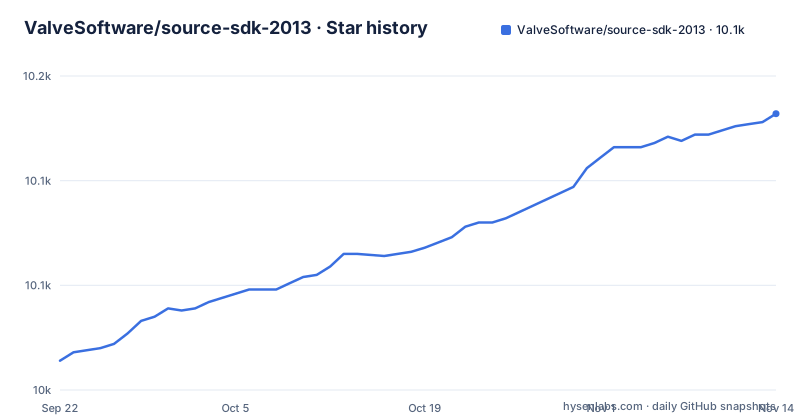
- ValveSoftware/source-sdk-201310,132 ★ · +118
| Repository | 2026-09-22 | 2026-11-14 |
|---|---|---|
| ValveSoftware/source-sdk-2013 | 10k | 10.1k |
118 Stars in the last 53 days, measured from the daily GitHub snapshot. Compare with other projects
Editorial analysis
The Steam Multiplayer package is a build input, not a download
Both platform requirement lists start with the same line: Source SDK 2013 Multiplayer installed via Steam. That makes the Steam package a build input rather than a runtime convenience, and a git clone is not self contained. Nothing in the top level replaces it, because the tree holds only src/ and game/ beside LICENSE, CONTRIBUTING, README.md, .gitattributes, .gitignore, thirdpartylegalnotices.txt and .github/. If you script setup, the clone is the first command and the second step is a machine where Steam has already placed the Multiplayer content:
git clone https://github.com/ValveSoftware/source-sdk-2013A build agent or container that only has git available fails before it reaches the compiler, and no error text is published for that case. Budget for the Steam install, not just the clone.
One generated solution file, then a separate startup project choice
On Windows, generation is a batch file you run from the src directory, and it exists to produce one solution holding every SDK project plus your mod:
createallprojects.batThe output is everything.sln, and that file is what Build > Build Solution on the menu bar compiles. Running a mod is a second decision: select the Client (Mod Name) project, right click it, choose Set as Startup Project, then press the big green > Local Windows Debugger button on the tool bar. The options that dialog opens with are already filled in for the Release configuration, so a first run starts from release defaults instead of a blank command line. Because this is a solution build, the first compile covers far more code than the one project you launch.
podman is the Linux path, and it is the one that reaches the Steam Runtime
The Linux requirement list is shorter than the Windows one: the same Steam Multiplayer install plus podman. The build script runs from src, and it is what compiles against the Steam Runtime:
./buildallprojectsAfterwards you move to the game directory at the root of the clone and launch the build launcher for your mod project, which for the Team Fortress 2 target is:
./mod_tfThe rule attached to that script is explicit: mods distributed on Steam must be built against the Steam Runtime, and these steps do it automatically. That constrains the artifact, not just the toolchain. A Linux binary produced any other way is not the one that rule describes, and the Windows steps never mention the runtime, so podman is the only documented path that yields a compliant build.
Python 3.13 is required on Windows with no stated consumer
The Windows requirements name Python 3.13 or later, yet none of the documented steps invoke a Python script. The build is createallprojects.bat followed by a Visual Studio solution compile, so nothing in the flow says which tool consumes the interpreter. If your toolchain pins an older Python, no note in the repository says whether an earlier version is acceptable, and no error is quoted for a version mismatch. The rest of the list is pinned harder: Desktop development with C++, MSVC v143 - VS 2022 C++ x64/x86 build tools (Latest), and either Windows 11 SDK (10.0.22621.0) or Windows 10 SDK (10.0.19041.1). Exact SDK numbers mean a Visual Studio install carrying a different Windows SDK is not the configuration described, and you may need to add the specific component yourself.
The only grant in the tree is non-commercial
The licensing statement is one line and it is restrictive: the SDK is licensed to users on a non-commercial basis under the SOURCE 1 SDK LICENSE, held in the LICENSE file at the repository root next to thirdpartylegalnotices.txt. That file is the only grant here, and the repository carries no separate commercial terms. Distribution guidance for shipping a mod both on and off Steam lives outside the code, at https://partner.steamgames.com/doc/sdk/uploading/distributing_source_engine. The consequence for a reader is narrow but firm: if your plan involves paid assets, a storefront release, or any revenue at all, this repository does not authorize it, and LICENSE plus that distribution page are the two places to read before you build anything you plan to sell.
No release tags, so nothing names a known good commit
The repository has no GitHub releases, and the top level carries no changelog file, so nothing in it names a version you can pin to. The last push to the default branch master is 2026-10-10. With no tags and no rollback notes, you track Valve's changes by commit hash, and when an update breaks your build there is no published marker for the last commit that worked. The one stability statement in the documentation is a build rule about the Steam Runtime, not a promise about which engine branch is supported. If you need reproducible builds across a team, keep your own commit pins and your own build log, because upstream offers only a moving branch.
The documented build path is multiplayer only, with no singleplayer step
The repository is the game code for Half-Life 2, HL2: DM and TF2, but the path the documentation walks you through is a multiplayer one. Both platform requirement lists ask for Source SDK 2013 Multiplayer installed via Steam, the only launcher named anywhere is mod_tf, and the Windows example launches a Client (Mod Name) project. No singleplayer requirement, build step, or launcher appears. For someone who wants a singleplayer Half-Life 2 mod, that gap is expensive: the repository clones cleanly, the batch file may run, and there is still no documented route to a singleplayer build. The Valve Developer Wiki page Source_SDK_2013 linked at the bottom of the README, and the repository homepage SDK2013_GettingStarted, are the next place to look.
Editorial conclusion
Use it if you are writing a multiplayer Half-Life 2 or TF2 mod and can install the Steam Multiplayer package on every build machine. Leave it if you need a singleplayer path or a commercial grant: the LICENSE file at the root is non-commercial, no tag names a known good commit, and the last push to master was 2026-10-10. Read LICENSE and the Steam distribution page before planning a public release.
Frequently asked questions
What is Source SDK 2013?
It is the 2013 edition of the Source SDK, and this repository holds the game code for Half-Life 2, HL2: DM and TF2. The primary language is C++ and the default branch is master.
Is Source SDK 2013 free?
The SDK is licensed to users on a non-commercial basis under the SOURCE 1 SDK LICENSE, which is contained in the LICENSE file at the repository root. No commercial grant is described, and distribution guidance for shipping a mod on and off Steam sits on Valve's partner documentation site.
How to install source sdk 2013 multiplayer?
Clone the repository, then install Source SDK 2013 Multiplayer through Steam before you build. Windows also needs Visual Studio 2022 with the Desktop development with C++ workload plus Python 3.13 or later, while Linux needs podman.
How to compile source sdk 2013?
On Windows, run createallprojects.bat from the src directory to generate everything.sln, then build the solution. On Linux, run ./buildallprojects from src, which compiles against the Steam Runtime, then launch your mod from the game directory with a launcher such as ./mod_tf.
Does source sdk 2013 require Visual Studio 2022?
The Windows requirements name Visual Studio 2022 with Desktop development with C++, MSVC v143 - VS 2022 C++ x64/x86 build tools, and either Windows 11 SDK (10.0.22621.0) or Windows 10 SDK (10.0.19041.1).
Can I build a singleplayer Half-Life 2 mod with source sdk 2013?
The repository holds the game code for Half-Life 2, HL2: DM and TF2, and both documented build paths require Source SDK 2013 Multiplayer installed via Steam. The only launcher named is mod_tf, and no singleplayer build step is given.
Official sources
Add this badge to your README
If you maintain this project, the badge below links readers to this analysis and shows its maintenance status from the daily GitHub snapshot. Paste the markdown into your README; add ?metric=license or ?metric=stars to the image URL for a different field.

[](https://hysenlabs.com/projects/valvesoftware-source-sdk-2013)Star history chart for your README
[](https://hysenlabs.com/projects/valvesoftware-source-sdk-2013)Was this useful?