LibreCAD: a 2D CAD program that stays 2D on purpose
LibreCAD is a cross-platform 2D CAD program. It can read DXF/DWG, and write DXF/DWG/PDF/SVG files. It supports point/line/circle/ellipse/parabola/hyperbola/spline primitives. The GUI is highly customizable, and has dozens of translations.
At a glance
- What is it?
- Twenty years of Qt, a GPLv2 core, DXF and DWG through the sibling project libdxfrw, read-only Shapefile import, and a DXF converter that ships in the same binary.
- Who is it for?
- LibreCAD is a mature answer to a question most 2D drafters stopped asking, which is whether a CAD program has to be a platform. It is a drawing tool: DXF in, DXF out, plus the converters and the read-only Shapefile importer, with no plugin marketplace, no account, and no 3D ambition.
- Can I use it commercially?
- Check first. The repository uses a licence we do not classify automatically, so read its LICENSE file before any commercial use.
- Is it still maintained?
- Yes. The repository last received commits 2 days ago.
- What is it written in?
- Mainly C++, according to GitHub's language statistics.
Answers come from the project's GitHub data, last synced on October 23, 2026, and from our analysis. They are not legal advice.
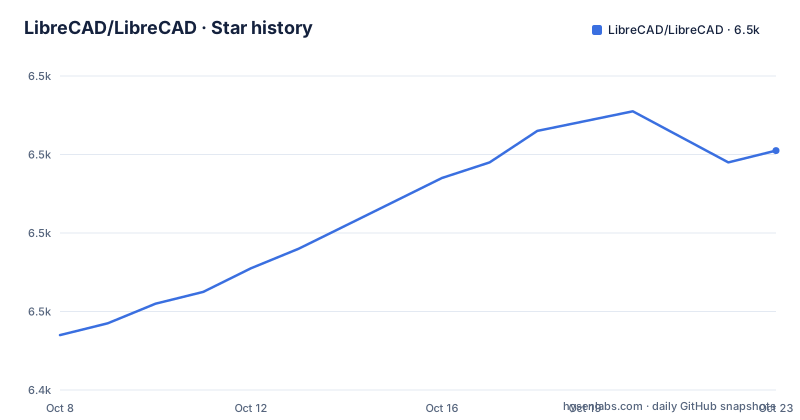
Star history
- LibreCAD/LibreCAD6,501 ★ · +47
| Repository | 2026-10-08 | 2026-10-23 |
|---|---|---|
| LibreCAD/LibreCAD | 6.5k | 6.5k |
47 Stars in the last 15 days, measured from the daily GitHub snapshot. Compare with other projects
Editorial analysis
What the README tells you in the first five lines
LibreCAD describes itself as a 2D CAD drawing tool based on the community edition of QCAD, using the cross-platform framework Qt. Two facts in that sentence set the scope of everything else. It is 2D, so there is no solid modeling and no assembly workspace. And it descends from QCAD's community edition, which means the file formats, the entity model, and much of the interaction vocabulary are inherited rather than invented.
The license is stated plainly in the README: free software, redistributable and modifiable under the GNU General Public License version 2. The repository also carries a LICENSE file at the root. GitHub, however, reports no license identifier for this repository, so if you are doing license compliance tooling rather than reading the README, you will have to read the LICENSE file yourself.
The interface is translated in over 30 languages, hosted on a separate translate server, and the repository description says dozens. The GUI is described as highly customizable, which in a Qt application of this age means preferences panels rather than a plugin system.
The scale is worth noting before you start. The repository has 6,402 stars and 1,433 forks, with 728 open issues, and the last push was 2026-09-22. That open issue count is large in absolute terms and normal for a project that has been running a public tracker for two decades. Nothing is archived, and there is no sign the project is winding down.
The homepage is librecad.org, the user manual is on readthedocs, and the wiki runs on DokuWiki at a separate domain. There is a forum and an IRC channel on libera.chat. The README asks that bugs go to GitHub Issues, which it marks as preferred, and notes that the old SourceForge tickets are disabled.
One binary that also converts, which is the most surprising feature
LibreCAD can be run as a command line converter. The README gives the shape as three subcommands applied to a source drawing, and the output path comes from the source filename.
$ librecad dxf2pdf foo.dxf
$ librecad dxf2png foo.dxf
$ librecad dxf2svg foo.dxf
Converting `foo.dxf` to PDF, PNG, or SVG produces the same basename with the matching extension. There is no output flag in these examples, so the naming convention is the interface, which is a limitation worth knowing if you are scripting batch conversions with unusual naming needs.
The DXF and DWG read/write story runs through a sibling project rather than through LibreCAD itself. The README points at libdxfrw as an associated project that allows LibreCAD to read DXF and DWG files, and it lives in its own repository under the same organization. The repository description extends the write side, saying LibreCAD can read DXF and DWG and write DXF, DWG, PDF, and SVG. The distinction matters for anyone building a pipeline: the format layer is a separate library with its own release cadence and its own bug reports.
The repository also advertises native ESRI Shapefile import built with shapelib, covering the .shp, .shx, and .dbf trio. The README describes what that import actually preserves, which is unusually specific for a CAD tool: points, polylines with arcs, and polygons come in as native entities, Z coordinates are preserved, DBF fields drive the layers, and per-entity styling such as color, linetype, and width is applied where the corresponding fields exist. Import is read-only and there is no Shapefile export.
Those three sentences define the practical envelope of the feature. Shapefile is the format you get when you leave the GIS world, and LibreCAD reads it into its own entity model. It does not round-trip back, so a workflow that starts in Shapefile and ends in Shapefile needs something else at the far end.
The branch matrix is the real compatibility story
LibreCAD's versioning is a set of long-lived branches, and the README's branch table is the single most useful thing in the document. It states that the master branch represents the latest pre-release code. The 2.2.2 branch requires Qt 6.4.0 or newer. The 2.2.1 branch requires Qt 5.15.0 or newer. The 2.2 branch requires Qt 5.2.1 or newer. The 2.1 branch will be the last to support Qt4. The 2.0 branch will be the last to support the QCAD toolbar.
Those five lines are a maintenance policy compressed into a list, and they tell you what each generation of the program is for. Qt 6 is only on the newest branch, which means anyone still on a distribution with Qt 5 packages is pinned to 2.2.1 or 2.2. Anyone who still needs the Qt4-era build is on 2.1. Anyone whose muscle memory is tied to the QCAD toolbar is on 2.0.
Here is where the documentation disagrees with itself. The README's Building section lists requirements as Qt 6.4.0+, with the MinGW version on Windows, plus Boost 1.55.0 or newer. Those are the requirements for master, or at least for the current build path, and they sit in the same document as a table saying 2.2.1 needs Qt 5.15 and 2.2 needs Qt 5.2.1.
Both facts are true and they resolve cleanly once you know which branch you are on. Read the requirements line as the answer for the branch you are actually building, which is almost always master or a 2.2.x tag. If you are on an older branch, the Qt version drops correspondingly and the build instructions in the wiki for that branch are the authority rather than the top-level requirements line.
The repository tree confirms this is a project in mid-migration rather than a single codebase. Alongside librecad.pro and common.pri and settings.pri, the old qmake files, there is CMakeLists.txt, CMakePresets.json, and a CI directory, which is the newer CMake build. There is also a snapcraft.yaml for packaging and a pixi.toml with a pixi.lock, so dependency and environment management has moved to several tools at once.
Downloading on macOS means clearing Gatekeeper by hand
The release naming on this repository is unusual enough to trip people up, and the macOS instructions require a manual step.
Three release tags exist at the time of this review, and none of them look like a version number. There is downloads-latest, there is continuous, which the README describes as the latest build from master, and there is 2.2.1-latest, which is the latest build from the stable 2.2.1 branch. The first two were published on 2026-09-16 and 2.2.1-latest on 2026-09-20. So a tag name tells you which branch you are getting rather than which version, and the actual version lives inside the asset.
The macOS build is a universal app covering Apple Silicon and Intel. The README describes what CI does about trust: it verifies the app's ad-hoc code signature both before packaging and from the mounted DMG, and the release assets include a .sha256 file.
shasum -a 256 -c LibreCAD-*.dmg.sha256That verification is worth running, but it is not the same as trust. Ad-hoc signing provides no Apple Developer ID and no notarization, so macOS blocks the first launch with a message saying it could not verify LibreCAD is free of malware. The documented path is to drag LibreCAD to Applications, open it once to dismiss the dialog, then go to System Settings, Privacy and Security, scroll to the Security section, and click Open Anyway next to LibreCAD. On macOS 14 and earlier, right-click then Open is enough.
If macOS still refuses, the README gives the terminal command that clears the quarantine attribute only, scoped to the application bundle, and links it to issue 2162.
xattr -dr com.apple.quarantine /Applications/LibreCAD.appA separate message, LibreCAD is damaged and can't be opened, means something different: an invalid code signature rather than an unverified one. The README attributes that to the v2.2.1.5 Apple Silicon build in issue 2574 and says later builds from both branches are signed correctly. So if you hit that message, check the version and move up rather than fighting the xattr command.
Building and testing from source
Building requires Qt 6.4.0 or newer on master, the MinGW build of Qt on Windows, and Boost 1.55.0 or newer. More detail lives in the wiki's build-from-source page, and the repository also carries librecad.dox for Doxygen and a librecad.astylerc plus a code_style directory for formatting, which tells you the project expects external contributions.
Unit tests exist and are off by default. To build them, for example for rs_math.cpp, you enable the BUILD_TESTS flag at configure time, build, and run the resulting binary.
cmake -DBUILD_TESTS=ON ..
make
./build/librecad_tests
The tests target a specific file in the example, which is a reminder that in a CAD program the geometry layer is where correctness actually lives. Floating point tolerance in arc and spline evaluation is the kind of thing that shows up as a drawing that looks right and measures wrong.
The repository tree is broad for a 2D application: plugins, libraries, externals with a .gitmodules file, tools, scripts, docs, tests, and a test_data directory. The test_data directory is what you want if you contribute, because DXF regression cases are the currency of work on a format-compatible CAD tool.
Contributing is documented on the wiki across two pages, Git and GitHub, and Becoming a developer. There is also a separate resources repository for people who would rather contribute icons, stylesheets, documentation, and templates, with associated downloads mirrored on SourceForge. For a project with this many users, that lower-friction path is probably the highest-value place to start.
One inconsistency to flag. The build status badge at the top of the README points at travis-ci.org, a service that has been dark for years, while the tree contains a CI directory that presumably runs something current. The badge is stale; the actual CI configuration is in the repository.
Editorial conclusion
LibreCAD is a mature answer to a question most 2D drafters stopped asking, which is whether a CAD program has to be a platform. It is a drawing tool: DXF in, DXF out, plus the converters and the read-only Shapefile importer, with no plugin marketplace, no account, and no 3D ambition. Two practical things decide whether it fits you. First, the branch you build or download determines your Qt version, from Qt 5.2.1 on 2.2 up to Qt 6.4.0 on 2.2.2, so pick the branch before you pick a package. Second, the macOS build is ad-hoc signed and not notarized, which means a Gatekeeper dialog on first launch and an xattr command if you want to remove it permanently. If you are producing flat 2D geometry that someone else will open in AutoCAD or a plotter, LibreCAD handles it and costs nothing. If your work needs solids, assemblies, or parametric 3D, you are looking at the wrong program and FreeCAD is the honest next step.
Frequently asked questions
Is LibreCAD better than FreeCAD?
They solve different problems. LibreCAD is a 2D drafting program, based on the community edition of QCAD, and it has no solid modeling. FreeCAD is a 3D parametric modeling workbench with a 2D sketcher as one part of it. If your work is flat geometry like floor plans, sections, or mechanical drawings, LibreCAD is the closer fit. If you need solids, assemblies, or feature-based history, you want FreeCAD.
Is LibreCAD completely free?
Yes. The README states that LibreCAD is free software that you can redistribute and modify under the GNU General Public License version 2, and a LICENSE file is included at the repository root. One caveat for tooling: GitHub reports no license identifier for the repository, so automated license checks will not resolve it on their own and you need to read the LICENSE file.
Is LibreCAD hard to learn?
Easier than it looks, because it is derived from QCAD and keeps QCAD's interaction model. The interface is translated into over 30 languages, the README describes it as highly customizable, and there is a user manual on readthedocs, a wiki, a forum, and an IRC channel on libera.chat. If you have drawn in any 2D CAD package before, the learning curve is tool conventions and layer management rather than a new mental model.
Which is better, LibreCAD or AutoCAD?
It depends on whether you need the whole AutoCAD ecosystem. LibreCAD is free, reads DXF and DWG through the sibling project libdxfrw, and writes DXF, DWG, PDF, and SVG, which covers the majority of 2D drafting work. AutoCAD is the commercial product with the full 3D feature set, richer blocks and annotation tools, and vendor support. LibreCAD also imports ESRI Shapefiles read-only, and has no Shapefile export.
Official sources
Add this badge to your README
If you maintain this project, the badge below links readers to this analysis and shows its maintenance status from the daily GitHub snapshot. Paste the markdown into your README; add ?metric=license or ?metric=stars to the image URL for a different field.

[](https://hysenlabs.com/projects/librecad-librecad)Star history chart for your README
[](https://hysenlabs.com/projects/librecad-librecad)Was this useful?