libretro-thumbnails: artwork for RetroArch playlists, one console at a time
Thumbnails for RetroArch
At a glance
- What is it?
- libretro-thumbnails is a content repository rather than a program, holding boxarts, logos, snaps and title screens for RetroArch playlists, split into per console submodules so that a large image set stays maintainable. It works well for anyone who wants local artwork instead of server provided thumbnails, and it does not work at all for platforms where the image naming rules cannot be satisfied.
- Who is it for?
- Adopt libretro-thumbnails when you want artwork that matches your own playlists instead of what a remote server returns, and when you can live with the naming rules that RetroArch applies when it matches an image to a game. Do not adopt it for a handheld or console build where a 512 pixel wide PNG cannot represent the material, and do not expect a contribution to show up immediately.
- Can I use it commercially?
- Not without permission. GitHub finds no licence file in the repository, and without a licence all rights are reserved by default: you may read the code but not reuse it. Check the README, or ask the authors, before using it.
- Is it still maintained?
- Yes. The repository last received commits 63 days ago.
- What is it written in?
- Mainly Makefile, according to GitHub's language statistics.
Answers come from the project's GitHub data, last synced on November 7, 2026, and from our analysis. They are not legal advice.
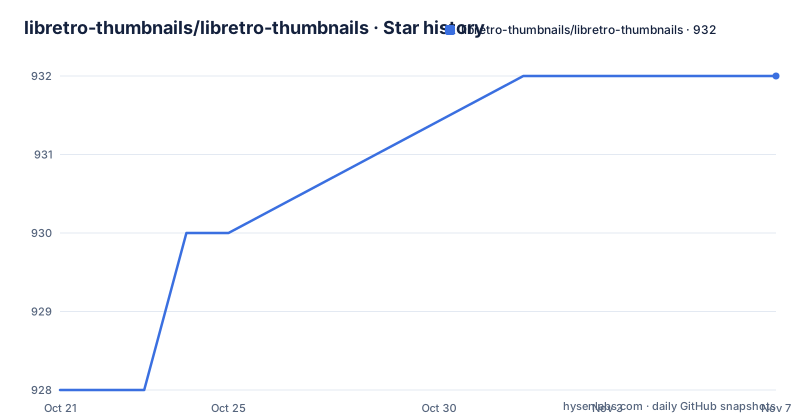
Star history
- libretro-thumbnails/libretro-thumbnails932 ★ · +4
| Repository | 2026-10-21 | 2026-11-07 |
|---|---|---|
| libretro-thumbnails/libretro-thumbnails | 928 | 932 |
4 Stars in the last 17 days, measured from the daily GitHub snapshot. Compare with other projects
Editorial analysis
A content repository, split into one submodule per console
libretro-thumbnails holds thumbnails for RetroArch, and the interesting engineering is in how it is organised rather than in any code. The project description states that thumbnails are organized into separate repositories by system or console to ease maintenance, and the top level of the repository shows what that means in practice: one directory per system, from Amstrad CPC and the Atari lines through Commodore 64, DOOM, DOS, FBNeo, MAME, Microsoft MSX, NEC PC Engine and onward, each of them a git submodule.
The primary language of the repository is listed as Makefile, which fits a project whose only automation is a small set of shell and git commands. There is no daemon, no service and no plugin API. It is a pile of images with a strict naming contract, and the tooling exists to keep that contract honest.
That design has a direct consequence for anyone evaluating it. The repository is huge in aggregate, but a single console directory is small, so a contributor can work on one system without touching the others, and a user can clone only what they need if they are willing to manage submodules by hand.
Four thumbnail types and a three part path
RetroArch expects four kinds of thumbnail, and the repository mirrors that taxonomy exactly. Named_Boxarts are scans of the boxes or covers of games. Named_Logos are the game logos, and the documentation notes these are not present for all systems. Named_Snaps are in-game snapshots, in other words gameplay screenshots. Named_Titles are images of the game's introductory title screen.
Each image lives at a path made of three parts: the playlist name, the thumbnail type folder, and the game file name with the png extension. The documented convention is written as thumbnails/Playlist Name/Named_Type/Game Name.png, and the type folder names match the four type prefixes.
RetroArch can display both automatic server provided thumbnails and custom thumbnails set by the user, which is the fork in the road for anyone deciding whether to install this repository. The server provides images for known games without any local work. This repository exists for the other case, where you want the artwork on your own disk, you want to contribute corrections, or you want images for a playlist the server does not cover.
Installing means a shallow recursive clone into the config directory
Installation is two commands, and the important detail is that the clone has to be recursive and shallow. The submodules are the actual artwork, and the depth of 1 keeps the download to the latest commit of each console rather than the full history.
cd ~/.config/retroarch
git clone --recursive --depth=1 http://github.com/libretro-thumbnails/libretro-thumbnails.git thumbnails
What you should end up with is a thumbnails directory inside your RetroArch configuration, holding one directory per console and, inside those, the type folders for boxarts, logos, snaps and titles.
The Makefile has no install script, and its install target says so directly, telling the user to place libretro-thumbnails in the config/thumbnails folder. There is no package manager entry, no service to start and nothing to configure in RetroArch itself beyond pointing it at the directory, since that is where RetroArch looks for thumbnails by default.
Updates come from submodule pulls, and make wires them together
Keeping the artwork current is a two part git operation. The parent repository is pulled, and then every submodule is moved to its latest upstream commit.
git pull
git submodule update --recursive --remote --init --force
The force flag and the remote flag are the substance of that command. Submodules are pinned to particular commits, so without --remote they would stay where they were, and the repository has to be told to accept whatever the console repositories point at now.
If you have make available, the same work is one command, because the update target chains pull, update-submodules and indexes.
makeThere is also a shell alternative that the documentation describes as maintaining shallow clones of depth 1 and checking out master.
sh update_modules.shChoose one of the three rather than mixing them. Running the submodule update with --force after a shallow clone script has already rewritten the clones is a good way to end up with a working tree that reports changes you did not make.
The .index files let RetroArch list what is actually present
RetroArch lists the available files in a directory by reading .index files, and the Makefile builds them from the submodule contents. The index target writes the name of each submodule into a root .index file, and the indexes target then lists the png files inside every submodule into that submodule's own .index.
make index
make
The recipe behind it is plain shell, which tells you exactly how the index is derived. It iterates the submodules with git submodule foreach, echoing each submodule name into ../.index, and then writing the png files of each one into a .index file. Because the listing comes from git ls-files, an image that exists on disk but is not tracked by git does not appear in the index.
The clean target removes the index files before rebuilding them, so a stale .index is not something you need to worry about by hand. This is a small part of the project, but it is the part that decides whether RetroArch shows you a library of thumbnails or an empty directory, and it is easy to miss when troubleshooting.
Contribution rules that decide whether an image matches a game
The guidelines are strict on purpose, because a thumbnail is only useful if RetroArch attaches it to the right game. Images must be png files, and the documentation notes that RetroArch versions later than 1.19.1 can read other formats including jpg, bmp and tga, but that the repository and the thumbnail server do not support them.
If a game name in a playlist contains any of the characters &, *, backtick, colon, angle brackets, question mark, pipe or double quote, those characters must be replaced with an underscore in the file name. When you replace an existing image, the new file must keep the exact old name so it still matches the game. When you add a new one, you have to research how libretro names the game in databases and match that.
Screenshots have a size rule: images wider than 512 pixels are scaled down to 512 pixels wide, and images at or below that width are added as they are. Shader and CRT filters are turned off for in-game captures, and bilinear filtering is off unless it was native to the console, because a 512 pixel wide image cannot represent scanline effects accurately.
A restricted character check is provided for the tree.
find . -name '*[&\*:`<>?\\|"*]*'One practical note on timing. An accepted pull request does not appear in RetroArch immediately, because the image has to travel from the repository to the thumbnail server in a periodic export, and the documentation puts that delay at one to two weeks depending on maintenance.
A cron job feeds the thumbnail server, and the licence is unstated
The server side is worth understanding, because it changes what happens after you contribute. The thumbnail server receives updates from the repository about once every two days on a cron job. If files look stale, the documented workaround is to append a nocaches parameter with the current date to the request URL so CloudFlare serves fresh content.
On maintenance, the last push was on 2026-09-06 and the repository has no GitHub releases, so there is nothing to pin a deployment to and no release notes to read. The project is a content pipeline rather than a versioned tool, which is a fair way to run it, but it means the only signal of activity is the commit history of the parent repository and the console submodules.
The licence is the open question. The licence field for this repository carries no value, and there is no LICENSE file among the top level entries. For a repository of images contributed by many people and widely mirrored, that is a detail to check before you redistribute the set, and the answer should come from the project rather than from an assumption.
One helper is mentioned with a warning: libretro-thumbnails-check can be used to find missing thumbnails, but the documentation states that the list may be deprecated and unmaintained.
Editorial conclusion
Adopt libretro-thumbnails when you want artwork that matches your own playlists instead of what a remote server returns, and when you can live with the naming rules that RetroArch applies when it matches an image to a game. Do not adopt it for a handheld or console build where a 512 pixel wide PNG cannot represent the material, and do not expect a contribution to show up immediately. Before the first clone, check that the path you install into really is RetroArch's thumbnails directory, run the restricted character check over your own file names, and confirm that the licence situation suits you, since the repository carries no licence value and no LICENSE file among its top level entries.
Frequently asked questions
How do I install libretro-thumbnails for RetroArch?
Clone the repository recursively and shallowly into the thumbnails directory inside your RetroArch configuration folder. The documented commands are cd ~/.config/retroarch followed by git clone --recursive --depth=1 of the repository url with the target directory thumbnails.
What thumbnail types does RetroArch support in this repository?
Four: Named_Boxarts for box or cover scans, Named_Logos for game logos, Named_Snaps for in-game screenshots and Named_Titles for the introductory title screen. Each file sits at thumbnails/Playlist Name/Named_Type/Game Name.png.
How do I update the thumbnails I already installed?
Run git pull and then git submodule update --recursive --remote --init --force, or run make if you have it available, since the update target chains pull, update-submodules and the index rebuild. A shell alternative called update_modules.sh maintains shallow clones and checks out master.
What are the rules for contributing a thumbnail image?
Images must be png and no wider than 512 pixels, with shaders and bilinear filtering turned off for in-game captures. Characters such as &, *, colon, pipe and double quote must be written as underscores in the file name, and replacing an existing image means keeping the exact previous file name.
Why do my thumbnail changes not appear in RetroArch right away?
An accepted contribution is only visible after the periodic export from the repository to the thumbnail server, which the documentation puts at one to two weeks depending on maintenance. The server itself receives updates from the repository about once every two days on a cron job.
Official sources
Add this badge to your README
If you maintain this project, the badge below links readers to this analysis and shows its maintenance status from the daily GitHub snapshot. Paste the markdown into your README; add ?metric=license or ?metric=stars to the image URL for a different field.

[](https://hysenlabs.com/projects/libretro-thumbnails-libretro-thumbnails)Star history chart for your README
[](https://hysenlabs.com/projects/libretro-thumbnails-libretro-thumbnails)Was this useful?