SaschaWillems/Vulkan: C++ samples, one command line, and an upstream move
C++ examples for the Vulkan graphics API
At a glance
- What is it?
- SaschaWillems/Vulkan collects C++ programs for the Vulkan graphics and compute API, with GLSL as the primary language and one shared set of command line flags. Its author now sends most new samples to KhronosGroup/Vulkan-Samples.
- Who is it for?
- Adopt this tree if you are learning Vulkan from the ground up or need one working reference for a single mechanism at a time, and check KhronosGroup/Vulkan-Samples first for anything Khronos already demonstrates. Leave it if you need a supported library or a release cadence, because this repository offers neither.
- Can I use it commercially?
- Yes. MIT is a permissive licence: you can use, modify and sell software built on it, as long as you keep its copyright and licence notices.
- Is it still maintained?
- Yes. The repository last received commits 5 days ago.
- What is it written in?
- Mainly GLSL, according to GitHub's language statistics.
Answers come from the project's GitHub data, last synced on November 14, 2026, and from our analysis. They are not legal advice.
Star history
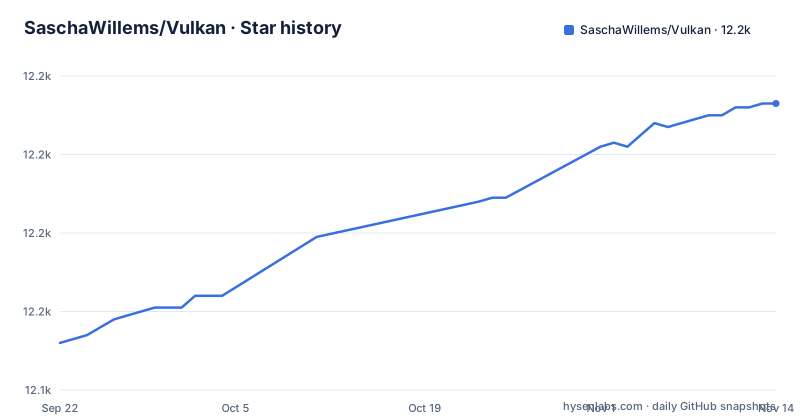
- SaschaWillems/Vulkan12,213 ★ · +61
| Repository | 2026-09-22 | 2026-11-14 |
|---|---|---|
| SaschaWillems/Vulkan | 12.2k | 12.2k |
61 Stars in the last 53 days, measured from the daily GitHub snapshot. Compare with other projects
Editorial analysis
Most new samples are going to KhronosGroup/Vulkan-Samples instead
Khronos now publishes an official Vulkan Samples repository at KhronosGroup/Vulkan-Samples, and the author states that he helped get it running and will contribute mostly to it from now on. Samples that do not fit there may still land here, and he says he will keep maintaining these. That split decides where you look first and where you send a patch. This tree reaches into PBR, deferred rendering, compute, hardware accelerated ray tracing, headless work, user interface, effects and extensions, and the directory names give the granularity: examples/computeparticles/, examples/descriptorbuffer/, examples/conservativeraster/, examples/debugutils/. When the feature you need already exists in the official repository, porting it costs less than writing against the spec yourself. The last push here was on 2026-10-25.
git clone --recursive is not optional, because assets are submodules too
Submodules carry the external dependencies and the assets, so a fresh checkout has to be recursive:
git clone --recursive https://github.com/SaschaWillems/Vulkan.gitTwo commands bring an existing tree current instead:
git submodule init
git submodule update
Skip the flag on a new clone and the external dependencies and assets will be missing. The same mechanism carries the assets, so texture data arrives alongside the code dependencies.
C++20 and MoltenVK, with the per platform detail left in BUILD.md
Requirements are narrow: a C++ compiler that supports C++20, and the README says the repository contains everything needed to build on Windows, Linux, Android, iOS, macOS and OpenHarmony. Everything platform specific sits in BUILD.md, which is linked rather than reproduced, so the first build begins with reading that file rather than with a command. Directory layout mirrors the same split: android/, apple/ and openharmony/ directories sit beside a base/ directory of shared code, with CMakeLists.txt at the top level. CREDITS.md holds the attributions the samples rely on. There are no GitHub releases either, so no prebuilt archive exists to download and no tagged version to diff a change against. Every build is local, and there is no published binary to compare yours to.
The shared command line, and why -gl has to come before -g
Once built, the binaries run from the bin directory, and every sample parses the same options. The README lists them from the program's own help output:
 --help: Show help
  -h, --height: Set window height
  -v, --validation: Enable validation layers
  -vs, --vsync: Enable V-Sync
  -f, --fullscreen: Start in fullscreen mode
  -w, --width: Set window width
  -s, --shaders: Select shader type to use (glsl, slang, hlsl)
  -g, --gpu: Select GPU to run on
  -gl, --listgpus: Display a list of available Vulkan devices
  -b, --benchmark: Run example in benchmark mode
  -bw, --benchwarmup: Set warmup time for benchmark mode in seconds
  -br, --benchruntime: Set duration time for benchmark mode in seconds
  -bf, --benchfilename: Set file name for benchmark resu
Two of those flags exist because the samples are not equally runnable. The project notes that some examples require specific device features, so on a multi-GPU system you list what exists with -gl and then pick with -g, in that order. Running with -v turns on validation layers, which turns a silent bad access into a message naming the call that caused it. Benchmark mode takes four flags instead of one: -b to enter it, then -bw and -br for the warmup and run durations in seconds, and -bf for the output file name. That last description is cut off mid word in the project's own listing, so treat it as incomplete.
SPIR-V sits in the middle, and the Rust shaders are not in this tree
Vulkan consumes shaders in an intermediate representation called SPIR-V, so whatever language you write in has to be compiled to that bytecode first. GLSL under shaders/glsl/ is the primary language, and most samples also carry slang sources under shaders/slang/ and HLSL under shaders/hlsl/. Carrying one sample in three languages is the point: the pipeline stays fixed and the shading language becomes the variable, which is what makes the differences between them readable side by side. The -s flag picks between glsl, slang and hlsl at run time, so one binary covers all three trees. Rust is the exception. The Rust GPU project maintains the Rust shader sources for these examples in a separate repository, under shaders/rust there rather than here, so a Rust evaluation keeps half of that work outside this checkout and no value of -s reaches it.
Four ways to get data to a shader, each with a different cost
The Basics examples open with two triangles: a Vulkan 1.0 version meant as a starting point from the ground up, where a large part of the code is boilerplate that later samples abstract away, and a Vulkan 1.3 version that uses features such as dynamic rendering to simplify API usage. Past those, each example narrows onto one data path. Descriptor sets pass data to shader binding points, and the sample sets up sets, layouts and a pool, builds a single pipeline from the set layout, then renders several objects against different sets. Dynamic uniform buffers keep many matrices in one uniform buffer and address each one at descriptor binding time, which cuts the number of sets you have to build. Push constants hold small uniform blocks inside the command buffer, so a shader gets its data with no uniform buffer at all. Specialization constants work at pipeline creation, producing several pipelines with different lighting paths from a single uber shader. The choice is a cost question about how much data crosses the boundary and how often, and the samples show the cost rather than the rule.
A 2D texture array does no interpolation between its slices
The texture examples make loading decisions for you, and one of them is worth reading before you copy the pattern. examples/texture/ loads a 2D texture from disk with all mip levels, stages it into video memory and samples it through a combined image sampler. examples/texturearray/ loads a 2D array whose slices each carry their own mip chain, and a 2D texture array does not interpolate between the slices. If a scene needs a continuous fade from one layer into the next, this sample will not give it to you, and the shared command line has no switch that changes it. examples/texturecubemap/ takes a cube map of six faces, uploads every face and mip level, and shows the result twice: as a skybox backdrop and as a reflection on a 3D model. Nothing in the flag set reaches mip bias, format conversion or compressed input, so those paths stay out of reach from the command line.
Linux, a Vulkan runtime and a version history are all missing
Two things a new user asks for are not in the README. The first is the Vulkan runtime itself. No step in the cloning, building or running sections installs a Vulkan implementation, and no SDK to download is named, so a build that works depends on an environment you set up somewhere else. The second is version history. With no GitHub releases there is no release note to read, no tag to roll back to and no stated upgrade path, and the only dated fact on offer is that the last push landed on 2026-10-25. That is a reasonable place to start reading and a poor thing to depend on.
Editorial conclusion
Adopt this tree if you are learning Vulkan from the ground up or need one working reference for a single mechanism at a time, and check KhronosGroup/Vulkan-Samples first for anything Khronos already demonstrates. Leave it if you need a supported library or a release cadence, because this repository offers neither. Before you commit, run -gl on the target machine and confirm the device you pick with -g has the features the sample requires.
Frequently asked questions
Is Vulkan for NVIDIA or AMD?
The samples name no vendor. What varies between machines is device support, and the project notes that some examples require specific device features, so on a multi-GPU system you can list the available Vulkan devices with -gl and choose one with -g.
What is Vulkan in a GPU?
Vulkan is the low-level graphics and compute API from Khronos. SaschaWillems/Vulkan is a collection of open source C++ examples for it, with GLSL as the primary language and MIT licensing.
Do I have to download Vulkan?
The Vulkan runtime is not part of this repository. No step in the cloning, building or running sections installs a Vulkan implementation and no SDK download is named, so the samples need an environment prepared separately.
How do I use Vulkan on Android?
Android is one of the platforms named as buildable, and the tree carries an android/ directory beside apple/ and openharmony/. No Android build steps appear outside BUILD.md, which is where the per platform detail is kept.
How do I install Vulkan on Windows 11?
Windows is one of the platforms named as buildable, and BUILD.md is where the platform steps live. No step in the repository installs a Vulkan implementation, so the samples still need one present on the machine before they run.
Official sources
Add this badge to your README
If you maintain this project, the badge below links readers to this analysis and shows its maintenance status from the daily GitHub snapshot. Paste the markdown into your README; add ?metric=license or ?metric=stars to the image URL for a different field.

[](https://hysenlabs.com/projects/saschawillems-vulkan)Star history chart for your README
[](https://hysenlabs.com/projects/saschawillems-vulkan)Was this useful?