SameBoy: a Game Boy emulator organised around proving its own timing accuracy
Game Boy and Game Boy Color emulator written in C
At a glance
- What is it?
- A portable C emulator with three frontends, an open source boot ROM it ships itself, and a test suite claim specific enough to check, which makes it a different kind of project from the usual emulator.
- Who is it for?
- SameBoy is the emulator to pick if you care about how a game actually ran on hardware rather than whether it runs on your machine, and the bundled boot ROM plus the cycle accurate LCD timing model are the two things that make it different. It is a poor fit if you want a plug and play binary for a platform with no prebuilt release, since the README documents compilation rather than downloads.
- Can I use it commercially?
- Check first. The repository uses a licence we do not classify automatically, so read its LICENSE file before any commercial use.
- Is it still maintained?
- Yes. The repository last received commits 9 days ago.
- What is it written in?
- Mainly C, according to GitHub's language statistics.
Answers come from the project's GitHub data, last synced on October 22, 2026, and from our analysis. They are not legal advice.
Star history
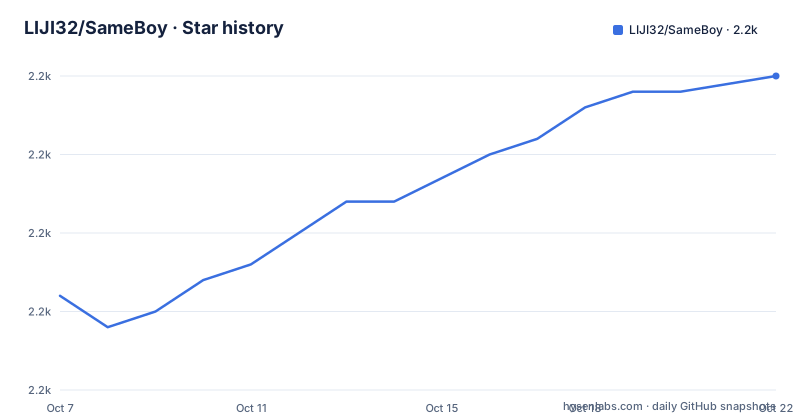
- LIJI32/SameBoy2,230 ★ · +14
| Repository | 2026-10-07 | 2026-10-22 |
|---|---|---|
| LIJI32/SameBoy | 2.2k | 2.2k |
14 Stars in the last 15 days, measured from the daily GitHub snapshot. Compare with other projects
Editorial analysis
An emulator built around a claim you can go and check
Most emulator READMEs are feature lists. SameBoy's is a compatibility section with test suite names in it, which changes what the project is asking you to judge.
The README states that SameBoy passes all of blargg's test ROMs, all of mooneye-gb's tests, noting that some of those require the original boot ROMs, and all of Wilbert Pol's tests. Those are hardware behaviour test suites written by people outside the emulator, and passing them is a claim with a defined meaning: the emulated CPU, memory map and timing behave the way real silicon does, not merely well enough for games to look right. The project also publishes results for its own automatic tester, described as available from its website.
Underneath that sits a specific technical commitment rather than a general one. The README claims T-cycle accurate emulation of LCD timing effects, naming the Demotronic trick, Prehistorik Man and GBVideoPlayer among the tech demos it supports, and it emulates the PCM_12 and PCM_34 registers. Those are the details that separate an emulator used for compatibility from one used for homebrew development or for understanding why a demo behaves as it does.
Shipping the boot ROM is the decision that shapes everything
SameBoy includes open source DMG and CGB boot ROMs as part of the project. Most emulators either require you to supply a dump yourself or ship something legally ambiguous. Doing it in the open means the boot sequence is part of the auditable source, and it also means the project can document the behaviour it implements.
The payoff is the palette system. Because the CGB boot ROM is part of the project rather than an opaque blob, SameBoy documents complete support for every game specific palette in it, which is how a Game Boy game ends up looking correct on Game Boy Color hardware. You can also select a palette manually with key combinations, with four additional palettes available through a modifier combination, and force a CGB game into paletted DMG mode when the ROM allows it.
There are two more consequences in the same list. Games with a non-Nintendo logo in the header are supported, which is the homebrew case. And the DMG boot has no long animation, which matters for anyone comparing frame timing between an emulator and real hardware. The Makefile accepts a BOOTROMS_DIR variable pointing at a directory of precompiled boot ROM files, so if you prefer your own dumps the build system will use those instead of compiling its own.
One portable C core behind three frontends
The core is written in portable C, and the repository wraps it three ways. The Cocoa frontend is native for macOS and is the default target there, the SDL frontend covers other operating systems, and there is a libretro core for anyone running a retroarch style frontend. The tree shows the separation: a Core directory, then Cocoa, SDL, libretro, Windows, AppleCommon, iOS, FreeDesktop and QuickLook directories alongside it.
Because the core is a library target, you can link it into something else. The make target named lib produces libsameboy.o and libsameboy.a for static linking, plus libsameboy.dylib, libsameboy.so or libsameboy.dll for dynamic linking, along with a headers directory. Static libraries are noted as unsupported on Windows because of linker limitations.
Features are not evenly spread across frontends, and the README is upfront about which are Cocoa only. Native Cocoa with drag and drop and smart titlebars, and Game Boy Camera support, are listed as Cocoa only. Shared across Cocoa and SDL are the model selection, 96KHz audio, battery save support, save states, the real time clock, retina and high DPI scaling, optional frame blending and several scaling algorithms including OmniScale and anti-aliased Scale2x.
The iOS side is a target list of its own, with ios for a plain app bundle, ios-ipa for an archive for side loading, and ios-deb for a deb package on jailbroken devices. That last one is a reminder that this project's supported platforms include jailbroken phones, which tells you something about who it is built for.
Building it, and the configuration matrix that controls the result
The build is a plain make invocation. The README lists the prerequisites honestly: clang or GCC, make, the macOS SDK and Xcode for the Cocoa frontend, libsdl2 for SDL, rgbds for boot ROM compilation, and cppp for cleaning up headers when compiling SameBoy as a library. libpng is also required when building for operating systems other than Windows and macOS.
makeThe default target depends on the platform, which is the sort of detail that saves time. cocoa is the default on macOS and sdl is the default everywhere else. The Makefile encodes that by checking the output of uname.
Four configurations are available and they are not cosmetic. CONF=debug is the default. CONF=release is a normal optimised build. CONF=native_release is faster than release but is tuned to the CPU it was compiled on and is therefore not portable. CONF=fat_release is exclusive to macOS and builds x86-64 and ARM64 fat binaries, which needs a recent enough clang and macOS SDK or explicit CC and SYSROOT settings.
sudo make installThat last line is the documented path for Linux, BSD and other FreeDesktop systems, and it installs SameBoy as both a GUI app and a command line tool. PREFIX and DESTDIR follow their standard usage, defaulting to an empty string and /usr/local, and DATA_DIR points at the resource files directory, defaulting to /usr/local/share/sameboy/ on FreeDesktop environments. On Windows the requirements are different again: Visual Studio, Git Bash or another distribution of basic Unix utilities, and either vcvars64.bat or vcvarsx86_amd64.bat run before make so the tools, libraries and headers are on the paths. Git Bash does not include make, which the README handles by pointing at a build.
A text debugger, and build flags that remove whole subsystems
The debugger is the feature that separates this from a games oriented emulator. The README lists an advanced text based debugger with an expression evaluator, a disassembler, conditional breakpoints, conditional watchpoints and backtracing. Conditional breakpoints matter more than they sound: they let you stop on a write to a particular address rather than on a line in your own source, which is how you find the instruction you did not write.
The release notes show the debugger growing rather than just existing. Version 1.0.2 added a usage command displaying the CPU's time outside halt and stop modes, a CPU usage graph in the Cocoa debugger window, and a change to the print and eval commands so they no longer pad with zeros by default. Version 1.0.3 added an examine command that can use the /s modifier for RGBDS compatible assembly output, and can use $ in its modifier for hexadecimal count values.
The Makefile is where the cost side of those subsystems shows. Setting DISABLE_TIMEKEEPING compiles the core with GB_DISABLE_TIMEKEEPING, which drops the real time clock. DISABLE_REWIND adds GB_DISABLE_REWIND and removes Core/rewind.c from the build. DISABLE_DEBUGGER adds GB_DISABLE_DEBUGGER, removes Core/debugger.c, Core/sm83_disassembler.c and Core/symbol_hash.c, and forces cheat search off as a side effect. DISABLE_CHEATS is a variable in the same family.
So the project lets you delete the expensive parts to fit a small target, and the coupling is documented in the build file rather than guessed at. If you are building for a constrained device, that list is the map of what you are giving up.
Licensing, release history and the platform question
The README states that SameBoy is an open source project licensed under the Expat license, with an additional exception for the iOS folder. GitHub itself reports no detected license type for the repository, and a LICENSE file is present in the tree. Those two statements are not necessarily in conflict, since the Expat license is a permissive MIT style license that automated detection sometimes misses, and the iOS carve out is the kind of detail that needs reading. If you intend to redistribute a build, read the LICENSE file rather than relying on either summary.
The release record is regular by emulator standards. SameBoy v1.0.3 came on 2026-03-04, v1.0.2 on 2025-08-03 and v1.0.1 on 2025-04-04. Each of the last two notes opens with the same compatibility promise, that save states are backwards compatible with SameBoy 0.14.3 and newer and with save states from any BESS compliant emulator. That is a stronger compatibility statement than most emulators make, and it is the one that matters if you have a library of saves.
What is missing is a download page. The README covers compilation at length and refers to the website for features and for the automatic tester results, but the project presents building from source as the normal path, and the tree has no packaging or installer directory. The README does add that SameBoy is compiled and tested on macOS, Ubuntu and 64-bit Windows 10, so those three are the platforms where a from source build is a known quantity.
Editorial conclusion
SameBoy is the emulator to pick if you care about how a game actually ran on hardware rather than whether it runs on your machine, and the bundled boot ROM plus the cycle accurate LCD timing model are the two things that make it different. It is a poor fit if you want a plug and play binary for a platform with no prebuilt release, since the README documents compilation rather than downloads. The README states the project is licensed under the Expat license with an additional exception for the iOS folder, while GitHub reports no detected license type for the repository, so read the LICENSE file before redistributing a build. The last push was on 2026-07-10 and the newest release is v1.0.3 from 2026-03-04.
Frequently asked questions
Is SameBoy a good emulator?
The README's own measure of good is compatibility and timing, and it answers on those terms: SameBoy states it passes all of blargg's test ROMs, all of mooneye-gb's tests and all of Wilbert Pol's tests, and claims T-cycle accurate emulation of LCD timing effects. It also bundles open source DMG and CGB boot ROMs, which is what lets it implement every game specific palette in the CGB boot ROM correctly.
Is SameBoy free?
The README states the project is open source and licensed under the Expat license, with an additional exception for the iOS folder. A LICENSE file is present in the repository, although GitHub reports no detected license type for it, so read that file directly if the terms matter for what you plan to do.
Is SameBoy safe to use?
The emulator's own code is open source and auditable, and the project asks users to report broken ROMs through its issue tracker rather than distributing any. What the project does not address is where ROM images come from, which is a separate question about the files you supply rather than about the emulator.
Official sources
Add this badge to your README
If you maintain this project, the badge below links readers to this analysis and shows its maintenance status from the daily GitHub snapshot. Paste the markdown into your README; add ?metric=license or ?metric=stars to the image URL for a different field.

[](https://hysenlabs.com/projects/liji32-sameboy)Star history chart for your README
[](https://hysenlabs.com/projects/liji32-sameboy)