linuxserver/docker-mods: Applying Container Modification Layers
Documentation and Examples of base container modifications
At a glance
- What is it?
- linuxserver/docker-mods documents a system for building and consuming user-created modification layers for LinuxServer.io containers. It suits focused customizations that should remain separate from a base image, but external code and a separate support boundary are explicit trade-offs.
- Who is it for?
- Adopt it when you need a small, independently published change to a LinuxServer.io container and can inspect its source and build pipeline. Do not adopt it when you require direct LinuxServer support, pinned s6 v2 images, or complete control over every file introduced during startup.
- Can I use it commercially?
- Yes, with conditions. GPL-3.0 is a copyleft licence: if you distribute software that includes it, you must release that software's source code under the same licence. Running it internally without distributing it does not trigger that obligation.
- Is it still maintained?
- Yes. The repository last received commits 20 days ago.
- What is it written in?
- GitHub does not report a main language for this repository.
Answers come from the project's GitHub data, last synced on October 23, 2026, and from our analysis. They are not legal advice.
Star history
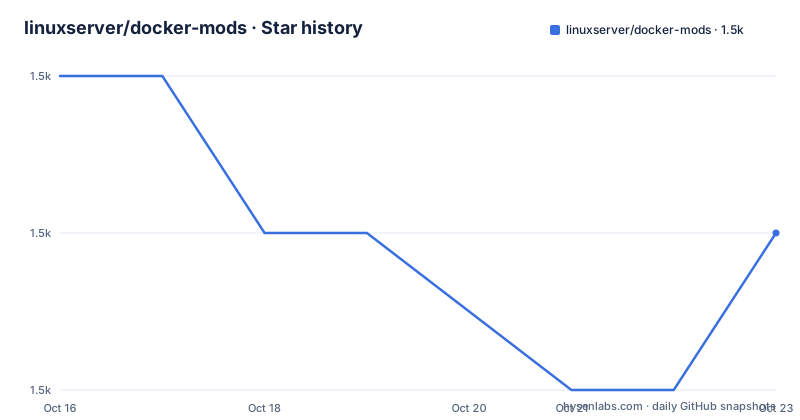
- linuxserver/docker-mods1,546 ★ · -1
| Repository | 2026-10-16 | 2026-10-23 |
|---|---|---|
| linuxserver/docker-mods | 1.5k | 1.5k |
-1 Stars in the last 7 days, measured from the daily GitHub snapshot. Compare with other projects
Editorial analysis
What docker-mods Adds to LinuxServer.io Containers
linuxserver/docker-mods addresses the gap between using an existing LinuxServer.io image and maintaining a private fork for a small change. A Docker Mod is a tarball of files stored in Docker Hub or GitHub Container Registry. The container downloads and extracts that tarball during boot, before its initialization logic runs. This makes it possible to add troubleshooting utilities, default configuration files, startup scripts, or configuration that connects containers through environment variables defined in a compose file.
The intended users are LinuxServer.io container users who need a controlled extension, and developers or community members who want to publish that extension as an independent project. The README presents each Mod as a separate artifact with its own repository and support channel. The base application image does not need to be rebuilt for every such change.
This approach also changes the support boundary. The README says LinuxServer's first troubleshooting step for a problem involving a Mod is to remove `DOCKER_MODS` and replace the container with a clean LinuxServer.io image. A Mod can therefore help with a focused customization while placing troubleshooting responsibility outside the core LinuxServer team.
How the Boot-Time Modification Layer Is Applied
The documented flow starts when a container receives one or more Mod endpoints through `DOCKER_MODS`. The Mod is obtained from its registry endpoint, its files are downloaded as a tarball, and its contents are extracted into the container before initialization logic begins. The README does not specify the lower-level downloader, so it does not establish behavior for registry authentication, local caching, retries, or partial download recovery.
`DOCKER_MODS` accepts either one endpoint in the form `user/endpoint:tag` or several endpoints separated by `|`. This lets a compose service request multiple independent Mods. The README also documents `RUN_BANNED_MODS`. Setting it to any value bypasses the centralized filter of banned Docker Hub users and runs Mods regardless of a ban. That is an explicit exception rather than a default recommendation, especially because the README warns about consuming files from sources outside LinuxServer's control.
LinuxServer publishes official Mod images through the `linuxserver/mods` endpoint. Tags for recent versions use the form `<imagename>-<modname>`, while tags containing a commitsha identify a specific version. The README links to `mods.linuxserver.io` for the official list. It does not document a rollback command or a documented procedure for inspecting every change before container startup.
A First nzbget Container With universal-tshoot
The README provides a complete first use case with nzbget. The command creates the container, sets the Mod endpoint and LinuxServer environment variables, mounts configuration and download paths, publishes port 6789, and selects the nzbget image. The `universal-tshoot` Mod is described as adding basic troubleshooting tools such as `dig`, `netstat`, and `nslookup`.
Replace the example host paths with locations available to the Docker host. The command creates the container; the README example does not include a separate `docker start` command. It therefore documents container creation and configuration rather than a complete start-and-verify sequence.
Using Docker Compose for a Documented Mod
Compose is the clearer option when a container has several environment variables, persistent volumes, and published ports. The README's YAML defines one nzbget service and places `DOCKER_MODS` in its environment list. The `latest` tag belongs to the base nzbget image, while the Mod is identified as `lscr.io/linuxserver/mods:universal-tshoot`.
After saving this service definition in a YAML file, Docker Compose can parse the image, environment, volume, port, and restart settings. The same `DOCKER_MODS` value works here and in the `docker create` example. No project-specific compose filename or startup command is documented, so the command should come from the user's existing compose setup rather than an invented repository path.
The example shows that a Mod does not replace normal container configuration. `PUID`, `PGID`, `TZ`, volumes, ports, and the restart policy remain part of the service. The Mod supplies files and startup logic, while the base image and compose file still define the application, identity, persistence, and network exposure.
Building a Single-Layer s6 v3 Modification
The repository supports s6 v3 Mods for current LinuxServer base images. The README states that new Mods will not work with older s6 v2 images, including older pinned or forked versions that use v2. This is a hard compatibility boundary.
The simplest Dockerfile starts from `scratch` and copies the repository's `root/` directory into the image:
FROM scratch

# copy local files
COPY root/ /
Files under `root/` are added to the end user's container path. The documentation requires a Mod to contain a single image layer. More complex builds must therefore assemble the required files into that layer rather than publishing multiple separate Mod layers.
For s6 v3, the documented tree places dependency marker files under `etc/s6-overlay/s6-rc.d`. A file-only Mod can depend on `init-mods-end`, while a package-installing Mod can depend on `init-mods-package-install`. The Mod's `init-mod-universal-mymod` directory declares a dependency on `init-mods`. Its `type` file contains `oneshot`, its `up` file contains the absolute path to `run`, and `chmod +x` is used to make the startup script executable.
The dependency marker determines where the Mod runs in the s6 sequence, while `run` carries the actual modification logic. The README says the complete example files are available on the repository's `template` branch.
Why a Focused Mod Still Creates Operational Risk
The main limitation is trust. Mod contents come from Docker Hub or GitHub Container Registry endpoints selected through configuration. The README calls out the security implications of consuming files from sources outside LinuxServer's control and tells users to exercise caution. It recommends ensuring that a Mod's source code is publicly posted and that its build pipeline pushes to Docker Hub. That requirement supports review, but it is not presented as an integrity guarantee.
The second limitation is compatibility. A Mod built for s6 v3 cannot be used with an older s6 v2 image. The base container's initialization version therefore matters as much as its application version. A faulty startup script can also interfere with initialization before the application service starts normally.
The third limitation is support. The README identifies removal of `DOCKER_MODS` and replacement with a clean image as the first troubleshooting step. This is a practical boundary for production use. A Mod can be appropriate for a personal or community-maintained deployment, but an organization that depends on direct LinuxServer troubleshooting must account for a separate codebase and support channel.
The repository has no GitHub releases, so it provides no release history for judging upgrades. It is not archived, and its last push was on 2026-10-03. The README does not document a compatibility matrix, automatic upgrade policy, or rollback procedure. The GPL-3.0 license applies to the repository; a published Mod can also contain independently licensed scripts, packages, and files.
Docker Mods Compared with Maintaining a Container Fork
The documented alternative is to maintain a fork of the main Docker repository. A fork gives the developer direct control over the image build, file layout, package installation, and startup sequence. It also keeps the customization in a repository whose relationship to the base image is explicit. The cost is that upstream changes may require manual comparison or rebuilding, and the developer owns the full image rather than a small modification layer.
Docker Mods take a different approach. The LinuxServer.io image remains the application image, while a registry-hosted tarball supplies additional files before initialization. This reduces image maintenance for a small change and lets an independent project publish the Mod. It does not remove build work. The Mod still needs source files, a build pipeline, correct s6 v3 dependencies, and review when the target image changes.
For a one-off troubleshooting package or an independently maintained service integration, the Mod format is more focused than a full fork. For a customization that changes many image layers or owns security-sensitive startup behavior, a fork may provide a clearer ownership boundary. The README allows other build systems when their jobs are transparent.
Editorial conclusion
Adopt it when you need a small, independently published change to a LinuxServer.io container and can inspect its source and build pipeline. Do not adopt it when you require direct LinuxServer support, pinned s6 v2 images, or complete control over every file introduced during startup. Verify the Mod source, image provenance, target container's s6 version, and startup script before deployment.
Frequently asked questions
What is a Docker Mod?
A Docker Mod is a tarball of files stored on Docker Hub or GitHub Container Registry. It is downloaded and extracted during container boot before initialization logic runs.
How do I apply a Mod to a LinuxServer.io container?
Set `DOCKER_MODS` to one endpoint such as `user/endpoint:tag`, or to several endpoints separated by `|`. The README uses `lscr.io/linuxserver/mods:universal-tshoot` with nzbget as its example.
Can I use a Docker Mod with an older LinuxServer image?
The README says new Mods support s6 v3 and will not work with older s6 v2 based images. Check the target image's initialization version before applying one.
What should I do if a Mod causes a LinuxServer.io container problem?
The README identifies removing `DOCKER_MODS` and replacing the container with a clean LinuxServer.io image as the first troubleshooting step.
Official sources
Add this badge to your README
If you maintain this project, the badge below links readers to this analysis and shows its maintenance status from the daily GitHub snapshot. Paste the markdown into your README; add ?metric=license or ?metric=stars to the image URL for a different field.

[](https://hysenlabs.com/projects/linuxserver-docker-mods)Star history chart for your README
[](https://hysenlabs.com/projects/linuxserver-docker-mods)Was this useful?