liquidctl: a per-model driver table for AIO coolers, and the version number you must check first
Cross-platform CLI and Python drivers for AIO liquid coolers and other devices
At a glance
- What is it?
- liquidctl is a cross-platform CLI and Python library that talks to AIO liquid coolers, pump controllers and fan/LED controllers from ASUS, Corsair, NZXT, Aquacomputer, Lian Li and others. What it can drive depends entirely on a per-model table with a minimum version for each row.
- Who is it for?
- Use liquidctl if you have a supported cooler or controller and want to control it from a terminal or a script on Linux, macOS, Windows or a BSD. Do not buy hardware on the assumption it works: the answer is in the per-model table and its minimum recommended version column, and newer models such as the Kraken 2024 Plus need 1.16.0 or later.
- Can I use it commercially?
- Yes, with conditions. GPL-3.0 is a copyleft licence: if you distribute software that includes it, you must release that software's source code under the same licence. Running it internally without distributing it does not trigger that obligation.
- Is it still maintained?
- Yes. The repository last received commits 159 days ago.
- What is it written in?
- Mainly Python, according to GitHub's language statistics.
Answers come from the project's GitHub data, last synced on November 22, 2026, and from our analysis. They are not legal advice.
Star history
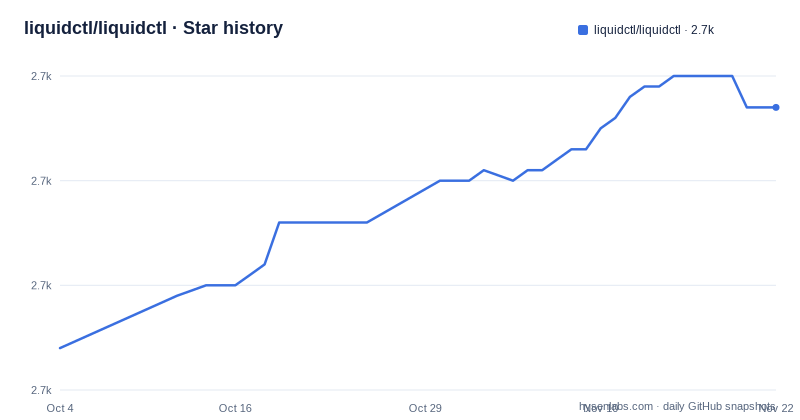
- liquidctl/liquidctl2,707 ★ · +23
| Repository | 2026-10-04 | 2026-11-22 |
|---|---|---|
| liquidctl/liquidctl | 2.7k | 2.7k |
23 Stars in the last 49 days, measured from the daily GitHub snapshot. Compare with other projects
Editorial analysis
Support is a table of exact models, each with its own guide and minimum version
The first thing to read in liquidctl is the supported devices table. Each row names a device family, links a guide in docs/, lists notes as letter codes, and gives an MRLV, the minimum recommended liquidctl version. Rows are narrow: NZXT Kraken M22 is one entry, Kraken X42, X52, X62 and X72 another, X53, X63 and X73 a third, and Z53, Z63 and Z73 a fourth. They point to different guides, kraken-x2-m2-guide.md for the first two and kraken-x3-z3-guide.md for the others.
The consequence is that a similar name on a box does not mean the same driver. A cooler from the same brand with a different revision can sit in a different guide or need a newer version. Reading the right row before purchase or installation is the only reliable check, and the table I am describing is long enough that the README keeps a comment explaining how the rows are sorted.
Newer coolers need newer liquidctl, up to 1.16.0 for some
The MRLV column shows that support has been added release by release. ASUS Ryujin III 360 and ASUS Ryuo I 240 list 1.16.0, as do the Lian Li GA II LCD, the NZXT Kraken 2024 Plus and the NZXT 2023 RGB Controller. The Kraken 2024 Elite RGB lists 1.15.0. Older Corsair Hydro and EVGA CLC coolers go back to 1.9.1, and the Corsair Hydro Platinum and Pro XT rows to 1.8.1.
The latest releases are v1.16.0 on 2026-03-03, v1.15.0 on 2025-04-13 and v1.14.0 on 2025-01-01. So a distribution package frozen at an older version may simply not know your cooler. The README lists installation through Linux distributions, Homebrew on macOS and FreeBSD and DragonFly BSD Ports, and each of those depends on what version the packager has built.
Installation has six routes, and the manual one asks the most of you
The README contents list the options. You can install from your Linux distribution, from Homebrew on macOS, or from FreeBSD and DragonFly BSD Ports. The manual route is broken into steps: Linux dependencies, macOS system dependencies, Windows system dependencies, creating a virtual environment, installing from PyPI or GitHub, allowing access to the devices, and additional files. A separate section covers working locally from a checkout.
The manual path matters when your platform package is too old for your cooler. It also means handling USB access yourself. The step named Allowing access to the devices is a distinct part of the manual process, so a successful pip install does not by itself mean the command can reach the hardware. The top level has liquidctl.8, a manual page, and an extra/ directory holding files outside the Python package, including extra/windows/LQiNFO.py and extra/contrib/fusion_rgb_cycle.py.
The command line is list, initialize, status, and a device selector
The example at the top of the README shows the shape of a session. Running liquidctl list prints numbered devices, for instance Corsair Vengeance RGB DIMM2, Corsair Vengeance RGB DIMM4, NZXT Smart Device (V1) and NZXT Kraken X (X42, X52, X62 or X72). Running liquidctl initialize all prints firmware version, LED accessory count and type for the Smart Device, and the firmware version for the Kraken. Running liquidctl status prints values such as fan speed in rpm, voltage and current.
The contents list gives sections on listing and selecting devices, on initializing and interacting with them, and on supported color specification formats. Because the tool addresses devices by listing and selecting, a machine with several supported devices needs you to choose the target rather than rely on a default. DIMMs appearing in the listing show the scope is wider than coolers alone.
Nothing runs at boot until you set it up for your operating system
liquidctl is a command that you run. The README has a section on automation and running at boot, with separate sub-sections for Linux using systemd, Windows using Task Scheduler, and macOS using various methods.
The consequence is that a setting you apply by hand, such as a color or a fixed speed, is not described as permanent by the contents list; you arrange for the command to run again after startup. That is real work on every platform, and it is different on each one. On macOS the heading says various methods rather than a single recommended one, so you will choose between them.
If you are comparing it with a graphical program, note the project describes itself as a cross-platform CLI and Python drivers; this repository does not present a graphical interface of its own.
The Python API is a first-class use, and the build derives its version from git
A section of the README is titled Using liquidctl in other programs and scripts, so the drivers can be imported rather than called through the CLI. The package lives in liquidctl/, with drivers in liquidctl/driver/, and tests in tests/.
The pyproject.toml uses setuptools with setuptools_scm, which writes the version to liquidctl/_version.py using the release-branch-semver scheme. In practice the version number comes from the repository state, so a checkout without its git metadata is a poor basis for reporting a version in an issue. The pytest configuration runs doctests in modules. Black is set with a line length of 100 and target versions py310 through py314, and several driver files are excluded pending conversion, among them asetek.py, commander_core.py, kraken2.py and smbus.py.
Maintenance signals and licensing
The repository is licensed GPL-3.0 and is not archived. The last push was on 2026-06-16, and the newest tagged release in the list above is v1.16.0 from March 2026. Beyond the code there is a CHANGELOG.md, a CONTRIBUTING.md, a CODE_OF_CONDUCT.md and a SECURITY.md, and badges point to a Discord server and an OpenSSF best practices entry.
The GPL-3.0 license matters if you plan to build the drivers into software you distribute: the terms of that license apply to your combined work. Using the command line for your own machine carries no such concern.
The README also has a Related projects section and a Troubleshooting section, which are the next stops when a device is listed but does not respond, or when you are weighing other tools that talk to the same hardware.
Editorial conclusion
Use liquidctl if you have a supported cooler or controller and want to control it from a terminal or a script on Linux, macOS, Windows or a BSD. Do not buy hardware on the assumption it works: the answer is in the per-model table and its minimum recommended version column, and newer models such as the Kraken 2024 Plus need 1.16.0 or later. Before installing, find your exact model in the table, open its guide, and confirm that you can grant your user access to the device.
Frequently asked questions
How do I install liquidctl?
The README lists installation through Linux distributions, macOS Homebrew, and FreeBSD and DragonFly BSD Ports, plus a manual route with virtual environment, PyPI or GitHub install, and device access setup.
How do I use liquidctl?
Run liquidctl list to see devices, liquidctl initialize all to initialise them, and liquidctl status to read values such as fan speed, voltage and current. It can also be used from other Python programs and scripts.
Which liquidctl version does a newer cooler like the Kraken 2024 Plus need?
The supported devices table lists 1.16.0 as the minimum recommended version for the NZXT Kraken 2024 Plus, and the latest release is v1.16.0 from 2026-03-03.
Official sources
Add this badge to your README
If you maintain this project, the badge below links readers to this analysis and shows its maintenance status from the daily GitHub snapshot. Paste the markdown into your README; add ?metric=license or ?metric=stars to the image URL for a different field.

[](https://hysenlabs.com/projects/liquidctl-liquidctl)Star history chart for your README
[](https://hysenlabs.com/projects/liquidctl-liquidctl)Was this useful?