WireViz reads a harness as YAML and hands back a diagram plus a BOM
Easily document cables and wiring harnesses.
At a glance
- What is it?
- WireViz turns a YAML file describing connectors, cables and connections into a GraphViz diagram and a tab separated bill of materials. The file format is small enough to learn in one sitting, and the project states plainly that it documents a harness rather than a whole system.
- Who is it for?
- WireViz fits hardware work where someone needs a repeatable drawing and a parts list for a cable or panel harness, and it fits version control because the source is YAML text. It does not fit whole system or netlist documentation, and it does not fit a team that needs a stable interface across releases.
- Can I use it commercially?
- Yes, with conditions. GPL-3.0 is a copyleft licence: if you distribute software that includes it, you must release that software's source code under the same licence. Running it internally without distributing it does not trigger that obligation.
- Is it still maintained?
- Yes. The repository last received commits 20 days ago.
- What is it written in?
- Mainly Python, according to GitHub's language statistics.
Answers come from the project's GitHub data, last synced on November 14, 2026, and from our analysis. They are not legal advice.
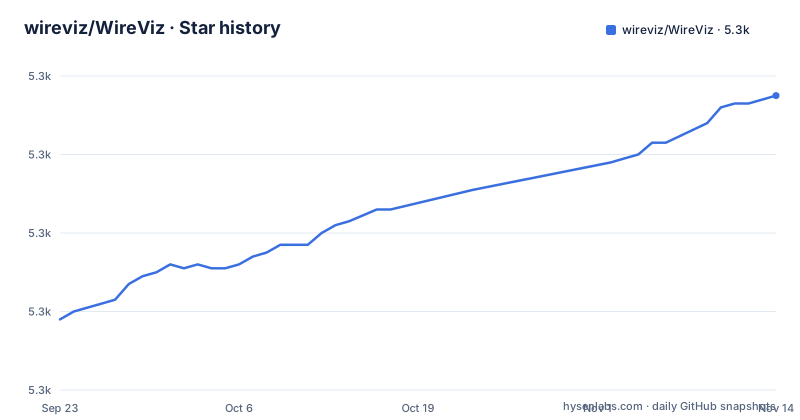
Star history
- wireviz/WireViz5,335 ★ · +57
| Repository | 2026-09-23 | 2026-11-14 |
|---|---|---|
| wireviz/WireViz | 5.3k | 5.3k |
57 Stars in the last 52 days, measured from the daily GitHub snapshot. Compare with other projects
Editorial analysis
connectors, cables and connections are the only three top level keys
demo01.yml uses three top level keys: connectors, cables and connections. The connectors block names each end of the harness with a type, a subtype and an optional pinlabels list, so demo01.yml declares X1 as D-Sub, subtype female, with nine pin labels DCD, RX, TX, DTR, GND, DSR, RTS, CTS and RI, while X2 is a Molex KK 254 with three labels. The cables block carries physical attributes instead of names: gauge 0.25 mm2, length 0.2, color_code DIN, wirecount 3 and shield true. The connections block is a list of groups, and each group lists what every component attaches to. Pin numbers appear as bracketed lists, and the shield is a single letter s rather than a number. Because the input is UTF-8 YAML, the files diff cleanly in version control and need no special editor.
Color comes from a scheme name, not from a hex value
Wire color handling follows IEC 60757 two letter abbreviations, so black is BK and red is RD, and four schemes ship with the tool. DIN 47100 runs WT/BN/GN/YE/GY/PK/BU/RD/BK/VT, IEC 60757 runs BN/RD/OR/YE/GN/BU/VT/GY/WT/BK, and the 25 Pair Color Code uses paired entries such as BUWH/WHBU/OGWH/WHOG/GNWH/WHGN/BNWH. TIA/EIA 568 A/B is a subset of the 25 pair scheme, which is what CAT-5 and CAT-6 runs use. Custom schemes are allowed when none of the four fit. A commented out line in the feature list sketches an option for emitting the abbreviation, the full name or a hex value such as #ffff00 with a case choice, so that output mode is not part of the current feature set. One line in a cable block, `color_code: DIN`, picks the scheme for every conductor in that run.
Gauge is written in mm2 or AWG and converted on request
A cable block states its gauge in mm2 or in AWG and WireViz reads either form, so files sourced from metric and imperial suppliers do not need hand conversion. The equivalent gauge between the two systems is calculated when asked for rather than on every run, which matters when a harness mixes a 0.25 mm2 signal core with a thicker AWG power pair and the drawing has to carry both numbers. demo01.yml records `gauge: 0.25 mm2` for a three wire shielded run of length 0.2. Nothing in the format ties color to size, since the scheme comes from `color_code` and the cross section from `gauge`, so two conductors of the same scheme can still differ in size. Connector pinout style is declared per connector rather than inferred, which is why X1 can carry nine labels while X2 carries three inside one harness.
One run can emit five files and a glob multiplies the work
A single invocation decides which artifacts land next to the input file, and the set is not fixed. Depending on the options specified it can produce all five of these:
mywire.gv         GraphViz output
mywire.svg        Wiring diagram as vector image
mywire.png        Wiring diagram as raster image
mywire.bom.tsv    BOM (bill of materials) as tab-separated text file
mywire.html       HTML page with wiring diagram and BOM embedded
The choices live in the options rather than in a config file, and `wireviz --help` is where you read them. Shell wildcards in the path are honored, which is the fast path for a directory of harnesses:
$ wireviz ~/path/to/files/*.ymlThe consequence is that every matched input yields the same five derived names beside it. The checked in examples show exactly that pairing, with `examples/demo01.yml` sitting next to demo01.gv, demo01.svg, demo01.png, demo01.html and demo01.bom.tsv, and the same set repeated for demo02, ex01 and ex02.
GraphViz has to be installed first and Ubuntu 18.04 ships Python 3.6
WireViz shells out to a separate GraphViz installation, so GraphViz must already be on the machine before any command produces output, and the GraphViz download page carries the OS specific instructions. The Python floor is 3.7, with Ubuntu 18.04 LTS called out because its system Python is 3.6 and users there install a newer interpreter separately. The released version comes from PyPI and gives you the command:
pip3 install wirevizThe development branch is a different path with a different cost, since it tracks a moving target:
git clone <repo url>
cd <working copy>
git checkout dev
pip3 install -e .
An editable install means the checkout rather than the package index decides what the `wireviz` command does. Four runtime dependencies come with it: click, pyyaml, pillow and graphviz, and requirements.txt also lists setuptools. The first run of all is one command against a file:
$ wireviz ~/path/to/file/mywire.ymlIt documents a harness, not the wiring of a whole system
The project draws its own boundary: WireViz is not designed to represent the complete wiring of a system, and its main aim is to document the construction of individual wires and harnesses. A harness file answers what each conductor is made of and where it lands, not how a board or a vehicle is wired end to end. The BOM inherits the same scope, since it is derived from the connectors and cables you declared. For a signal or panel harness builder that shape is the point. For someone who wants a netlist across a whole machine there is nowhere in the file to put it, and the tool will not infer it.
Beta packaging and commits that outran the tagged releases
Packaging declares Development Status 4 - Beta and lists classifiers for Python 3.7 through 3.12, with the runtime floor stated as 3.7 or later. The status note is blunter: this is very much a work in progress, and source code, API, syntax and functionality may change wildly at any time. Tags and commits have drifted apart. The three newest releases, v0.3.2, v0.4 and v0.4.1, all carry the date 2024-07-13, while the default branch was last pushed on 2026-10-25, so current behavior lives in commits that no tagged release contains. A pinned install from PyPI and a clone of the default branch are therefore different tools with the same name. Only a console entry point named `wireviz` is registered and the environment classifier is Console, so the command line is the entire interface. Syntax details sit in `syntax.md`, demo rebuilding in `buildscript.md`, and change history in `CHANGELOG.md`, all of which move with that unreleased work.
Editorial conclusion
WireViz fits hardware work where someone needs a repeatable drawing and a parts list for a cable or panel harness, and it fits version control because the source is YAML text. It does not fit whole system or netlist documentation, and it does not fit a team that needs a stable interface across releases. Before committing to it, check that GraphViz is installed on every machine that will run the command, and read CHANGELOG.md to see whether a syntax you rely on has moved since the tagged release you installed.
Frequently asked questions
What is WireViz?
WireViz is a tool for documenting cables, wiring harnesses and connector pinouts. It takes plain text, YAML-formatted files as input and produces graphical output such as SVG and PNG through GraphViz, and it handles automatic bill of materials creation.
How to install WireViz?
Install the released version from PyPI with pip3 install wireviz. WireViz requires Python 3.7 or later, and it requires GraphViz to be installed as well, with OS specific instructions on the GraphViz download page.
What are the color codes in WireViz?
Four schemes ship with WireViz: DIN 47100, IEC 60757, the 25 Pair Color Code, and TIA/EIA 568 A/B, which is a subset of the 25 pair scheme used in CAT-5 and CAT-6. Colors use IEC 60757 abbreviations such as BK for black and RD for red, and custom schemes are allowed.
How do I use WireViz to generate a diagram?
Point the command at a YAML file, for example wireviz ~/path/to/file/mywire.yml, and choose the output formats you want. Wildcards in the path process several files at once, and wireviz --help lists the format options.
Official sources
Add this badge to your README
If you maintain this project, the badge below links readers to this analysis and shows its maintenance status from the daily GitHub snapshot. Paste the markdown into your README; add ?metric=license or ?metric=stars to the image URL for a different field.

[](https://hysenlabs.com/projects/wireviz-wireviz)Star history chart for your README
[](https://hysenlabs.com/projects/wireviz-wireviz)Was this useful?