Zhigeng (知更): a local context and memory layer for Mac voice input and Codex/Claude Code
Zhigeng (robin) is a context and memory layer for local AI. On Mac it takes voice input, replies in context, and dispatches to Codex/Claude Code; on iOS it's becoming a portable memory terminal and remote control for local agents. Local-first, BYOK.
At a glance
- What is it?
- Zhigeng is a source-available macOS app that turns speech into polished text, drafts replies from screen context, and hands bigger jobs to local coding agents. It is local-first and BYOK, but the licence forbids commercial use and the README leaves several operational questions open.
- Who is it for?
- Zhigeng may suit Apple Silicon Mac users who want context-aware voice input and local agent handoff. The project describes local memory and optional local speech recognition, but cloud model use can transmit relevant inputs to external providers; review permissions, retention and provider settings before use.
- Can I use it commercially?
- Check first. The repository uses a licence we do not classify automatically, so read its LICENSE file before any commercial use.
- Is it still maintained?
- Yes. The repository last received commits 86 days ago.
- What is it written in?
- Mainly TypeScript, according to GitHub's language statistics.
Answers come from the project's GitHub data, last synced on November 25, 2026, and from our analysis. They are not legal advice.
Star history
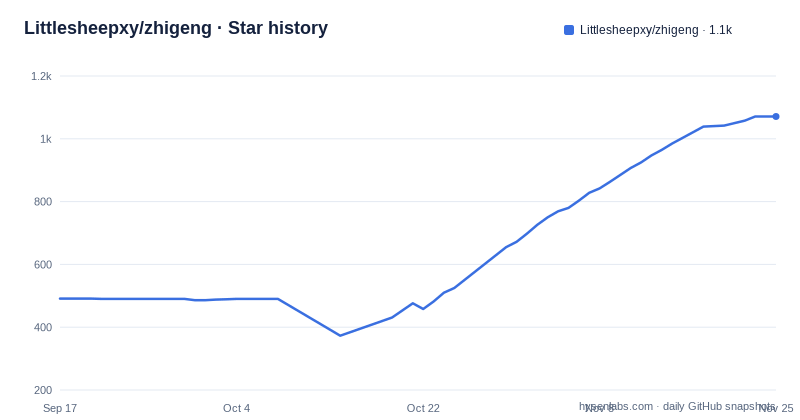
- Littlesheepxy/zhigeng1,071 ★ · +580
| Repository | 2026-09-17 | 2026-11-25 |
|---|---|---|
| Littlesheepxy/zhigeng | 491 | 1.1k |
580 Stars in the last 69 days, measured from the daily GitHub snapshot. Compare with other projects
Editorial analysis
The problem Zhigeng targets: agents that do not know your context
The README states the premise directly: "AI 不缺能力,缺的是认识你." Zhigeng is built for people who already use Codex, Claude Code or WorkBuddy and are tired of re-explaining the same background in every new session. The app watches what you are doing (active window, conversation, clipboard, copied records), keeps a local trail of that activity, and distils it into memory entries about people, projects and tone. Depending on the task and configuration, relevant context may be supplied to a selected model or agent; check what data leaves the device when using a cloud provider.
The audience is narrow and specific: macOS users on Apple Silicon who are willing to run a signed DMG, paste their own API keys into the settings, and accept that the memory lives on their machine rather than in a vendor account. The README frames the product as vendor-neutral, which matters if you switch between OpenAI, Anthropic, Zhipu, Kimi and OpenRouter. The engineering package name inside the repository is still @fold/*, so expect that naming mismatch in paths and scripts.
How Zhigeng works: voice, trail, memory, dispatch
The mechanism has four visible layers. Voice input captures audio and produces text; the README says short-pressing the right Command key starts transcription, and that the output is not literal dictation but a cleaned version that fixes restarts, drops filler words and adjusts tone for Feishu, WeChat or email. A long press on the same key produces several candidate replies based on the current conversation and application; you pick one and it is inserted into the real input box, leaving the send decision to you.
The trail layer records which apps and windows you work in, plus clipboard history, as context for drafting. Memory stores who you care about, what you are working on and habitual phrasing. The README notes that a profile can be imported from common AI assistants. On top of that, the connections layer routes simple tasks to Zhigeng itself and complex ones to local agents, with integrations listed for Feishu, DingTalk, WeCom, Slack and Gmail.
ASR can run entirely on the machine through SenseVoice or Whisper, or through a cloud provider. The .env.example shows a proxy process on port 3003 that fronts Alibaba Cloud's DashScope WebSocket endpoints, and FOLD_ASR_PROVIDER accepts auto, local-funasr, local-whisper or dashscope. Model routing is split into a planner (quality-oriented, defaulting to moonshot with model k3) and a fast model for transcription cleanup and reply drafts (defaulting to openrouter with google/gemini-3.1-flash-lite). A separate vision path uses Zhipu's glm-5v-turbo for screenshot-based drafts, falling back to OCR plus the fast text model when it fails.
Installing Zhigeng and running it from source
The README points to a signed and notarised macOS Apple Silicon installer at https://zhigeng.app/Zhigeng-mac-arm64.dmg and says no beta code is required. To run the desktop client from source, the repository uses pnpm workspaces and Turbo. The README gives these commands:
pnpm install
cp .env.example .env
pnpm desktop:dev
The first command installs workspace dependencies; package.json pins [email protected] and requires Node >=20. The copy step is optional, and the README notes that you can run without keys and use a mock to see the flow. The third command rebuilds the native modules and starts the ASR proxy and desktop app in parallel, so expect two processes.
To build a signed DMG you need a local Developer ID and notarisation credentials:
pnpm desktop:packFor a first real use, the README's own example is to download a PDF into ~/Downloads, short-press right Command and say "帮我整理刚下载的报价发给 Jason". The desktop shortcuts are right Command short press for structured input, right Command long press for context-aware replies, Option Space to hand a task to a local agent, and Esc to cancel. If you want to inspect the environment variables before starting, the ASR proxy and provider settings live in .env.example under keys such as FOLD_ASR_PROVIDER, ASR_PROXY_PORT and FOLD_FAST_PROVIDER.
Where Zhigeng gets in the way
The most concrete constraint is the licence. The repository uses PolyForm Noncommercial 1.0.0, and the README's own table says you may view, study, modify and self-host for personal or noncommercial use, but you may not build a commercial product, take clients, sell services or run it as SaaS, and you may not remove the copyright notice before redistributing. For any proposed deployment or redistribution, read the licence itself and seek a separate licence or appropriate advice where necessary; whether a use qualifies depends on its circumstances.
The second constraint is platform. The documented installer targets Apple Silicon; check current release and source-build documentation before assuming Intel support. The iOS keyboard extension in apps/ios is described as under development and is not included in the current macOS DMG, so anyone expecting a phone-side memory terminal today will be disappointed.
The third is operational opacity. The README does not document rollback, data export, memory deletion format or upgrade migration, even though memory is the core asset. The trail feature records active windows and clipboard contents, which is exactly the kind of data some employers restrict; the README says memory can be viewed, disabled and deleted, but it does not describe retention limits or where the trail database sits. Treat that as a gap to verify in the source before deploying on a work machine.
Alternatives and how they differ
The obvious alternative is a system-level dictation tool such as macOS's built-in dictation or a dedicated transcription app. Features vary by product and version, so compare each tool's current dictation and context features. Zhigeng's difference is the context layer: it reads the current window and conversation to shape the output, and it stores memory across sessions. If all you want is accurate dictation, a simpler tool is cheaper and has fewer permissions to grant.
A second alternative is building the same loop with an agent framework plus a local vector store. A custom implementation can give you more control over retention, but the licences and terms of its components and providers still apply. The trade-off is that you would rebuild the voice capture, the right-Command hotkey plumbing, the reply drafting and the app integrations yourself. Zhigeng's value is that this loop already exists as a packaged Electron app with a documented shortcut set.
A third comparison is against cloud dictation services that sync your history to an account. Zhigeng's README argues for the opposite: keys stay in the local keychain, ASR can be local, and memory is described as staying on the machine. Cloud model calls may send selected input or context to the provider and incur provider charges; local speech recognition does not by itself make the entire workflow offline.
Maintenance, licence and upgrade cost
The repository is not archived. The last push was on 2026-09-01, and the only release listed is v0.0.1 for macOS Apple Silicon, published on 2026-08-26. That is a very early release history, so plan for breaking changes: the engineering package namespace is still @fold/* while the product is named Zhigeng, which hints at an incomplete rename and makes script names and paths unstable ground for automation.
Upgrade cost is dominated by configuration rather than code. The .env.example lists multiple providers for the planner, the fast model, the vision model and ASR, each with its own API key variable. For source builds, review the environment configuration; the README also describes settings for cloud model keys and local speech recognition, so the exact switching workflow depends on the version and deployment. The environment file is one documented configuration path for source builds; verify credential storage in the version you install. Licence implications are straightforward in direction but not in detail: PolyForm Noncommercial 1.0.0 permits personal and research use and forbids commercial use. Whether a given internal deployment counts as commercial is a question for your own legal reading of LICENSE, not something the README resolves.
Editorial conclusion
Zhigeng may suit Apple Silicon Mac users who want context-aware voice input and local agent handoff. The project describes local memory and optional local speech recognition, but cloud model use can transmit relevant inputs to external providers; review permissions, retention and provider settings before use. Check the current platform and iOS availability, and read the PolyForm Noncommercial licence or contact the author about commercial licensing for your specific use.
Frequently asked questions
What is Zhigeng?
Zhigeng is a source-available macOS app described as an independent, vendor-neutral voice input and memory agent. It handles speech-to-text, drafts context-aware replies, records a local activity trail, and dispatches larger tasks to local agents such as Codex or Claude Code.
How do I install Zhigeng on macOS?
The README points to a signed and notarised Apple Silicon installer at https://zhigeng.app/Zhigeng-mac-arm64.dmg and says no beta code is needed. To run from source, the README gives pnpm install, an optional cp .env.example .env, and pnpm desktop:dev.
Can I use Zhigeng commercially?
No. The repository is licensed under PolyForm Noncommercial 1.0.0, and the README states you may view, modify and self-host for personal or noncommercial use, but may not build a commercial product, sell services or run it as SaaS. Commercial licensing enquiries go to [email protected].
Does Zhigeng require an API key?
Cloud model use requires your own provider credentials; the README also describes a mock flow without keys and local SenseVoice or Whisper speech recognition. Local ASR alone does not make subsequent cloud model processing local. Check the version and configuration to understand what is sent to each provider.
Is the iOS keyboard available yet?
No. The README says apps/ios is under development, targeting an iOS 17+ keyboard extension and portable memory terminal, and states that the iOS version is not part of the current macOS DMG.
Official sources
Add this badge to your README
If you maintain this project, the badge below links readers to this analysis and shows its maintenance status from the daily GitHub snapshot. Paste the markdown into your README; add ?metric=license or ?metric=stars to the image URL for a different field.

[](https://hysenlabs.com/projects/littlesheepxy-zhigeng)Star history chart for your README
[](https://hysenlabs.com/projects/littlesheepxy-zhigeng)Was this useful?