Thunderbolt: frequent v0.1.x releases, a Makefile that names Docker projects after your parent directory, and an honest list of what is missing
AI You Control: Choose your models. Own your data. Eliminate vendor lock-in.
At a glance
- What is it?
- Thunderbolt is an MPL-2.0 cross-platform AI client from the Thunderbird organisation that describes itself as still early, targets enterprise on-prem deployments, and ships system-managed models that a self-hosted backend serves only when given ANTHROPIC_API_KEY and TINFOIL_API_KEY. Its releases are numbered v0.1.x, and its test:5x script runs the same suite in randomised order five times over.
- Who is it for?
- Thunderbolt fits an organisation that wants to run its own AI client on its own hardware and is willing to accept the shape of the project as it stands today.
- Can I use it commercially?
- Yes, with conditions. MPL-2.0 is a weak copyleft licence: you can use it inside commercial and closed-source software, but if you distribute changes to its own files, you must publish those changes under the same licence.
- Is it still maintained?
- Yes. The repository received new commits within the last day.
- What is it written in?
- Mainly TypeScript, according to GitHub's language statistics.
Answers come from the project's GitHub data, last synced on November 13, 2026, and from our analysis. They are not legal advice.
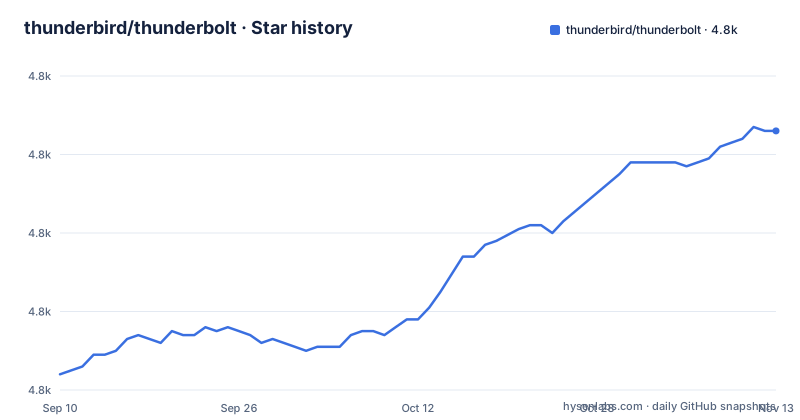
Star history
- thunderbird/thunderbolt4,826 ★ · +62
| Repository | 2026-09-10 | 2026-11-13 |
|---|---|---|
| thunderbird/thunderbolt | 4.8k | 4.8k |
62 Stars in the last 64 days, measured from the daily GitHub snapshot. Compare with other projects
Editorial analysis
The releases are nightly builds with a date in the tag
Look at the release names before anything else, because they explain the versioning scheme completely. The three most recent releases are v0.1.152 published 2026-11-02, v0.1.151 published 2026-10-31, and v0.1.150 published 2026-10-30. So the patch component moves with each release, and there is no date in the tag. The package manifest agrees, carrying version 0.1.152 for the source tree. A RELEASE.md file sits at the root.
The README names three things the project does not do yet
The callout near the top is the most useful paragraph in the file, and it is worth reading as a specification of what is missing rather than as marketing. The project clarifies that it is still early and under active development, currently targeting enterprise customers who want to deploy it on-prem, and encourages self-hosting to try it out with caveats still being worked on. The first caveat is offline operation: while full offline-first behaviour is planned, it currently depends on authentication and search functionality, though search can be disabled under Settings → Connections, and the workaround offered for testing is to deploy your own backend with Docker Compose and sign up. The second is inference: Thunderbolt ships system-managed models that the backend serves, Opus 5.5 routed to Anthropic and confidential models hosted in Tinfoil enclaves with DeepSeek V4.1 Flash as the default for a new install, but a backend you host yourself only serves those if you give it ANTHROPIC_API_KEY and TINFOIL_API_KEY; otherwise you add API keys for any OpenAI-compatible provider in settings, or point it at Ollama or llama.cpp for free local inference. The third is stated separately, that the project is currently undergoing a security audit and preparing for enterprise production readiness.
Four make targets cover the whole local setup
The getting started section is four commands, each with an inline comment saying what it does:
make doctor    # verify your tools — prints exact install commands for anything missing
make setup     # install frontend + backend dependencies, wire up agent symlinks
make up        # start Postgres + PowerSync in Docker
make run       # start the backend (:8000) and frontend (:1420)
The design of the doctor target is the part worth noting. Rather than failing with a missing dependency, it prints the exact install commands for anything missing, which turns a first-run failure into a list of things to run. The setup target does two things beyond installing dependencies, which is wiring up agent symlinks. The up target brings up Postgres and PowerSync in Docker, which tells you the local stack expects a database and an offline sync service rather than running against a hosted backend. The run target then starts the backend on port 8000 and the frontend on port 1420, matching the default cloud URL in the example environment file.
The Docker project name is derived from your parent directory
There is a detail in the Makefile that will surprise anyone with two checkouts side by side. The container compose tool is auto-detected, preferring podman-compose when it is present and working and falling back to docker compose. The compose project name is computed by taking the basename of the parent directory and the basename of the repository directory, lowercasing both, and replacing anything outside the allowed set of characters with a hyphen, so two sibling working trees do not share Postgres data. You can override it with COMPOSE_PROJECT_NAME if you want a fixed name. The comment explains the sanitisation more carefully than most projects do: each segment is sanitised so that paths with spaces, uppercase letters or other special characters still produce a valid Docker Compose project name, and the lowercase step runs first so the sed expression can assert the lowercase set rather than letting uppercase through and relying on the character replacement having already run.
The environment file documents four switches and one of them is not safe to flip casually
The example environment file is commented in a way that documents the decisions rather than the syntax. VITE_THUNDERBOLT_CLOUD_URL is optional and defaults to http://localhost:8000 according to its comment, and the example sets it to http://localhost:8000/v1, which is the backend the make run target starts. VITE_AUTH_MODE takes the value sso for enterprise SSO using either OIDC or SAML, and is omitted for the consumer mode. VITE_AUTH_ENABLE_ANONYMOUS defaults to false, and the comment is explicit that it enables unauthenticated sessions where visitors silently receive a temporary session, and that it is mutually exclusive with SSO mode, requiring the backend mirror AUTH_ALLOW_ANONYMOUS to be true as well. That pairing is the one to be careful with, because the two halves live in different files and a frontend-only change leaves the backend still refusing anonymous sessions. The remaining switches are a waitlist bypass for UI development that bypasses frontend routing but not backend auth, and a flag that shows app download links and banners for internal testing deployments. The iroh relay variable is build-time and inlined by Vite, with a separate runtime variable for the CLI bridge.
The test command is one long randomised run, and there is a five times variant
The test script in the package manifest is a single command chain rather than a set of named suites, which tells you something about how the project avoids flaky ordering. The main test script runs bun test against the src directory with a 5000 millisecond timeout and the randomize flag, then runs a second pass over shared unit tests, shared defaults, shared i18n, and a list of specific script tests including create-release, check-e2e-specs-collected, notify-on-failure, sanitize-nightly-artifacts, post-pr-metrics, post-eval-results and review-orchestrator, and finally runs the end to end directory's db-diagnostic and fake-provider tests. There is a test:5x variant of the same command with the timeout raised to an hour and a rerun-each 5 flag added, so the same suite is executed five times to expose ordering dependencies. Separate narrower suites exist for the shared agent core, including a five times variant and a browser script, plus four separate Playwright configurations at the root for the standard, e2ee, extended and preview runs.
Nine documentation files, and a separate route for security reports
The documentation section is split into Using Thunderbolt, Self-Hosting, and Developing and Contributing, and what it covers is a fair map of the project: an introduction, a FAQ, the extension points, the CLI, telemetry, feature pages from projects and skills to multi-device sync and end-to-end encryption, self-hosting with Docker Compose, Kubernetes or Pulumi on AWS, authentication, rate limiting, and a development quick start. The tree matches that list and adds more: a backend/ directory, a cli/, a crates/ directory next to src-tauri/ for the desktop shell, a powersync-service/ directory, a shared/ directory, e2e/, deploy/, docs/ and dist-isolation/, plus an install.sh, an AGENTS.md and a CLAUDE.md at the root. Security reporting has its own file, SECURITY.md, at the root.
Editorial conclusion
Thunderbolt fits an organisation that wants to run its own AI client on its own hardware and is willing to accept the shape of the project as it stands today. Read the callout at the top of the README before anything else: the project states it is still early and under active development, that it is undergoing a security audit and preparing for enterprise production readiness, and that it currently depends on authentication and search functionality even though full offline-first operation is planned. One practical consequence follows. A backend you host yourself only serves the system-managed models if you give it ANTHROPIC_API_KEY and TINFOIL_API_KEY; otherwise you supply your own model provider, with Ollama or llama.cpp for free local inference or OpenAI-compatible API keys in settings. If you need offline operation, it is not available yet. The last push is dated 2026-11-02.
Frequently asked questions
What is Thunderbolt from Thunderbird?
It is an open-source, cross-platform AI client from the Thunderbird organisation, licensed MPL-2.0 and available on web, iOS, Android, Mac, Linux and Windows. It is compatible with frontier, local and on-prem models, and is intended to be deployed on-prem.
Does Thunderbolt provide its own AI models or inference?
It ships system-managed models that the backend serves: Opus 5.5 routed to Anthropic, and confidential models hosted in Tinfoil enclaves, with DeepSeek V4.1 Flash as the default for a new install. A backend you host yourself only serves those if you give it ANTHROPIC_API_KEY and TINFOIL_API_KEY; otherwise add API keys for any OpenAI-compatible provider in settings, or point Thunderbolt at Ollama or llama.cpp for free local inference.
How do I run Thunderbolt locally?
Four make targets: `make doctor` verifies your tools and prints exact install commands for anything missing, `make setup` installs frontend and backend dependencies and wires up agent symlinks, `make up` starts Postgres and PowerSync in Docker, and `make run` starts the backend on port 8000 and the frontend on port 1420.
Is Thunderbolt offline-first yet?
Not yet. The README says it is planned but that it currently depends on authentication and search functionality, though search can be disabled under Settings → Connections. For local testing you can deploy your own backend with Docker Compose and sign up.
Official sources
Add this badge to your README
If you maintain this project, the badge below links readers to this analysis and shows its maintenance status from the daily GitHub snapshot. Paste the markdown into your README; add ?metric=license or ?metric=stars to the image URL for a different field.

[](https://hysenlabs.com/projects/thunderbird-thunderbolt)Star history chart for your README
[](https://hysenlabs.com/projects/thunderbird-thunderbolt)Was this useful?