Lightnovel Crawler: turn a web novel URL into an EPUB, or run your own library server
Generate and download e-books from online sources.
At a glance
- What is it?
- Lightnovel Crawler is a Python tool that discovers a novel's chapter list, downloads every chapter and writes an e-book, with an optional self-hosted server that adds accounts, translation and a browser reader. The command line is the part worth adopting first.
- Who is it for?
- Adopt Lightnovel Crawler if you want a repeatable way to turn a chapter list into an EPUB and you are comfortable running a Python package or a Docker Compose stack. Do not adopt it if you need a supported scraper with a service guarantee, or if you expect a source to keep working after the site redesigns.
- Can I use it commercially?
- Yes, with conditions. GPL-3.0 is a copyleft licence: if you distribute software that includes it, you must release that software's source code under the same licence. Running it internally without distributing it does not trigger that obligation.
- Is it still maintained?
- Yes. The repository last received commits 10 days ago.
- What is it written in?
- Mainly Python, according to GitHub's language statistics.
Answers come from the project's GitHub data, last synced on November 21, 2026, and from our analysis. They are not legal advice.
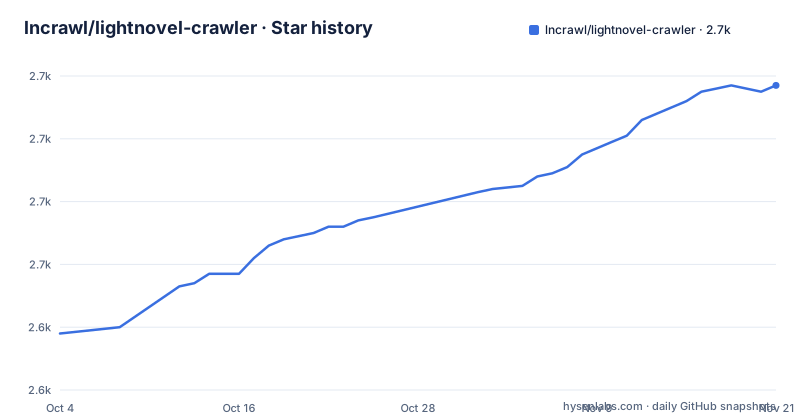
Star history
- lncrawl/lightnovel-crawler2,717 ★ · +79
| Repository | 2026-10-04 | 2026-11-21 |
|---|---|---|
| lncrawl/lightnovel-crawler | 2.6k | 2.7k |
79 Stars in the last 48 days, measured from the daily GitHub snapshot. Compare with other projects
Editorial analysis
What Lightnovel Crawler actually automates
The repetitive part of reading web fiction is not the reading. It is opening a table of contents, following each chapter link, stripping the navigation, and repeating that every time a new chapter appears. Lightnovel Crawler collapses that into a URL. The README's own framing is one command: you hand it a novel page, it discovers the chapter list, fetches every chapter and writes an EPUB.
The audience is narrow and clear. It is for people who read serialized fiction on sites that have no export button, and who are willing to run a Python package, a standalone binary, or a Docker stack to get one. The repository ships a desktop app for Windows, Linux and macOS that needs no Python at all, which widens that audience to anyone who can download a file. The README states the project covers 361 sources across 11 languages served by 446 crawlers, and that count is regenerated by CI rather than typed by hand, so it tracks the sources directory.
The project is explicit about scope: personal use only, for content you have legitimate access to. That is not boilerplate. It is the boundary that decides whether this tool is appropriate for you at all.
One crawler per source, and why that is the whole architecture
Every supported site is a small crawler file with the same contract. That is the design decision everything else follows from. Because sources share an interface, the CLI can accept any URL and dispatch to the right crawler, search can run across every source that implements it, and the web app's source editor can load a crawler file, attach a language server for completions and diagnostics, and stream a test run back to the browser.
The dependency list in pyproject.toml shows the shape of the runtime. There is httpx with brotli and http2 for fetching, beautifulsoup4, lxml, html5lib and readability-lxml for parsing, ebooklib for EPUB output, and separate packages for scraping and source handling (lncrawl-scraper, lncrawl-sourcelib). Translation is not in the core package: it comes from lncrawl-translator, a separate distribution, which is why the server stack runs a translator container rather than embedding engines.
Two consequences are worth naming. First, a source breaks when the site changes its markup, and the fix is a crawler file, not a version bump of the engine. Second, the quality of your experience is the quality of the specific crawler for your site, not a property of the project as a whole. A tool with 446 crawlers has 446 independent failure surfaces.
Installing lncrawl and running a first crawl
The Python package is the shortest path. The README gives the install and a single crawl command together, and the crawl command takes the novel page URL, an output format flag, and --all to fetch every chapter rather than a selection.
pip install -U lightnovel-crawler

lncrawl crawl "https://example.com/novel/page" -f epub --all
After that runs, you should find an EPUB in the working directory. The README describes the flow as discovering the chapter list, fetching every chapter, and writing the file, so a long novel means a long-running command with visible per-chapter progress rather than a single blocking pause.
If you would rather not maintain a Python environment, the README points at standalone builds for Windows, Linux and macOS, described as shipping the same engine, the same sources and the same web app, and opening a desktop app with no login. There is also a container image published to ghcr.io under the project's packages.
The server path is heavier and the repository's compose.yml is the honest description of it. A server container listens on 8181 and is started with `-ll server -p 8181`, backed by Postgres 17, an ebook-convert API on 8182, a translator service on 8184 that is deliberately not published because it is unauthenticated, and a tor-pool service for proxying. The server container reads LNCRAWL_DATA_PATH and DATABASE_URL from the environment. That is four moving parts before you read a single chapter, and it is the correct choice only if you want the library, accounts and scheduled re-download features.
Where it stops working, and why retries are not the answer
The README makes a claim that most scrapers get wrong: a challenge page served with a 200 status is a failure, not a chapter. That distinction matters because a naive crawler writes the interstitial into your EPUB and you discover it on the e-reader. The project states that blocks are diagnosed rather than retried.
Diagnosis is not a fix, though. The failure mode that will actually bite you is a source that has been redesigned: the crawler still runs, the selectors still match something, and the output is quietly wrong. Nothing in the README describes a validation pass over chapter text, so verifying the first few chapters of an unfamiliar source is on you.
Two other limits are worth stating plainly. The README notes that EPUB, TXT and JSON are produced directly while the remaining formats go through Calibre, so eighteen output formats is really three plus a Calibre dependency. And the server's translator container is unauthenticated by design, reachable only on the internal network through the server's admin proxy; anyone who exposes port 8184 directly has removed that protection. Sites also change, and a crawler that worked last month is not guaranteed to work today. The project has no way to promise otherwise.
How it differs from Calibre's own news recipes
The obvious comparison is Calibre's built-in news download feature, since Calibre already converts formats and Lightnovel Crawler already depends on it for most outputs. The approaches differ in where the source definitions live and who maintains them.
Calibre recipes are Python scripts written against Calibre's own API and distributed with Calibre or shared by users. Lightnovel Crawler instead keeps crawlers in a sources directory inside its own repository, regenerates SOURCES.md in CI, and exposes an editor with language-server completions so a broken source can be fixed from the browser and test-run with streamed results. That is a different bet: the project is maintaining a crawler collection as a first-class artifact, not treating site support as an extension of a conversion tool.
The practical difference for you is what you get when a site breaks. With Calibre you write or find a recipe. With Lightnovel Crawler you either wait for the source file to be updated upstream or edit it yourself in the built-in editor, which is a lower barrier if you do not know Calibre's API but a higher one if you already do.
Licence, maintenance and what upgrading costs
The licence is GPL-3.0. If you run it for yourself, that is uninteresting. If you modify it and distribute the result, or run a modified version as a network service for others, the copyleft obligations are the ones to read in the LICENSE file rather than take from an article. The README's personal-use note is a separate matter from the licence: it is about the fiction you download, not about the code.
Maintenance looks current. The last push to the dev branch was on 2026-09-11, and the most recent release listed is v4.14.0 on 2026-08-03, following v4.13.0 and v4.13.1 in late July. The project is not archived. The pyproject.toml declares Python 3.9 through 3.14, and the Dockerfile builds on a python:3.14 base with uv, so the supported interpreter range is wide but the container path is pinned to a recent interpreter.
Upgrade cost concentrates in two places. The core package pulls a long dependency list including FastAPI, SQLModel, Alembic, psycopg and a set of lncrawl-* packages, so a pip upgrade can move several of them at once. On the server path, Alembic is present, which implies database migrations between versions; the README does not document a rollback procedure, so a downgrade after a schema change is not something you should assume works.
Editorial conclusion
Adopt Lightnovel Crawler if you want a repeatable way to turn a chapter list into an EPUB and you are comfortable running a Python package or a Docker Compose stack. Do not adopt it if you need a supported scraper with a service guarantee, or if you expect a source to keep working after the site redesigns. Before committing, verify that the specific site you read is in SOURCES.md, run one crawl with --all against a short novel, and check the output EPUB opens in your reader.
Frequently asked questions
How do I use Lightnovel Crawler?
Install the package with pip and run the crawl command against a novel page URL, passing a format flag and --all to fetch every chapter. The README's example writes an EPUB from a single URL. A desktop build and a Docker image ship the same engine if you prefer not to manage Python.
What is Lightnovel Crawler?
It is a Python tool that generates and downloads e-books from online sources. Each supported site is a small crawler file with the same contract, so you supply a URL and it discovers the chapter list, fetches the chapters and writes the file. It also ships a server that adds a browser reader, translations and scheduled re-downloads.
Is Lightnovel Crawler safe?
The README does not address safety directly. What it does state is that the tool is for personal use only, for content you have legitimate access to, and that the server's translator container is unauthenticated and therefore kept off the published network. If you self-host, that container's exposure is the thing to check.
Official sources
Add this badge to your README
If you maintain this project, the badge below links readers to this analysis and shows its maintenance status from the daily GitHub snapshot. Paste the markdown into your README; add ?metric=license or ?metric=stars to the image URL for a different field.

[](https://hysenlabs.com/projects/lncrawl-lightnovel-crawler)Star history chart for your README
[](https://hysenlabs.com/projects/lncrawl-lightnovel-crawler)Was this useful?